1. บทนำ
ขอบคุณสำหรับการซื้อasing the PONER SAUND H69 Projector. This device is designed to provide a high-quality visual experience with its 1080P Full HD resolution and 500 ANSI lumens brightness. Equipped with advanced features like WiFi, Bluetooth 5.2, electric focus, auto keystone correction, and a versatile 360° adjustable stand, this projector offers flexibility and ease of use for various entertainment and presentation needs. Please read this manual carefully before operating the projector to ensure proper use and optimal performance.
2. ข้อมูลด้านความปลอดภัย
- อย่ามองตรงเข้าไปในเลนส์โปรเจ็กเตอร์เมื่อลamp อยู่บนแล้ว
- ตรวจสอบให้แน่ใจว่ามีการระบายอากาศที่เหมาะสมรอบๆ โปรเจ็กเตอร์เพื่อป้องกันความร้อนสูงเกินไป อย่าปิดกั้นช่องระบายอากาศ
- ใช้เฉพาะอะแดปเตอร์ไฟฟ้าที่มาพร้อมกับโปรเจ็กเตอร์เท่านั้น
- ห้ามให้โปรเจ็กเตอร์โดนฝน ความชื้น หรืออุณหภูมิที่สูงหรือต่ำเกินไป
- หลีกเลี่ยงการวางโปรเจ็กเตอร์บนพื้นผิวที่ไม่มั่นคง
- อย่าพยายามถอดประกอบหรือซ่อมแซมโปรเจ็กเตอร์ด้วยตนเอง โปรดติดต่อเจ้าหน้าที่บริการที่มีคุณสมบัติเหมาะสมเพื่อขอความช่วยเหลือ
- เก็บโปรเจ็กเตอร์ให้ห่างจากน้ำและของเหลวอื่นๆ
3. เนื้อหาบรรจุภัณฑ์
โปรดตรวจสอบว่าสินค้าทั้งหมดมีอยู่และอยู่ในสภาพดี:
- PONER SAUND H69 Projector
- อะแดปเตอร์แปลงไฟ
- รีโมทคอนโทรล (ไม่รวมแบตเตอรี่)
- เคเบิ้ล AV
- คู่มือการใช้งาน
4. สินค้าหมดview
Familiarize yourself with the components and ports of your PONER SAUND H69 Projector.
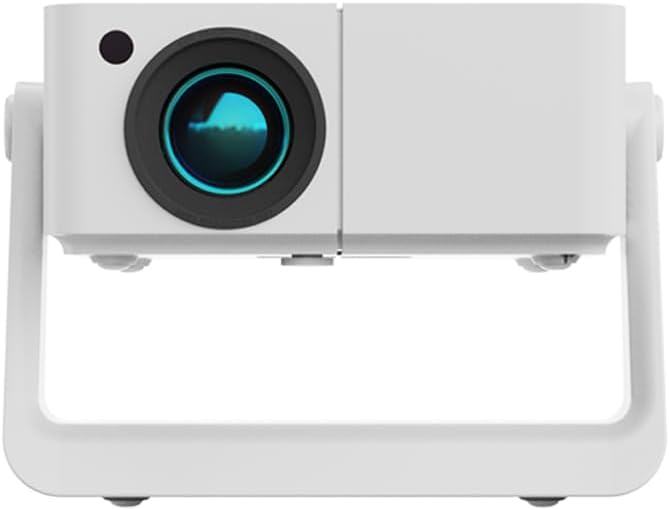
รูปที่ 4.1 : ด้านหน้า view of the PONER SAUND H69 Projector, showing the lens and sensor.

รูปที่ 4.2: ด้านหลังและด้านข้าง view of the projector, highlighting the Headset jack, USB port, IR receiver, HDMI port, Power input, and Power button with F+/- controls.
พอร์ตและปุ่มควบคุม:
- เลนส์: ฉายภาพภาพลักษณ์
- ตัวรับสัญญาณ IR: สำหรับสัญญาณควบคุมระยะไกล
- แจ็คหูฟัง: 3.5mm audio output for headphones or external speakers.
- พอร์ต USB: สำหรับเชื่อมต่ออุปกรณ์จัดเก็บข้อมูล USB
- พอร์ต HDMI: For connecting HDMI-enabled devices like laptops, gaming consoles, or TV sticks.
- กำลังไฟเข้า: เชื่อมต่อกับอะแดปเตอร์ไฟ
- ปุ่มเปิด/ปิด: เปิด/ปิดโปรเจ็กเตอร์
- F+/- Buttons: Adjust focus manually if needed.
5. การตั้งค่า
5.1 การเปิดเครื่องครั้งแรก
- Connect the power adapter to the projector's power input port and then to a power outlet.
- กดปุ่มเปิด/ปิดบนโปรเจ็กเตอร์หรือรีโมทคอนโทรลเพื่อเปิดใช้งานอุปกรณ์
- โปรเจ็กเตอร์จะแสดงหน้าจอเริ่มต้นการทำงาน
5.2 การจัดวางและการปรับแต่ง
The H69 projector features a built-in 360° adjustable stand, auto keystone correction, and electric focus for flexible setup.

Figure 5.1: The projector's built-in stand allows for 360° rotation, enabling projection onto ceilings, walls, or floors.
- การวางตำแหน่ง: Place the projector on a stable surface. Utilize the 360° stand to adjust the projection angle as needed, allowing for projection on walls, ceilings, or floors.
- แก้ไขภาพบิดเบี้ยวอัตโนมัติ: โปรเจ็กเตอร์จะแก้ไขการบิดเบี้ยวรูปทรงสี่เหลี่ยมคางหมูโดยอัตโนมัติ ทำให้ได้ภาพสี่เหลี่ยมผืนผ้าแม้จะฉายในมุมเอียงก็ตาม
- โฟกัสไฟฟ้า: The projector features electric focus for precise image clarity. This can be adjusted via the remote control or the F+/- buttons on the projector.

Figure 5.2: Visual representation of auto keystone correction and electric focus adjusting the projected image.
5.3 การเชื่อมต่อ
The H69 projector offers multiple connectivity options:
- ไวไฟ: Connect to your wireless network for online streaming and screen mirroring. Navigate to the 'Settings' menu on the projector's interface to configure WiFi.
- Bluetooth 5.2: Pair with external Bluetooth speakers or headphones for enhanced audio. Access Bluetooth settings from the projector's main menu.
- ช่องต่อ HDMI: Connect laptops, gaming consoles (e.g., PlayStation), TV boxes, or other HDMI-enabled devices using an HDMI cable.
- ยูเอสบี: เสียบแฟลชไดรฟ์ USB เพื่อเล่นสื่อ fileโดยตรงเลย
- เอวี: Use the included AV cable to connect older devices.
6. คู่มือการใช้งาน
6.1 การทำงานพื้นฐาน
- เปิด/ปิดเครื่อง: Press the Power button on the projector or remote.
- การนำทาง: Use the arrow keys and OK button on the remote control to navigate the projector's Android interface.
- การเลือกแหล่งสัญญาณเข้า: Select the desired input source (HDMI, USB, WiFi, etc.) from the main menu.
6.2 การเชื่อมต่ออุปกรณ์ภายนอก
The projector supports various external devices for versatile entertainment.

Figure 6.1: The projector's Android system provides access to various streaming applications for endless entertainment.
- สมาร์ทโฟน/แท็บเล็ต: Connect via WiFi for screen mirroring (e.g., AirPlay for iOS, Miracast for Android). Ensure both devices are on the same WiFi network.
- แล็ปท็อป/พีซี: Connect via HDMI for a direct display output.
- คอนโซลเกม: Connect via HDMI for an immersive gaming experience.
- ไดรฟ์ USB: Insert a USB drive into the USB port. The projector's media player will allow you to browse and play supported video, audio, and image files.
6.3 Image and Audio Adjustment
- จุดสนใจ: The projector features electric focus. Use the remote control or the F+/- buttons on the projector to achieve a sharp image.
- การแก้ไขคีย์สโตน: The projector has automatic keystone correction. If manual adjustment is needed, it can typically be found in the 'Settings' menu.
- ซูม: Adjust the image size (50%-100% zoom) through the projector's settings without moving the unit.
- ปริมาณ: Adjust audio volume using the remote control.
7. การบำรุงรักษา
7.1 การทำความสะอาด
- เลนส์: ใช้ผ้าเนื้อนุ่ม ปราศจากขน และออกแบบมาสำหรับเลนส์แว่นตาโดยเฉพาะ ห้ามใช้สารทำความสะอาดหรือผ้าที่มีฤทธิ์กัดกร่อน
- ตัวโปรเจ็กเตอร์: Wipe the surface with a soft, dry cloth. For stubborn marks, slightly dampเทน้ำลงบนผ้า
- ช่องระบายอากาศ: Periodically clean the ventilation openings with a soft brush or compressed air to ensure proper airflow and prevent overheating.
7.2 พื้นที่จัดเก็บ
เมื่อไม่ได้ใช้งานเป็นเวลานาน ควรเก็บโปรเจคเตอร์ไว้ในที่แห้งและเย็น หลีกเลี่ยงแสงแดดโดยตรงและฝุ่นละอองมากเกินไป แนะนำให้ใช้บรรจุภัณฑ์เดิมหรือกล่องป้องกัน
8 การแก้ไขปัญหา
หากคุณพบปัญหาเกี่ยวกับโปรเจ็กเตอร์ โปรดดูปัญหาและวิธีแก้ไขที่พบบ่อยต่อไปนี้:
| ปัญหา | สาเหตุที่เป็นไปได้ | สารละลาย |
|---|---|---|
| ไม่มีภาพแสดง | Power not connected; Incorrect input source; Lens cap on. | Ensure power is connected and unit is on; Select correct input source (HDMI, USB, etc.); Remove lens cap. |
| ภาพเบลอ | Out of focus; Projector too far/close to screen. | Use electric focus (remote or F+/- buttons) to adjust; Ensure projector is within optimal projection distance. |
| ภาพบิดเบี้ยว (รูปทรงสี่เหลี่ยมคางหมู) | โปรเจ็กเตอร์ไม่ตั้งฉากกับจอ | Auto keystone correction should adjust automatically. If not, check settings for manual keystone adjustment. |
| ไม่มีเสียง | Volume too low; Incorrect audio output; External device audio issue. | Increase volume; Check audio output settings on projector; Ensure external device audio is working. |
| ไม่สามารถเชื่อมต่อกับ WiFi/Bluetooth ได้ | รหัสผ่านไม่ถูกต้อง; อยู่นอกระยะ; มีสัญญาณรบกวน | Verify WiFi password; Move projector closer to router; Reduce interference from other devices. For iPhone connectivity issues, ensure both devices support the same mirroring protocol and are on the same network. |
| รีโมตคอนโทรลไม่ทำงาน | Batteries dead/incorrectly inserted; IR receiver blocked. | Replace batteries; Ensure correct polarity; Clear any obstructions between remote and projector's IR receiver. |
หากปัญหายังคงมีอยู่หลังจากลองวิธีแก้ไขเหล่านี้แล้ว โปรดติดต่อฝ่ายสนับสนุนลูกค้า
9. ข้อมูลจำเพาะ
Key technical specifications for the PONER SAUND H69 Projector:
| คุณสมบัติ | ข้อมูลจำเพาะ |
|---|---|
| ยี่ห้อ | โพเนอร์ ซาวนด์ |
| หมายเลขรุ่น | H69 |
| ความละเอียดการแสดงผล | Native 1920 x 1080 (Full HD) |
| ความสว่าง | 500 ANSI Lumens |
| เทคโนโลยีการเชื่อมต่อ | HDMI, USB, WiFi (5G+2.4G WiFi6), Bluetooth 5.2 |
| คุณสมบัติพิเศษ | 360° Stand, Auto Keystone Correction, Built-in Stand, Electric Focus |
| การใช้ที่แนะนำ | Home Cinema, Business Presentations, Outdoor Movie |
| สี | สีขาว |
| น้ำหนักสินค้า | 1.76 ปอนด์ |
| ขนาดสินค้า | 6.5 x 6 x 6 นิ้ว |
10. การรับประกันและการสนับสนุน
Your PONER SAUND H69 Projector comes with a standard manufacturer's warranty. For specific warranty terms and conditions, please refer to the warranty card included in your package or visit the official PONER SAUND webเว็บไซต์.
For technical support, troubleshooting assistance, or service inquiries, please contact PONER SAUND customer support through the contact information provided on the product packaging or the official brand website. Please have your model number (H69) and purchase details ready when contacting support.
แหล่งข้อมูลออนไลน์:
- เยี่ยมชม PONER SAUND Store on Amazon สำหรับข้อมูลผลิตภัณฑ์และการอัพเดท


