ข้อมูลด้านความปลอดภัยที่สำคัญ
This device is intended for professional use only. Always follow proper sterilization procedures and local health regulations. For external use only. Keep out of reach of children.
เนื้อหาแพ็คเกจ
- BRONC V8 Tattoo Pen
- Large Capacity Battery (pre-installed)
- สายชาร์จ Type-C
- อะแดปเตอร์อาร์ซีเอ
- กระเป๋าใส่อุปกรณ์

Image: The BRONC V8 Tattoo Machine kit, showcasing the pen, its dedicated carrying case, and the included RCA adapter.
สินค้าเกินview
The BRONC V8 is a rotary tattoo machine designed for precision and efficiency. It features a coreless Swiss DC motor and offers dual-mode operation, allowing use with its built-in battery or via an RCA adapter. The machine includes a convenient button for presetting and switching between two voltagระดับอี

ภาพ: ด้านหน้าแบบละเอียด view of the BRONC V8 Rotary Tattoo Machine, highlighting its digital display and control interface.
ข้อมูลจำเพาะ
| พารามิเตอร์ | ค่า |
|---|---|
| วัสดุ | อลูมิเนียมเกรดอากาศยาน |
| จังหวะ | 4.0มม. |
| ความลึกของเข็ม | 0-5.0มม. |
| มอเตอร์ | Swiss DC motor |
| ความเร็วขณะเดินเครื่องเปล่า | 11,000 รอบ/นาที |
| เล่มที่tagอี เอาท์พุต | 4.5V-11.0V |
| Recommended Working Voltage | 5.5V-7.5V |
| ความจุของแบตเตอรี่ | 2000mAh |
| Support Work Time | 7.0-9.0 hours (Test Results) |
| ข้อมูลจำเพาะของแบตเตอรี่ | 7V 18500 Li-ion |
| ขนาด (เส้นผ่านศูนย์กลาง x ความยาว) | 32 x 141มม. |
| Weight (Pen with battery) | 227กรัม |
การตั้งค่า
1. การติดตั้งและการชาร์จแบตเตอรี่
- ตรวจสอบให้แน่ใจว่าเครื่องปิดอยู่
- Unscrew the battery cap at the bottom of the pen.
- Insert the 18500 Li-ion battery with the positive (+) terminal facing inwards.
- ขันฝาครอบแบตเตอรี่กลับเข้าที่อย่างแน่นหนา
- To charge, connect the Type-C charging cable to the port on the machine and to a suitable USB power source. The display will indicate charging status.
2. Needle Cartridge Installation
- Select a compatible needle cartridge.
- Gently push the needle cartridge into the front opening of the machine until it clicks into place.
- Ensure the cartridge is seated firmly and does not wobble.
3. Adjusting Needle Depth
Rotate the grip section of the machine clockwise or counter-clockwise to adjust the needle depth from 0mm to 5.0mm. The grip features a click mechanism for precise adjustments.
4. Using the RCA Adapter (Optional)
For wired operation, remove the battery cap and battery. Attach the RCA adapter to the bottom of the machine. Connect an RCA cable from the adapter to an external power supply.

Image: A hand demonstrating the proper grip on the BRONC V8 Tattoo Machine, with a needle cartridge installed.
การดำเนินการ
1. การเปิด/ปิดเครื่อง
- To power on, press and hold the power button (usually the central button) until the display illuminates.
- หากต้องการปิดเครื่อง ให้กดปุ่มเปิด/ปิดค้างไว้อีกครั้งจนกว่าจอแสดงผลจะดับลง
2. การปรับระดับเสียงtage
- Use the '+' and '-' buttons to increase or decrease the voltage.
- ฉบับที่tage output ranges from 4.5V to 11.0V. The recommended working voltage คือ 5.5V-7.5V
3. Using Dual Voltage Presets
The BRONC V8 allows you to preset and quickly switch between two preferred voltages. Consult the specific button layout on your device for the preset function. Typically, a dedicated button or a long press on a voltage button activates this feature.
4. Switching Operation Modes
The machine can operate wirelessly with the built-in battery or wired using the RCA adapter and an external power supply. Switch between modes by either installing the battery or the RCA adapter as described in the Setup section.
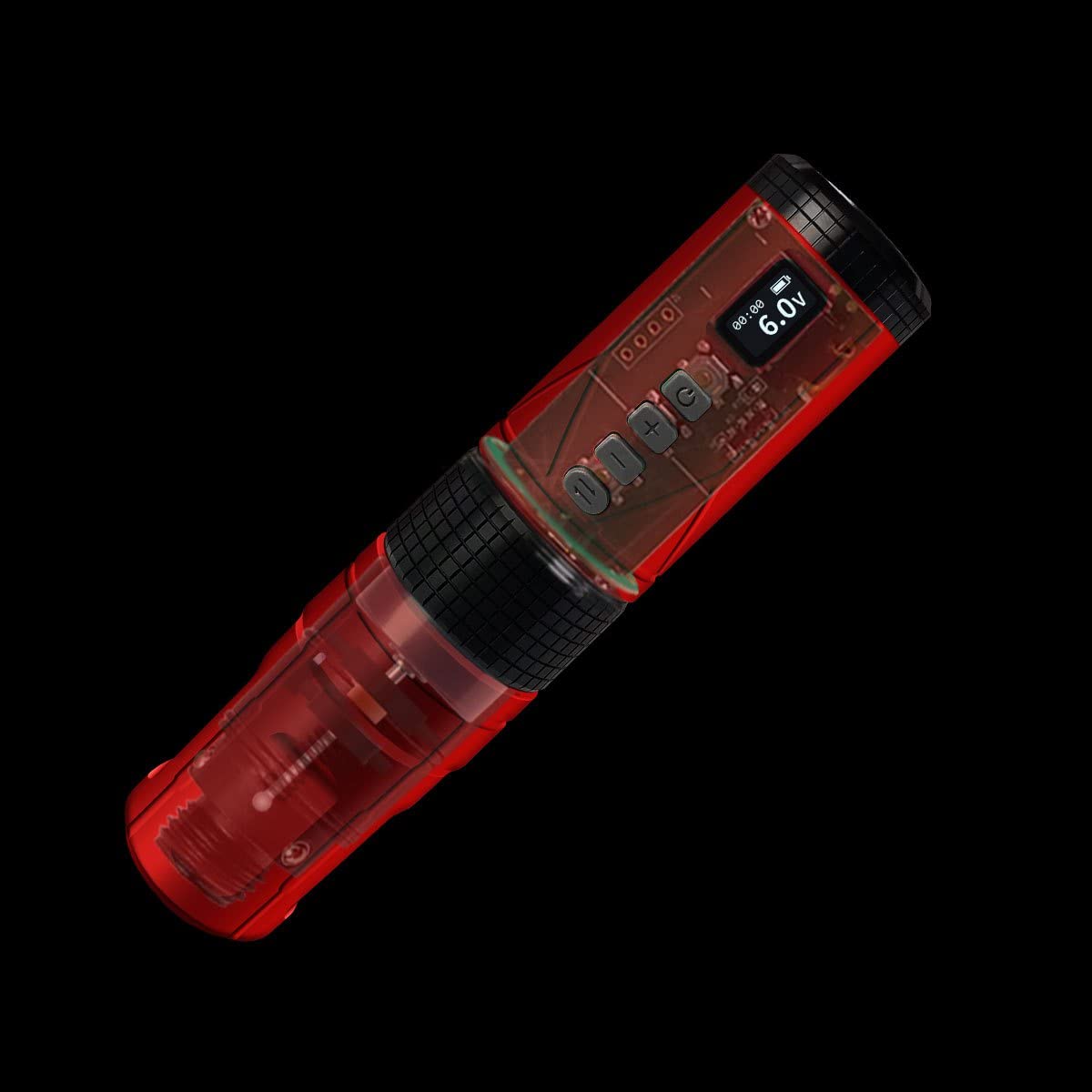
ภาพ: ภาพถ่ายแบบเอ็กซ์เรย์ view of the BRONC V8 Tattoo Machine, illustrating its internal coreless motor and electronic components.
การซ่อมบำรุง
การทำความสะอาด
- ถอดปลั๊กเครื่องออกจากแหล่งจ่ายไฟทุกครั้งก่อนทำความสะอาด
- เช็ดทำความสะอาดภายนอกเครื่องด้วยผ้าสะอาดamp ใช้ผ้าและน้ำยาฆ่าเชื้อชนิดอ่อนโยนที่ไม่ทำให้เกิดรอยขีดข่วน
- Do not immerse the machine in liquid.
- ตรวจสอบให้แน่ใจว่าพื้นผิวทุกส่วนแห้งสนิทก่อนจัดเก็บหรือใช้งานครั้งต่อไป
พื้นที่จัดเก็บ
- Store the machine in its carrying case in a cool, dry place, away from direct sunlight and extreme temperatures.
- Remove the battery if storing for extended periods to prevent discharge.
การแก้ไขปัญหา
เครื่องไม่เปิด
- ตรวจสอบแบตเตอรี่: ตรวจสอบให้แน่ใจว่าแบตเตอรี่ได้รับการติดตั้งอย่างถูกต้องและชาร์จจนเต็ม
- การเชื่อมต่ออาร์ซีเอ: If using the RCA adapter, verify it is securely connected to both the machine and the power supply.
เล่มที่tage Not Adjusting
- ฟังก์ชั่นปุ่ม: Ensure the '+' and '-' buttons are pressed firmly.
- วงจรไฟฟ้า: Try turning the machine off and on again.
Machine Vibrates Excessively or Makes Unusual Noise
- ตลับเข็ม: Check if the needle cartridge is properly seated and not damaged. Replace if necessary.
- ปัญหาภายใน: หากปัญหายังคงอยู่ ให้หยุดการใช้งานและติดต่อฝ่ายสนับสนุนลูกค้า
การรับประกันและการสนับสนุน
For warranty information or technical support, please refer to the documentation included with your purchase or visit the official BRONC webไซต์ เก็บหลักฐานการซื้อของคุณไว้เพื่อใช้ในกรณีเรียกร้องการรับประกัน


