การแนะนำ
The energeeks Guardian outdoor fixed WiFi IP camera is designed to provide reliable and effective surveillance for your home, garden, or business. Featuring high-resolution imaging, advanced detection capabilities, and robust weather protection, this manual will guide you through its setup, operation, and maintenance to ensure optimal performance.
สินค้าเกินview
The energeeks Guardian camera is a compact and durable device built for outdoor environments. Below are key visual components and their descriptions.
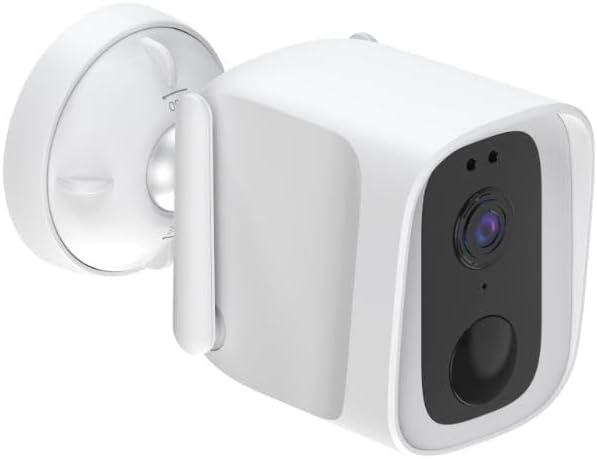
โดยรวม View: This image shows the energeeks Guardian camera from an angled perspective, highlighting its compact design and the integrated mounting bracket. The camera features a white casing with a black front panel containing the lens and sensors.

แผงด้านหน้า: แนวหน้าโดยตรง view of the camera, detailing the central lens, the light sensor, and the infrared LEDs for night vision. The lower circular element is likely the microphone or a motion sensor.

ไซด์โปรfile: This image displays the side of the camera, showing the integrated antenna for WiFi connectivity and the robust mounting arm that allows for flexible positioning.

มุม View with Mount: อีกมุมหนึ่ง view, providing a clearer look at the adjustable mounting base, which facilitates easy installation on various surfaces.
คุณสมบัติหลัก
- IP65 Weather Protection: Designed to withstand dust and powerful water jets, ensuring reliable performance in various weather conditions (rain, snow, sun).
- ความละเอียด 4 ล้านพิกเซล: Captures clear and detailed high-definition images for precise surveillance.
- การมองเห็นกลางคืนขั้นสูง: Provides clear monitoring up to 10 meters in total darkness, ensuring 24/7 security.
- การตรวจจับการเคลื่อนไหวและเสียง: Equipped with advanced technology to detect both motion and sound, sending instant alerts to your mobile device for proactive surveillance.
- เสียงสองทาง: Features a built-in microphone and speaker for real-time communication through the camera.
- Integrated LED Lights and Siren: Activates upon motion detection to deter potential intruders, adding an extra layer of security.
- ตัวเลือกการจัดเก็บที่ยืดหยุ่น: Supports recording to a micro SD card (not included) or cloud storage for convenient access to your footage.
- Wi-Fi and ONVIF Compatibility: Easily integrates with 2.4 GHz Wi-Fi networks and other security devices via ONVIF protocol.
- แอปพลิเคชั่นมือถือ: Control and monitor your camera from anywhere using the free mobile app available for iOS and Android, compatible with SMARTLIFE by Tuya.
คู่มือการติดตั้ง
1. การแกะกล่องและการเตรียมการ
- นำส่วนประกอบทั้งหมดออกจากบรรจุภัณฑ์อย่างระมัดระวัง
- Verify that all listed components are present (camera, power adapter, mounting screws, user manual).
- Choose a suitable outdoor location for installation, ensuring good Wi-Fi signal strength and a clear view ของพื้นที่ที่ต้องเฝ้าระวัง
2. เปิดเครื่อง
- Connect the camera to the provided power adapter.
- Plug the power adapter into a suitable outdoor power outlet. Ensure the outlet is protected from weather elements.
- Wait for the camera's indicator light to show it is ready for pairing (refer to the camera's LED indicator guide in the full manual for specific light patterns).
3. การติดตั้งและการจับคู่แอป
- Download the "SMARTLIFE" or "Tuya Smart" app from your mobile device's app store (iOS App Store or Google Play Store).
- ลงทะเบียนบัญชีใหม่หรือเข้าสู่ระบบหากคุณมีบัญชีอยู่แล้ว
- ในแอป ให้แตะ "เพิ่มอุปกรณ์" หรือไอคอน "+"
- Select "Security & Video Surveillance" and then "Smart Camera (Wi-Fi)".
- Follow the on-screen instructions to connect the camera to your 2.4 GHz Wi-Fi network. This usually involves scanning a QR code displayed on your phone with the camera's lens.
- Once successfully paired, you can rename your camera and begin live viewการไอเอ็นจี
4. การติดตั้งทางกายภาพ
- Using the provided mounting screws and template (if included), securely attach the camera's base to your chosen surface (wall, eaves, etc.).
- Adjust the camera's angle to cover the desired surveillance area.
- ตรวจสอบให้แน่ใจว่าการเชื่อมต่อทั้งหมดมีความปลอดภัยและกันน้ำหากจำเป็น
คำแนะนำการใช้งาน
สด View และการบันทึก
- Open the SMARTLIFE/Tuya Smart app and select your energeeks Guardian camera.
- The live video feed will appear. You can switch between SD and HD resolution.
- To manually record video or capture screenshots, use the respective buttons on the live view อินเทอร์เฟซ
- If a micro SD card is inserted, recordings will be saved locally. Cloud storage options are also available via the app.
การตรวจจับการเคลื่อนไหวและเสียง
- ไปที่การตั้งค่ากล้องภายในแอป
- Enable "Motion Detection" and "Sound Detection".
- ปรับระดับความไวตามความจำเป็นเพื่อลดการแจ้งเตือนที่ผิดพลาดให้น้อยที่สุด
- Configure notification settings to receive alerts on your mobile device when an event is detected.
ระบบเสียงสองทาง
- ไลฟ์สด view screen, tap the microphone icon to speak through the camera's speaker.
- แตะไอคอนลำโพงเพื่อฟังเสียงจากไมโครโฟนของกล้อง
LED Lights and Siren
- These features can be configured to activate automatically upon motion detection via the app settings.
- You may also be able to manually activate the siren or LED lights from the live view อินเทอร์เฟซ
การซ่อมบำรุง
- การทำความสะอาด: Periodically clean the camera lens and casing กับ d อ่อนamp ผ้า. ห้ามใช้สารเคมีรุนแรงหรือวัสดุกัดกร่อน
- อัพเดตเฟิร์มแวร์: Check the app regularly for available firmware updates. Keeping your camera's firmware up-to-date ensures optimal performance, security, and access to new features.
- แหล่งจ่ายไฟ: Ensure the power connection remains secure and free from damage.
- การเชื่อมต่อ Wi-Fi: Monitor your Wi-Fi signal strength in the app to ensure a stable connection for continuous surveillance.
การแก้ไขปัญหา
| ปัญหา | สาเหตุที่เป็นไปได้ | สารละลาย |
|---|---|---|
| กล้องออฟไลน์/ไม่สามารถเชื่อมต่อ Wi-Fi ได้ | Weak Wi-Fi signal, incorrect Wi-Fi password, camera too far from router, router issues. |
|
| คุณภาพของภาพไม่ดี | เลนส์สกปรก สภาพแสงน้อย มีปัญหาแบนด์วิดท์ของเครือข่าย |
|
| No motion/sound alerts | Detection settings disabled, sensitivity too low, app notifications blocked. |
|
| เสียงสองทางไม่ทำงาน | Microphone/speaker disabled in app, volume too low, network latency. |
|
ข้อมูลจำเพาะ
| คุณสมบัติ | รายละเอียด |
|---|---|
| ชื่อรุ่น | Guardian 1080p outdoor fixed IP camera |
| หมายเลขรุ่น | EG-CIPEXT003 |
| ปณิธาน | 4 Megapixels (1080p video recording) |
| ช่วงการมองเห็นตอนกลางคืน | สูงสุด 10 เมตร |
| การเชื่อมต่อ | Wi-Fi (2.4 GHz), Wired |
| ระดับความต้านทานต่อน้ำ | IP65 (กันน้ำ) |
| เสียง | ระบบเสียงสองทาง (ไมโครโฟนและลำโพง) |
| คุณสมบัติพิเศษ | Motion Detector, Sound Detection, LED Lights, Siren |
| ตัวเลือกการจัดเก็บข้อมูล | Micro SD card, Cloud storage |
| พลัง | 5 โวลต์ 10 วัตต์ |
| ขนาด (กว้าง x ยาว x สูง) | 12 x 6 x 9 ซม. |
| น้ำหนัก | 500 กรัม |
| วัสดุ | พลาสติก |
| ข้อแนะนำการใช้ | การรักษาความปลอดภัยภายนอกอาคาร |
การรับประกันและการสนับสนุน
ข้อมูลการรับประกัน
Specific warranty details for the energeeks Guardian camera are typically provided with your purchase documentation or on the manufacturer's official webไซต์ โปรดดูแหล่งข้อมูลเหล่านี้สำหรับข้อมูลเกี่ยวกับระยะเวลาการรับประกัน ความคุ้มครอง และขั้นตอนการเรียกร้อง
การสนับสนุนลูกค้า
For technical assistance, troubleshooting beyond this manual, or any product-related inquiries, please contact energeeks customer support. Contact information can usually be found on the product packaging, the official energeeks website, or within the SMARTLIFE/Tuya Smart application.
Note: ENERGEEKS aims to make home automation accessible and provides detailed manuals and personalized support in Spanish. For English support, please check their official channels.


