1. ข้อมูลด้านความปลอดภัย
โปรดอ่านคำแนะนำทั้งหมดอย่างละเอียดก่อนประกอบและใช้งาน เก็บคู่มือนี้ไว้เพื่อใช้อ้างอิงในอนาคต
- ห้ามเกินขีดจำกัดน้ำหนักสูงสุดที่สามารถรองรับได้ 88 ปอนด์ (40 กก.)
- ตรวจสอบให้แน่ใจว่ารูปแบบ VESA ของทีวีของคุณเข้ากันได้ (100x100 มม. ถึง 400x400 มม.)
- Verify that all screws are securely tightened before placing the TV on the stand.
- ห้ามให้เด็กปีนป่ายหรือเล่นตู้วางทีวี
- วางขาตั้งบนพื้นผิวที่มั่นคงและเรียบเพื่อป้องกันการล้ม
- Avoid placing heavy objects on the stand's base that could compromise stability.
2. เนื้อหาบรรจุภัณฑ์
ตรวจสอบให้แน่ใจว่าชิ้นส่วนทั้งหมดครบถ้วนและไม่เสียหายก่อนเริ่มประกอบ หากมีชิ้นส่วนใดขาดหายหรือเสียหาย โปรดติดต่อฝ่ายบริการลูกค้า

ภาพ: ระเบิด view of the TV stand components.
- ฐานกระจกนิรภัย
- เสาค้ำยัน
- แผ่นยึดทีวี
- VESA Extension Brackets (if applicable for larger VESA patterns)
- Various Screws, Washers, and Spacers for TV attachment
- Assembly Hardware (bolts, nuts, Allen wrench)
- พื้นยางกันลื่น
3. การติดตั้งและการประกอบ
Follow these steps to assemble your XINLEI Universal TV Stand Base.
- Attach Non-Slip Feet to Base: Secure the non-slip rubber feet to the underside of the tempered glass base.
- Assemble Support Column: Attach the support column to the tempered glass base using the provided hardware. Ensure it is firmly secured.
- Attach TV Mounting Plate: Secure the TV mounting plate to the top of the support column.
- เตรียมทีวีสำหรับการติดตั้ง:
- Identify your TV's VESA mounting holes on the back.
- Select the appropriate screws and spacers from the provided hardware kit that fit your TV's VESA pattern.
- Attach the VESA extension brackets to the TV mounting plate if your TV's VESA pattern requires them (e.g., 400x400mm).
- สำคัญ: Before attaching the TV to the stand, ensure that the mounting plate and screws will not block any ports or cables on the back of your television.
- ติดตั้งทีวี: Carefully lift your TV and align its VESA holes with the mounting plate/brackets. Secure the TV using the selected screws and spacers. Ensure the TV is level and stable.

Image: Detail of the tempered glass base with non-slip feet.
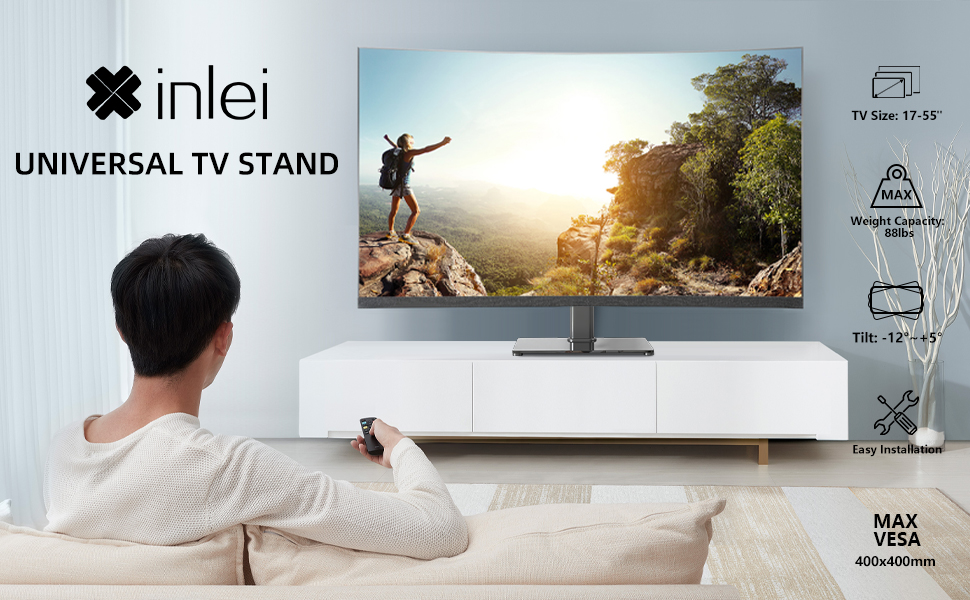
Image: Illustration emphasizing checking for port obstruction.

Image: Fully assembled TV stand with a television.
4. คู่มือการใช้งาน
The XINLEI Universal TV Stand Base offers height adjustment and tilt functionality for optimal viewการไอเอ็นจี
4.1 การปรับความสูง
This stand provides 3 adjustable height levels. To adjust the height:
- Carefully remove the TV from the mounting plate.
- Adjust the mounting plate's position on the support column to one of the three available height settings (11.1", 13.03", or 14.96" from the base).
- Secure the mounting plate at the desired height using the provided fasteners.
- Re-mount the TV onto the adjusted plate.
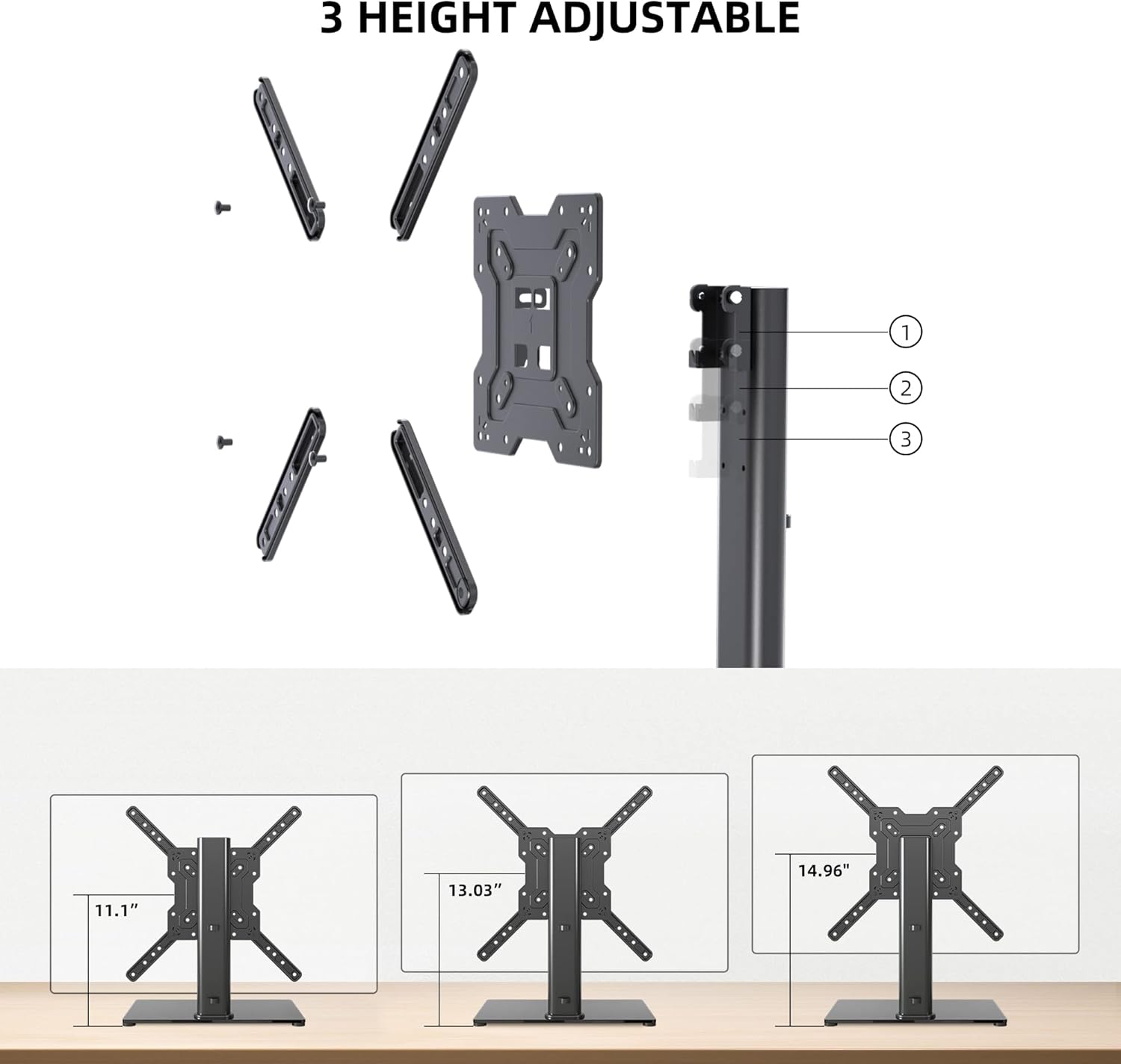
Image: Visual representation of the three height settings.
4.2 การปรับความเอียง
The TV mounting plate allows for a tilt range of -12 to +5 degrees.
- Loosen the tilt adjustment screws on the side of the mounting plate.
- Gently tilt the TV to your preferred viewมุมอิง
- Tighten the tilt adjustment screws to secure the TV in position.

Image: Diagram demonstrating the tilt functionality.
4.3 การจัดการสายเคเบิล
Utilize the integrated cable management system within the support column to keep cables organized and out of sight.

ภาพ: อดีตample of cable management through the stand's column.
5. การบำรุงรักษา
การบำรุงรักษาอย่างสม่ำเสมอจะช่วยให้ขาตั้งทีวีของคุณใช้งานได้ยาวนานและปลอดภัย
- การทำความสะอาด: Wipe the tempered glass base and metal components with a soft, damp ผ้า หลีกเลี่ยงน้ำยาทำความสะอาดที่มีฤทธิ์กัดกร่อนหรือตัวทำละลายที่อาจทำลายพื้นผิวได้
- การตรวจสอบ: ตรวจสอบสกรูและข้อต่อทั้งหมดเป็นระยะ เพื่อให้แน่ใจว่ายังแน่นอยู่ ขันให้แน่นอีกครั้งหากจำเป็น
- ความเสถียร: Ensure the stand remains on a level surface and that the non-slip feet are intact.
6 การแก้ไขปัญหา
If you encounter issues during assembly or use, refer to the following common solutions.
- ทีวีไม่ได้ตั้งระดับ: Ensure the stand is on a flat surface. Check that the TV mounting plate is securely attached and that the VESA screws are tightened evenly.
- สกรูยาว/สั้นเกินไป: The kit includes various screw lengths and spacers. Refer to your TV's manual for recommended screw sizes for VESA mounting. Use the appropriate spacers to ensure a secure fit without over-tightening or damaging the TV.
- Mount Blocks Ports: Before final mounting, always verify that the mounting plate does not obstruct any necessary ports on your TV. If it does, adjust the TV's position on the VESA plate or consider using longer spacers if safe and compatible.
- ขาตั้งดูไม่มั่นคง: Confirm that all assembly bolts are fully tightened. Ensure the tempered glass base is placed on a solid, flat surface and that the non-slip feet are properly installed.
7. ข้อมูลจำเพาะ
| คุณสมบัติ | ข้อมูลจำเพาะ |
|---|---|
| แบบอย่าง | TS102 |
| ขนาดทีวีที่เข้ากันได้ | 17 ถึง 55 นิ้ว |
| ความจุน้ำหนัก | 88 ปอนด์ (40 กก.) |
| ความเข้ากันได้ของ VESA | 100x100มม. ถึง 400x400มม. |
| การปรับความสูง | 3 levels (11.1", 13.03", 14.96") |
| มุมเอียง | -12° ถึง +5° |
| ขนาดฐาน | 10.24" x 15.75" |
| วัสดุ | กระจกนิรภัย, เหล็ก |
| สี | สีดำ |
| น้ำหนักสินค้า | 9.86 ปอนด์ |

Image: Technical specifications and dimensions.
8. การรับประกันและการสนับสนุน
XINLEI products are designed for durability and performance. For warranty information or technical support, please refer to the product packaging or contact XINLEI customer service directly.
Please have your model number (TS102) and purchase information ready when contacting support.


