สินค้าเกินview
The Alpena ToughPods LED Rock Lights are designed to enhance the aesthetic and visibility of various vehicles, including trucks, cars, ATVs, and SUVs. This kit provides a multi-colored underglow lighting experience with durable, waterproof LED pods controlled wirelessly.

Image: A vehicle illuminated with green underglow lights, showcasing the vibrant effect of the ToughPods.
สิ่งที่รวมอยู่
Your Alpena ToughPods kit comes with all necessary components for installation and operation:
- 4 wired auxiliary lights, each with 6 LEDs
- 1 wireless remote control
- 4 rubber pads for secure mounting
- Cable zip ties
- Mounting hardware (spade and splice connectors, extension, heat shrink tubing)
- คู่มือการใช้งาน 1 เล่ม
- Cigarette plug switch

Image: All components of the ToughPods kit, including the LED pods, wiring harness, remote control, and various installation accessories.
การติดตั้งและการตั้งค่า
Follow these steps for proper installation of your ToughPods LED Rock Lights:
- การจัดวางแผน: Determine the desired locations for the four LED pods on your vehicle (e.g., undercarriage, wheel wells, frame). Ensure the wiring can reach the central control unit and power source.
- เตรียมพื้นผิวการติดตั้ง: Clean the mounting surfaces thoroughly to ensure proper adhesion and secure fit.
- Mounting the Pods:
- For secure and paint-friendly installation, mount the RGB rock lights using the four included rubber pads.
- The pods feature wire channels to allow for flush mounting.
- For slim mounts, simply remove the rubber pads before installation.
- การเชื่อมต่อสายไฟ: Connect the wired auxiliary lights to the main control unit. Utilize the provided spade and splice connectors, extension, and heat shrink tubing for secure and weather-resistant connections.
- การเชื่อมต่อไฟฟ้า: Connect the main control unit to your vehicle's 12V power source using the included cigarette plug switch. Ensure all connections are tight and insulated.
- การเดินสายไฟที่ปลอดภัย: Use the provided cable zip ties to neatly secure all wiring, preventing it from dangling or interfering with moving parts.
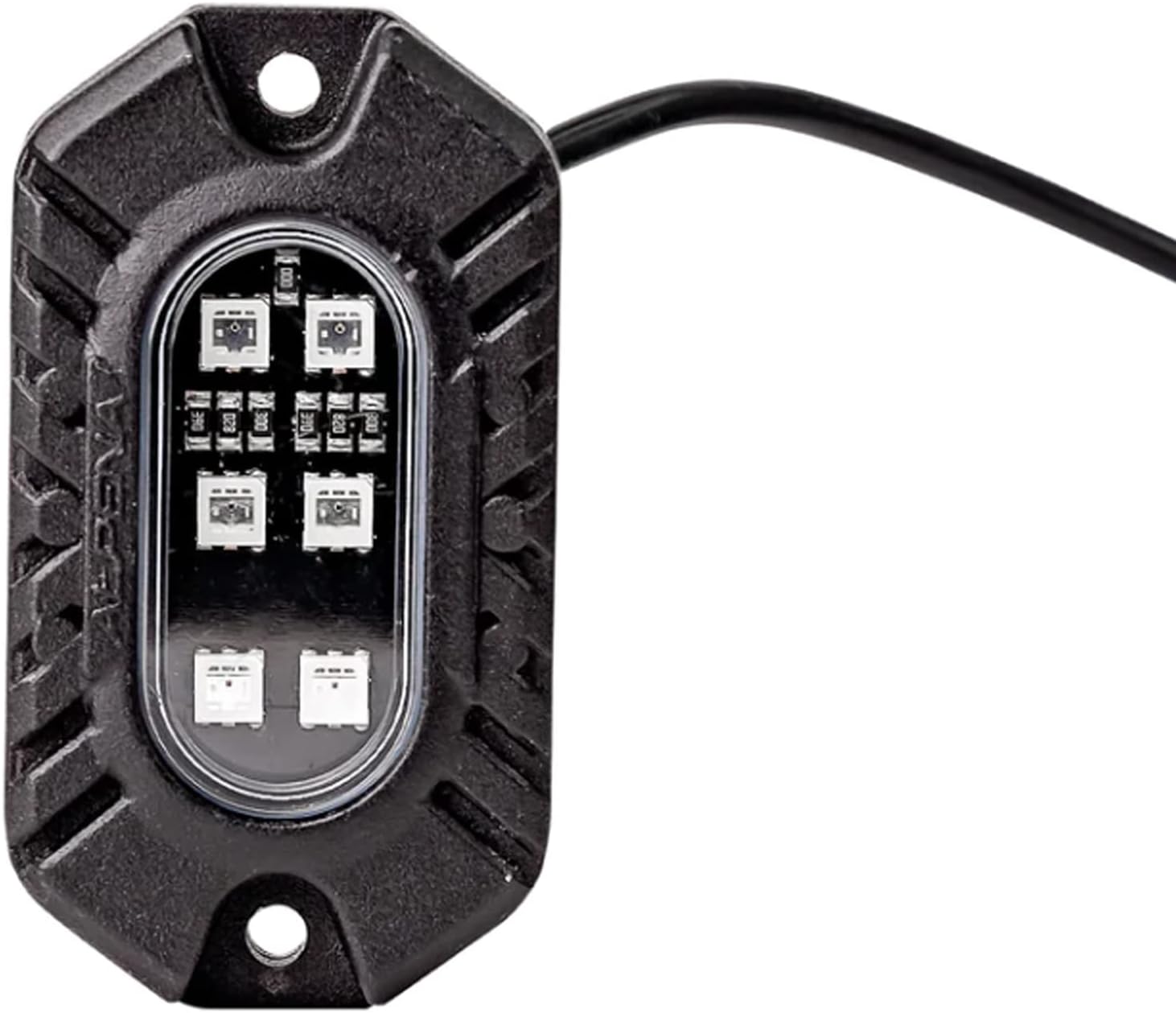
ภาพ: รายละเอียด view of one Alpena ToughPod, showing its robust casing and integrated LEDs.
คำแนะนำการใช้งาน
The Alpena ToughPods are controlled via the included wireless remote. This remote allows for easy customization of your lighting experience.
- เปิด/ปิดเครื่อง: Use the designated button on the remote to turn the lights on or off.
- การเลือกสี: The remote provides access to 9 different color varieties. Press the color buttons to cycle through or select your desired color.
- Light Mode Settings: Choose from 4 different light mode settings (e.g., solid, strobe, fade, flash) to create dynamic lighting effects. Refer to the remote's button layout for specific mode activation.
- ค่าที่ตั้งไว้ล่วงหน้าแบบกำหนดเอง: The system comes with custom presets, allowing for quick selection of popular color and pattern combinations.
การซ่อมบำรุง
To ensure the longevity and optimal performance of your Alpena ToughPods, follow these maintenance guidelines:
- การทำความสะอาด: ทำความสะอาดชุดไฟ LED เป็นระยะด้วยผ้าเนื้อนุ่มและแห้งamp cloth to remove dirt and debris. Avoid abrasive cleaners or high-pressure washes directly on the pods.
- ความต้านทานน้ำ: The ToughPods are designed with an IP65 rating, making them resilient against dust and low-pressure water jets. While waterproof, avoid submerging the pods or exposing them to prolonged high-pressure water.
- การตรวจสอบสายไฟ: Regularly inspect all wiring and connections for any signs of wear, fraying, or corrosion. Re-secure or repair any loose connections to maintain optimal performance and safety.
- แบตเตอรี่รีโมทคอนโทรล: If the remote control's range or responsiveness decreases, replace its battery (type typically CR2025 or similar, check remote for specifics).

Image: An off-road vehicle with red underglow lights, demonstrating the product's robust design suitable for tough conditions.
การแก้ไขปัญหา
If you encounter issues with your Alpena ToughPods, refer to the following common troubleshooting steps:
| ปัญหา | สาเหตุที่เป็นไปได้ | สารละลาย |
|---|---|---|
| ไฟไม่เปิด | No power, loose connection, faulty remote battery. | Check power source (cigarette lighter), ensure all wiring connections are secure, replace remote battery. |
| ไฟกระพริบหรือหรี่ลง | Insufficient power, loose wiring, damaged pod. | Verify stable 12V power supply, inspect all wiring for damage or loose connections, contact support if a pod is damaged. |
| รีโมทคอนโทรลไม่ตอบสนอง | Dead battery, out of range, interference. | Replace remote battery, ensure you are within effective range of the control unit, minimize electronic interference. |
| Only some pods are working. | Loose connection to specific pod, damaged pod. | Check wiring connections for the non-working pods. If connections are secure, the pod may be faulty and require replacement. |
ข้อมูลจำเพาะ
| คุณสมบัติ | รายละเอียด |
|---|---|
| ยี่ห้อ | อัลพีน่า |
| หมายเลขรุ่น | 78234อี |
| สี | หลากสี |
| ฟอร์มแฟกเตอร์ | ฝัก |
| การใช้ที่แนะนำ | Vehicle Exterior (Trucks, Cars, ATVs, SUVs) |
| เทคโนโลยีการเชื่อมต่อ | USB (for power input to control unit) |
| คุณสมบัติพิเศษ | กันน้ำ (ระดับ IP65) |
| วัสดุ | พลาสติกหรือวัสดุผสม |
| จำนวนชิ้น | 4 (auxiliary lights) |
| รีโมทคอนโทรล | Included (Wireless) |
| น้ำหนักสินค้า | 2.01 ปอนด์ |
| ขนาดแพ็คเกจ | 8.96 x 5.12 x 2.6 นิ้ว |
| ยูพีซี | 084902782349 |
การรับประกันและการสนับสนุน
For warranty information, technical support, or further assistance with your Alpena ToughPods LED Rock Lights, please refer to the official Alpena webหรือติดต่อฝ่ายบริการลูกค้าโดยตรง เก็บใบเสร็จรับเงินไว้เพื่อใช้ในการเคลมประกัน
คุณยังสามารถเยี่ยมชม ร้าน Alpena บน Amazon สำหรับข้อมูลผลิตภัณฑ์และทรัพยากรสนับสนุนเพิ่มเติม


