การแนะนำ
This user manual provides comprehensive instructions for the installation, operation, and maintenance of your ENDORFY Navis F360 ARGB All-in-One (AIO) CPU Water Cooler. Designed for high-performance cooling, this system features a 360mm radiator, a PWM-controlled pump, and three Fluctus 120 PWM ARGB fans to ensure optimal thermal management for your CPU.
สินค้าเกินview
The ENDORFY Navis F360 ARGB is an advanced liquid cooling solution for modern computer systems. It consists of a radiator, a pump/cold plate assembly, and three 120mm fans, all integrated with Addressable RGB (ARGB) lighting for customizable aesthetics.

รูปที่ 1: The ENDORFY Navis F360 ARGB AIO CPU Water Cooler, showing the 360mm radiator with three fans, connected to the CPU water block and pump assembly.
คุณสมบัติหลัก:
- AiO Water Cooling: High-performance, pre-assembled water cooling loop, ready to install and maintenance-free.
- PWM-Controlled Pump: Quiet pump block with ceramic bearings and PWM control for efficient cooling.
- Three Fluctus 120 PWM ARGB Fans: Optimized for high static pressure, providing superb performance on water radiators at low noise levels.
- ARGB LED Lighting: Backlit pump and fans with independently controlled ARGB LEDs for customizable lighting effects.
- Nano Reset ARGB Controller: Built-in lighting can be controlled by compatible motherboards or independently with the included Nano Reset ARGB controller.
- Kink-Resistant Rubber Hoses: Internally reinforced tubes are flexible and easy to route, with outer sleeves protecting the tubes and providing a uniform look.
- Multi-Socket Compatibility: Redesigned mounting system is easy to install and compatible with all modern AMD and Intel sockets.

รูปที่ 2: The Navis F360 ARGB installed inside a computer case, demonstrating its compact fit and the vibrant ARGB lighting of the fans and pump. This setup highlights the cooler's ability to provide effective cooling in demanding conditions.

รูปที่ 3: รายละเอียด view of the Fluctus 120 PWM ARGB fans, highlighting their serrated blade edge profile designed for quiet and efficient airflow. The image shows the pre-installed fans on the radiator.
รูปที่ 4: Illustration of the PWM controlled pump and the 360-millimeter radiator, emphasizing the uncompromised cooling performance provided by these components, including the ceramic bearing in the pump.

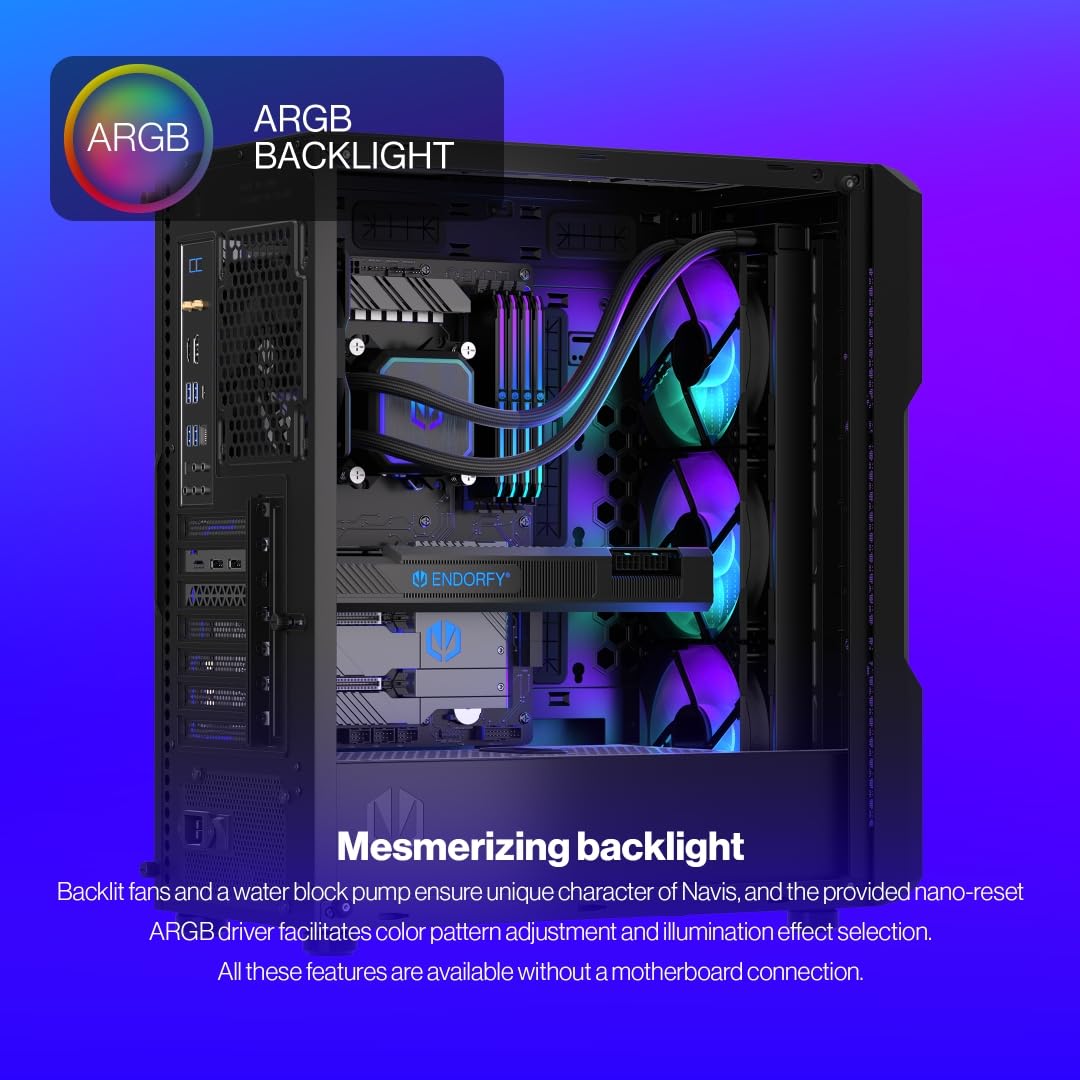
รูปที่ 5: The mesmerizing ARGB backlight of the Navis F360 ARGB, showcasing the vibrant illumination of the fans and water block pump. The image also indicates that color patterns can be adjusted via the Nano Reset ARGB driver without a direct motherboard connection.

รูปที่ 6: An image illustrating the convenient and simple installation process of the Navis F360 ARGB. The integrated water block pump frame and 39 cm long flexible tubes allow for versatile placement within a computer case.
ข้อมูลจำเพาะ
| คุณสมบัติ | รายละเอียด |
|---|---|
| ยี่ห้อ | รับรอง |
| หมายเลขรุ่น | EY3B006 |
| ขนาดสินค้า | 15.55"ยาว x 4.72"กว้าง x 1.1"สูง (39.5 x 12 x 2.8 ซม.) |
| น้ำหนัก | 3.15 ปอนด์ (1.43 กก.) |
| วิธีการทำความเย็น | น้ำ |
| อุปกรณ์ที่รองรับ | เดสก์ท็อปพีซี |
| ระดับเสียง | 14 เดซิเบล (ขั้นต่ำ) |
| วัสดุปั๊ม | Ceramic bearings |
| ประเภทตัวเชื่อมต่อกระแสไฟ | 4-Pin (PWM) |
| เล่มที่tage | 12 โวลต์ |
| วัดtage | 8.46 วัตต์ |
| Included Thermal Compound | Pactum PT-3 |
| ความเข้ากันได้ของซ็อกเก็ต CPU | Intel LGA 1700/1200/115x, AMD AM5/AM4 |
การติดตั้งและการตั้งค่า
ก่อนเริ่มการติดตั้ง โปรดตรวจสอบให้แน่ใจว่าคอมพิวเตอร์ของคุณปิดอยู่และถอดปลั๊กออกจากเต้ารับแล้ว ขอแนะนำให้สวมสายรัดข้อมือป้องกันไฟฟ้าสถิตเพื่อป้องกันความเสียหายต่อชิ้นส่วนต่างๆ
เนื้อหาแพ็คเกจ:
- ENDORFY Navis F360 ARGB AIO Cooler (Radiator with 3x Fluctus 120 PWM ARGB fans, pump/cold plate assembly, tubing)
- อุปกรณ์ยึดสำหรับซ็อกเก็ต Intel และ AMD
- Pactum PT-3 Thermal Compound (pre-applied or in tube)
- Nano Reset ARGB Controller
- คู่มือการใช้งาน (เอกสารนี้)

รูปที่ 7: The included Pactum PT-3 thermal paste and applicator. This easy-to-apply thermal paste ensures excellent heat removal performance, and the tube provides enough for several installations.
ขั้นตอนการติดตั้ง:
- เตรียมเมนบอร์ด: Install the appropriate backplate for your CPU socket (Intel or AMD) onto the motherboard. Refer to your motherboard's manual for specific instructions on CPU and backplate installation.
- ติดตั้งหม้อน้ำ: Identify a suitable mounting location in your PC case for the 360mm radiator (e.g., top, front). The fans are pre-installed on the radiator for convenience. Secure the radiator to the case using the provided screws.
- เตรียม CPU: If thermal paste is not pre-applied to the cold plate, apply a small amount of the included Pactum PT-3 thermal compound to the center of your CPU's Integrated Heat Spreader (IHS).
- ติดตั้งปั๊ม/แผ่นเย็น: Carefully align the pump/cold plate assembly with the mounting holes around your CPU socket. Gently lower the cold plate onto the CPU, ensuring even contact. Secure the pump assembly using the appropriate standoffs and thumb screws for your socket type. Tighten screws in a diagonal pattern until snug.
- เชื่อมต่อสายเคเบิล:
- เชื่อมต่อสาย PWM 4 พินของปั๊มเข้ากับหัวต่อ CPU_FAN หรือ AIO_PUMP บนเมนบอร์ดของคุณ
- Connect the fan's 4-pin PWM cable (from the daisy-chained fans) to a fan header on your motherboard or a fan controller.
- Connect the ARGB cables from the pump and fans to the Nano Reset ARGB Controller. Then, connect the controller to a SATA power connector from your power supply. If your motherboard supports ARGB, you can connect the controller to a 3-pin 5V ARGB header on your motherboard for software control.
- การจัดการสายเคเบิล: เดินสายเคเบิลทั้งหมดให้เรียบร้อยเพื่อให้แน่ใจว่ามีการไหลเวียนของอากาศที่เหมาะสมและโครงสร้างที่สะอาด
For detailed visual guides and specific socket instructions, please refer to the official ENDORFY knowledge base: http://endorfy.com/kb/EY3B006
การดำเนินการ
Once installed, the ENDORFY Navis F360 ARGB operates automatically based on your motherboard's fan and pump control settings. The PWM (Pulse Width Modulation) functionality allows the pump and fans to adjust their speed according to CPU temperature, providing efficient cooling while minimizing noise.
การควบคุมแสง ARGB:
- Via Nano Reset ARGB Controller: If connected to the included Nano Reset controller, you can cycle through various lighting modes and colors by pressing the button on the controller.
- ผ่านซอฟต์แวร์เมนบอร์ด: If the Nano Reset controller is connected to a compatible 3-pin 5V ARGB header on your motherboard, you can control the lighting effects using your motherboard's RGB software (e.g., ASUS Aura Sync, MSI Mystic Light, Gigabyte RGB Fusion, ASRock Polychrome Sync).
การซ่อมบำรุง
The ENDORFY Navis F360 ARGB is designed to be a maintenance-free AIO liquid cooler. The closed-loop system means you do not need to refill or replace the coolant.
การบำรุงรักษาที่แนะนำ:
- การทำความสะอาดฝุ่น: Periodically inspect the radiator fins and fan blades for dust buildup. Use compressed air or a soft brush to gently remove dust. Excessive dust can impede airflow and reduce cooling performance.
- การตรวจสอบท่อ: Occasionally check the rubber hoses for any signs of kinks, leaks, or damage. While designed to be kink-resistant, ensuring they are not overly bent will prolong their lifespan.
- ตรวจสอบการเชื่อมต่อ: Ensure all power and signal cables remain securely connected to the motherboard, power supply, and ARGB controller.
การแก้ไขปัญหา
If you encounter issues with your ENDORFY Navis F360 ARGB, refer to the following common problems and solutions:
| ปัญหา | สาเหตุที่เป็นไปได้ | สารละลาย |
|---|---|---|
| อุณหภูมิ CPU สูง |
|
|
| Fans or Pump Making Unusual Noise |
|
|
| ไฟ ARGB ไม่ทำงาน |
|
|
การรับประกันและการสนับสนุน
The ENDORFY Navis F360 ARGB CPU Water Cooler comes with a การรับประกันจากผู้ผลิต 3 ปี from the date of purchase, covering defects in materials and workmanship. This warranty does not cover damage caused by improper installation, accident, abuse, misuse, natural disaster, or unauthorized modification.
For technical support, warranty claims, or further assistance, please visit the official ENDORFY support page or contact their customer service:
Webเว็บไซต์: endorfy.com/contact
Please have your product model number (EY3B006) and proof of purchase ready when contacting support.


