1. บทนำ
Thank you for choosing the Sharp SumoBox CP-LS100. This high-performance portable speaker is designed to deliver powerful and clear audio for various applications, from personal entertainment to small events. This manual provides essential information for setting up, operating, and maintaining your SumoBox CP-LS100 to ensure optimal performance and longevity.

Figure 1.1: Sharp SumoBox CP-LS100 Portable Speaker
2. ข้อมูลด้านความปลอดภัย
โปรดอ่านคำแนะนำด้านความปลอดภัยทั้งหมดก่อนใช้ผลิตภัณฑ์ เก็บคู่มือนี้ไว้เพื่อใช้อ้างอิงในอนาคต
- Do not expose the speaker to rain, moisture, or extreme temperatures. The CP-LS100 model is not IPX rated and is not designed for use in damp หรือสภาวะเปียกชื้น
- ตรวจสอบให้แน่ใจว่ามีการระบายอากาศที่เหมาะสมรอบๆ ลำโพง อย่าปิดกั้นช่องระบายอากาศใดๆ
- ใช้เฉพาะอะแดปเตอร์ไฟฟ้าที่มาพร้อมกับเครื่องเท่านั้น
- ห้ามเปิดฝาครอบลำโพง ควรส่งซ่อมโดยช่างผู้ชำนาญการเท่านั้น
- Avoid placing the speaker on unstable surfaces.
- ควรวางลำโพงให้ห่างจากแหล่งความร้อน เช่น เครื่องทำความร้อน ช่องระบายความร้อน เตา หรืออุปกรณ์อื่นๆ (รวมถึง) ampเครื่องให้ความร้อน) ที่ผลิตความร้อน
- ปกป้องสายไฟไม่ให้ถูกเหยียบหรือถูกหนีบ โดยเฉพาะที่ปลั๊ก เต้ารับไฟฟ้า และจุดที่สายไฟออกจากเครื่อง
3. เนื้อหาบรรจุภัณฑ์
Carefully unpack your SumoBox CP-LS100 and ensure all items are present and in good condition. The package should contain:
- Sharp SumoBox CP-LS100 Portable Speaker
- สายไฟ
- Eight (8) Round Protective Corners
- Hex Driver and Screws for protective corners
- คู่มือการใช้งาน (เอกสารนี้)
4. สินค้าหมดview
The Sharp SumoBox CP-LS100 is a robust portable speaker designed for powerful audio output and versatile connectivity. It features a durable construction with a heavy-duty metal grill and integrated handles for easy transport.
4.1 คุณสมบัติหลัก
- กำลังขับสูง: Delivers 125W RMS (105dB) through 2 x 8-inch woofers and 2 x 2-inch tweeters.
- แบตเตอรี่แบบถอดได้: Provides up to 10 hours of playing time on a single charge. Additional batteries are available separately.
- Duo Mode (True Wireless Stereo): Pair two SumoBox speakers for a true stereo sound experience.
- 3-Channel Pro Panel: Features XLR/TRS combo inputs for microphones, instruments (keys, guitar), and other audio sources, with individual volume, treble, bass, and reverb controls.
- Amplified Speaker Link: Connect multiple SumoBox speakers via daisy chain for expanded sound coverage.
- SAM by Devialet: Utilizes Speaker Active Matching (SAM) technology for optimized speaker driver performance.
- พอร์ตชาร์จ USB: ชาร์จอุปกรณ์มือถือได้อย่างสะดวกสบาย
- โหมดใช้งานภายใน/ภายนอกอาคาร: Optimizes sound for different environments.
- ขาตั้งลำโพงแบบยึด: Integrated 35mm mount for use with compatible speaker stands (minimum 25kg weight handling).
- การควบคุมแอพสมาร์ทไลฟ์: Manage settings and controls via the dedicated mobile application.
4.2 การควบคุมและพอร์ต
The rear panel of the SumoBox CP-LS100 provides access to all controls and input/output ports.

Figure 4.1: 3-Channel Pro Panel
- CH1/CH2 XLR/TRS Combo Inputs: For connecting microphones or instruments.
- Volume, Treble, Bass, Reverb Knobs: Individual controls for each channel.
- Ducking Button: Automatically lowers music volume when a microphone input is detected.
- ปุ่มจับคู่บลูทูธ: เริ่มโหมดการจับคู่บลูทูธ
- Duo Mode Button: Activates True Wireless Stereo pairing with another SumoBox.
- Indoor/Outdoor Mode Selector: ปรับแต่งเสียงfile เพื่อประสิทธิภาพที่เหมาะสมที่สุด
- AUX IN (3.5 มม.): For connecting external audio devices. Note: Using this port will override any active Bluetooth connection.
- Speaker Link IN/OUT: XLR ports for connecting multiple SumoBox units.
- พอร์ตชาร์จ USB: สำหรับชาร์จอุปกรณ์ภายนอก
- อินพุต DC 18V: For charging the battery when it is not in the SumoBox.
- Power Input (AC 100-240V): For main power supply and charging.
5. การตั้งค่า
5.1 Attaching Protective Corners
The SumoBox CP-LS100 comes with eight protective corners to enhance durability and allow for stable positioning. Use the provided hex driver and screws to attach these corners to the designated points on the speaker.
5.2 การชาร์จแบตเตอรี่
Before first use, fully charge the speaker's battery. Connect the power cable to the speaker's power input and then to a wall outlet. The battery indicator lights will show the charging status. A full charge provides approximately 10 hours of playback.

Figure 5.1: Removable Battery
5.3 การเปิด/ปิดเครื่อง
Press and hold the Power button on the rear panel to turn the speaker on or off.
6. ปฏิบัติการ
6.1 การจับคู่บลูทูธ
- Turn on the SumoBox CP-LS100.
- Press the Bluetooth pairing button on the rear panel. The Bluetooth indicator will flash.
- On your Bluetooth-enabled device (smartphone, tablet, laptop), search for "SumoBox CP-LS100" in the Bluetooth settings.
- Select the speaker to pair. Once connected, the Bluetooth indicator will glow solid.
6.2 Duo Mode (True Wireless Stereo)
To achieve true wireless stereo sound, you can pair two SumoBox CP-LS100 speakers.

Figure 6.1: Duo Mode Setup
- Ensure both SumoBox speakers are powered on and not connected to any other Bluetooth device.
- On the first speaker (which will be the primary/left channel), press the Duo Mode button. The Duo Mode indicator will flash.
- On the second speaker (which will be the secondary/right channel), press the Duo Mode button.
- The two speakers will automatically connect. Once connected, the Duo Mode indicators on both speakers will glow solid.
- ทีนี้ ให้เชื่อมต่ออุปกรณ์บลูทูธของคุณเข้ากับลำโพงหลักตามที่อธิบายไว้ในหัวข้อ 6.1 เสียงจะเล่นในระบบสเตอริโอผ่านลำโพงทั้งสองตัว
6.3 การเชื่อมต่อไมโครโฟนและเครื่องดนตรี
Use XLR or 1/4-inch TRS cables to connect microphones or instruments to the CH1 and CH2 combo inputs. Adjust the individual Volume, Treble, Bass, and Reverb knobs for each channel to achieve the desired sound.

Figure 6.2: XLR/TRS Combo Inputs
6.4 Speaker Linking (Daisy Chain)
For larger venues or events, you can connect multiple SumoBox speakers using the Speaker Link IN/OUT XLR ports. This allows you to expand your sound system.

รูปที่ 6.3: Amplified Speaker Link
Connect the Speaker Link OUT of the first speaker to the Speaker Link IN of the second speaker, and so on. Note that daisy-chaining speakers via this method may introduce a slight latency (approximately 35ms per additional speaker).
6.5 Indoor/Outdoor Mode
Toggle the Indoor/Outdoor mode selector to optimize the speaker's sound profile for your environment. The outdoor mode typically enhances bass and projection for open spaces.
6.6 แอพสมาร์ทไลฟ์
Download the Smart Life app to control your SumoBox CP-LS100 from your mobile device. The app provides access to most of the rear panel controls for convenience.
7. การบำรุงรักษา
- การทำความสะอาด: ใช้ผ้าแห้งนุ่มเช็ดทำความสะอาดภายนอกลำโพง ห้ามใช้น้ำยาทำความสะอาดหรือสเปรย์กระป๋อง
- การดูแลแบตเตอรี่ For optimal battery life, avoid fully discharging the battery frequently. If storing the speaker for an extended period, charge the battery to about 50% and store in a cool, dry place.
- พื้นที่จัดเก็บ: ควรเก็บลำโพงไว้ในที่แห้งและเย็น หลีกเลี่ยงแสงแดดโดยตรงและอุณหภูมิที่สูงหรือต่ำเกินไป
8 การแก้ไขปัญหา
| ปัญหา | สาเหตุที่เป็นไปได้ | สารละลาย |
|---|---|---|
| ลำโพงไม่เปิดเครื่อง | แบตเตอรี่หมดหรือไม่ได้เชื่อมต่อสายไฟ | Connect the power cable and charge the battery. Ensure the power outlet is functional. |
| ไม่มีเสียงออก | Volume is too low, input source not connected, or incorrect input selected. | Increase volume. Check all cable connections. Ensure the correct input channel is active. |
| ปัญหาการเชื่อมต่อบลูทูธ | Device is out of range, not in pairing mode, or already connected to another device. | Move device closer to speaker. Ensure speaker is in Bluetooth pairing mode. Disconnect from other devices. |
| เสียงเพี้ยน | Volume too high, input signal too strong, or speaker placed on an unstable surface. | Reduce volume on speaker and/or input device. Check input signal level. Ensure speaker is on a stable surface. |
| Duo Mode not connecting. | Speakers are too far apart or already paired to other devices. | Ensure speakers are within close proximity. Disconnect both speakers from any other Bluetooth devices before initiating Duo Mode. |
9. ข้อมูลจำเพาะ
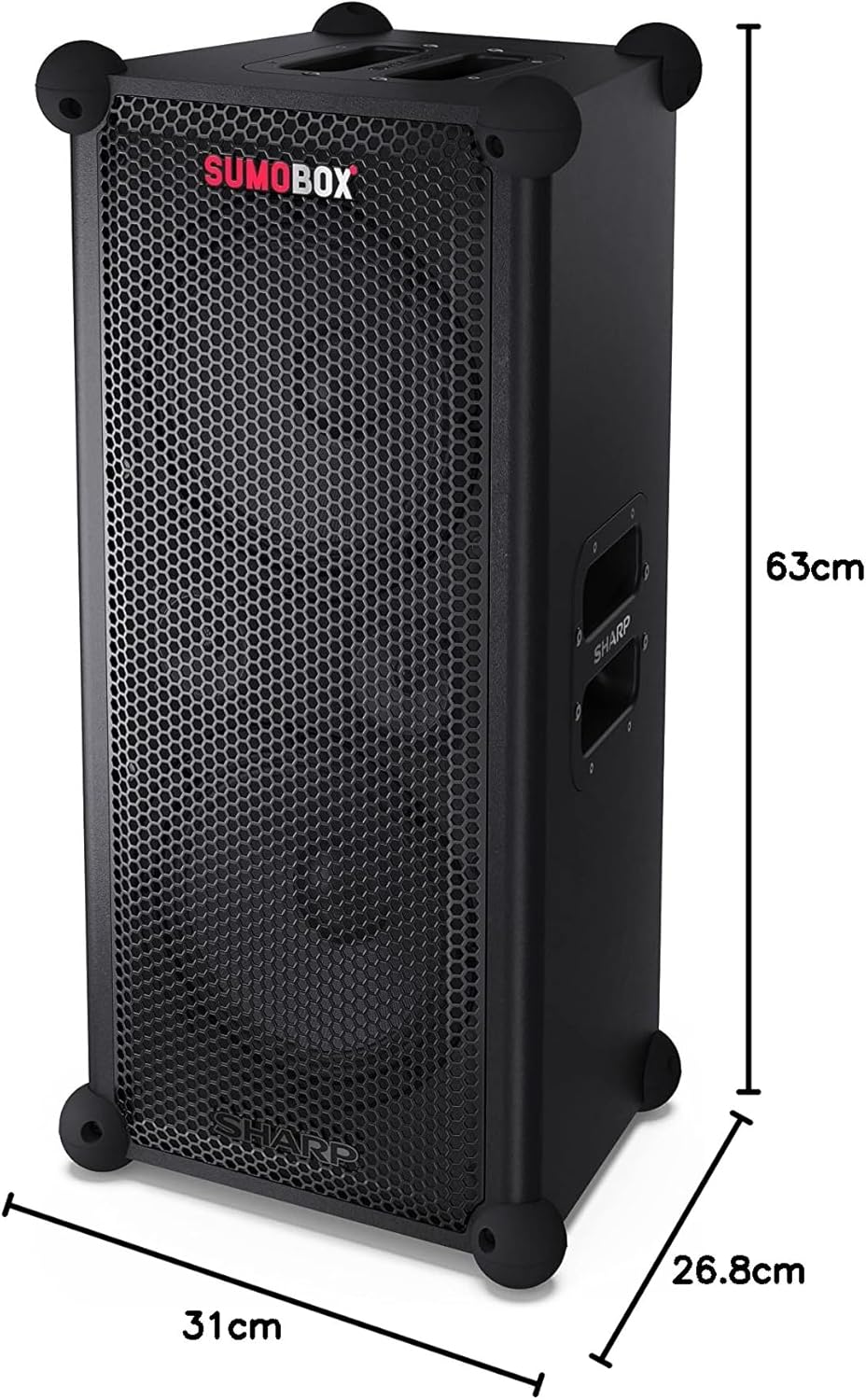
รูปที่ 9.1: ขนาดผลิตภัณฑ์
| คุณสมบัติ | รายละเอียด |
|---|---|
| ชื่อรุ่น | SumoBox CP-LS100 |
| ประเภทลำโพง | หอคอยแบบพกพา |
| กำลังขับของลำโพง | 120 วัตต์ (RMS) |
| ระดับความดันเสียง (SPL) | 105เดซิเบล |
| เส้นผ่านศูนย์กลางซับวูฟเฟอร์ | 8 นิ้ว (x2) |
| เทคโนโลยีการเชื่อมต่อ | บลูทูธ |
| โหมดเอาต์พุตเสียง | Stereo (with Duo Mode) |
| ประเภทตัวควบคุม | Pro panel with advanced control and Sharp Life app |
| อายุการใช้งานแบตเตอรี่ | นานถึง 10 ชั่วโมง |
| ความจุของแบตเตอรี่ | 5 Amp ชั่วโมง |
| น้ำหนักสินค้า | 9.7 กิโลกรัม |
| ขนาดสินค้า (กว้าง x ยาว x สูง) | 26.8 x 31 x 63 ซม. |
| สี | สีดำ |
| ระดับการกันน้ำ | Not IPX Rated (Not waterproof) |
10. การรับประกันและการสนับสนุน
สำหรับข้อมูลการรับประกันและการสนับสนุนทางเทคนิค โปรดดูบัตรรับประกันที่แนบมากับผลิตภัณฑ์ของคุณ หรือเยี่ยมชมเว็บไซต์อย่างเป็นทางการของ Sharp website. You can also contact Sharp customer service for assistance with product registration, troubleshooting, and service inquiries.
Sharp Customer Support: www.sharp.ca


