1. บทนำ
The Coulisse Motion Blinds Domotica Box RS485 (CM-19) is designed for the seamless integration of motorized window blinds with existing home and building automation networks and systems. This device acts as a bridge, allowing for advanced control and automation of your MotionBlinds motorized window coverings. It is compatible with a wide variety of wired and battery-powered motors and controls used in residential, commercial, and hospitality settings.
2. สินค้าหมดview
The CM-19 Domotica Box is a compact device that facilitates communication between your motorized blinds and a central automation system. It features a minimalist design with essential controls and connectivity ports.

รูปที่ 2.1 : ด้านหน้า View. This image displays the front of the CM-19 Domotica Box, highlighting the control buttons for scene selection, adjustment, pairing, and unpairing of devices.
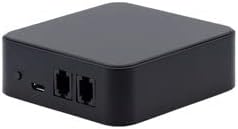
รูปที่ 2.2: ด้านหลัง View. This image shows the back of the CM-19 Domotica Box, featuring a micro USB port for power and two RJ45 ports for network or RS485 connections.

Figure 2.3: Key Features and Dimensions. This diagram illustrates the compact size of the Domotica Box (approximately 3.11 inches) and highlights its primary functions: seamless integration of motorized blinds and power compatibility with any standard USB charger.

Figure 2.4: Smart Technology Overview. ภาพนี้ให้ภาพรวมview of the MotionBlinds smart technology ecosystem, detailing how Bluetooth motors can be set up quickly and integrated with smart home systems like Google Home and Amazon Alexa via an optional Wi-Fi bridge. It also emphasizes the privacy aspect of local data storage.
3. ข้อมูลด้านความปลอดภัย
Please read and understand all safety instructions before installing and operating the Domotica Box. Failure to follow these instructions may result in electric shock, fire, or serious injury.
- Ensure the device is powered by a compatible USB charger (5V DC, minimum 1A) to prevent damage.
- อย่าให้เครื่องสัมผัสกับน้ำ ความชื้น หรืออุณหภูมิที่สูงหรือต่ำเกินไป
- Do not attempt to open, modify, or repair the device. Refer all servicing to qualified personnel.
- เก็บอุปกรณ์ให้ห่างจากแสงแดดและแหล่งความร้อนโดยตรง
- ตรวจสอบให้แน่ใจว่ามีการระบายอากาศที่เหมาะสมรอบๆ อุปกรณ์
4. การตั้งค่า
4.1 Powering the Domotica Box
- Locate a suitable power outlet near your desired installation location.
- Connect a standard USB charger (not included) to the micro USB port on the back of the CM-19 Domotica Box.
- Plug the USB charger into the power outlet. The device will power on automatically.
4.2 Integration with Home Automation Systems
The CM-19 Domotica Box is designed for seamless integration with home and building automation networks using RS485 communication. Consult your home automation system's documentation for specific connection and configuration procedures.
4.3 Optional Smart Home Connectivity (via Wi-Fi Bridge)
For connecting Bluetooth-powered MotionBlinds to popular smart home systems like Google Home, Amazon Alexa, and others, an optional MotionBlinds Wi-Fi bridge is required. This bridge facilitates communication between your blinds and the smart home ecosystem.
- Install the MotionBlinds Wi-Fi bridge according to its specific instructions.
- Follow the setup steps within the MotionBlinds application to connect your blinds to the Wi-Fi bridge and subsequently to your preferred smart home system.
4.4 Smartphone App Setup
To control your blinds with a smartphone, download the official MotionBlinds app from your device's app store. After installation, follow the in-app instructions to pair your blinds and configure settings. This process typically involves a few easy steps.
5. คู่มือการใช้งาน
5.1 Controlling Blinds via Smartphone App
Once your blinds are paired with the MotionBlinds app, you can control their movement (open, close, stop) directly from your smartphone. The app provides an intuitive interface for managing individual blinds or groups of blinds.
5.2 Programming Timers and Automation
The MotionBlinds app allows you to program timers directly into the motor, enabling automated operation of your blinds. This feature allows blinds to move to pre-set positions at scheduled times, providing convenience and energy efficiency.
- Open the MotionBlinds app and navigate to the timer or automation section.
- Create new schedules by selecting specific blinds, desired positions, and activation times.
- Save your programmed timers. The blinds will then operate on autopilot according to your settings.
บันทึก: All data and intelligence related to programmed timers and blind positions are stored locally on the motor, not in the cloud, to ensure user privacy.
6. การบำรุงรักษา
The Coulisse Motion Blinds Domotica Box CM-19 requires minimal maintenance.
- การทำความสะอาด: To clean the exterior of the device, use a soft, dry cloth. For minor spots, a slightly damp cloth can be used. Do not use harsh chemicals, abrasive cleaners, or excessive moisture.
- คำแนะนำการดูแลผลิตภัณฑ์: Spot Clean.
- Ensure the device is kept free from dust and debris to maintain optimal performance.
7 การแก้ไขปัญหา
If you encounter issues with your Coulisse Motion Blinds Domotica Box, please refer to the following common troubleshooting steps. For more complex issues, contact customer support.
- อุปกรณ์ไม่เปิดเครื่อง: Ensure the USB cable is securely connected to both the Domotica Box and a working USB charger. Try a different USB charger and cable.
- Blinds not responding: Verify that the Domotica Box is powered on and properly connected to your home automation system. Check the pairing status of your blinds within the MotionBlinds app.
- ปัญหาการเชื่อมต่อแอป: Ensure your smartphone has a stable internet connection. Restart the MotionBlinds app. If using a Wi-Fi bridge, ensure it is properly configured and connected to your network.
- การควบคุมเป็นระยะ: Check for any potential sources of interference near the Domotica Box or your blinds. Ensure the device is within range of your blinds (if using Bluetooth directly).
8. ข้อมูลจำเพาะ
| คุณลักษณะ | รายละเอียด |
|---|---|
| ยี่ห้อ | ม่านปรับแสง |
| ผู้ผลิต | คูลิสเซ่ |
| หมายเลขรุ่น | ซีเอ็ม-19 |
| ASIN | B0BWSJ4MBF |
| ยูพีซี | 655457900597 |
| สี | สีดำ |
| น้ำหนักสินค้า | 4 ออนซ์ |
| ขนาดแพ็คเกจ | 6 x 4 x 4 นิ้ว |
| โหมดการทำงาน | อัตโนมัติ |
| ประเภทการควบคุม | Motorized, Cordless |
| ประเภทการติดตั้ง | ด้านในติดตั้ง |
| วันที่พร้อมใช้งานครั้งแรก | 25 มกราคม 2023 |
9. การรับประกันและการสนับสนุน
For information regarding product warranty, returns, or technical support, please contact the seller or the manufacturer, Coulisse/MotionBlinds, directly. Refer to your purchase documentation for specific warranty terms and contact details.
You can often find support resources, FAQs, and contact information on the official MotionBlinds webเว็บไซต์: www.motionblinds.com


