1. บทนำ
Thank you for choosing the TRIGKEY Green G4 Mini PC. This compact and powerful desktop computer is designed for a variety of uses, including home office, multimedia entertainment, and light design tasks. Featuring the 12th Generation Intel Alder Lake-N100 processor, 16GB DDR4 RAM, and a 500GB M.2 SSD, it offers a fast and fluid experience. This manual provides essential information for setting up, operating, maintaining, and troubleshooting your device.

Figure 1: TRIGKEY Green G4 Mini PC
The TRIGKEY Green G4 Mini PC is a compact and efficient computing solution, ideal for various daily tasks. Its small form factor allows for easy placement in any environment.
2. คุณสมบัติผลิตภัณฑ์และมากกว่าview
The TRIGKEY Green G4 Mini PC is equipped with advanced components to ensure optimal performance and connectivity.
- โปรเซสเซอร์: 12th Gen Intel Alder Lake-N100 (up to 3.40 GHz, 4 Cores/4 Threads, 15W TDP).
- หน่วยความจำ: 16GB DDR4 3200 MHz (single channel).
- พื้นที่จัดเก็บ: 500GB M.2 2280 SSD, expandable with a 2.5" SSD/HDD (up to 2TB).
- กราฟิก: Integrated Intel UHD Graphics, supporting dual 4K@60Hz output via HDMI.
- การเชื่อมต่อ: Gigabit Ethernet, Dual-band Wi-Fi 6 (802.11ax), Bluetooth 5.2.
- พอร์ต: Four USB 3.2 Gen2 ports, two HDMI ports, 3.5mm audio jack, DC power input, LAN port, CLR CMOS button.
- ระบบปฏิบัติการ: Pre-installed Windows 11 Pro, also supports Linux and Ubuntu.
- คุณสมบัติเพิ่มเติม: Auto Power On, RTC Wake-up function, Wake-on-LAN.
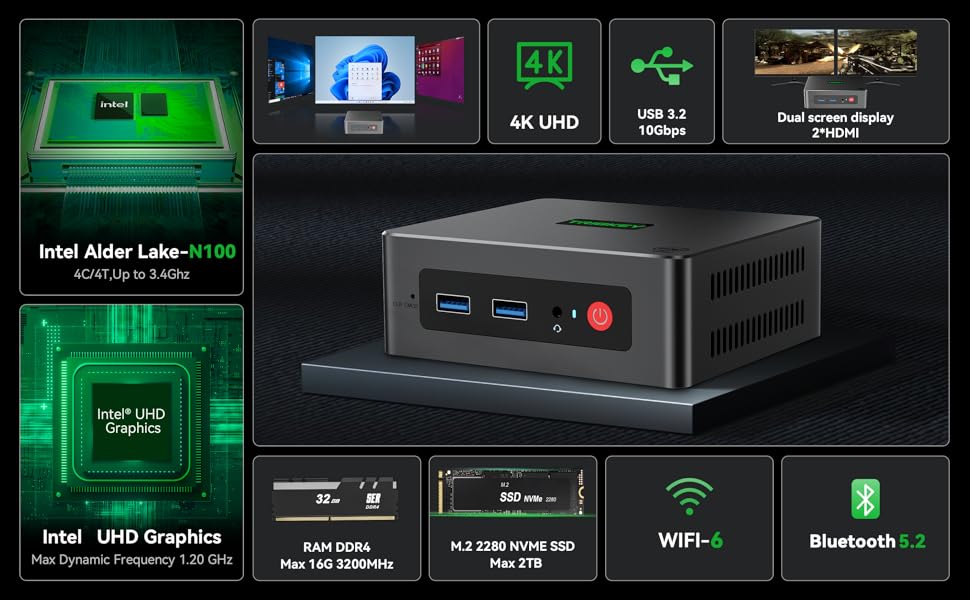
รูปที่ 2: ข้อมูลจำเพาะผลิตภัณฑ์โดยละเอียด
ภาพนี้ให้ภาพรวมที่ครอบคลุมview of the TRIGKEY Green G4 Mini PC's technical specifications, including dimensions, CPU, graphics, wireless capabilities, storage, and interfaces.

Figure 3: Rich Interfaces Design
This diagram illustrates the various ports available on the TRIGKEY Green G4 Mini PC, including USB 3.2 Gen2, HDMI, LAN, and audio jacks, highlighting its versatile connectivity options.
3. คู่มือการติดตั้ง
3.1 การแกะกล่องและการตรวจสอบเบื้องต้น
Carefully remove all components from the packaging. Verify that all accessories are present:
- TRIGKEY G4 Mini PC
- อะแดปเตอร์แปลงไฟ
- แท่นยึด VESA
- HDMI Cable (long)
- คู่มือการใช้งาน
- Screws for storage expansion
Inspect the Mini PC for any visible damage before proceeding.
3.2 การเชื่อมต่ออุปกรณ์ต่อพ่วง
- เชื่อมต่อจอแสดงผล: Connect your monitor(s) to the HDMI ports on the back of the Mini PC using the provided HDMI cable. The Green G4 supports dual 4K@60Hz displays.
- เชื่อมต่อคีย์บอร์ดและเมาส์: เสียบแป้นพิมพ์และเมาส์ USB ของคุณเข้ากับพอร์ต USB 3.2 ที่ว่างอยู่
- เชื่อมต่อเครือข่าย (ทางเลือก): For a wired connection, connect an Ethernet cable from your router to the LAN port on the Mini PC. For wireless, ensure your Wi-Fi network is available.
- เชื่อมต่อพลังงาน: Insert the power adapter into the DC input port on the Mini PC, then plug the adapter into a power outlet.
4. คู่มือการใช้งาน
4.1 การเปิด/ปิดเครื่อง
- เปิดเครื่อง: กดปุ่มเปิด/ปิดที่อยู่ด้านหน้าของมินิพีซี ไฟแสดงสถานะการทำงานจะสว่างขึ้น
- หมดแรง: To shut down the system, go to the Start Menu in Windows and select "Power" > "Shut down". Alternatively, you can press and hold the power button for a few seconds for a forced shutdown (not recommended for regular use).
- เริ่มต้นใหม่อีกครั้ง: From the Start Menu, select "Power" > "Restart".
4.2 Operating System and Initial Setup
The TRIGKEY Green G4 Mini PC comes with Windows 11 Pro pre-installed and activated. Upon first boot, you will be guided through the Windows setup process, including language selection, network connection, and user account creation. Follow the on-screen prompts to complete the setup.
The Mini PC also supports other operating systems like Linux and Ubuntu, allowing for flexible customization based on user preference.
4.3 การเชื่อมต่อเครือข่าย
- ไวไฟ : To connect to a wireless network, click the Wi-Fi icon in the system tray, select your desired network, enter the password, and click "Connect". The Mini PC supports Wi-Fi 6 for faster and more stable connections.
- อีเธอร์เน็ต: หากเสียบสายอีเธอร์เน็ต ระบบจะตรวจจับและเชื่อมต่อกับเครือข่ายแบบใช้สายโดยอัตโนมัติ
- บลูทูธ: To pair Bluetooth devices (e.g., headphones, speakers), go to Windows Settings > Bluetooth & devices, and follow the instructions to add a new device. The Mini PC features Bluetooth 5.2.
4.4 การตั้งค่าจอแสดงผลคู่
The TRIGKEY Green G4 Mini PC supports connecting two monitors simultaneously via its dual HDMI ports, enabling extended desktop or mirrored display modes.
- Connect both monitors to the HDMI ports.
- คลิกขวาบนเดสก์ท็อปและเลือก "การตั้งค่าการแสดงผล"
- Under "Multiple displays", choose your preferred display option (e.g., "Extend these displays" or "Duplicate these displays").

Figure 4: Dual Screen Display Capability
This image demonstrates the TRIGKEY Green G4 Mini PC's ability to support two independent displays, enhancing productivity for office work or immersive viewing for movies.
5. การบำรุงรักษา
5.1 การขยายพื้นที่เก็บข้อมูล
The TRIGKEY Green G4 Mini PC comes with a 500GB M.2 2280 SSD. For additional storage, you can install a 2.5-inch SSD or HDD (up to 2TB).
- โปรดตรวจสอบให้แน่ใจว่ามินิพีซีปิดเครื่องและถอดปลั๊กออกแล้ว
- Locate the bottom cover of the Mini PC.
- Carefully remove the screws securing the cover.
- Install the 2.5-inch SSD/HDD into the designated slot and secure it with the provided screws.
- ปิดฝาครอบด้านล่างและขันสกรูให้แน่น

Figure 5: M.2 2280 SSD and Expansion
This image highlights the M.2 2280 SSD and the potential for storage expansion with an additional 2.5-inch drive, demonstrating the system's upgradeability.
5.2 Cooling and General Care
The Mini PC features an integrated fan for cooling. To ensure optimal performance and longevity:
- วางมินิพีซีในบริเวณที่มีอากาศถ่ายเทสะดวก
- อย่าอุดรูระบายอากาศ
- Keep the device clean and free from dust. Use a soft, dry cloth for cleaning the exterior.
- หลีกเลี่ยงการให้อุปกรณ์สัมผัสกับอุณหภูมิ ความชื้น หรือแสงแดดโดยตรง
6 การแก้ไขปัญหา
If you encounter issues with your TRIGKEY Green G4 Mini PC, refer to the following common troubleshooting steps:
| ปัญหา | วิธีแก้ปัญหาที่เป็นไปได้ |
|---|---|
| ไม่มีการแสดงผลบนจอภาพ |
|
| ไม่มีไฟฟ้า |
|
| Wi-Fi/Bluetooth ไม่ทำงาน |
|
| ระบบช้าหรือไม่ตอบสนอง |
|
For more complex issues or if the above steps do not resolve the problem, please contact TRIGKEY customer support.
7. ข้อมูลจำเพาะทางเทคนิค
| คุณสมบัติ | ข้อมูลจำเพาะ |
|---|---|
| ยี่ห้อ | ทริกกี้ |
| หมายเลขรุ่น | Green G4 N100 |
| ยี่ห้อโปรเซสเซอร์ | อินเทล |
| ประเภทโปรเซสเซอร์ | Celeron N (Alder Lake-N100) |
| ความเร็วของโปรเซสเซอร์ | สูงสุด 3.4 GHz |
| จำนวนแกน | 4 |
| แรม | แรม 16GB DDR4 |
| หน่วยความจำสูงสุด | 16GB |
| ขนาดการเก็บข้อมูล | 500 GB M.2 2280 SSD |
| เทคโนโลยีการจัดเก็บ | SSD (expandable to 2TB with 2.5" SSD/HDD) |
| ยี่ห้อชิปเซ็ตกราฟิก | อินเทล |
| จีพียู | กราฟิก Intel UHD |
| ความละเอียดการแสดงผล | 3840 x 2160 (4K@60Hz) |
| ประเภทการเชื่อมต่อ | Bluetooth, Wi-Fi 6, Gigabit Ethernet |
| เทคโนโลยีไร้สาย | Bluetooth 5.2, 802.11ax |
| ฮาร์ดแวร์อินเตอร์เฟซ | 3.5mm Audio, Bluetooth 5, HDMI, USB 3.2 Gen 2 |
| จำนวนพอร์ต HDMI | 2 |
| จำนวนพอร์ต USB 3.0 | 4 (USB 3.2 Gen2) |
| ระบบปฏิบัติการ | Windows 11 Pro (รองรับ Linux, Ubuntu) |
| ขนาดแพ็คเกจ | 21.4 x 12.8 x 5.4 ซม. |
| น้ำหนักสินค้า | 680 กรัม |
8. การรับประกันและการสนับสนุน
TRIGKEY is committed to providing excellent customer service.
- การรับประกัน: The TRIGKEY Green G4 Mini PC comes with a 1-year warranty from the date of purchase.
- การสนับสนุนด้านเทคนิค: Lifetime technical support is available for all TRIGKEY products.
- ทรัพยากร: หลากหลาย files and tutorials are available to help customers resolve common PC issues. Phone and remote assistance are also offered.
ข้อมูลติดต่อ:
If you have any questions or require assistance, please do not hesitate to contact TRIGKEY customer service.
Figure 6: TRIGKEY Customer Service
This image displays various contact methods for TRIGKEY customer support, including email, online consultation, website, and technical support.


