การแนะนำ
This user manual provides essential information for the safe and efficient operation of your Ekrist Portable Charger Power Bank 25,800mAh. Designed for on-the-go use, this power bank ensures your smart devices remain connected at all times. Featuring an advanced intelligent controlling IC, it offers enhanced safety, efficiency, and broad compatibility. Each unit undergoes 100% inspection and continuous aging tests to guarantee unprecedented convenience and reliable performance.
มีอะไรอยู่ในกล่อง
- 1 x Ekrist 25800mAh Battery Portable Charger
- 1 x สาย USB C
- 1 x คู่มือผู้ใช้
ข้อมูลจำเพาะ
| คุณสมบัติ | รายละเอียด |
|---|---|
| ความจุ | 25800mAh |
| ประเภทแบตเตอรี่ | Li-polymer (Grade A rated CE RoHs and UL certification) |
| ป้อนข้อมูล | 5V/3A |
| เอาท์พุต | Triple Output: 2x USB-A, USB-C (5V/3A) |
| ขนาด | 0.72 x 2.95 x 5.94 นิ้ว (1.83 x 7.49 x 15.09 ซม.) |
| น้ำหนักสินค้า | 11.8 ออนซ์ (335g) |
| สี | สีเขียว |
| หมายเลขรุ่น | HX160Y8 |
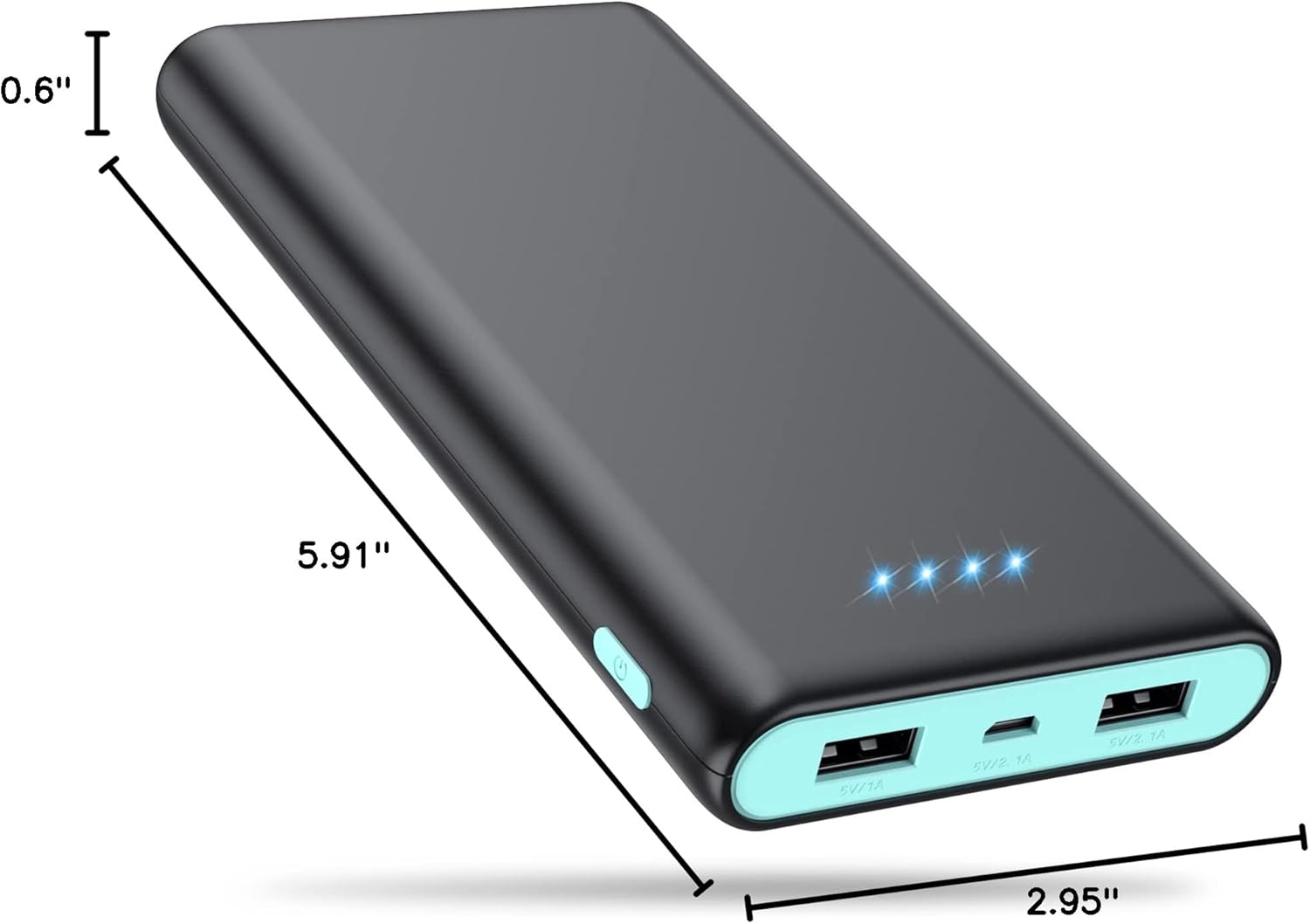
รูปที่ 1: ขนาดผลิตภัณฑ์
คุณสมบัติหลัก
- ความจุสูงเป็นพิเศษ: With a 25800mAh capacity, this power bank can charge most smartphones 6-8 times, eliminating battery anxiety during travel or outdoor activities.
- Triple USB Charging & USB-C In/Out: Equipped with three USB ports (2.1A, 1A, and 3A USB-C), allowing you to charge up to three devices simultaneously without compromising charging speed.
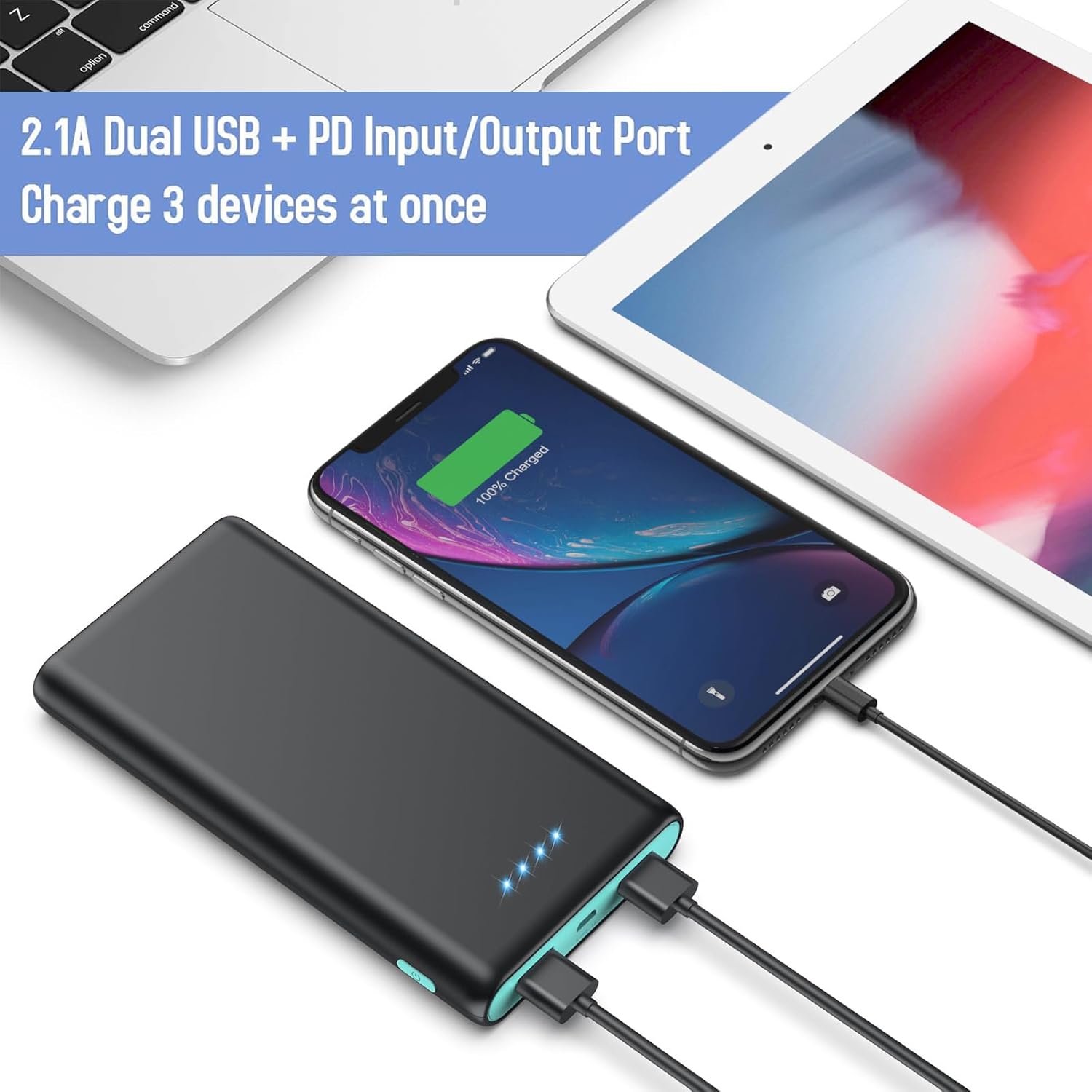
Figure 2: Triple Output Ports
- Intelligent Smart IC & Certified Safe: Features an advanced intelligent controlling IC for higher quality, safer, and more reliable performance. Built-in smart protection system ensures complete protection against overcurrent, high temperature, overcharge, and overvoltage.

รูปที่ 3: คุณสมบัติการป้องกันหลายระดับ
- 4 LED Power Indicators: Four blue LED lights clearly show the remaining power level (25%~50%~75%~100%), allowing you to monitor the battery status at a glance.

Figure 4: LED Power Indicators
- เข้ากันได้สากล: Compatible with a wide range of devices including iPhone (16/15/14/13/12/11/X/6/6s/7/8 Series), Android phones (Samsung Galaxy S25/S24/S23 Series, Google Pixel, Moto), tablets (iPad Pro), and other USB smart devices.

รูปที่ 5: ความเข้ากันได้ของอุปกรณ์สากล
- Flight Safe & Portable Design: Its lightweight and compact design makes it easy to carry in a pocket, bag, or fanny pack, and it is safe for air travel.

รูปที่ 6: การออกแบบที่กะทัดรัดและพกพาสะดวก
การตั้งค่า
- ค่าใช้จ่ายเริ่มต้น: Before first use, fully charge the power bank. Connect the included USB-C cable to the power bank's USB-C port and connect the other end to a compatible AC adapter (not included). The LED indicators will light up to show charging progress. All four LEDs will be solid blue when fully charged.
- ตรวจสอบระดับแบตเตอรี่: Briefly press the power button on the side of the power bank to check the current battery level indicated by the blue LED lights.
คำแนะนำการใช้งาน
- การชาร์จอุปกรณ์ของคุณ:
- Connect your device's charging cable to one of the power bank's USB output ports (USB-A or USB-C).
- เชื่อมต่อปลายสายอีกด้านเข้ากับอุปกรณ์ของคุณ
- The power bank will automatically begin charging your device. The blue LED indicators will remain lit during charging.

รูปที่ 7: การชาร์จอุปกรณ์หลายเครื่อง
- การชาร์จแบตสำรอง:
- Use the included USB-C cable or your original device's cable.
- Connect the USB-C end to the power bank's USB-C input/output port.
- Connect the other end to a USB wall charger (e.g., 2.1A or 3A for faster charging) or a computer USB port.
- The LED indicators will flash to show charging status and become solid when fully charged.
การดูแลรักษา
- เก็บพาวเวอร์แบงค์ให้ห่างจากอุณหภูมิที่สูงหรือต่ำมาก แสงแดดโดยตรง และของเหลว
- Avoid dropping or subjecting the power bank to strong impacts, as this can damage internal components.
- ทำความสะอาดพาวเวอร์แบงค์ด้วยผ้านุ่มและแห้ง ห้ามใช้สารเคมีรุนแรงหรือวัสดุที่มีฤทธิ์กัดกร่อน
- Store the power bank in a cool, dry place when not in use. For long-term storage, it is recommended to charge it to about 50% every 3 months to preserve battery life.
การแก้ไขปัญหา
- พาวเวอร์แบงค์ไม่ชาร์จ:
- ตรวจสอบให้แน่ใจว่าสายชาร์จเชื่อมต่อกับพาวเวอร์แบงค์และแหล่งจ่ายไฟอย่างแน่นหนาแล้ว
- Try a different USB-C cable or AC adapter.
- Verify the power source (wall outlet, computer USB port) is functional.
- อุปกรณ์ไม่ชาร์จจากพาวเวอร์แบงค์:
- Check if the power bank has sufficient charge (indicated by LED lights).
- Ensure your device's charging cable is properly connected to both the power bank and your device.
- Try a different USB output port on the power bank.
- Verify your device's charging cable is not damaged.
- Some devices may require a specific charging current; ensure compatibility.
- การชาร์จช้า:
- Ensure you are using a high-speed charging port (e.g., 2.1A or 3A USB-C) on the power bank and a compatible wall adapter.
- Using multiple ports simultaneously may reduce individual charging speeds.
- Check the quality of your charging cable; a low-quality or damaged cable can slow down charging.
การรับประกันและการสนับสนุน
Ekrist provides 24 Months Support Services for your 25800mAh portable battery charger. This includes friendly, easy-to-reach support for any questions or issues you may encounter. Please refer to your purchase documentation for specific warranty claim procedures or contact Ekrist customer service directly for assistance.
For further assistance, please visit the official Ekrist support webเว็บไซต์หรือติดต่อทีมบริการลูกค้าของพวกเขา

