1. บทนำ
Welcome to the Wave Digital Business Card user manual. This guide provides comprehensive instructions for setting up and utilizing your new digital business card. The Wave Digital Business Card offers a modern, efficient way to share your professional contact information using NFC technology and QR codes, compatible with both iPhone and Android devices.

Figure 1: Wave Digital Business Card and its digital profile บนสมาร์ทโฟน
2. การตั้งค่า
Setting up your Wave Digital Business Card is a straightforward process. Follow these steps to create your digital profile and link it to your card.
- Activate Your Card: Upon receiving your card, locate the QR code on the back. Use your smartphone's camera to scan this QR code, or gently tap the card to the back of your NFC-enabled smartphone (for iPhones, tap to the top back; for Androids, tap to the center back).
- สร้างมืออาชีพของคุณfile: The scan or tap will direct you to the Wave platform to create your digital profile. Follow the on-screen prompts to set up your account.
- Customize Your Information: Enter your contact details, social media links, webเว็บไซต์ URLs, and any other professional information you wish to share. You can also upload a profile picture and customize the appearance of your digital profile.
- Save Your Profile: Ensure all changes are saved. Your digital profile is now linked to your Wave Digital Business Card.
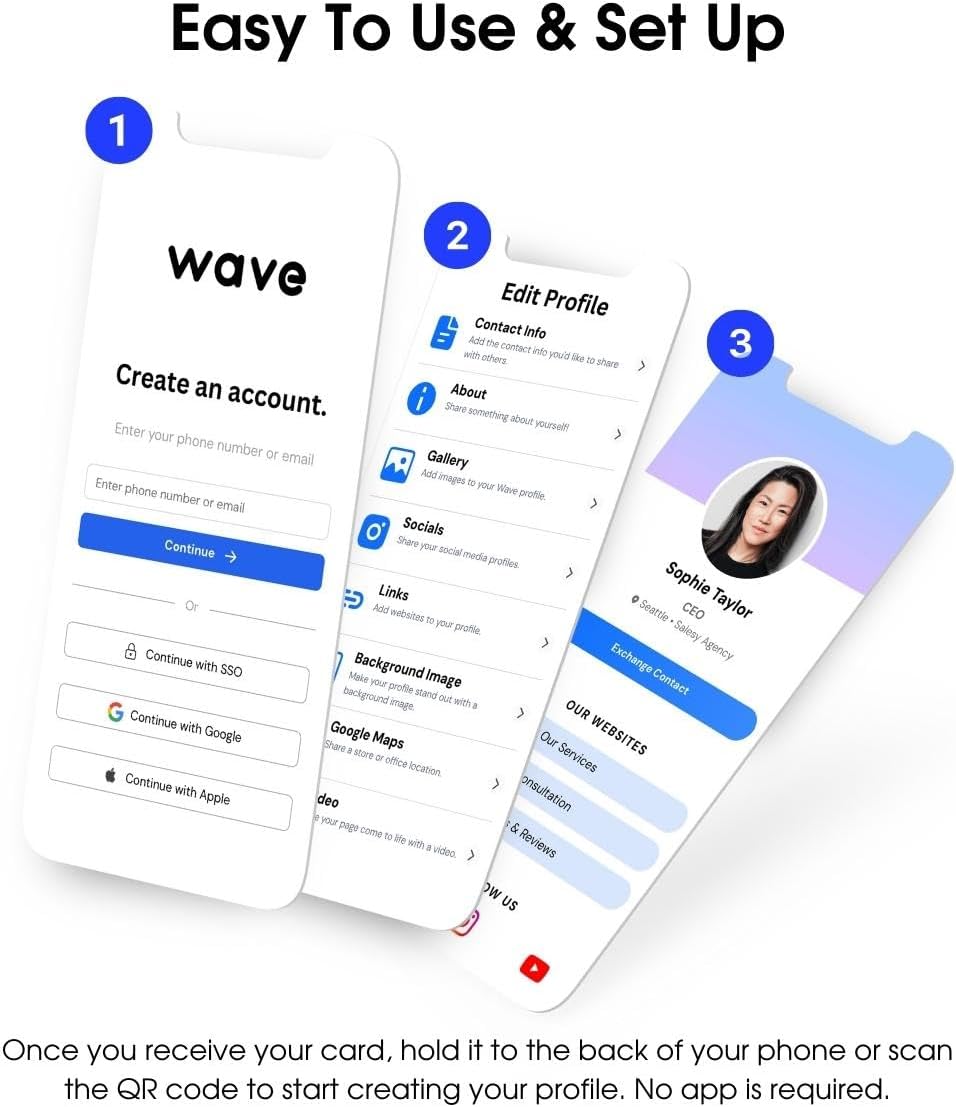
Figure 2: Visual guide to the easy setup and profile กระบวนการสร้างสรรค์
Video 1: An official video from Wave Connect demonstrating the digital business card.
3. Operating Instructions: Sharing Your Information
The Wave Digital Business Card offers multiple convenient ways to share your contact information.
3.1. NFC Tap Feature
- สำหรับไอโฟน: Tap the Wave card to the very top back of the recipient's iPhone. Ensure the phone is unlocked and NFC is enabled (usually by default).
- สำหรับอุปกรณ์ Android: Tap the Wave card to the center back of the recipient's Android phone. Ensure the phone is unlocked and NFC is enabled in the device settings.
- Upon a successful tap, a notification will appear on the recipient's phone, allowing them to view and save your digital profile.
3.2. QR Code Scanning
- If the recipient's phone does not support NFC or if they prefer, they can scan the QR code located on the back of your Wave card using their smartphone camera.
- The camera will recognize the QR code and prompt them to open your digital profile in their web เบราว์เซอร์
3.3. Direct Link Sharing
- You can also share your digital profile link directly via text message, email, or any messaging app. Access your profile on the Wave platform and use the sharing options provided.
- โปรของคุณfile link can be added to digital wallets like Apple Wallet or Google Wallet for quick access.

Figure 3: Unlimited sharing options for your digital business card.
4. คุณสมบัติหลัก
- โปรปรับแต่งได้files: Create and manage multiple digital profiles for different professional roles or businesses. Each profile can be tailored with specific contact information, social media links, and branding.
- Unlimited Sharing: Share your digital business card an unlimited number of times without the need for physical cards.
- การจัดการข้อมูลติดต่อ: Store an unlimited amount of contacts. The platform allows for organizing contacts with tags, notes, and relevant individual information.
- เข้ากันได้สากล: Works with all modern smartphones (iPhone, Android) ensuring broad accessibility.
- Free & Pro Versions: Access core sharing and contact storage features for free. Upgrade to a PRO version for additional content and advanced features.

รูปที่ 4: อดีตample of customizable digital profiles.

Figure 5: All your information in one place for easy management.
5. การบำรุงรักษา
To ensure the longevity and optimal performance of your Wave Digital Business Card, follow these simple maintenance guidelines:
- รักษาความสะอาด: Wipe the card with a soft, dry cloth to remove dust or smudges. Avoid abrasive cleaners.
- หลีกเลี่ยงเงื่อนไขที่รุนแรง: Do not expose the card to extreme temperatures, direct sunlight for prolonged periods, or harsh chemicals.
- จัดการด้วยความระมัดระวัง: While durable, avoid bending or scratching the card excessively to protect the embedded NFC chip and QR code.
- โปรดิจิตอลfile อัปเดต: Regularly log into your Wave account to ensure your digital profile information is current and accurate.
6 การแก้ไขปัญหา
If you encounter any issues with your Wave Digital Business Card, refer to the following common solutions:
- Card Not Tapping (NFC):
- Ensure the recipient's phone is unlocked.
- Verify NFC is enabled in the phone's settings (especially for Android devices).
- For iPhones, ensure the tap is made to the very top back of the phone. For Androids, tap to the center back.
- Remove any thick phone cases that might interfere with the NFC signal.
- ไม่สามารถสแกนคิวอาร์โค้ดได้:
- Ensure the QR code on the card is clean and free from obstructions.
- Check that the recipient's phone camera is focused on the QR code.
- Ensure adequate lighting for scanning.
- โปรfile Not Loading/Incorrect Information:
- ตรวจสอบการเชื่อมต่ออินเทอร์เน็ตของคุณ
- Log into your Wave account to confirm your profile information is correctly saved and published.
- Clear your browser's cache if accessing via a web ลิงค์
7. ข้อมูลจำเพาะ
| คุณสมบัติ | รายละเอียด |
|---|---|
| ขนาดสินค้า | 2.13 x 3.37 x 0.04 นิ้ว |
| น้ำหนักสินค้า | 1.76 ออนซ์ |
| การเชื่อมต่อ | NFC (การสื่อสารระยะใกล้), รหัส QR |
| ความเข้ากันได้ | All modern smartphones (iPhone, Android) |
| ผู้ผลิต | คลื่น |
| สี | สีขาว |
8. การรับประกันและการสนับสนุน
For any product-related inquiries, technical support, or warranty information, please visit the official Wave website or contact their customer service. Details can typically be found on the product packaging or through your Wave account portal.
การสนับสนุนทางออนไลน์: สำหรับข้อมูลล่าสุดและแหล่งข้อมูลสนับสนุน โปรดเยี่ยมชม [ที่อยู่เว็บไซต์] Wave Store on Amazon.


