1. บทนำ
The IK Multimedia TONEX Pedal is a stereo multi-effects guitar and bass pedal designed to bring ultra-realistic amp and pedal tones to your live performance or studio setup. Utilizing breakthrough AI Machine Modeling technology, it offers a vast library of authentic tone models, along with a comprehensive suite of built-in effects. This manual provides essential information for setting up, operating, maintaining, and troubleshooting your TONEX Pedal.
2. ข้อมูลด้านความปลอดภัย
- แหล่งจ่ายไฟ: Use only the provided 9V DC power supply. Ensure the correct voltagและขั้วไฟฟ้าเพื่อป้องกันความเสียหาย
- น้ำและความชื้น: Do not expose the unit to water, rain, or excessive moisture. Avoid operating in damp สภาพแวดล้อม
- แหล่งความร้อน: เก็บเครื่องให้ห่างจากแหล่งความร้อน เช่น หม้อน้ำ เครื่องทำความร้อน เตา หรืออุปกรณ์อื่นๆ ที่ผลิตความร้อน
- การระบายอากาศ : ตรวจสอบให้แน่ใจว่ามีการระบายอากาศที่เหมาะสม อย่าปิดกั้นช่องระบายอากาศใดๆ
- การทำความสะอาด: ทำความสะอาดด้วยผ้าแห้งเท่านั้น ห้ามใช้น้ำยาทำความสะอาดของเหลวหรือน้ำยาทำความสะอาดสเปรย์
- การบริการ: โปรดส่งผลิตภัณฑ์นี้ให้ช่างผู้ชำนาญการเป็นผู้ดำเนินการซ่อมบำรุง ห้ามซ่อมแซมผลิตภัณฑ์นี้ด้วยตนเอง
3. เนื้อหาบรรจุภัณฑ์
- IK Multimedia TONEX Pedal
- 9V แหล่งจ่ายไฟ DC
- สาย USB
- Registration Card/Software Download Instructions
4. สินค้าหมดview
The TONEX Pedal features a robust anodized aluminum chassis designed for durability. Its intuitive layout provides quick access to essential controls and versatile connectivity options.
4.1. การควบคุมที่แผงด้านหน้า
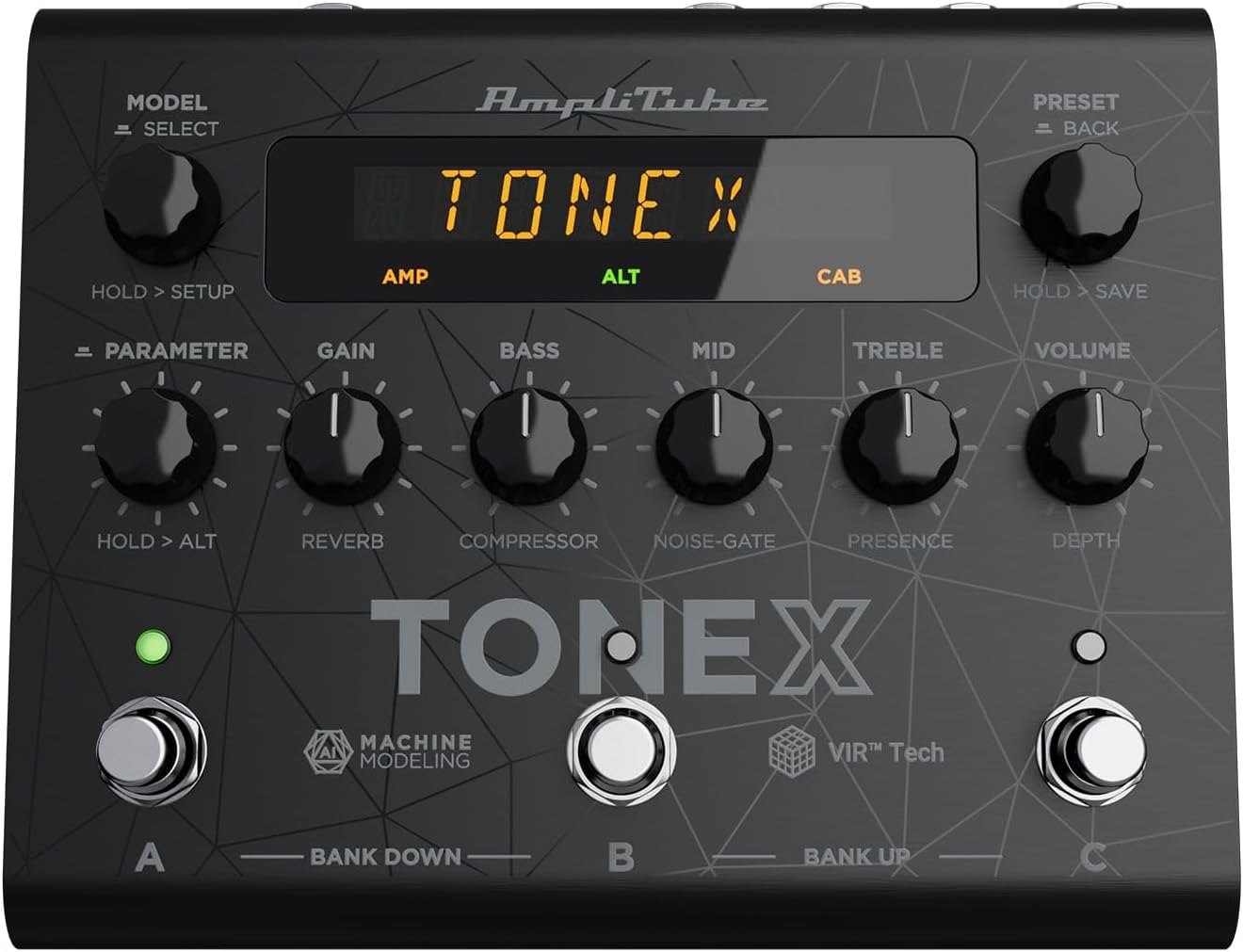
Figure 1: TONEX Pedal Front Panel
ภาพนี้แสดงด้านบน view of the TONEX Pedal, highlighting its compact design and the arrangement of knobs, footswitches, and the digital display. Key controls such as 'Model/Select', 'Preset/Back', 'Parameter', 'Gain', 'Bass', 'Mid', 'Treble', and 'Volume' are visible, along with the three footswitches labeled A, B, and C.
- ปุ่ม MODEL / SELECT: Used to select tone models and navigate menus. Press and hold for Setup menu.
- ปุ่ม PRESET / BACK: Used to select presets and go back in menus. Press and hold to save presets.
- ปุ่มปรับพารามิเตอร์: Adjusts various parameters. Press and hold for alternative parameters.
- กำไรลูกบิด: Controls the input gain of the tone model.
- ลูกบิดเบส: ปรับการตอบสนองความถี่ต่ำ
- ปุ่ม MID: ปรับการตอบสนองความถี่กลาง
- ลูกบิดเสียงแหลม: ปรับการตอบสนองความถี่สูง
- ปุ่มปรับระดับเสียง: ควบคุมปริมาณเอาต์พุตโดยรวม
- สวิตช์เท้า A, B, C: Select presets within a bank. Also used for bank up/down (A+B, B+C) and bypass.
- แสดง: Shows current preset, parameter values, and menu options.
4.2. การเชื่อมต่อแผงด้านหลัง

Figure 2: TONEX Pedal Rear Panel Connections
This image shows the rear panel of the TONEX Pedal, detailing its various input and output connections. Visible ports include the instrument input, left and right outputs (mono), headphone output, MIDI In/Out, external control input, USB port, and the 9V DC power input. This panel facilitates integration into various audio setups, from live rigs to studio environments.
- อินพุต: 1/4" mono input for your guitar or bass.
- OUTPUT L/R (MONO): 1/4" stereo outputs for connecting to a PA system, power amp, or audio interface. Use the L output for mono operation.
- หูฟัง: 1/4" stereo output for silent practice.
- MIDI เข้า/ออก: 5-pin DIN connectors for MIDI control and integration with other MIDI devices.
- EXT. CONTROL: 1/4" input for an external expression pedal or footswitch.
- ยูเอสบี: USB-B port for connecting to a computer (PC/Mac) for software control, preset management, and using the pedal as an audio interface.
- POWER 9V DC: Input for the included 9V DC power supply.
5. การตั้งค่า
5.1. การเชื่อมต่อเบื้องต้น
- เชื่อมต่อเครื่องดนตรีของคุณเข้ากับ ป้อนข้อมูล ช่องเสียบแจ็คอยู่ที่แผงด้านหลัง
- เชื่อมต่อ ผลลัพธ์ L (และ R for stereo) to your amplifier, PA system, or audio interface.
- หากต้องการ สามารถเชื่อมต่อหูฟังเข้ากับอุปกรณ์ได้ หูฟัง แจ็ค.
- เชื่อมต่อแหล่งจ่ายไฟ 9V DC ที่ให้มาเข้ากับ กำลังไฟ 9V DC input and plug it into a power outlet. The pedal will power on automatically.
5.2. การติดตั้งซอฟต์แวร์
To unlock the full potential of your TONEX Pedal, including access to ToneNET and advanced editing features, install the TONEX Editor software on your computer.
- Visit the IK Multimedia website and register your product using the provided registration card.
- Download and install the TONEX Editor software for your operating system (Windows 10 or later, macOS 10.15 or later).
- Connect the TONEX Pedal to your computer via the ยูเอสบี port. The pedal can function as a 24-bit/44.1 kHz USB audio interface for studio recording.
- Follow the on-screen instructions in the software to update firmware and manage your tone models and presets.
6. คู่มือการใช้งาน
6.1 การเลือกดูค่าที่ตั้งไว้ล่วงหน้า
The TONEX Pedal comes preloaded with 150 gig-ready presets, organized into 50 banks of three presets each.
- การเลือกค่าที่ตั้งไว้ล่วงหน้า: หมุน PRESET / BACK knob to quickly scroll through and audition available presets.
- การใช้ Footswitch: Tap footswitches A, B, หรือ C to load different presets within the current bank.
- การเปลี่ยนธนาคาร: Simultaneously press footswitches A และ B to move down a bank, or B และ C to move up a bank.
- Bypass Tone Model: Once a preset is loaded, tapping its corresponding footswitch a second time will bypass the tone model, allowing for a clean signal.
6.2. การปรับพารามิเตอร์
The TONEX Pedal offers five main and five alternative parameters on the front panel for tone shaping.
- พารามิเตอร์หลัก: Directly adjust ได้รับ, BASS, กลาง, เสียงแหลม, และ ปริมาณ using their respective knobs.
- พารามิเตอร์ทางเลือก: กดค้างไว้ พารามิเตอร์ encoder to access alternative parameters: Reverb Level, Compressor Threshold, Noise Gate Threshold, Presence, and Depth. Rotate the corresponding knobs to adjust these.
- พารามิเตอร์เพิ่มเติม: กดปุ่ม พารามิเตอร์ encoder once to access further parameters for fine-tuning your sound.
6.3. การบันทึกการตั้งค่าล่วงหน้า
- Saving with Renaming/Relocation: ถือไว้ PRESET / BACK encoder. You can then rotate the พรีเซ็ต knob to edit characters for renaming, and rotate the แบบอย่าง knob to move the cursor or change the bank location. Press the พรีเซ็ต knob again to confirm and save.
- Quick Save: To quickly save a preset with the same name in the same location, press the แบบอย่าง และ พรีเซ็ต encoders simultaneously. The display will show "SAVED".
6.4. Cab Emulation
If connecting to a standard guitar or bass amp with its own speaker cabinet, you may wish to turn off the TONEX Pedal's internal cab emulation to avoid redundant processing. This can be done via the Setup menu (hold MODEL / SELECT ลูกบิด).
6.5. Official Product Video: TONEX Pedal Main Features
วิดีโอ 1: จบแล้วview of the IK Multimedia TONEX Pedal's main features, including its controls, connectivity, and basic operation. This video demonstrates how to navigate presets, adjust parameters, and utilize the pedal's various functions for live and studio use.
7. การบำรุงรักษา
- การทำความสะอาด: Regularly wipe the pedal with a soft, dry cloth to remove dust and grime. Avoid abrasive cleaners.
- พื้นที่จัดเก็บ: Store the pedal in a cool, dry place when not in use. Protect it from extreme temperatures and humidity.
- การจัดการสายเคเบิล: Ensure cables are not kinked or strained to prevent damage to the connectors and ports.
8 การแก้ไขปัญหา
- ไม่มีไฟฟ้า: Ensure the 9V DC power supply is correctly connected to the pedal and a working power outlet.
- ไม่มีเสียง: Check all audio cable connections (instrument input, outputs to amp/PA, headphones). Verify volume levels on the pedal and connected devices. Ensure the tone model is not bypassed.
- Unexpected Behavior/Glitches: Try performing a factory reset (refer to the full online manual for specific steps). Ensure your firmware is up to date via the TONEX Editor software.
- ปัญหาการเชื่อมต่อซอฟต์แวร์: Ensure the USB cable is securely connected. Try a different USB port or cable. Restart both the pedal and your computer.
9. ข้อมูลจำเพาะ
| คุณสมบัติ | ข้อมูลจำเพาะ |
|---|---|
| หมายเลขรุ่น | แป้นเหยียบ TONEX |
| ขนาด (กว้าง x ยาว x สูง) | 6.93 x 5.59 x 2.17 นิ้ว (ประมาณ 17.6 x 14.2 x 5.5 ซม.) |
| น้ำหนักสินค้า | 2.86 ปอนด์ (ประมาณ 1.3 กก.) |
| สี | สีดำ |
| แหล่งพลังงาน | 9V DC (ไฟฟ้าระบบต่อสาย) |
| ฮาร์ดแวร์อินเตอร์เฟซ | ยูเอสบี |
| รูปแบบสัญญาณ | ดิจิตอล |
| ความเข้ากันได้ของระบบปฏิบัติการ | Windows® 10 or later, macOS® 10.15 or later (macOS® 11 Big Sur required for Modeler) |
| การตอบสนองความถี่ | 5 เฮิรตซ์ - 24 กิโลเฮิรตซ์ |
| ช่วงไดนามิค | 123 เดซิเบล |
10. การรับประกันและการสนับสนุน
ผลิตภัณฑ์ของ IK Multimedia อยู่ภายใต้การรับประกันแบบจำกัด สำหรับข้อมูลการรับประกันโดยละเอียด การลงทะเบียนผลิตภัณฑ์ และการสนับสนุนทางเทคนิค โปรดเยี่ยมชมเว็บไซต์อย่างเป็นทางการของ IK Multimedia webหรือติดต่อฝ่ายบริการลูกค้า เก็บหลักฐานการซื้อไว้เพื่อใช้ในการเคลมประกัน
Webเว็บไซต์: www.ikmultimedia.com


