คู่มือผู้ใช้โปรเซสเซอร์เดสก์ท็อป AMD Ryzen 7 7800X3D
รุ่น: AMD Ryzen 7 7800X3D
ยี่ห้อ: AMD
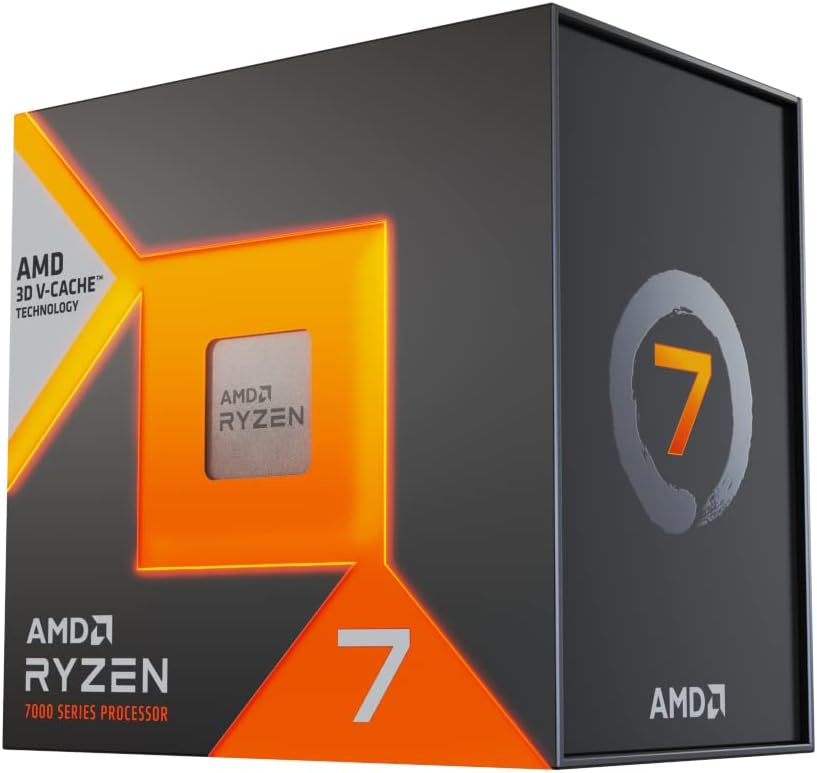
ภาพ: ด้านหน้า view of the AMD Ryzen 7 7800X3D processor retail box.
รุ่น: AMD Ryzen 7 7800X3D
ยี่ห้อ: AMD
ภาพ: ด้านหน้า view of the AMD Ryzen 7 7800X3D processor retail box.
Welcome to the new era of performance with the AMD Ryzen 7 7800X3D Desktop Processor. This processor ushers in the speed of "Zen 4" architecture, designed for gamers and creators, featuring massive built-in memory for ultimate game performance. It provides dependable and fast execution of tasks with maximum efficiency, thanks to its 8-core, 16-thread design and 5 nm process technology. The integrated AMD Radeon Graphics controller also ensures amazing graphics output.
Please read and understand all safety precautions before handling or installing your processor. Improper handling can lead to damage to the component or personal injury.
Verify that all items are present in your AMD Ryzen 7 7800X3D processor package:
Follow these steps carefully to install your AMD Ryzen 7 7800X3D processor:
Once installed, your AMD Ryzen 7 7800X3D processor will automatically manage its performance based on workload. For optimal experience, consider the following:
Proper maintenance helps prolong the life and performance of your processor:
If you encounter issues with your AMD Ryzen 7 7800X3D processor, try the following common troubleshooting steps:
Key technical specifications for the AMD Ryzen 7 7800X3D Desktop Processor:
| คุณสมบัติ | ข้อมูลจำเพาะ |
|---|---|
| รุ่นโปรเซสเซอร์ | เอเอ็มดี ไรเซ่นส์ 7 7800X3D |
| CPU Cores / Threads | 8 คอร์ / 16 เธรด |
| ความเร็วสัญญาณนาฬิกาพื้นฐาน | 4.2 กิกะเฮิรตซ์ |
| คล็อกบูสต์สูงสุด | สูงสุด 5.0 GHz |
| แคช L2 | 8MB |
| แคช L3 | 96 MB (พร้อม 3D V-Cache) |
| TDP เริ่มต้น | 120วัตต์ |
| เทคโนโลยีโปรเซสเซอร์ | 5 nm "Zen 4" |
| ซ็อคเก็ตซีพียู | เอเอ็ม5 |
| กราฟิกแบบบูรณาการ | กราฟิก AMD Radeon |
| อุณหภูมิใช้งานสูงสุด (Tjmax) | 89 องศาเซลเซียส |

ภาพ: ด้านหลัง view of the AMD Ryzen 7 7800X3D processor retail box, showing key features and specifications.
Your AMD Ryzen 7 7800X3D processor is covered by AMD's standard limited warranty. Please refer to the warranty information included in your product packaging for full terms and conditions.
For technical support, driver downloads, and additional resources, please visit the official AMD Support webเว็บไซต์:
You can also find community forums and FAQs on the AMD webเว็บไซต์นี้จัดทำขึ้นเพื่อช่วยตอบคำถามและแก้ไขปัญหาทั่วไป
 |
คู่มืออ้างอิงฉบับย่อ AMD Ryzen Master 1.5: เพิ่มประสิทธิภาพการทำงานของโปรเซสเซอร์ให้เหมาะสมที่สุด ขอแนะนำ AMD Ryzen Master 1.5 โปรแกรมยูทิลิตี้สำหรับผู้ที่ชื่นชอบการประกอบคอมพิวเตอร์ เพื่อตรวจสอบ ปรับแต่ง และเพิ่มประสิทธิภาพโปรเซสเซอร์เดสก์ท็อป AMD Ryzen และ Ryzen Threadripper เพื่อประสิทธิภาพและความเสถียรที่ดียิ่งขึ้น |
 |
คู่มือผู้ใช้ชุดเดสก์ท็อป AMD 4700S 8-Core คู่มือการใช้งานฉบับสมบูรณ์สำหรับชุดคอมพิวเตอร์ตั้งโต๊ะ AMD 4700S 8-Core ครอบคลุมการติดตั้ง ข้อมูลจำเพาะ ความปลอดภัย ขั้วต่อ และข้อมูลการรับประกัน |
 |
คู่มือผู้ใช้และคู่มือการติดตั้งโปรเซสเซอร์ AMD Ryzen 5 5600X คู่มือการใช้งานและคู่มือการติดตั้งฉบับสมบูรณ์สำหรับโปรเซสเซอร์ AMD Ryzen 5 5600X ครอบคลุมข้อมูลจำเพาะของผลิตภัณฑ์ เมนบอร์ดที่ใช้งานร่วมกันได้ ขั้นตอนการติดตั้ง เคล็ดลับการปรับแต่ง และการแก้ไขปัญหา |
 |
โปรเซสเซอร์ AMD Ryzen 5 7500F: ข้อมูลจำเพาะทางเทคนิคและคู่มือการติดตั้ง ข้อมูลจำเพาะทางเทคนิคโดยละเอียด ข้อมูลความเข้ากันได้ และคู่มือการติดตั้งสำหรับโปรเซสเซอร์ AMD Ryzen 5 7500F รวมถึงประสิทธิภาพที่คาดหวังและรายละเอียดการรับประกัน |
 |
โปรเซสเซอร์ AMD AM5 เพิ่มประสิทธิภาพสูงสุด: Maximale Leistung und Stabilität เพิ่มประสิทธิภาพของโปรเซสเซอร์ AMD AM5 (Ryzen 7000er und 9000er Serie) เป็นเวลายาวนาน BIOS-Einstellungen และ Benchmarking ของ Steigerung von Leistung และ Stabilität |
 |
โปรเซสเซอร์ AMD Ryzen 5 5600: คู่มือผู้ใช้และคู่มือการติดตั้ง คู่มือการใช้งานและคู่มือการติดตั้งอย่างเป็นทางการสำหรับโปรเซสเซอร์ AMD Ryzen 5 5600 ให้รายละเอียดเกี่ยวกับคุณสมบัติเฉพาะ ส่วนประกอบที่แนะนำที่ใช้งานร่วมกันได้ คำแนะนำการติดตั้งทีละขั้นตอน และเคล็ดลับการแก้ไขปัญหาเพื่อประสิทธิภาพสูงสุด |