สินค้าเกินview
The iGear Duo Charging Cable is a versatile 2-in-1 solution designed for efficient charging and data synchronization across a wide range of devices. It features both a Type-C to Type-C connection and a Type-C to iPhone-pin connection, making it compatible with various smartphones, laptops, power banks, and other USB-C and Lightning-enabled devices.
คุณสมบัติที่สำคัญ ได้แก่:
- การเชื่อมต่อแบบคู่: Offers both Type-C to Type-C and Type-C to iPhone-pin connections in a single cable.
- ชาร์จเร็ว: Supports 65W Power Delivery (PD) for Type-C to Type-C connections and 20W fast charging for Type-C to iPhone-pin connections.
- ความทนทานสูง: Constructed with a durable nylon braided exterior designed to resist breakage and withstand over 50,000 bends.
- ความเข้ากันได้กว้าง: Compatible with a broad range of devices including Android phones, iPhones, laptops, power banks, and speakers.
- Data Sync Capability: Enables high-speed data transfer up to 480Mbps.

Image: The iGear Duo Charging Cable showcasing its Type-C and detachable Lightning connectors, highlighting its dual functionality.
คู่มือการติดตั้ง
The iGear Duo Charging Cable is designed for plug-and-play simplicity. No complex setup or software installation is required.
- Identify Device Port: Determine whether your device requires a Type-C connection or an iPhone-pin (Lightning) connection.
- เลือกตัวเชื่อมต่อ:
- For Type-C devices: Use the integrated Type-C connector.
- For iPhone-pin (Lightning) devices: Attach the Lightning adapter to the Type-C connector. The Lightning adapter is designed to securely fit onto the Type-C end of the cable.
- Connect to Power Source/Device: Plug the appropriate connector into your device (phone, laptop, etc.) and the other Type-C end into a compatible power adapter (wall charger, power bank) or another device for data transfer.
คำแนะนำการใช้งาน
อุปกรณ์ชาร์จไฟ
The iGear Duo Charging Cable supports fast charging for both Type-C and iPhone-pin devices. Ensure your power adapter supports Power Delivery (PD) for optimal charging speeds.
- For Type-C Devices: Connect the Type-C end of the cable to your device and the other Type-C end to a 65W PD compatible power adapter.
- For iPhone-pin Devices: Attach the Lightning adapter to the cable's Type-C end, then connect it to your iPhone-pin device. Plug the other Type-C end into a 20W PD compatible power adapter.
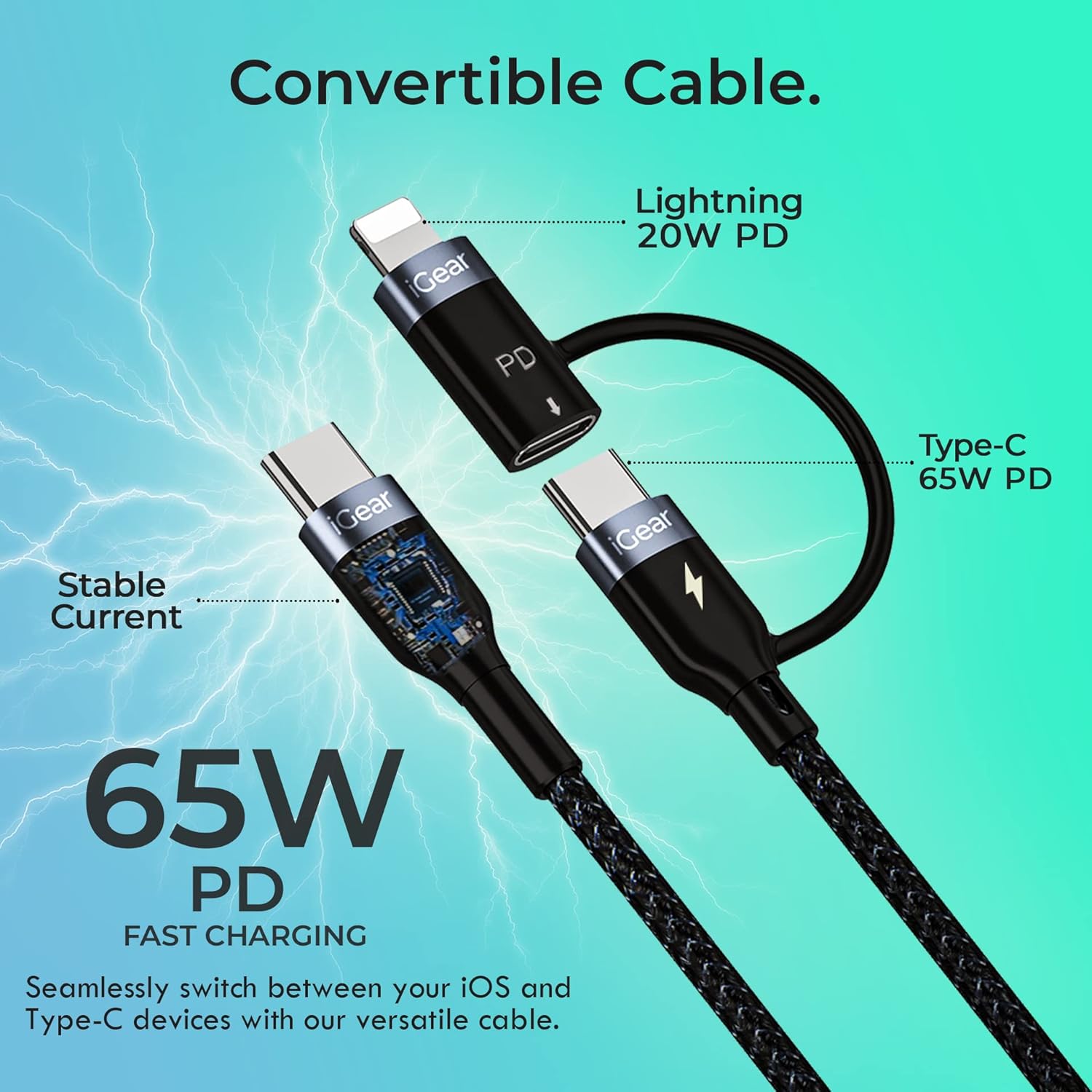
Image: A visual representation of the cable's convertible design, illustrating how the Lightning adapter connects to the Type-C end, and specifying 20W PD for Lightning and 65W PD for Type-C.
การโอนข้อมูล
The cable facilitates high-speed data transfer between compatible devices, such as a smartphone and a laptop.
- เชื่อมต่ออุปกรณ์: Plug one end of the cable into your device (e.g., smartphone) and the other end into the data port of another device (e.g., laptop).
- เริ่มการโอน: Follow the prompts on your devices to allow data access and begin transferring files. The cable supports data transfer speeds of up to 480Mbps.

Image: A hand holding a smartphone connected via the iGear Duo Cable, with text overlays indicating "65W Fast Charging" and "Upto 480Mbps Data Transfer," demonstrating its dual capabilities.
การดูแลรักษา
Proper care will extend the life of your iGear Duo Charging Cable and ensure optimal performance.
- หลีกเลี่ยงการก้มตัวมากเกินไป: While the cable is designed to be durable and withstand many bends, avoid sharp or excessive bending, especially near the connectors, to prevent internal wire damage.
- จัดเก็บอย่างถูกต้อง: When not in use, coil the cable loosely. Avoid tightly wrapping or knotting the cable, which can stress the internal wires and outer braiding.
- รักษาความสะอาด: Use a soft, dry cloth to wipe down the cable and connectors. Avoid using harsh chemicals or abrasive materials.
- ป้องกันจากองค์ประกอบ: เก็บสายเคเบิลให้ห่างจากอุณหภูมิที่สูงหรือต่ำมาก แสงแดดโดยตรง และความชื้น
- จัดการขั้วต่ออย่างระมัดระวัง: เมื่อถอดปลั๊กออกจากอุปกรณ์หรือแหล่งจ่ายไฟ ควรดึงที่หัวต่อเสมอ ไม่ใช่ดึงที่ตัวสาย

ภาพ: ภาพตัดขวางโดยละเอียด view of the cable's construction, highlighting its protective layers: rubber coating for insulation, copper wire for power, aluminum shield for protection, and a nylon braided jacket for durability.
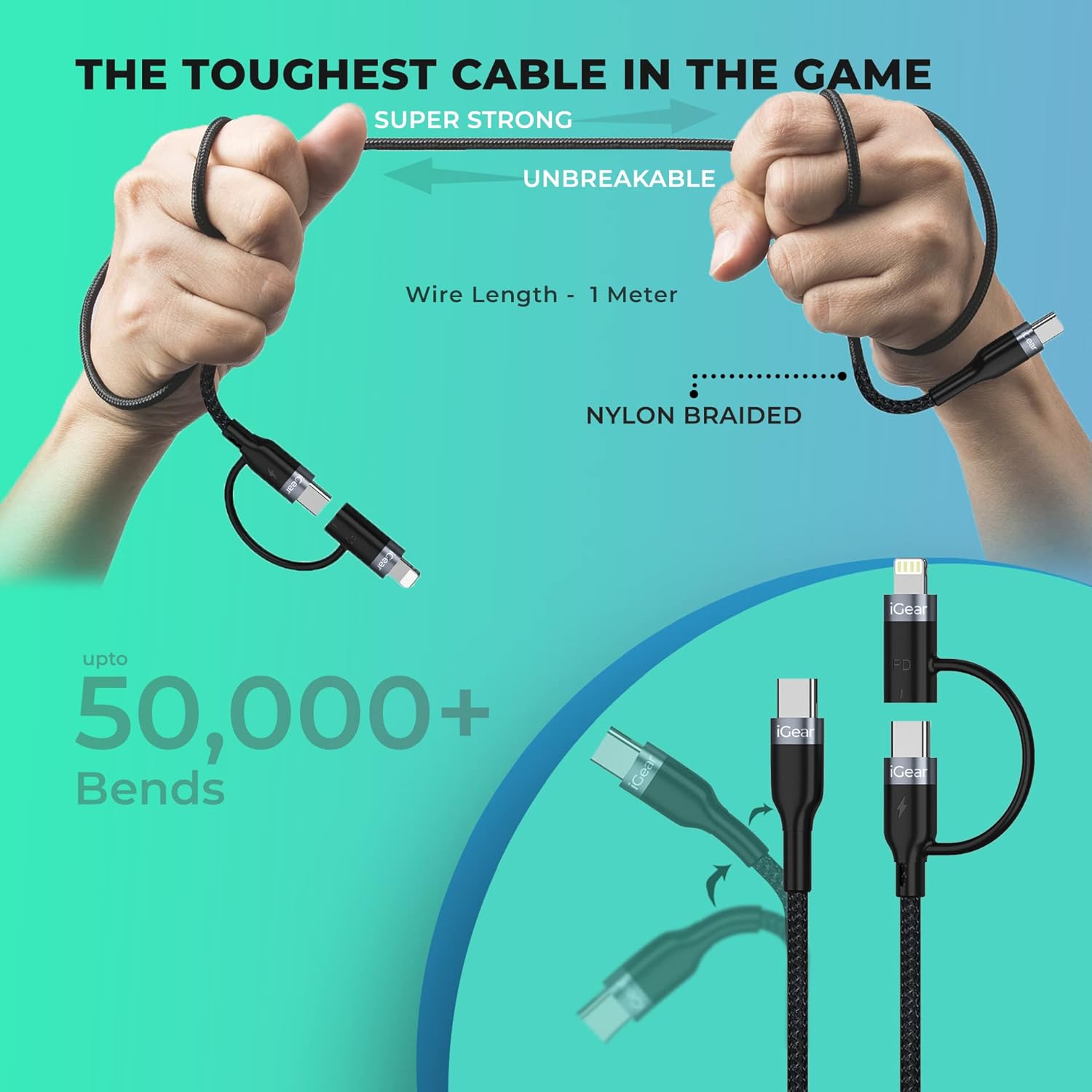
Image: A visual representation of the cable's robust design, showing it being bent and twisted, emphasizing its "Super Strong" and "Unbreakable" nylon braided construction, capable of withstanding over 50,000 bends.
การแก้ไขปัญหา
If you encounter issues with your iGear Duo Charging Cable, refer to the following common problems and solutions:
| ปัญหา | สาเหตุที่เป็นไปได้ | สารละลาย |
|---|---|---|
| อุปกรณ์ไม่ชาร์จ | Loose connection, incompatible power adapter, dirty port, or damaged cable. |
|
| ความเร็วในการชาร์จช้า | Power adapter not supporting PD, device drawing less power, or background apps consuming power. |
|
| การถ่ายโอนข้อมูลไม่ทำงาน | Incorrect connection, device settings, or driver issues. |
|
ข้อมูลจำเพาะทางเทคนิค
| คุณสมบัติ | ข้อมูลจำเพาะ |
|---|---|
| ยี่ห้อ | ไอเกียร์ |
| หมายเลขรุ่น | ไอจี-1012 |
| ประเภทขั้วต่อ | USB Type C, Lightning (via adapter) |
| ประเภทสายเคเบิล | ยูเอสบี |
| Power Delivery (Type-C to Type-C) | Up to 65W PD |
| Power Delivery (Type-C to iPhone-pin) | Up to 20W PD |
| ความเร็วในการถ่ายโอนข้อมูล | สูงสุดถึง 480Mbps |
| อุปกรณ์ที่รองรับ | Headphone, Laptop, Power Bank, Smartphone, Speaker (Android & iPhone) |
| คุณสมบัติพิเศษ | Braided, Data Transfer, Durable |
| สี | สีดำ |
| วัสดุภายนอก | ไนลอน |
| น้ำหนักสินค้า | 40 กรัม |
| ขนาดแพ็คเกจ | 16.2 x 8.3 x 2.3 ซม. |
| ส่วนประกอบที่รวมอยู่ | สายชาร์จ 1 เส้น |
การรับประกันและการสนับสนุน
ข้อมูลการรับประกัน
The iGear Duo Charging Cable comes with a รับประกัน 1 ปี นับจากวันที่ซื้อสินค้า การรับประกันนี้ครอบคลุมถึงข้อบกพร่องจากการผลิตและปัญหาที่เกิดขึ้นจากการใช้งานปกติ ไม่ครอบคลุมถึงความเสียหายที่เกิดจากการใช้งานผิดวิธี อุบัติเหตุ การดัดแปลงโดยไม่ได้รับอนุญาต หรือภัยพิบัติทางธรรมชาติ
โปรดเก็บใบเสร็จรับเงินไว้เป็นหลักฐานการซื้อสำหรับการเรียกร้องการรับประกัน
การสนับสนุนลูกค้า
For any product-related inquiries, technical assistance, or warranty claims, please contact iGear customer support:
- ผู้ผลิต: IGEAR TECH PRIVATE LIMITED
- ที่อยู่: Goregaon East, Mumbai 400063
- เบอร์ติดต่อ : 9327667193
You may also visit the official iGear store on Amazon for more information and product updates: iGear Amazon Store


