การแนะนำ
This manual provides essential information for the safe and efficient operation of your Boxlight P8 WX35NXT DLP Projector. Please read this manual thoroughly before using the projector and retain it for future reference. The Boxlight P8 WX35NXT is an Ultra Short Throw DLP projector designed for various applications, offering WXGA resolution and 3500 ANSI lumens brightness.
ข้อมูลด้านความปลอดภัยที่สำคัญ
- ห้ามปิดกั้นช่องระบายอากาศ: ตรวจสอบให้แน่ใจว่ามีการระบายอากาศที่เหมาะสมรอบๆ โปรเจ็กเตอร์เพื่อป้องกันความร้อนสูงเกินไป
- หลีกเลี่ยงการสัมผัสเลนส์โดยตรงกับดวงตา: เครื่องฉายภาพปล่อยแสงสว่างจ้าซึ่งอาจก่อให้เกิดอันตรายต่อดวงตาได้
- Do not place near water or moisture: This can lead to electric shock or fire.
- Use only specified power supply: Refer to the product label for correct voltagและข้อกำหนดปัจจุบัน
- จัดการด้วยความระมัดระวัง: ควรหลีกเลี่ยงการทำโปรเจ็กเตอร์ตกหรือกระแทกอย่างแรง
- การบริการ: ส่งต่อการบริการทั้งหมดไปยังบุคลากรบริการที่มีคุณสมบัติเหมาะสม
เนื้อหาแพ็คเกจ
ตรวจสอบว่ามีรายการทั้งหมดอยู่ในแพ็คเกจ:
- Boxlight P8 WX35NXT DLP Projector
- สายไฟ
- รีโมทคอนโทรล (พร้อมแบตเตอรี่)
- สายเคเบิล VGA
- คู่มือการใช้งาน (เอกสารนี้)
สินค้าเกินview
ส่วนประกอบโปรเจคเตอร์

รูปที่ 1: สูงสุด view of the Boxlight P8 WX35NXT projector. This image displays the main lens assembly, the integrated control panel with navigation buttons, and the overall casing design. The projector features an ultra-short throw lens positioned at the top front, allowing for projection from a very short distance.
- เลนส์ฉายภาพ: Located at the front-top, designed for ultra-short throw projection.
- แผงควบคุม: Buttons for power, menu navigation, source selection, and keystone correction.
- ตะแกรงระบายอากาศ: Located on the sides and front for heat dissipation.
- วงแหวนโฟกัส: Manual adjustment for image sharpness.
พอร์ตเชื่อมต่อ
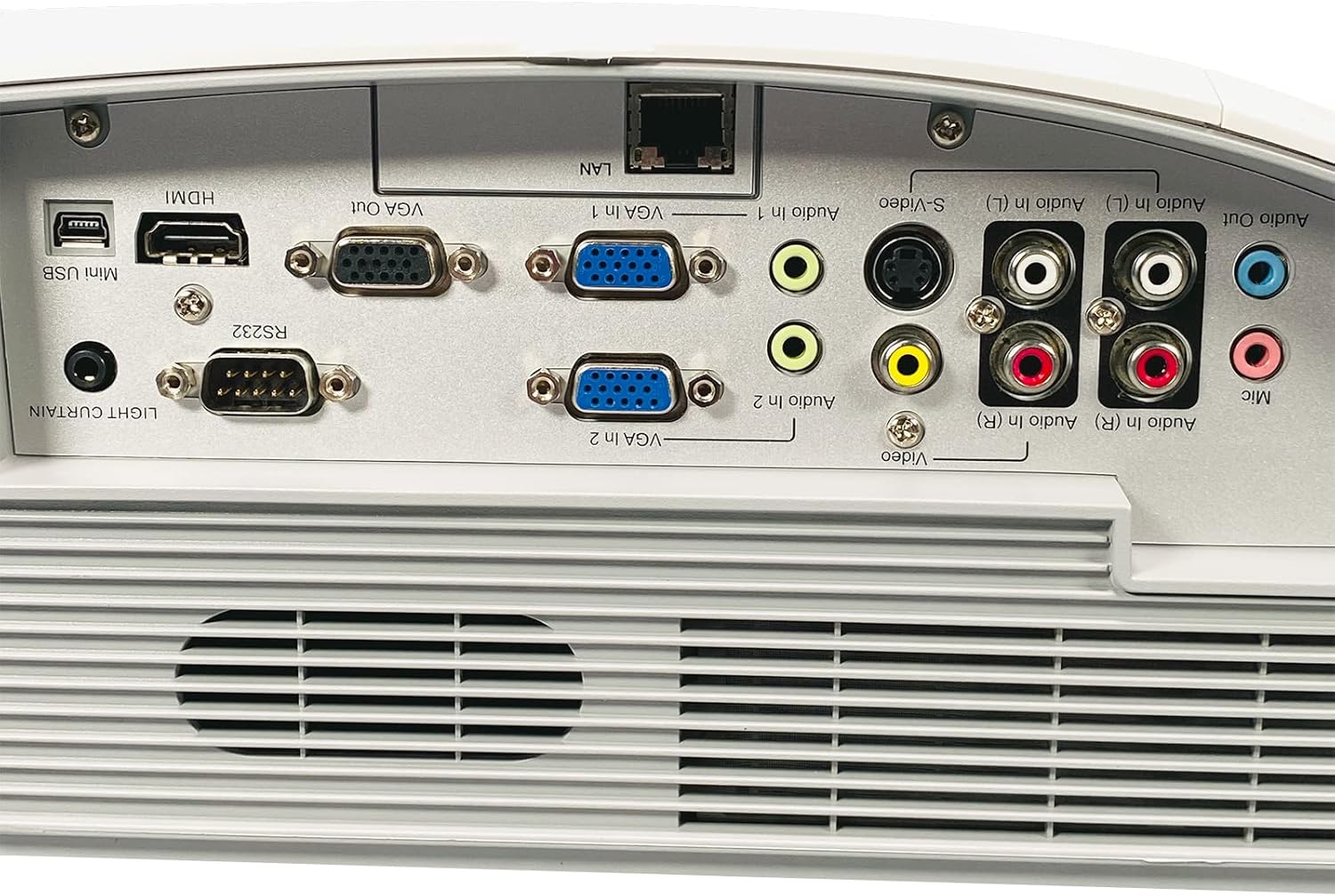
รูปที่ 2: Rear panel of the Boxlight P8 WX35NXT projector, detailing the various input and output ports. From left to right, ports include Mini USB, HDMI, RS232, VGA Out, VGA In (x2), LAN, S-Video, Composite Video (RCA), Audio In (L/R), Audio Out, and Microphone input.
- ช่องต่อ HDMI: อินพุตวิดีโอและเสียงดิจิทัล
- VGA In (x2): ช่องรับสัญญาณวิดีโอแบบอนาล็อกสำหรับคอมพิวเตอร์
- VGA Out: Analog video output for a monitor.
- LAN (RJ-45): Network connection for control and monitoring.
- มินิยูเอสบี: For service or interactive features.
- RS232 (DB-9pin): พอร์ตอนุกรมสำหรับควบคุมโปรเจ็กเตอร์
- เอส-วิดีโอ: อินพุตวิดีโอแบบอะนาล็อก
- วิดีโอคอมโพสิต (RCA): อินพุตวิดีโอแบบอะนาล็อก
- Audio In (L/R): RCA audio inputs.
- เสียงออก: เอาท์พุตเสียง
- ไมค์: อินพุตไมโครโฟน
คู่มือการติดตั้ง
1. การจัดวางโปรเจ็กเตอร์
As an ultra-short throw projector, the P8 WX35NXT is designed to be placed very close to the projection surface (screen or wall). Position the projector on a stable, flat surface directly in front of the screen. Ensure there are no obstructions to the projection path or ventilation openings.
2. การเชื่อมต่อไฟฟ้า
- เสียบสายไฟเข้ากับช่องเสียบไฟของโปรเจ็กเตอร์
- เสียบปลายอีกด้านของสายไฟเข้ากับเต้ารับไฟฟ้าที่มีสายดิน
3. การเชื่อมต่อแหล่งอินพุต
Connect your video source (e.g., computer, Blu-ray player) to the appropriate input port on the projector's rear panel (refer to Figure 2).
- ช่องต่อ HDMI: สำหรับวิดีโอและเสียงดิจิทัล
- VGA: For analog computer video. Connect an audio cable separately if needed.
- S-Video/Composite: For standard definition video sources.
4. เปิดเครื่องครั้งแรก
- กดปุ่ม พลัง button on the projector's control panel or remote control.
- The power indicator light will change, and the projector will begin its startup sequence.
5. การปรับโฟกัส
Adjust the focus ring located near the lens until the projected image is clear and sharp.
คำแนะนำการใช้งาน
เปิด/ปิดเครื่อง
- การเปิดเครื่อง: กดปุ่ม พลัง ปุ่มหนึ่งครั้ง
- วิธีปิดเครื่อง: กดปุ่ม พลัง button twice. The projector will display a shutdown confirmation. Confirm to power off.
การเลือกแหล่งที่มาของข้อมูล
กดปุ่ม แหล่งที่มา button on the control panel or remote control to cycle through available input sources (HDMI, VGA1, VGA2, S-Video, Video).
การนำทางเมนู
ใช้ เมนู button to open the On-Screen Display (OSD) menu. Use the arrow buttons to navigate and the เข้า กดปุ่มเพื่อเลือกตัวเลือก กด เมนู อีกครั้งเพื่อออก
การปรับภาพ
- ความสว่าง/คอนทราสต์: Adjust these settings in the OSD menu to optimize image quality for your viewการปรับปรุงสิ่งแวดล้อม
- อัตราส่วนภาพ: Select the appropriate aspect ratio (e.g., 16:10, 4:3) from the OSD menu to match your content.
- การแก้ไขคีย์สโตน: If the image appears trapezoidal, use the keystone correction function (often a dedicated button or in the OSD) to square the image.
การซ่อมบำรุง
การทำความสะอาดโปรเจคเตอร์
- Casing: ใช้ผ้าแห้งนุ่มเช็ดทำความสะอาดโปรเจคเตอร์asing. สำหรับคราบฝังแน่น dampชุบผ้าด้วยน้ำและผงซักฟอกอ่อนๆ เล็กน้อย แล้วเช็ดให้แห้ง
- เลนส์: Use a professional lens cleaning cloth and lens cleaning solution. Avoid abrasive materials or excessive pressure.
- การระบายอากาศ : Periodically check and clean the ventilation grilles to ensure proper airflow. Use a soft brush or compressed air to remove dust.
Lamp การทดแทน
The Boxlight P8 WX35NXT uses a DLP light source, which typically has a very long lifespan and does not require frequent lamp replacement like traditional projectors. If a light source issue occurs, contact technical support.
การแก้ไขปัญหา
| ปัญหา | สาเหตุที่เป็นไปได้ | สารละลาย |
|---|---|---|
| ไม่มีภาพแสดง |
|
|
| ภาพเบลอ |
|
|
| รูปภาพเป็นรูปสี่เหลี่ยมคางหมู |
|
|
| ไม่มีเสียง |
|
|
ข้อมูลจำเพาะ
| ยี่ห้อ | กล่องไฟ |
| แบบอย่าง | P8 WX35NXT |
| เทคโนโลยีการแสดงผล | ดีแอลพี |
| ความละเอียดดั้งเดิม | 1280x800 (WXGA) |
| ความละเอียดสูงสุด | 1080p (FHD) |
| ความสว่าง | 3500 ANSI Lumens |
| อัตราส่วนคอนทราสต์ | 3000:1 น. |
| อัตราส่วนภาพ | 16:10 (เนทิฟ) |
| อัตราการโยน | Ultra-short Throw |
| การเชื่อมต่อ | HDMI, VGA In (x2), VGA Out, LAN (RJ-45), Mini USB, RS232, S-Video, Composite Video, Audio In (L/R), Audio Out, Mic |
| ลำโพงในตัว | โมโน 10.0 วัตต์ |
| น้ำหนักสินค้า | 17.7 ปอนด์ (8.03 กก.) |
| กำลังไฟเข้า | ไฟฟ้ากระแสสลับ 100-240V ~ 50/60 Hz 3.6A |
การรับประกันและการสนับสนุน
For technical support or warranty inquiries, please contact Boxlight directly. Refer to the product label for specific contact information.

รูปที่ 3: Product label on the underside of the projector. This label provides essential information including the manufacturer's address, technical support contact details, model number (P8 WX35NXT), input power specifications, and regulatory compliance marks (CE, UL, FC).
- ผู้ผลิต: กล่องไฟ
- การสนับสนุนด้านเทคนิค: International +1 360-464-2119, USA and Canada 1-866-972-1549
- Webเว็บไซต์: www.boxlight.com
- แบบอย่าง: P8 WX35NXT
- หมายเลขซีเรียล : 330901135450075 (อดีตample, actual serial number varies per unit)
Please register your product on the Boxlight website to activate your warranty and receive product updates.


