1. บทนำ
This manual provides comprehensive instructions for the setup, operation, and maintenance of your iDPRT 320E Thermal Label Printer. Please read this manual thoroughly before using the device to ensure proper functionality and to prevent damage. The iDPRT 320E is designed for efficient label printing in various environments, supporting multiple operating systems and connectivity options.
2. อะไรอยู่ในกล่อง
ตรวจสอบว่ามีส่วนประกอบทั้งหมดอยู่ครบเมื่อแกะกล่อง:
- iDPRT 320E Thermal Label Printer
- คู่มือการใช้งาน
- สายเคเบิลข้อมูล USB
- อะแดปเตอร์แปลงไฟ
- Sampเลเลเบล
3. สินค้าหมดview
The iDPRT 320E Thermal Label Printer is a compact device designed for high-speed, high-resolution label printing. It features a simple design with essential ports for connectivity and an intuitive LED indicator for operational status.
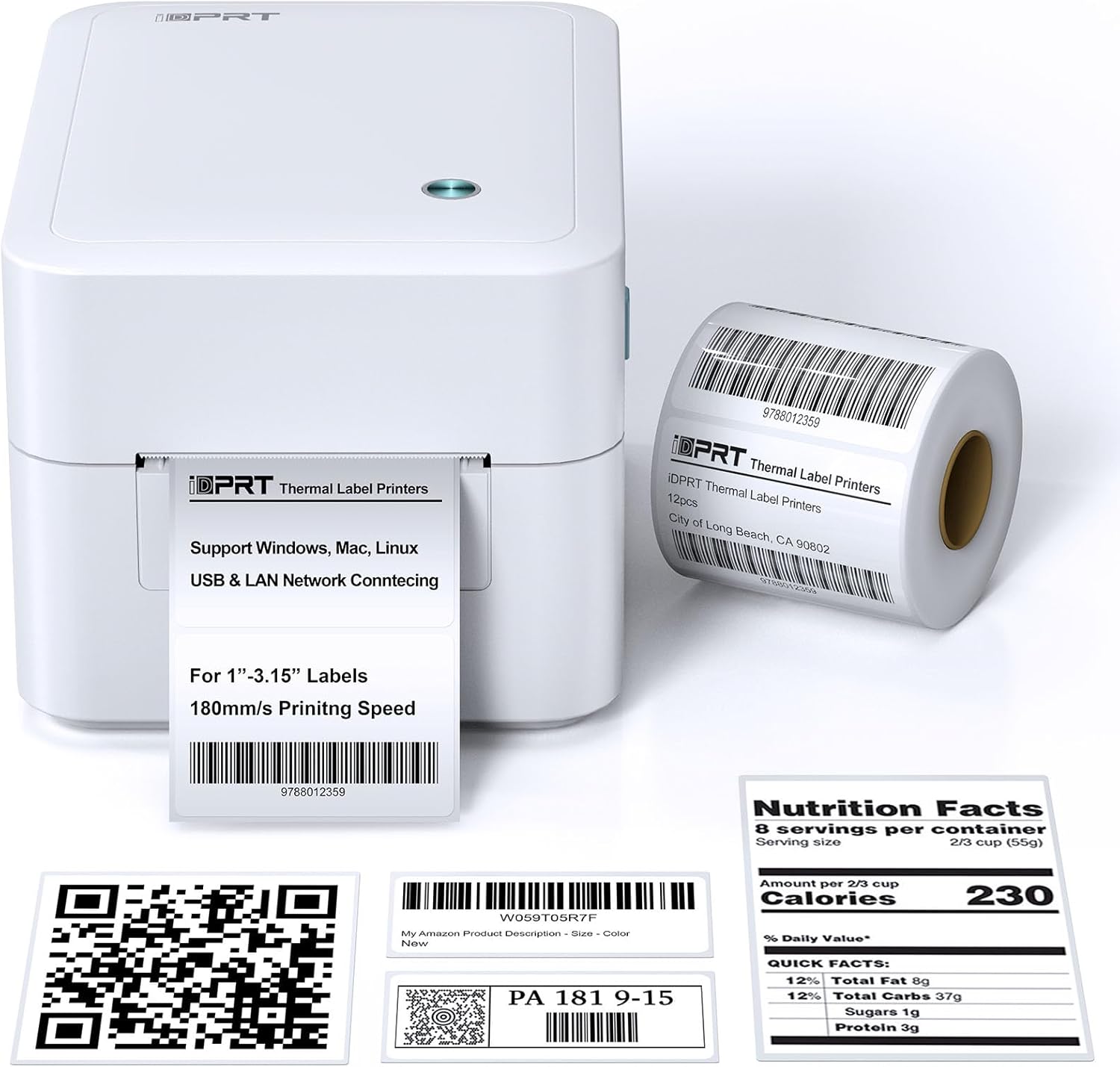
รูปที่ 3.1 : ด้านหน้า view of the iDPRT 320E Thermal Label Printer with sample labels.
ส่วนประกอบหลัก:
- ป้ายกำกับช่องทางออก: จุดที่ฉลากพิมพ์ปรากฏขึ้น
- Cover Release Latches: Used to open the printer cover for label loading.
- พอร์ตไฟ: เชื่อมต่อกับอะแดปเตอร์ไฟ
- พอร์ต USB: สำหรับเชื่อมต่อโดยตรงกับคอมพิวเตอร์
- พอร์ต LAN: สำหรับการเชื่อมต่อเครือข่าย
- ไฟแสดงสถานะ LED: แสดงสถานะเครื่องพิมพ์
4. คำแนะนำในการตั้งค่า
4.1 การเชื่อมต่อสายไฟ
- ต่ออะแดปเตอร์แปลงไฟเข้ากับพอร์ตจ่ายไฟของเครื่องพิมพ์
- เสียบอะแดปเตอร์จ่ายไฟเข้ากับเต้ารับไฟฟ้าที่เหมาะสม
4.2 การโหลดฉลาก
The printer supports thermal labels with widths between 1 and 3.15 inches.
- Gently press the cover release latches on both sides of the printer to open the top cover.
- Place the roll of thermal labels into the label compartment, ensuring the labels feed from the bottom of the roll and the printable side faces upwards.
- ปรับตัวกั้นฉลากให้พอดีกับความกว้างของฉลากอย่างแน่นหนา โดยไม่ทำให้ฉลากเสียหายasinกรัมพวกเขา
- Pull a few labels past the print head and out through the label exit slot.
- ปิดฝาครอบด้านบนให้แน่นจนกระทั่งล็อคเข้าที่

Figure 4.1: Correct method for loading thermal labels into the printer.
4.3 การติดตั้งไดรเวอร์และซอฟต์แวร์
To use the printer with your computer, you must install the appropriate drivers and the Label Designer software.
- เยี่ยมชมเว็บไซต์ iDPRT อย่างเป็นทางการ website to download the latest drivers for your operating system (Windows, Mac, or Linux).
- Download and install the free Label Designer software from the official website. This software is available for Windows and as an online editor for Mac users.
- Follow the on-screen instructions to complete the installation process for both the drivers and the software.

Figure 4.2: The iDPRT 320E printer supports multiple operating systems.
4.4 ตัวเลือกการเชื่อมต่อ
The iDPRT 320E offers flexible connectivity:
- การเชื่อมต่อ USB: เชื่อมต่อเครื่องพิมพ์เข้ากับคอมพิวเตอร์โดยตรงโดยใช้สาย USB ที่ให้มา
- LAN Network Connection: Connect the printer to your local area network using an Ethernet cable for shared access.
- แอปมือถือ: For direct printing from your smartphone, download the iDPRT mobile application.

Figure 4.3: USB and LAN network connectivity options.
5. คู่มือการใช้งาน
5.1 Creating Labels with Label Designer Software
The Label Designer software allows you to create and customize various label types.
- Launch the Label Designer software on your computer.
- เลือกเทมเพลตหรือเริ่มออกแบบฉลากใหม่
- Customize your labels with text, barcodes, QR codes, images, and various fonts. The software supports different label sizes and layouts.
- Ensure the label dimensions in the software match the physical labels loaded in the printer.

Figure 5.1: Designing labels using the Label Designer software.
5.2 การพิมพ์ฉลาก
Once your label design is complete and labels are loaded:
- In the Label Designer software, click the 'Print' button.
- Select the iDPRT 320E printer from the list of available printers.
- Adjust print settings such as quantity and print speed if necessary. The printer supports speeds up to 180mm/s and a resolution of 203 DPI.
- Confirm the settings and initiate printing.

Figure 5.2: The printer delivers high-quality 203 DPI resolution for clear labels.
Figure 5.3: The printer is capable of high-speed printing up to 180mm/s.
5.3 ความหมายของไฟแสดงสถานะ LED
The LED indicator on the printer provides visual feedback on its status:
- Green (Solid On): The printer is currently printing.
- Red (Solid On): The printer cover is not properly closed, or there is a paper jam/error.
- Blue (Solid On): เครื่องพิมพ์พร้อมใช้งานแล้ว
6. การบำรุงรักษา
6.1 การทำความสะอาดเครื่องพิมพ์
การทำความสะอาดอย่างสม่ำเสมอจะช่วยรักษาคุณภาพการพิมพ์และยืดอายุการใช้งานของเครื่องพิมพ์
- โปรดตรวจสอบให้แน่ใจว่าเครื่องพิมพ์ปิดอยู่และถอดปลั๊กออกก่อนทำความสะอาด
- ใช้ผ้านุ่มไม่เป็นขุย งampened with isopropyl alcohol to gently wipe the print head. Avoid touching the print head with bare hands.
- Clean the exterior of the printer with a dry, soft cloth. Do not use abrasive cleaners or solvents.
- Remove any dust or label debris from the label compartment.
7 การแก้ไขปัญหา
If you encounter issues with your iDPRT 320E printer, refer to the following common problems and solutions:
| ปัญหา | สาเหตุที่เป็นไปได้ | สารละลาย |
|---|---|---|
| เครื่องพิมพ์ไม่เปิดเครื่อง | สายไฟหลุด; เต้ารับไฟฟ้าชำรุด | ตรวจสอบการเชื่อมต่อสายไฟ ลองใช้ปลั๊กไฟอื่นดู |
| ฉลากไม่พิมพ์ | Labels loaded incorrectly; Printer cover open; No drivers installed; Incorrect printer selected | Reload labels correctly; Close cover firmly; Install drivers; Select iDPRT 320E in print dialog. |
| คุณภาพการพิมพ์ไม่ดี (สีซีดจาง ภาพเบลอ) | Print head dirty; Low-quality labels; Incorrect print density settings | Clean the print head; Use recommended thermal labels; Adjust print density in software settings. |
| Cannot connect via USB/LAN | Cable faulty; Driver issue; Network configuration problem | Try a different cable; Reinstall drivers; Verify network settings (for LAN). |
| Cannot connect via mobile app | App not installed; Printer not discoverable; Network issue | Ensure app is installed and updated; Check printer's network connection; Restart printer and app. |
| Mac Bluetooth connectivity issues | Direct Bluetooth printing to Mac is not supported; Driver limitations | Connect via USB or LAN for Mac systems. Mobile app connectivity is available for smartphones. |
8. ข้อมูลจำเพาะ
Detailed technical specifications for the iDPRT 320E Thermal Label Printer:
| คุณสมบัติ | ข้อมูลจำเพาะ |
|---|---|
| ชื่อรุ่น | 320อี |
| เทคโนโลยีการพิมพ์ | เทอร์มอล |
| ความเร็วการพิมพ์สูงสุด | 180 มม./วินาที (ขาวดำ) |
| ความละเอียดการพิมพ์สูงสุด | 203 จุดต่อนิ้ว |
| ขนาดสื่อสูงสุด | 1"-3.15" inches width |
| เทคโนโลยีการเชื่อมต่อ | ยูเอสบี, แลน |
| อุปกรณ์ที่รองรับ | PC (Windows, Mac, Linux), Mobile (iOS/Android via App) |
| วิธีการควบคุม | App, Software |
| ขนาดสินค้า | ลึก 8.11 นิ้ว x กว้าง 6.1 นิ้ว x สูง 5.28 นิ้ว |
| น้ำหนักสินค้า | 3.78 ปอนด์ |
| คุณสมบัติพิเศษ | Automatic Label Recognition, LAN Network Connectivity |
9. การรับประกันและการสนับสนุน
9.1 ข้อมูลการรับประกัน
The iDPRT 320E Thermal Label Printer comes with a limited warranty. Please refer to the warranty card included in your product packaging or visit the official iDPRT webเว็บไซต์สำหรับข้อกำหนดและเงื่อนไขโดยละเอียด
9.2 การสนับสนุนลูกค้า
For technical assistance, troubleshooting, or any inquiries regarding your iDPRT 320E printer, please contact our customer service team. You can reach us via the Amazon messaging system or through the contact information provided on the official iDPRT website. Our team is available to assist you with any pre-sales or after-sales support needs.


