การแนะนำ
คู่มือนี้ให้คำแนะนำโดยละเอียดเกี่ยวกับการติดตั้ง การใช้งาน การบำรุงรักษา และการแก้ไขปัญหาของล็อคประตูอัจฉริยะ Lockly รุ่น 6S ของคุณ ล็อคประตูอัจฉริยะ Lockly รุ่น 6S เป็นระบบล็อคประตูอัจฉริยะที่เชื่อมต่อบลูทูธ ออกแบบมาสำหรับการเข้าออกโดยไม่ต้องใช้กุญแจ มีแป้นพิมพ์แบบหน้าจอสัมผัส การควบคุมผ่านแอปพลิเคชัน กุญแจอิเล็กทรอนิกส์ และความสามารถในการใช้รหัสเข้าออกแบบออฟไลน์ เหมาะสำหรับบ้าน สำนักงาน และอสังหาริมทรัพย์ให้เช่า เพื่อเพิ่มความปลอดภัยและความสะดวกสบาย
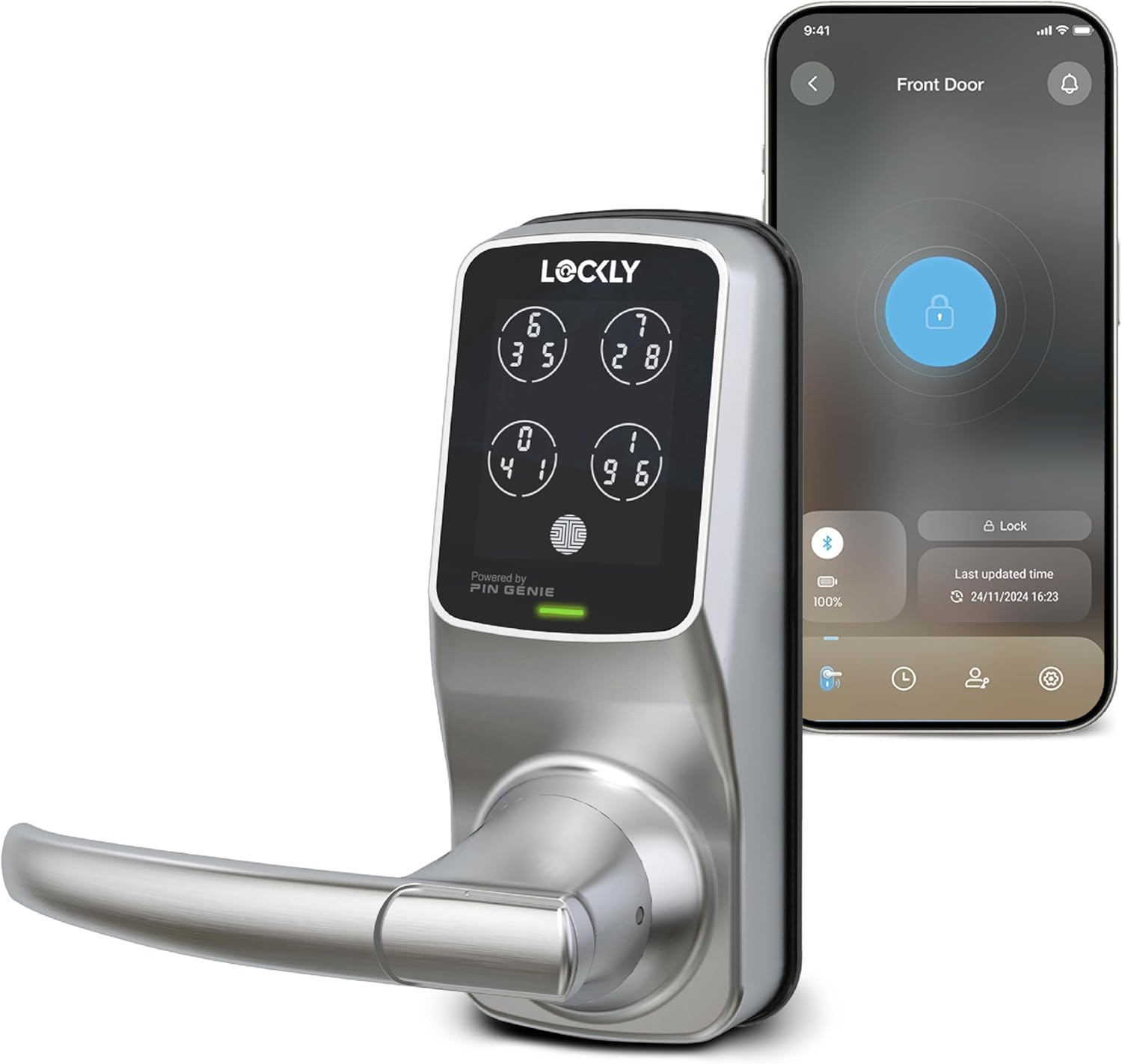
ภาพ: ล็อกประตูอัจฉริยะ Lockly รุ่น 6S สีซาตินนิกเกิล วางคู่กับสมาร์ทโฟนที่แสดงหน้าจอแอปพลิเคชัน Lockly สำหรับควบคุมระยะไกล
การตั้งค่า
ความเข้ากันได้ของประตู
ก่อนการติดตั้ง โปรดตรวจสอบให้แน่ใจว่าประตูของคุณตรงตามข้อกำหนดด้านความเข้ากันได้ Lockly รุ่น 6S ออกแบบมาสำหรับประตูที่มีความหนาและระยะห่างจากขอบประตูตามมาตรฐาน
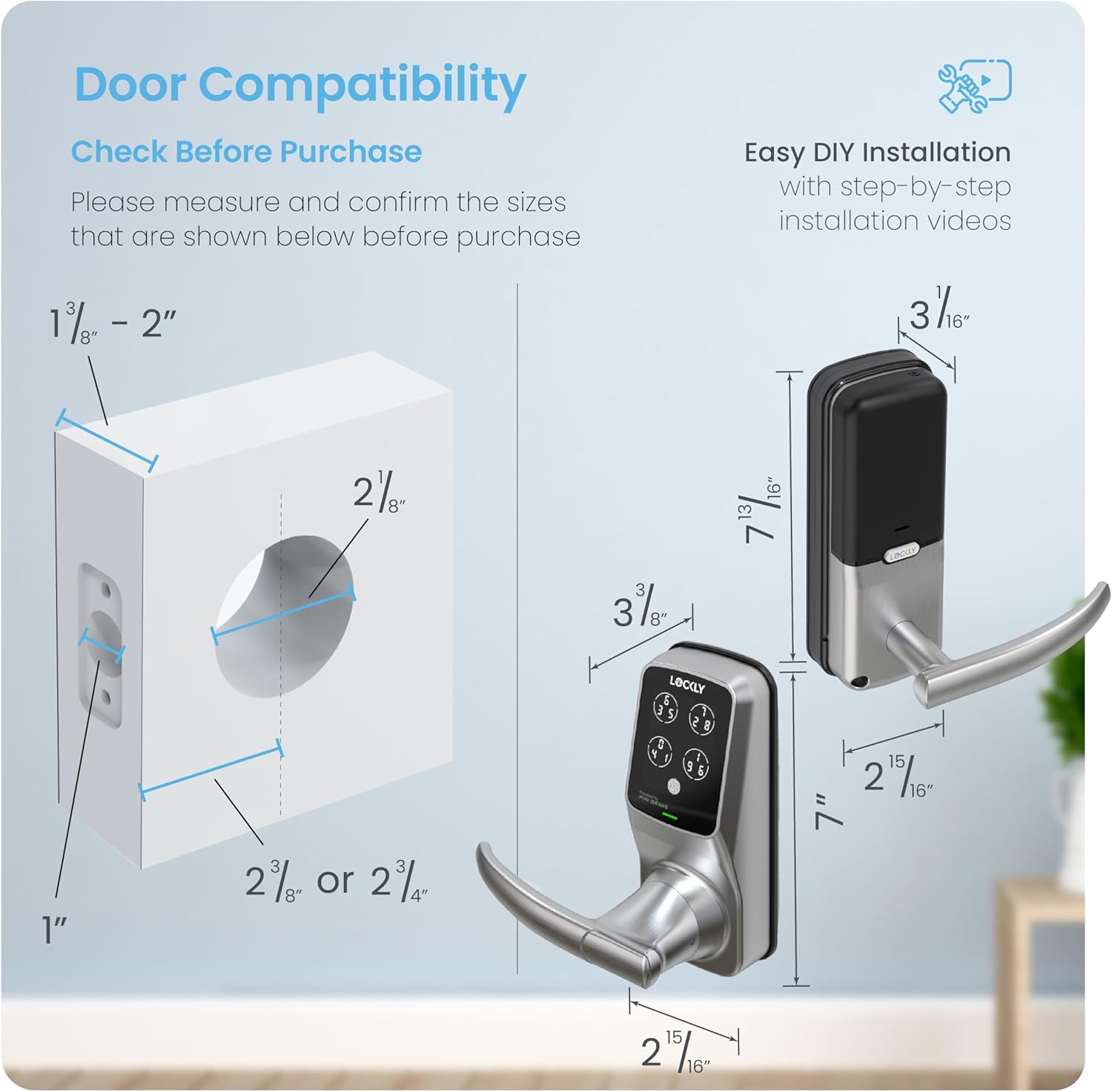
ภาพ: แผนภาพแสดงขนาดประตูที่จำเป็นสำหรับการติดตั้งอย่างถูกต้อง รวมถึงความหนาของประตู (1 3/8" - 2"), ระยะห่างจากขอบประตูถึงรูเจาะ (2 3/8" หรือ 2 3/4") และเส้นผ่านศูนย์กลางรูเจาะ (2 1/8")
การติดตั้ง
Lockly รุ่น 6S ออกแบบมาเพื่อให้ติดตั้งเองได้ง่ายโดยใช้เครื่องมือทั่วไปในบ้าน มีคำแนะนำทีละขั้นตอนอย่างละเอียดอยู่ในคู่มือการติดตั้งฉบับเต็ม ซึ่งโดยปกติจะเข้าถึงได้ผ่านแอป Lockly หรือเว็บไซต์ของผู้ผลิต webเว็บไซต์ระบุว่า ตัวล็อคนี้พร้อมสำหรับการเปลี่ยนกระบอกกุญแจ ทำให้คุณสามารถเปลี่ยนกระบอกกุญแจได้โดยไม่ต้องเปลี่ยนตัวล็อคทั้งหมด โดยใช้ชุดเปลี่ยนกระบอกกุญแจมาตรฐาน
การใช้งานล็อคอัจฉริยะ Lockly รุ่น 6S
หลายวิธีในการปลดล็อก
ล็อคอัจฉริยะ Lockly รุ่น 6S ของคุณมีวิธีการปลดล็อคที่สะดวกสบายหลายวิธี:
- แป้นพิมพ์ดิจิทัล PIN Genie ที่ได้รับสิทธิบัตร: ใช้แป้นพิมพ์แบบไดนามิกที่เป็นเอกลักษณ์สำหรับการป้อนรหัสอย่างปลอดภัย
- แอพสมาร์ทโฟน: ควบคุมการล็อกได้โดยตรงจากสมาร์ทโฟนของคุณผ่านแอป Lockly
- คีย์ทางกายภาพ: ใช้กุญแจจริงแบบดั้งเดิมเป็นตัวสำรอง
- การควบคุมด้วยเสียง: เชื่อมต่อกับ Amazon Alexa หรือ Hey Google เพื่อสั่งการด้วยเสียง (ต้องใช้ฮับ Wi-Fi เสริม)
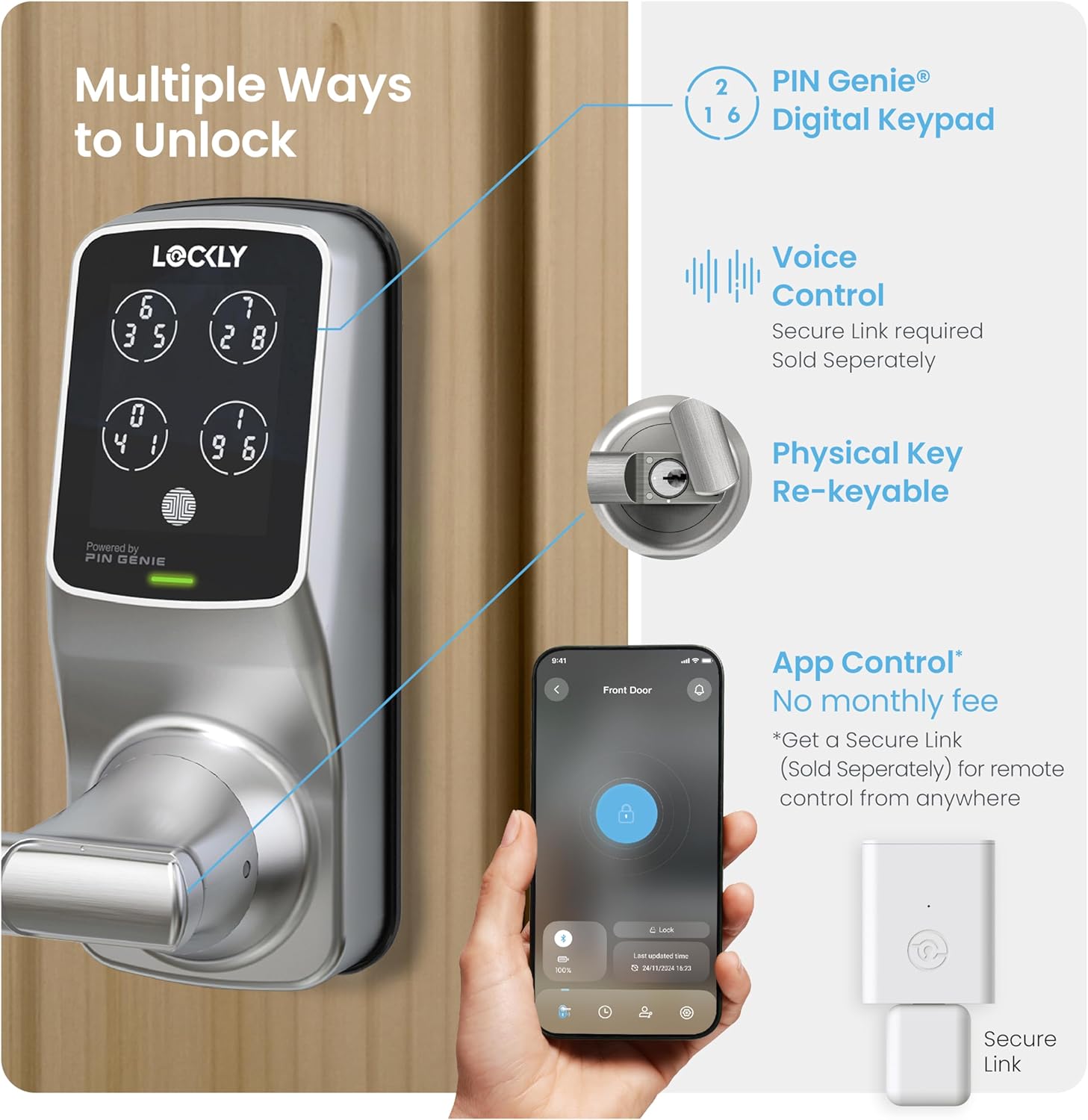
ภาพ: ภาพประกอบแสดงวิธีการต่างๆ ในการปลดล็อก Lockly Smart Lock รวมถึงแป้นพิมพ์ PIN Genie, กุญแจจริง, การควบคุมผ่านแอปพลิเคชันบนสมาร์ทโฟน และการควบคุมด้วยเสียง (โดยใช้ฮับ Secure Link ที่เป็นอุปกรณ์เสริม)
แป้นพิมพ์ดิจิทัลป้องกันการแอบดู (PIN Genie)
แป้นพิมพ์ PIN Genie ที่ได้รับการจดสิทธิบัตรแล้ว ช่วยเพิ่มความปลอดภัยด้วยการสลับตัวเลขบนหน้าจอสัมผัสแบบไดนามิก ทำให้เป็นไปไม่ได้ที่ผู้เห็นเหตุการณ์จะเดารหัสของคุณได้ แม้ว่าพวกเขาจะเห็นคุณป้อนรหัสอยู่ก็ตาม

ภาพ: ภาพจำลองแป้นพิมพ์ PIN Genie แสดงให้เห็นว่าตัวเลขบนปุ่มเสมือนทั้งสี่ปุ่มเปลี่ยนตำแหน่งหลังจากใช้งานแต่ละครั้ง เพื่อป้องกันไม่ให้ผู้สังเกตการณ์จดจำรหัสได้
การควบคุมแอพมือถือ
แอป Lockly ช่วยให้คุณล็อกและปลดล็อกประตูจากระยะไกลได้ หากใช้ร่วมกับฮับ Wi-Fi (อุปกรณ์เสริม) คุณสามารถตรวจสอบสถานะการเปิด/ปิดประตูและรับการแจ้งเตือนแบบเรียลไทม์ได้โดยตรงบนสมาร์ทโฟนของคุณ

ภาพ: หน้าจอสมาร์ทโฟนแสดงแอป Lockly พร้อมตัวเลือกในการล็อก/ปลดล็อก view การแจ้งเตือนและประวัติการเข้าถึง ซึ่งบ่งชี้ถึงความสามารถในการควบคุมระยะไกล
ระบบล็อคอัตโนมัติแบบตั้งโปรแกรมได้
คุณสมบัติการล็อกอัตโนมัติที่ปรับแต่งได้ช่วยให้คุณอุ่นใจด้วยการล็อกประตูโดยอัตโนมัติหลังจากช่วงเวลาที่กำหนด (5 ถึง 300 วินาที) ทำให้มั่นใจได้ว่าบ้านของคุณปลอดภัยแม้ว่าคุณจะลืมล็อกด้วยตนเองก็ตาม

ภาพ: บุคคลอุ้มเด็กทารกเดินออกจากประตูที่ติดตั้งระบบล็อคอัจฉริยะ Lockly Smart Lock ซึ่งแสดงถึงความสะดวกสบายของฟังก์ชันล็อคอัตโนมัติ
บูรณาการการควบคุมด้วยเสียง
เพื่อความสะดวกยิ่งขึ้น คุณสามารถควบคุมล็อคอัจฉริยะ Lockly ด้วยคำสั่งเสียงผ่าน Amazon Alexa หรือ Hey Google ได้ ฟังก์ชันนี้ต้องใช้ฮับ Wi-Fi เสริม ซึ่งจำหน่ายแยกต่างหาก
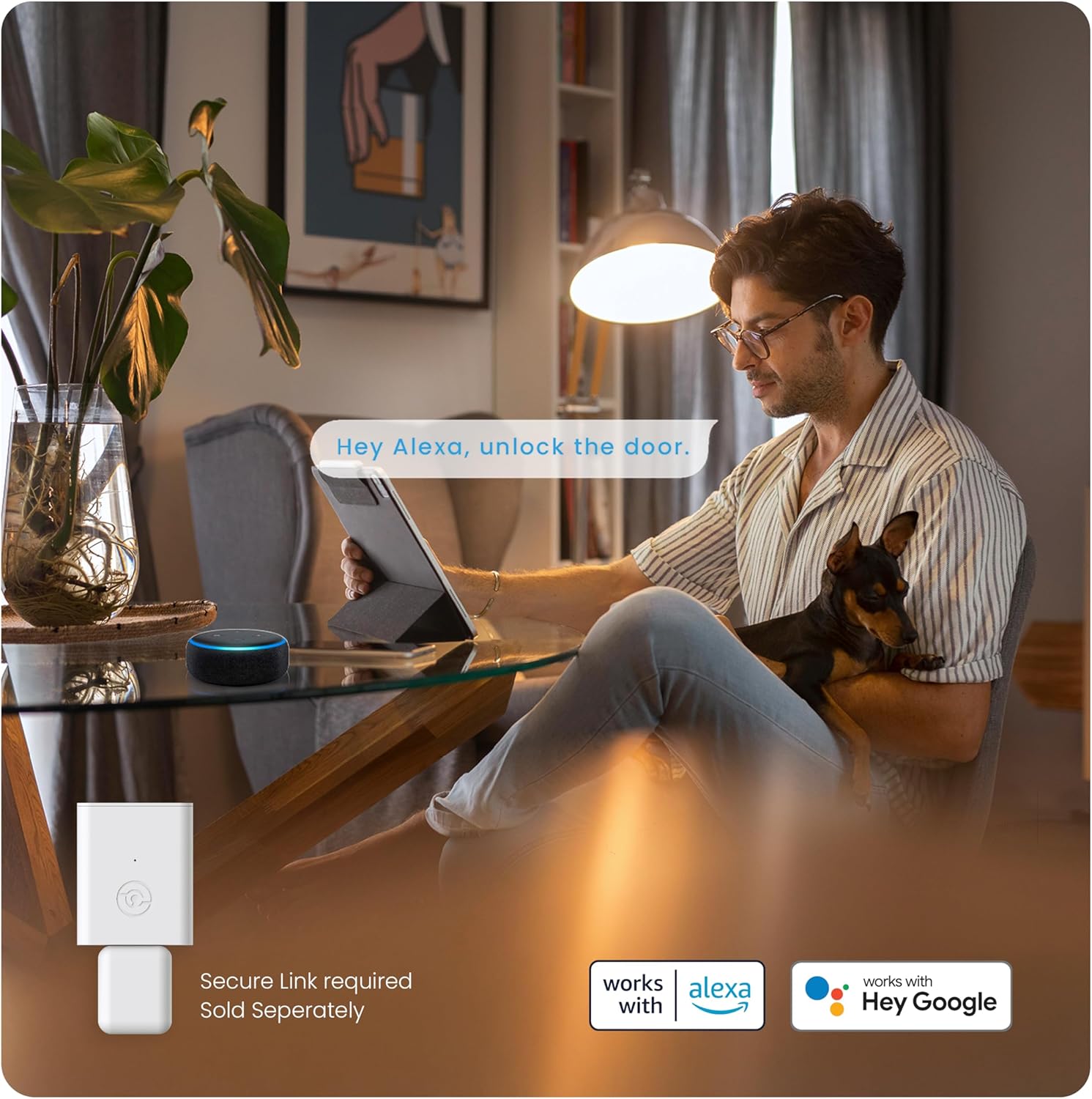
ภาพ: ชายคนหนึ่งกำลังพักผ่อนในห้องนั่งเล่น พร้อมทั้งใช้งานอุปกรณ์ Alexa เพื่อสาธิตฟีเจอร์ควบคุมด้วยเสียงสำหรับล็อคอัจฉริยะ Lockly
รหัสการเข้าถึงแบบออฟไลน์ (OAC)
สร้างรหัสเข้าใช้งานแบบใช้ครั้งเดียวหรือแบบจำกัดจำนวนครั้ง ซึ่งใช้งานได้แบบออฟไลน์โดยไม่จำเป็นต้องเชื่อมต่ออินเทอร์เน็ตหรือแอป Lockly เหมาะอย่างยิ่งสำหรับการให้สิทธิ์การเข้าถึงชั่วคราวแก่แขกหรือเจ้าหน้าที่บริการ

ภาพ: หญิงคนหนึ่งกำลังดูสมาร์ทโฟนของเธอ และได้รับข้อความที่มีรหัสเข้าใช้งานแบบออฟไลน์ ซึ่งแสดงให้เห็นถึงความสะดวกสบายในการให้สิทธิ์การเข้าถึงโดยไม่ต้องพึ่งพาอินเทอร์เน็ต
eKeys และ eBadges
อนุญาตและยกเลิกสิทธิ์การเข้าถึงสำหรับสมาชิกในครอบครัว เพื่อน และผู้มาเยี่ยมผ่านแอป Lockly โดยใช้ eKeys และ eBadges จากนั้นผู้ใช้สามารถปลดล็อกประตูผ่านแอปหรือโดยใช้คุณสมบัติสแกนเพื่อเปิดได้

ภาพ: ภาพประกอบแสดงแอป Lockly กำลังสร้าง eBadge และบุคคลกำลังใช้สมาร์ทโฟนเพื่อปลดล็อกประตู เพื่อสาธิตคุณสมบัติ eKeys และ eBadges
การซ่อมบำรุง
การเปลี่ยนแบตเตอรี่
เครื่องล็อคประตู Lockly รุ่น 6S ใช้แบตเตอรี่ AA 4 ก้อน ใช้งานได้นานสูงสุด 12 เดือน เครื่องล็อคจะแจ้งเตือนเมื่อแบตเตอรี่เหลือน้อย และมีช่องเสียบแบตเตอรี่ 9V สำหรับใช้งานฉุกเฉินหากแบตเตอรี่หมด
การทำความสะอาดและการดูแลรักษา
เพื่อรักษารูปลักษณ์และการใช้งานของตัวล็อค ให้เช็ดพื้นผิวด้านนอกด้วยผ้าเนื้อนุ่มและแห้งamp ใช้ผ้าเช็ดทำความสะอาด หลีกเลี่ยงการใช้สารทำความสะอาดที่มีฤทธิ์กัดกร่อนหรือตัวทำละลายที่อาจทำให้พื้นผิวหรือชิ้นส่วนอิเล็กทรอนิกส์เสียหายได้
การแก้ไขปัญหา
- แป้นพิมพ์ไม่ตอบสนองหรือสัญญาณอ่อนลง: ตรวจสอบให้แน่ใจว่าแป้นพิมพ์สะอาดและปราศจากสิ่งสกปรก หากโดนแสงแดดโดยตรงเป็นเวลานาน อาจทำให้การมองเห็นหน้าจอลดลง ลองปรับตำแหน่งหรือหาที่บังแดดหากปัญหานี้เกิดขึ้นอย่างต่อเนื่อง
- ปัญหาการเชื่อมต่อบลูทูธ: หากตัวล็อกเชื่อมต่อกับสมาร์ทโฟนของคุณผ่านบลูทูธไม่ได้ โปรดตรวจสอบให้แน่ใจว่าคุณอยู่ใกล้กับตัวล็อก การรีสตาร์ทแอป Lockly หรือบลูทูธของโทรศัพท์อาจช่วยแก้ไขปัญหาได้
- ล็อคไม่ทำงาน/ไม่ทำงาน: ตรวจสอบดูว่ามีสิ่งกีดขวางใดๆ ในกรอบประตูหรือแผ่นล็อคหรือไม่ ตรวจสอบให้แน่ใจว่าแบตเตอรี่ไม่เหลือน้อยหรือหมด หากปัญหายังคงอยู่ ให้ตรวจสอบการจัดตำแหน่งการติดตั้ง
- รหัสการเขียนโปรแกรมที่ยาก: โปรดดูแอป Lockly หรือคู่มือดิจิทัลฉบับเต็มสำหรับขั้นตอนการตั้งโปรแกรมที่ถูกต้อง ตรวจสอบให้แน่ใจว่าคุณทำตามลำดับอย่างถูกต้อง โดยเฉพาะอย่างยิ่งสำหรับแป้นพิมพ์ PIN Genie แบบไดนามิก
- การเชื่อมต่อ Wi-Fi Hub: หากใช้ฮับ Wi-Fi (อุปกรณ์เสริม) โปรดตรวจสอบให้แน่ใจว่าได้วางไว้ในระยะไม่เกิน 30 ฟุตจากตัวล็อคเพื่อให้ได้สัญญาณที่ดีที่สุด ตรวจสอบให้แน่ใจว่าฮับเชื่อมต่อกับเครือข่าย Wi-Fi ในบ้านของคุณอย่างถูกต้องแล้ว
สำหรับปัญหาที่ซับซ้อนกว่านี้ โปรดดูส่วนการแก้ไขปัญหาโดยละเอียดในแอป Lockly หรือติดต่อฝ่ายสนับสนุนลูกค้าของ Lockly
ข้อมูลจำเพาะ
| คุณสมบัติ | รายละเอียด |
|---|---|
| ยี่ห้อ | ล็อคลี่ |
| ชื่อรุ่น | 6S |
| หมายเลขรุ่นสินค้า | พีจีดี6เอสเอ็นเอ็น |
| ประเภทล็อค | แป้นพิมพ์ตัวเลข |
| คุณสมบัติพิเศษ | ระบบล็อคอัตโนมัติ ไม่ต้องใช้กุญแจ |
| วัสดุ | นิกเกิล |
| สี | นิกเกิลซาติน |
| ประเภทการเสร็จสิ้น | ขัดเงา |
| ขนาดสินค้า กว้าง x ยาว x สูง | 6.69 x 1 x 7 นิ้ว |
| น้ำหนักสินค้า | 5.85 ปอนด์ |
| โปรโตคอลการเชื่อมต่อ | บลูทูธ, Wi-Fi (โดยใช้ฮับเสริม) |
| วิธีการควบคุม | แอปพลิเคชัน, ระบบสัมผัส, ระบบสั่งงานด้วยเสียง (โดยใช้ฮับเสริม) |
| การใช้ที่แนะนำ | ประตูบ้าน ประตูสำนักงาน ประตูโรงแรม |
| จำเป็นต้องใช้แบตเตอรี่หรือไม่? | ใช่ (ใช้แบตเตอรี่ AA 4 ก้อน ไม่รวมอยู่ในชุด) |
การรับประกันและการสนับสนุน
ข้อมูลการรับประกัน
ล็อคอัจฉริยะ Lockly รุ่น 6S มาพร้อมการรับประกันแบบจำกัด 1 ปี ครอบคลุมชิ้นส่วนกลไก ผิวเคลือบ และชิ้นส่วนอิเล็กทรอนิกส์ โปรดเก็บหลักฐานการซื้อไว้เพื่อใช้ในการเคลมประกัน
การสนับสนุนลูกค้า
Lockly ให้บริการสนับสนุนทางเทคนิคตลอด 24 ชั่วโมง 7 วันต่อสัปดาห์ตลอดอายุการใช้งานสำหรับผลิตภัณฑ์ทั้งหมด คุณสามารถติดต่อฝ่ายบริการลูกค้าได้ทางโทรศัพท์ อีเมล หรือแชทสด เพื่อขอความช่วยเหลือเกี่ยวกับการติดตั้ง การใช้งาน หรือการแก้ไขปัญหา


