1. บทนำ
This manual provides essential instructions for the safe and effective operation of your Pyle PPHP1569UT 15-Inch PA Combo Speaker System. Please read this manual thoroughly before use and retain it for future reference. This system features a 500 Watt maximum power output, Bluetooth wireless streaming, multiple input options, and an integrated carry handle for portability.

Image 1.1: The Pyle PPHP1569UT 15-Inch PA Combo Speaker System, including two speakers on stands, a wired microphone, various audio cables, and a remote control.
2. คำแนะนำด้านความปลอดภัยที่สำคัญ
- แหล่งพลังงาน: เชื่อมต่ออุปกรณ์เข้ากับเต้ารับไฟฟ้ากระแสสลับที่มีแรงดันไฟฟ้าตามที่กำหนดเท่านั้นtage (AC110/220V 50/60HZ).
- การระบายอากาศ : ตรวจสอบให้แน่ใจว่ามีการระบายอากาศที่เหมาะสม อย่าปิดกั้นช่องระบายอากาศ
- น้ำและความชื้น: อย่าวางเครื่องใช้ไฟฟ้านี้ไว้ในที่ที่มีฝนหรือความชื้น อย่าวางสิ่งของที่บรรจุของเหลว เช่น แจกัน ไว้บนเครื่องใช้ไฟฟ้านี้
- ความร้อน: ห้ามวางใกล้แหล่งความร้อน เช่น เครื่องทำความร้อน ช่องระบายความร้อน เตา หรืออุปกรณ์อื่นๆ (รวมถึง) ampเครื่องให้ความร้อน) ที่ผลิตความร้อน
- การทำความสะอาด: ทำความสะอาดด้วยผ้าแห้งเท่านั้น
- การบริการ: อย่าพยายามให้บริการผลิตภัณฑ์นี้ด้วยตนเอง ส่งต่อการบริการทั้งหมดไปยังช่างบริการที่ผ่านการรับรอง
- การจัดวาง: Place the speakers on a stable, level surface or securely mount them on compatible 35mm speaker stands.
3. เนื้อหาบรรจุภัณฑ์
ตรวจสอบว่ามีสิ่งของทั้งหมดอยู่ในกล่อง:
- 15-inch Bluetooth Active PA Speaker
- 15-inch Passive PA Speaker
- (2) ขาตั้งลำโพง
- สายไฟ
- Audio Cable 5M (SpeakON to SpeakON for connecting active to passive speaker)
- ไมโครโฟนแบบมีสาย
- Remote Control (requires 3V Lithium Battery, CR2025, included)
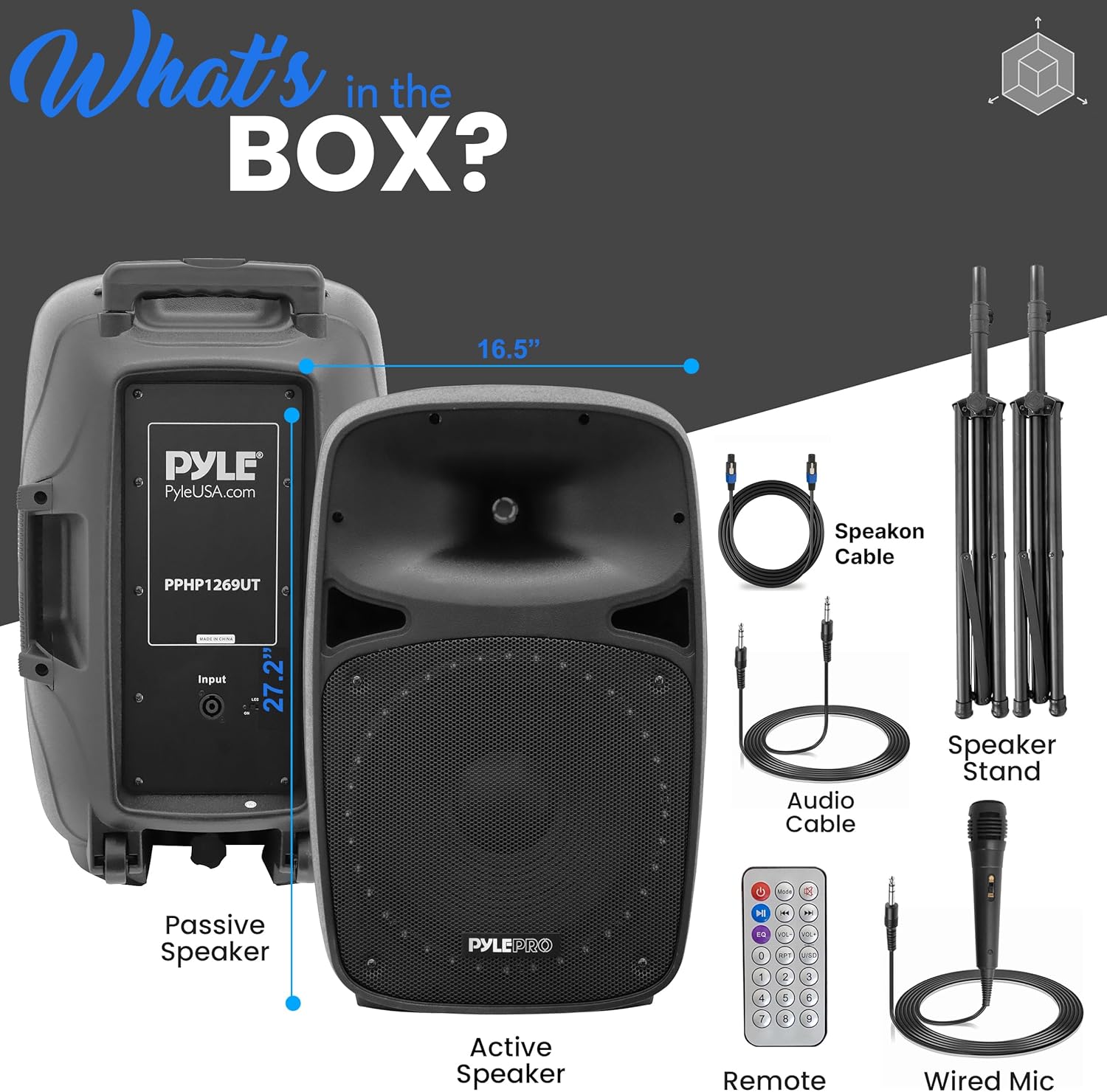
Image 3.1: Visual representation of the Pyle PPHP1569UT package contents.
4. ชิ้นส่วนและการควบคุม
Familiarize yourself with the rear panel controls and connections of the active speaker:
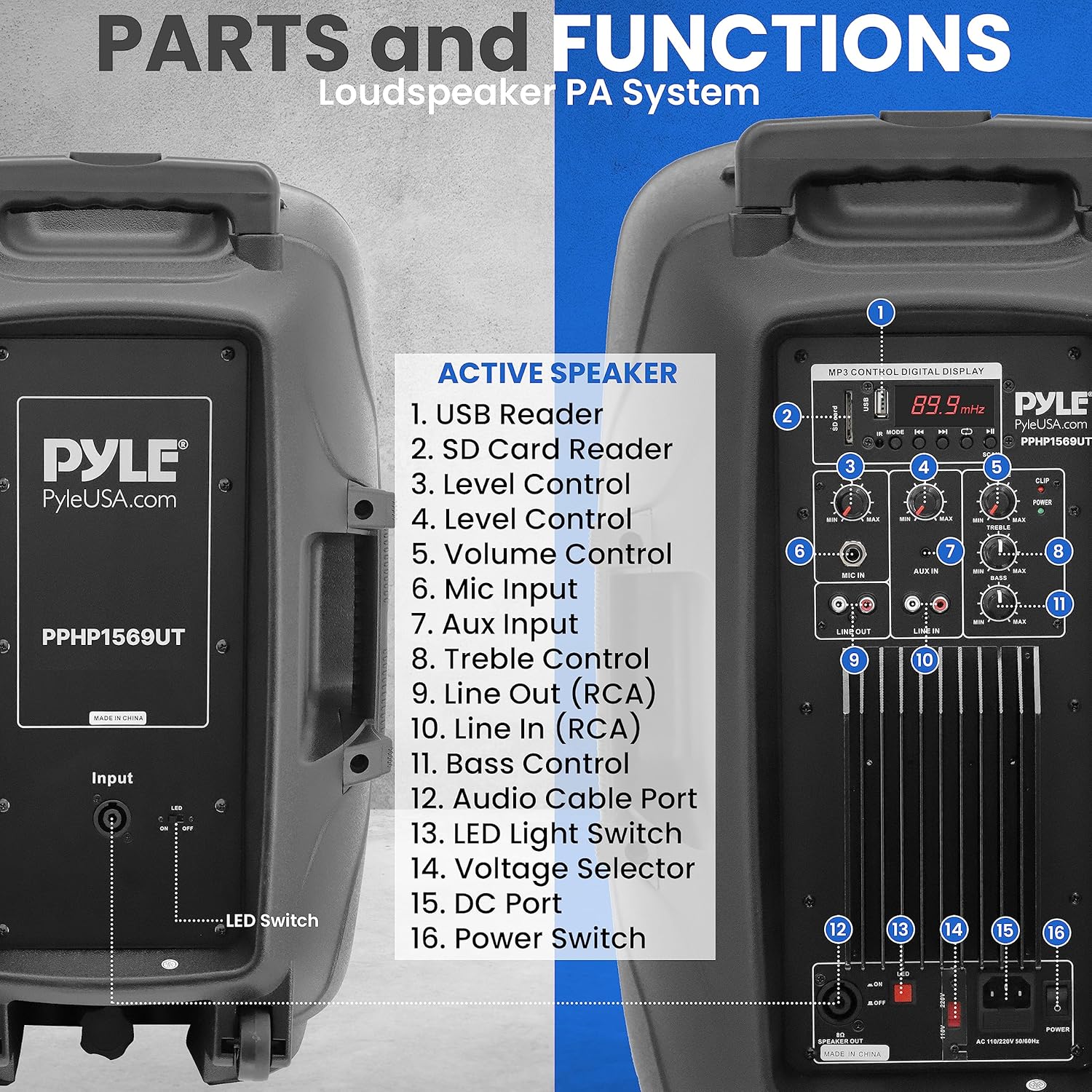
Image 4.1: Rear panel of the active speaker with numbered labels for each control and input.
- เครื่องอ่าน USB: Insert a USB flash drive for MP3/WMA playback.
- เครื่องอ่านการ์ด SD: Insert an SD memory card for MP3/WMA playback.
- การควบคุมระดับ: Adjusts the input level for various sources.
- การควบคุมระดับเสียง: Master volume adjustment for the entire system.
- อินพุตไมโครโฟน: 1/4'' Jack for connecting a microphone.
- อินพุต Aux: 3.5mm Stereo Line Input for connecting external audio devices.
- การควบคุมเสียงแหลม: ปรับการตอบสนองความถี่สูง
- ไลน์เอาท์ (อาร์ซีเอ): RCA (L/R) output for connecting to other audio equipment.
- Line In (RCA): RCA (L/R) input for connecting external audio devices.
- การควบคุมเสียงเบส: ปรับการตอบสนองความถี่ต่ำ
- Audio Cable Port: SpeakON connector for linking to the passive speaker.
- เล่มที่tagอี ตัวเลือก: Switch between 110V and 220V power.
- พอร์ต DC: For DC power input (if applicable, refer to specific model details).
- สวิตช์ไฟ: เปิด/ปิดเครื่อง
- สวิตช์ไฟ LED: Controls the LED lights on the speaker grille.
5. คำแนะนำในการตั้งค่า
5.1 การจัดวางลำโพง
- Place the speakers on a stable, flat surface or mount them on the provided 35mm speaker stands. Ensure the stands are fully extended and locked for stability.
- Position the speakers to achieve optimal sound dispersion for your listening area.
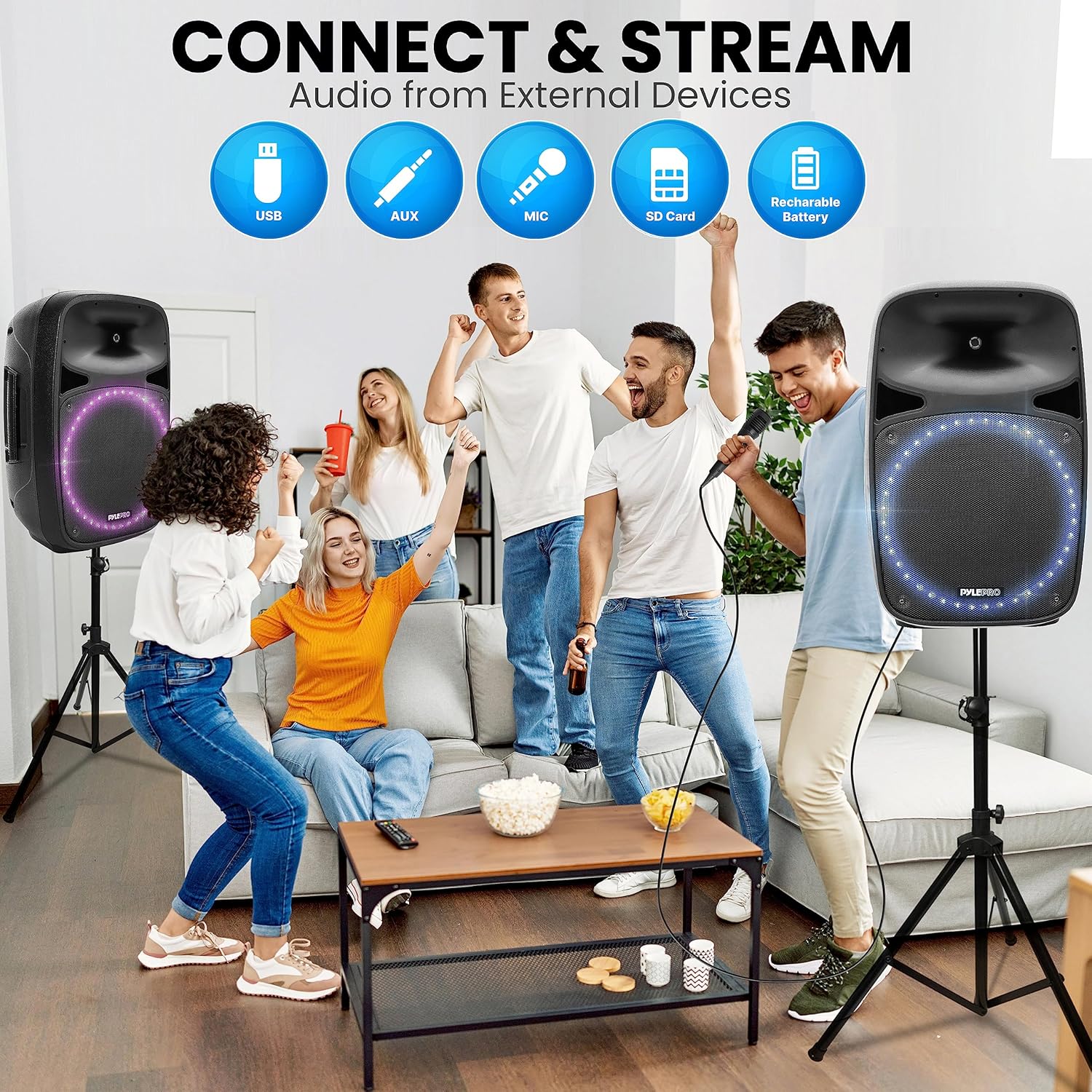
Image 5.1: The speaker's integrated carry handle, 35mm speaker stand mount, and roller caster wheels for easy transport and setup.
5.2 การเชื่อมต่อลำโพง
- Identify the active speaker (with controls) and the passive speaker.
- Use the provided 5-meter SpeakON audio cable to connect the 'Audio Cable Port' on the active speaker to the corresponding input on the passive speaker.
5.3 การเชื่อมต่อสายไฟ
- Ensure the 'Voltage Selector' on the active speaker is set to the correct voltage สำหรับภูมิภาคของคุณ (110V หรือ 220V)
- Connect the power cable to the active speaker and then to a suitable AC power outlet.
- Do not turn on the power switch until all connections are made.
6. คู่มือการใช้งาน
6.1 การเปิด/ปิดเครื่อง
Flip the 'Power Switch' to the ON position to turn on the system. Flip it to OFF to power down.
6.2 การสตรีมไร้สายบลูทูธ
- Turn on the speaker system. The digital LCD display will indicate the current mode.
- Press the 'Mode' button (if available, typically near the LCD) to select Bluetooth mode. The display will show 'BLUE' or a Bluetooth icon.
- ค้นหาอุปกรณ์ Bluetooth ที่พร้อมใช้งานบนอุปกรณ์ที่รองรับ Bluetooth ของคุณ (สมาร์ทโฟน แท็บเล็ต พีซี)
- Select the device named 'Pyle ' from the list.
- Once paired, you can stream audio wirelessly. The Bluetooth version is 5.0, offering a wireless range of 100+ feet.

Image 6.1: The speaker's built-in Bluetooth functionality for wireless audio streaming from compatible devices.
6.3 AUX/Line Input
- Connect your external audio device (e.g., MP3 player, laptop) to the 'Aux Input' (3.5mm stereo) or 'Line In (RCA)' using an appropriate audio cable.
- Select the corresponding input mode on the speaker system.
- Adjust the 'Level Control' and 'Volume Control' as needed.
6.4 การเล่นไฟล์ผ่าน USB/การ์ด SD
- Insert a USB flash drive or SD memory card (up to 32GB) containing MP3 or WMA audio files into the respective 'USB Reader' or 'SD Card Reader'.
- The system should automatically switch to USB/SD mode and begin playback. If not, press the 'Mode' button.
- Use the playback controls (Play/Pause, Next, Previous) on the rear panel or remote control.

Image 6.2: The speaker system supports various external audio sources including USB, AUX, Microphone, and SD Card.
6.5 การใช้งานไมโครโฟน
- Connect the wired microphone to the 'Mic Input' (1/4'' Jack).
- Adjust the 'Mic Volume' control to your desired level.
- Ensure the microphone is not pointed directly at the speakers to prevent feedback.
6.6 การควบคุมโทนเสียง
Use the 'Treble Control' and 'Bass Control' knobs to adjust the high and low frequencies of the audio output to suit your preference.
7. การบำรุงรักษา
7.1 การทำความสะอาด
- ถอดปลั๊กไฟก่อนทำความสะอาดทุกครั้ง
- Use a soft, dry cloth to clean the exterior surfaces of the speakers.
- ห้ามใช้น้ำยาทำความสะอาดชนิดเหลว สเปรย์ หรือตัวทำละลาย เนื่องจากอาจทำให้พื้นผิวหรือชิ้นส่วนภายในเสียหายได้
7.2 พื้นที่จัดเก็บ
- When not in use for extended periods, store the speaker system in a cool, dry place, away from direct sunlight and extreme temperatures.
- It is recommended to store the speakers in their original packaging or a protective cover to prevent dust accumulation and physical damage.
8 การแก้ไขปัญหา
| ปัญหา | สาเหตุที่เป็นไปได้ | สารละลาย |
|---|---|---|
| ไม่มีไฟฟ้า | ไม่ได้เสียบสายไฟ; สวิตช์ไฟปิดอยู่; ปลั๊กไฟเสีย | Ensure power cable is securely connected; Turn power switch ON; Test outlet with another device. |
| ไม่มีเสียง | Volume too low; Incorrect input mode; Cables not connected properly; Passive speaker not connected | Increase Master Volume; Select correct input mode; Check all audio cable connections; Ensure active and passive speakers are connected via SpeakON cable. |
| บลูทูธไม่เชื่อมต่อ | Speaker not in Bluetooth mode; Device too far; Incorrect device selected | Switch speaker to Bluetooth mode; Move device closer (within 100ft); Select 'Pyle ' from your device's Bluetooth list. |
| ไมโครโฟนไม่ทำงาน | Microphone not connected; Mic Volume too low; Faulty microphone | Ensure microphone is securely plugged into 'Mic Input'; Increase 'Mic Volume'; Test with another microphone if possible. |
| เสียงเพี้ยน | Volume too high; Input signal too strong; Damaged speaker | Reduce Master Volume or input level; Check source device output; Contact support if distortion persists at low volumes. |
9. ข้อมูลจำเพาะทางเทคนิค
- กำลังขับสูงสุด: 500 วัตต์
- กำลังขับ RMS: 120 วัตต์
- Amplifier คลาส: AB
- ขนาดวูฟเฟอร์: 15-inch (2x)
- ขนาดทวีตเตอร์: 1.0-inch (2x)
- วัสดุทวีตเตอร์: PEI Diaphragm
- Woofer Basket Material: Stampเหล็กเอ็ด
- อิมพีแดนซ์: 8 โอห์ม
- Frequency Response (Crossover): 3.3kHz
- เวอร์ชันบลูทูธ: 5.0
- ช่วงไร้สาย Bluetooth: 100+ ฟุต
- ชื่อเครือข่ายบลูทูธ: 'Pyle '
- อินพุตเสียง: 1/4'' Jack Microphone Input, 3.5mm Stereo Line Input, RCA (L/R) Input, USB, SD Card
- เอาต์พุตเสียง: RCA (L/R) Out
- เสียงดิจิตอล File ความเข้ากันได้: MP3, WMA
- รองรับหน่วยความจำแฟลช SD/USB สูงสุด: 32GB
- พลัง: AC110/220V 50/60HZ (Selectable)
- ขนาดสินค้า (กว้าง x ยาว x สูง) : 16.5 นิ้ว x 14.6 นิ้ว x 27.2 นิ้ว
- น้ำหนักสินค้า: 77.8 ปอนด์
- ประเภทการติดตั้ง: รองรับขาตั้งลำโพงขนาด 35 มม
- แบตเตอรี่รีโมทคอนโทรล: 3V Lithium Battery, CR2025
10. การรับประกันและการสนับสนุน
For warranty information, technical support, or service inquiries, please refer to the warranty card included with your product or visit the official Pyle webอย่าพยายามซ่อมแซมเครื่องด้วยตนเอง เพราะอาจทำให้การรับประกันเป็นโมฆะ


