1. บทนำ
Welcome to the instruction manual for the Supermicro X13SEM-TF motherboard. This document provides essential information for the proper installation, configuration, and maintenance of your motherboard. Please read this manual thoroughly before proceeding with any installation or operation.
The Supermicro X13SEM-TF is designed to support Intel Xeon SPR-SP CPUs with up to 56 cores and 350W TDP, featuring EBGPCH and 8-channel DDR5 memory support.
2. สินค้าหมดview
Below is an image of the Supermicro X13SEM-TF motherboard, highlighting its key components.
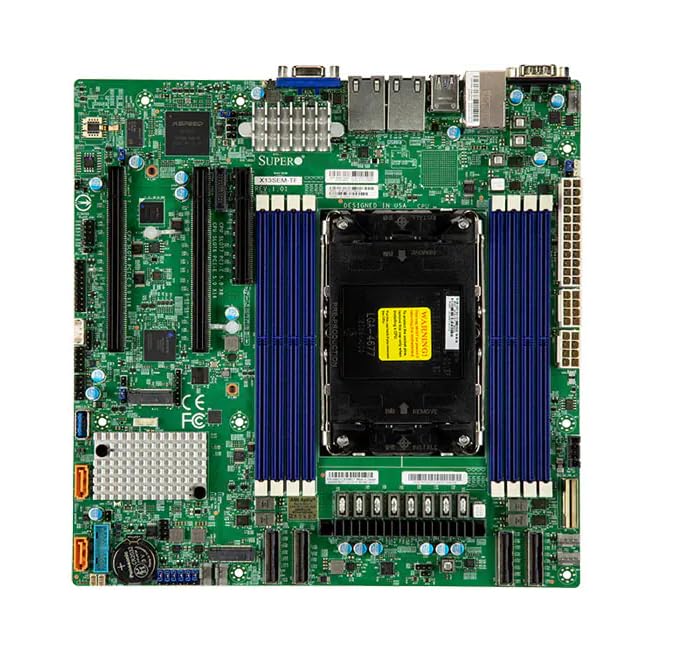
Image Description: This image displays the Supermicro X13SEM-TF motherboard. Key visible components include the large LGA 4677 CPU socket at the center, surrounded by eight DDR5 DIMM slots (blue). Various PCIe slots, SATA ports, USB headers, and power connectors are distributed across the green PCB. The rear I/O panel features USB ports, Ethernet ports, and a VGA port. Heatsinks are visible over the VRM and chipset areas.
3. ข้อมูลด้านความปลอดภัย
Always observe standard electrostatic discharge (ESD) precautions when handling the motherboard.
- โปรดตัดการเชื่อมต่อแหล่งจ่ายไฟทั้งหมดก่อนทำการติดตั้งหรือบำรุงรักษา
- สวมสายรัดข้อมือป้องกันไฟฟ้าสถิต
- Avoid touching components directly unless necessary.
- Ensure proper ventilation within the system chassis.
- Refer to professional assistance if unsure about any procedure.
4. การตั้งค่าและการติดตั้ง
4.1. เนื้อหาบรรจุภัณฑ์
ตรวจสอบว่ามีส่วนประกอบทั้งหมดอยู่ในแพ็คเกจ:
- Supermicro X13SEM-TF Motherboard
- แผ่นป้องกันพอร์ตอินพุต/เอาต์พุต (หากไม่ได้รวมอยู่ในตัว)
- สาย SATA
- คู่มือการใช้งาน (เอกสารนี้)
- แผ่นซีดี/แฟลชไดรฟ์ (หรือดูคำแนะนำในการดาวน์โหลด)
4.2. การติดตั้งเมนบอร์ด
- เตรียมโครงรถ: Ensure the computer chassis is ready for motherboard installation. Install standoffs in the appropriate locations.
- ติดตั้ง I/O Shield: If provided separately, install the I/O shield into the chassis opening.
- ติดตั้งเมนบอร์ด: Carefully place the motherboard into the chassis, aligning it with the standoffs and I/O shield. Secure it with screws.
- ติดตั้งซีพียู:
- เปิดคันโยกซ็อกเก็ต CPU
- Align the CPU (Intel Xeon SPR-SP) with the socket, matching the triangular markers.
- วาง CPU ลงในซ็อกเก็ตเบาๆ อย่าฝืน
- ปิดก้านซ็อกเก็ตเพื่อยึดซีพียู
- ติดตั้งตัวระบายความร้อน CPU: Attach the compatible CPU cooler according to its manufacturer's instructions. Ensure proper thermal paste application.
- ติดตั้งหน่วยความจำ (RAM):
- คลายคลิปที่ช่องเสียบ DDR5 DIMM ออก
- Align the memory modules with the slots, ensuring the notch matches.
- Press down firmly on both ends until the clips snap into place. Refer to the motherboard layout for optimal memory population.
- เชื่อมต่อพลังงาน:
- เชื่อมต่อขั้วต่อไฟหลัก ATX 24 พิน
- Connect the 8-pin (or 4+4-pin) CPU power connector(s).
- เชื่อมต่ออุปกรณ์จัดเก็บข้อมูล: Connect SATA data and power cables to your storage drives (HDDs/SSDs) and the motherboard's SATA ports.
- เชื่อมต่อหัวต่อแผงด้านหน้า: Connect the power switch, reset switch, HDD LED, power LED, and front panel USB/audio headers to their respective pins on the motherboard. Refer to the motherboard diagram for correct pin assignments.
- ติดตั้งการ์ดขยาย: Insert any necessary PCIe expansion cards (e.g., graphics cards, network cards) into the appropriate PCIe slots and secure them.
5. คู่มือการใช้งาน
5.1. เปิดเครื่องครั้งแรก
After completing all connections, connect the power supply to an electrical outlet and power on the system.
The system should boot to the BIOS/UEFI interface or an installed operating system.
5.2. การกำหนดค่า BIOS/UEFI
To enter the BIOS/UEFI setup, press the designated key (usually เดล or F2) ระหว่างการเริ่มต้นระบบ
Configure boot order, system time, and other necessary settings. Save changes before exiting.
5.3. การติดตั้งไดร์เวอร์
Install all necessary drivers for the motherboard chipset, network, audio, and any other integrated components. Drivers can be found on the Supermicro website or the provided driver media.
6. การบำรุงรักษา
Regular maintenance ensures optimal performance and longevity of your motherboard.
- การกำจัดฝุ่น: ควรทำความสะอาดฝุ่นจากเมนบอร์ดและส่วนประกอบต่างๆ เป็นระยะ โดยใช้ลมเป่าอัดแรงดันสูง ตรวจสอบให้แน่ใจว่าระบบปิดเครื่องและถอดปลั๊กออกแล้ว
- อัปเดต BIOS/UEFI: ตรวจสอบ Supermicro website for BIOS/UEFI updates. Update only if necessary and follow the provided instructions carefully.
- การอัปเดตไดรเวอร์: Keep drivers updated for optimal compatibility and performance.
- การตรวจร่างกาย: ตรวจสอบเมนบอร์ดเป็นระยะเพื่อหาสัญญาณความเสียหาย การเชื่อมต่อหลวม หรือตัวเก็บประจุบวม
7 การแก้ไขปัญหา
7.1. ไม่มีอำนาจ
- ตรวจสอบการเชื่อมต่อสายไฟทั้งหมด (ขั้วต่อ ATX 24 พิน, ขั้วต่อ CPU 8 พิน)
- ตรวจสอบให้แน่ใจว่าได้เปิดแหล่งจ่ายไฟแล้ว
- ทดสอบแหล่งจ่ายไฟด้วยระบบอื่นหรือเครื่องทดสอบแหล่งจ่ายไฟ
- ตรวจสอบการเชื่อมต่อสวิตช์ไฟแผงด้านหน้า
7.2. ไม่มีการแสดงผล
- ตรวจสอบให้แน่ใจว่าได้เชื่อมต่อจอภาพและเปิดใช้งานเครื่องแล้ว
- Check if the graphics card (if dedicated) is properly seated and powered.
- ลองใส่โมดูล RAM ใหม่อีกครั้ง
- If using integrated graphics, ensure the CPU supports it and the display cable is connected to the motherboard's video output.
7.3. ความไม่เสถียรของระบบ / การขัดข้อง
- ตรวจสอบอุณหภูมิ CPU และ GPU
- Verify RAM is correctly installed and compatible.
- เรียกใช้เครื่องมือตรวจสอบหน่วยความจำ
- ตรวจสอบให้แน่ใจว่าได้ติดตั้งไดรเวอร์ทั้งหมดและอัปเดตเป็นเวอร์ชันล่าสุดแล้ว
- ตรวจสอบดูว่ามีสายเคเบิลหรือชิ้นส่วนใดหลวมหรือไม่
8. ข้อมูลจำเพาะ
| คุณสมบัติ | รายละเอียด |
|---|---|
| แบบอย่าง | Supermicro X13SEM-TF (MBD-X13SEM-TF-B) |
| รองรับซีพียู | Intel Xeon SPR-SP, up to 56 cores, 350W TDP |
| ซ็อคเก็ตซีพียู | แอลจีเอ 4677 |
| ชิปเซ็ต | EBGPCH |
| หน่วยความจำ | 8-channel DDR5 DIMM slots |
| ขนาด (กxยxส) | 16 x 12 x 5 นิ้ว |
| น้ำหนัก | 2.86 ปอนด์ |
| ผู้ผลิต | ซูเปอร์ไมโคร |
| วันที่พร้อมใช้งานครั้งแรก | 20 มกราคม 2023 |
9. การรับประกันและการสนับสนุน
9.1. ข้อมูลการรับประกัน
For detailed warranty information, please refer to the official Supermicro webเว็บไซต์หรือบัตรรับประกันที่รวมอยู่ในผลิตภัณฑ์ของคุณ
9.2. การสนับสนุนด้านเทคนิค
If you encounter issues that cannot be resolved using this manual, please contact Supermicro technical support.
Visit the official Supermicro website for support resources, driver downloads, and contact information: www.supermicro.com/support


