การแนะนำ
This manual provides essential information for setting up, operating, maintaining, and troubleshooting your Xiaomi Redmi Note 11R 5G smartphone. The Redmi Note 11R 5G is designed for reliable performance, featuring a MediaTek Dimensity 700 Octa-core processor, a 6.58-inch IPS LCD display, a dual-camera system, and a long-lasting 5000 mAh battery with 18W fast charging. It operates on Android 12 with MIUI 13.
มีอะไรอยู่ในกล่อง
Upon unboxing your Xiaomi Redmi Note 11R 5G, please verify that all the following items are included:
- สมาร์ทโฟน Xiaomi Redmi Note 11R 5G
- สาย USB
- อะแดปเตอร์แปลงไฟ
- ที่ชาร์จแบตในรถเร็ว
คู่มือการติดตั้ง
1. การใส่ซิมการ์ดและการ์ด MicroSD
The Redmi Note 11R 5G supports dual Nano SIM cards and a MicroSD card for expanded storage. Locate the SIM tray on the side of the device.

คำอธิบายภาพ: ด้านหนึ่ง view of the Xiaomi Redmi Note 11R 5G smartphone in Polar Blue, highlighting the location of the SIM card tray on the left edge of the device. This tray accommodates both Nano SIM cards and a MicroSD card.
- Gently insert the SIM ejector tool (not included, but typically comes with smartphones) into the small hole on the SIM tray.
- ดึงถาดออกมา
- Place your Nano SIM cards and/or MicroSD card into the designated slots, ensuring the gold contacts face downwards.
- ใส่ถาดกลับเข้าไปในโทรศัพท์อย่างระมัดระวัง
2. การชาร์จและเปิดเครื่องครั้งแรก
ก่อนใช้งานครั้งแรก ขอแนะนำให้ชาร์จอุปกรณ์ของคุณจนเต็ม
- Connect the USB cable to the power adapter and then to your phone's charging port.
- Plug the power adapter into a wall outlet. The phone supports 18W fast charging.
- Once sufficiently charged, press and hold the power button (usually on the right side) until the Xiaomi logo appears.
3. ความเข้ากันได้ของเครือข่าย
This device is an unlocked 4G VoLTE smartphone. For optimal 4G LTE service in the USA market, it is designed to work with carriers operating under the T-Mobile network, such as T-Mobile, Metro by T-Mobile, Mint Mobile, Ultra Mobile, and Tello. Please note that this device will ไม่ work on Verizon, AT&T, Boost Mobile, Cricket Wireless, Metro PCS (if not T-Mobile network), or any CDMA carrier.
4. การตั้งค่าซอฟต์แวร์เบื้องต้น
Follow the on-screen prompts to complete the initial setup, which includes selecting your language, connecting to Wi-Fi, signing in with your Google account, and setting up security features like the side-mounted fingerprint sensor.
การใช้งานอุปกรณ์ของคุณ
1. การนำทางพื้นฐาน
The Redmi Note 11R 5G features a responsive touchscreen display. Navigate through menus, open apps, and interact with content using taps, swipes, and pinch gestures. The operating system is Android 12 with Xiaomi's MIUI 13 interface.
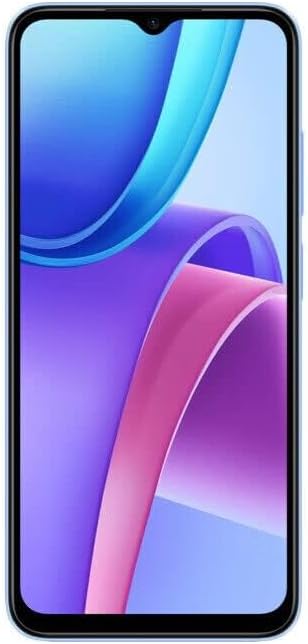
คำอธิบายภาพ: ด้านหน้า view of the Xiaomi Redmi Note 11R 5G smartphone in Polar Blue, showcasing its 6.58-inch IPS LCD display with a vibrant wallpaper. The front camera is visible at the top center.
2. เซ็นเซอร์ลายนิ้วมือ
Your device includes a side-mounted fingerprint sensor for secure and quick unlocking. To set it up, go to การตั้งค่า > รหัสผ่านและความปลอดภัย > ปลดล็อกด้วยลายนิ้วมือ และปฏิบัติตามคำแนะนำเพื่อลงทะเบียนลายนิ้วมือของคุณ
3. การใช้กล้อง
The phone is equipped with a dual rear camera system (13 MP wide + 2 MP depth) and a 5 MP front camera. Open the Camera app to capture photos and videos.

คำอธิบายภาพ: ด้านหลัง view of the Xiaomi Redmi Note 11R 5G smartphone in Polar Blue. The prominent black rectangular module at the top houses the dual rear cameras and LED flash, with "Redmi" branding vertically aligned.
- กล้องหลัง: Features include LED flash, HDR, and panorama. Video recording is supported at 1080p@30fps.
- กล้องหน้า: เหมาะสำหรับการถ่ายเซลฟี่และการสนทนาทางวิดีโอ
4. การเชื่อมต่อ
อุปกรณ์ของคุณรองรับตัวเลือกการเชื่อมต่อที่หลากหลาย:
- ไวไฟ : เชื่อมต่อกับเครือข่ายไร้สายผ่าน การตั้งค่า > Wi-Fi. Supports 802.11 a/b/g/n/ac, dual-band, Wi-Fi Direct, and hotspot functionality.
- บลูทูธ: จับคู่กับอุปกรณ์บลูทูธอื่นๆ ผ่านทาง การตั้งค่า > บลูทูธ.
- จีพีเอส: GPS ในตัวสำหรับการนำทางและบริการระบุตำแหน่ง
การซ่อมบำรุง
1. การดูแลแบตเตอรี่
The Redmi Note 11R 5G has a non-removable Li-Po 5000 mAh battery. To prolong battery life:
- หลีกเลี่ยงอุณหภูมิที่สูงหรือต่ำเกินไป
- Use the provided charger for optimal charging speed and safety.
- หลีกเลี่ยงการระบายแบตเตอรี่จนหมดบ่อยครั้ง
2. การอัปเดตซอฟต์แวร์
ตรวจสอบการอัปเดตระบบเป็นประจำเพื่อให้แน่ใจว่าอุปกรณ์ของคุณมีคุณสมบัติล่าสุด การแก้ไขช่องโหว่ด้านความปลอดภัย และการปรับปรุงประสิทธิภาพ ไปที่ การตั้งค่า > เกี่ยวกับโทรศัพท์ > เวอร์ชัน MIUI เพื่อตรวจสอบการอัปเดต
3. การทำความสะอาดอุปกรณ์ของคุณ
Use a soft, lint-free cloth to clean the screen and body of your phone. Avoid harsh chemicals or abrasive materials. The device is built with a glass front, plastic frame, and plastic back.
4. การจัดการการจัดเก็บข้อมูล
Your device comes with 128 GB of internal storage. To manage storage effectively, regularly clear unnecessary files, uninstall unused apps, and utilize cloud storage or the MicroSD card slot for larger media files.
การแก้ไขปัญหา
This section addresses common issues you might encounter with your Redmi Note 11R 5G.
1. อุปกรณ์ไม่เปิดเครื่อง
- ตรวจสอบให้แน่ใจว่าแบตเตอรี่ชาร์จเต็มแล้ว เสียบโทรศัพท์เข้ากับที่ชาร์จอย่างน้อย 15-30 นาที
- กดปุ่มเปิด/ปิดค้างไว้ 10-15 วินาทีเพื่อบังคับให้รีสตาร์ท
2 ปัญหาการเชื่อมต่อเครือข่าย
- โปรดตรวจสอบให้แน่ใจว่าได้ใส่ซิมการ์ดอย่างถูกต้องและเปิดใช้งานแล้ว
- Check if your carrier is compatible with the device (refer to "Network Compatibility" in the Setup Guide).
- สลับเปิดและปิดโหมดเครื่องบิน
- รีสตาร์ทอุปกรณ์
- รีเซ็ตการตั้งค่าเครือข่ายผ่าน การตั้งค่า > การเชื่อมต่อและการแชร์ > รีเซ็ต Wi-Fi เครือข่ายมือถือ และบลูทูธ.
3. ประสิทธิภาพช้า
- ปิดแอปพลิเคชันที่ไม่ได้ใช้งานซึ่งทำงานอยู่เบื้องหลัง
- Clear cache and data for problematic apps.
- ให้แน่ใจว่ามีพื้นที่เก็บข้อมูลเพียงพอ
- ควรทำการรีสตาร์ทอุปกรณ์เป็นประจำ
4. แบตเตอรี่หมดเร็ว
- ตรวจสอบการใช้งานแบตเตอรี่ใน ตั้งค่า > แบตเตอรี่ เพื่อระบุแอปที่กินพลังงาน
- ลดความสว่างหน้าจอและตั้งค่าเวลาปิดหน้าจออัตโนมัติ
- ปิดใช้งานคุณสมบัติที่ไม่จำเป็น เช่น GPS, Bluetooth หรือ Wi-Fi เมื่อไม่ได้ใช้งาน
- จำกัดการรีเฟรชแอปพื้นหลัง
5. รีเซ็ตเป็นค่าโรงงาน
หากปัญหาเกิดขึ้นอย่างต่อเนื่อง การรีเซ็ตเป็นค่าโรงงานอาจแก้ไขปัญหาได้ คำเตือน: การดำเนินการนี้จะลบข้อมูลทั้งหมดในโทรศัพท์ของคุณ โปรดสำรองข้อมูลสำคัญก่อนดำเนินการต่อ ไปที่ การตั้งค่า > เกี่ยวกับโทรศัพท์ > รีเซ็ตเป็นค่าจากโรงงาน.
ข้อมูลจำเพาะ
Detailed technical specifications for the Xiaomi Redmi Note 11R 5G:
| คุณสมบัติ | ข้อมูลจำเพาะ |
|---|---|
| ชื่อรุ่น | Note 11R |
| ระบบปฏิบัติการ | ระบบปฏิบัติการ Android 12, MIUI 13 |
| โปรเซสเซอร์ | MediaTek MT6833 Dimensity 700 (7 nm) Octa-core (2x2.2 GHz Cortex-A76 & 6x2.0 GHz Cortex-A55) |
| จีพียู | มาลี-G57 MC2 |
| แสดง | หน้าจอ IPS LCD ขนาด 6.58 นิ้ว ความละเอียด 1080 x 2408 พิกเซล |
| แรม | 4GB |
| การจัดเก็บข้อมูลภายใน | 128GB |
| กล้องหลัง | Dual: 13 MP (wide), PDAF + 2 MP (depth) with LED flash, HDR, panorama. Video: 1080p@30fps |
| กล้องหน้า | 5 MP (กว้าง) |
| แบตเตอรี่ | Non-removable Li-Po 5000 mAh, 18W Fast Charging |
| เซ็นเซอร์ | Side-mounted fingerprint, accelerometer, gyro, proximity, compass |
| การเชื่อมต่อ | Wi-Fi 802.11 a/b/g/n/ac (dual-band, Wi-Fi Direct, hotspot), Bluetooth, GPS |
| ขนาด | 164 x 76.1 x 8.9 มม. (6.46 x 3.00 x 0.35 นิ้ว) |
| น้ำหนัก | 201 กรัม (7.09 ออนซ์) |
| สร้าง | Glass front, plastic frame, plastic back |
| แจ็คเสียง | 3.5 มม. |

คำอธิบายภาพ: A close-up image of a certification label, likely from the product packaging or a display unit, showing various technical details and regulatory compliance marks for the Redmi Note 11R. This includes model number, processor type, display specifications, battery capacity, and camera details, along with regional certifications.
การรับประกันและการสนับสนุน
สำหรับข้อมูลการรับประกัน โปรดดูบัตรรับประกันที่รวมอยู่ในผลิตภัณฑ์ของคุณหรือเยี่ยมชมเว็บไซต์ Xiaomi อย่างเป็นทางการ website. For technical support, product registration, or service inquiries, please contact Xiaomi customer service or the authorized reseller from whom you purchased the device. Keep your proof of purchase for warranty claims.
You can often find support resources, FAQs, and contact information on the official Xiaomi support portal.