1. บทนำ
This manual provides essential instructions for the installation, operation, and maintenance of the DEYE SUN-12K-SG04LP3-EU Three-Phase Hybrid Inverter. Please read this manual thoroughly before installation and operation to ensure proper use and to prevent damage to the device or injury to personnel. Keep this manual for future reference.

รูปที่ 1: DEYE SUN-12K-SG04LP3-EU Hybrid Inverter and included accessories. This image displays the main inverter unit along with various cables, connectors, and current transformers that are part of the product package.
2. คำแนะนำด้านความปลอดภัย
โปรดปฏิบัติตามข้อควรระวังด้านความปลอดภัยต่อไปนี้เสมอ เพื่อลดความเสี่ยงจากไฟฟ้าช็อต ไฟไหม้ หรือการบาดเจ็บ:
- การติดตั้งและการบำรุงรักษาจะต้องดำเนินการโดยบุคลากรที่มีคุณสมบัติเท่านั้น
- Ensure the inverter is disconnected from all power sources (PV array, battery, grid) before performing any service or maintenance.
- ห้ามใช้งานอินเวอร์เตอร์หากได้รับความเสียหายหรือดูเหมือนว่าจะทำงานผิดปกติ
- Do not attempt to repair the inverter yourself. Contact authorized service personnel.
- ให้เด็กอยู่ห่างจากอินเวอร์เตอร์
- The inverter can reach high temperatures during operation. Avoid touching it directly.
- ตรวจสอบให้แน่ใจว่ามีการระบายอากาศที่เหมาะสมรอบๆ อินเวอร์เตอร์เพื่อป้องกันความร้อนสูงเกินไป
3. สินค้าหมดview
The DEYE SUN-12K-SG04LP3-EU is a three-phase hybrid inverter designed for solar energy systems. It features two Maximum Power Point Trackers (MPPTs), a WLAN module for monitoring, and an IP65 rating for outdoor installation. It supports low-voltage 48V batteries and offers flexible DC/AC coupling options.
3.1 คุณสมบัติหลัก
- 12 kW Three-Phase Hybrid Inverter
- แรงดันไฟต่ำ 48 โวลต์tage Battery Compatibility (Lead-Acid or Lithium-Ion)
- Two MPPTs for optimized solar energy harvesting
- Integrated WLAN module for remote monitoring
- IP65 protection rating for outdoor use
- Supports three-phase unbalanced output
- Equipped with CAN (x2) and RS485 (x1) ports for BMS and parallel communication
- Smart Load application and Grid-Peak-Shave function
3.2 ขอบเขตการจัดส่ง

รูปที่ 2: Components included in the DEYE SUN-12K-SG04LP3-EU package. This image shows the various accessories such as communication cables, DC connectors, current transformers, and the user manual that come with the inverter.
Verify that all components listed below are present in the package:
- DEYE SUN-12K-SG04LP3-EU Hybrid Inverter Unit
- โมดูล WLAN
- คู่มือการใช้งาน
- ตัวยึด
- Communication Cables (e.g., Ethernet, RS485)
- ขั้วต่อ DC
- หม้อแปลงกระแสไฟฟ้า (CTs)
- เซ็นเซอร์วัดอุณหภูมิ
4. การตั้งค่าและการติดตั้ง
Proper installation is crucial for the safe and efficient operation of the inverter. Follow these steps carefully.
4.1 การเลือกสถานที่
- Install the inverter in a well-ventilated area, away from direct sunlight, rain, and dust.
- Ensure the ambient temperature is within the operating range (-40 °C to 60 °C).
- Maintain adequate clearance around the inverter for heat dissipation.
- The inverter is IP65 rated, allowing for outdoor installation, but protection from extreme weather is recommended.
4.2 การติดตั้งอินเวอร์เตอร์
The inverter is designed for wall mounting.
- Use the provided mounting bracket as a template to mark drilling points on the wall.
- เจาะรูและใส่พุกยึดผนังที่เหมาะสม
- ยึดโครงยึดเข้ากับผนัง
- Carefully lift the inverter and hang it onto the mounting bracket.
- Secure the inverter to the bracket using the provided screws.

รูปที่ 3: สูงสุด view of the inverter showing mounting points for wall installation. This image highlights the design features that facilitate easy and flexible installation of the unit on a wall.
4.3 การเชื่อมต่อทางไฟฟ้า
All electrical connections must comply with local electrical codes and standards.

รูปที่ 4: ด้านล่าง view of the DEYE inverter, illustrating all connection ports. This includes battery connections, communication ports (CAN, RS485), PV input, grid connection, load connection, and generator/smart load ports.
- การเชื่อมต่ออินพุต PV: Connect the DC cables from the solar array to the PV input terminals (DC1, DC2). Ensure correct polarity. The inverter has 2 MPPTs.
- การเชื่อมต่อแบตเตอรี่: Connect the battery cables to the BATTERY terminals. The inverter supports 48V low-voltage batteries (Lead-Acid or Lithium-Ion). Ensure correct polarity.
- การเชื่อมต่อระบบไฟฟ้ากระแสสลับ: Connect the AC grid cables to the GRID terminals. This is a three-phase inverter.
- โหลดการเชื่อมต่อ: Connect the load cables to the LOAD terminals.
- Generator/Smart Load Connection: If applicable, connect the generator or smart load to the GEN terminals.
- พอร์ตสื่อสาร: Connect BMS (Battery Management System) via CAN (COM1, COM2) or RS485 (COM3) ports. An RS232 port is also available for remote control.
- โมดูล WLAN: Insert the WLAN module into its designated port for remote monitoring capabilities.
- เซ็นเซอร์อุณหภูมิ: Connect the external temperature sensor.
บันทึก: The inverter supports parallel connection of up to 10 units for increased capacity.
5. คู่มือการใช้งาน
This section details the startup procedure and basic operation of the DEYE Hybrid Inverter.
5.1 การเริ่มต้นเริ่มต้น
- After all electrical connections are securely made, switch on the DC switch located on the side of the inverter.
- Switch on the AC breaker from the grid side.
- อินเวอร์เตอร์จะทำการทดสอบตัวเอง จากนั้นจึงเริ่มทำงาน
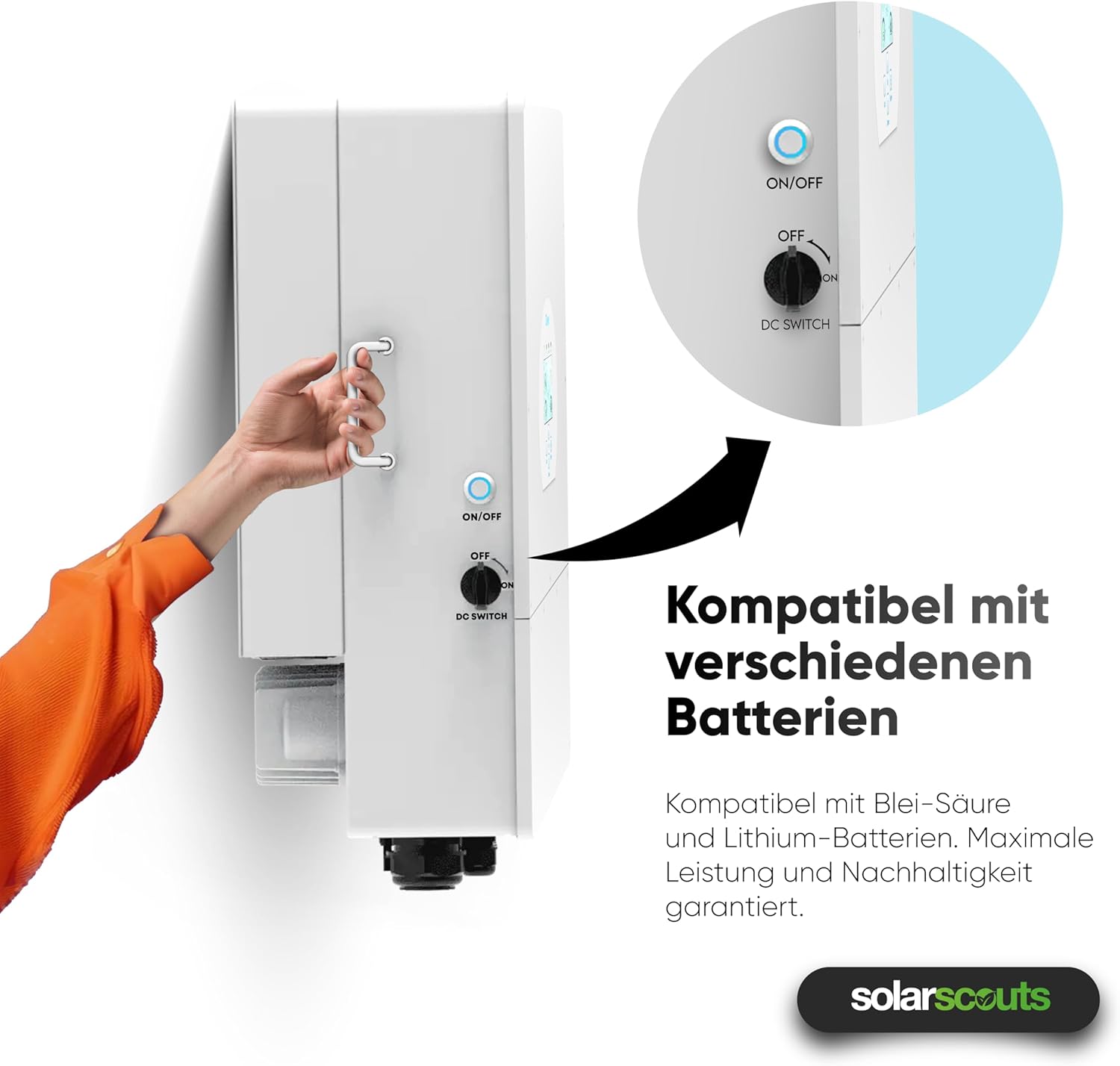
รูปที่ 5: A hand operating the ON/OFF and DC switch on the side of the inverter. This switch controls the power flow and is essential for safe startup and shutdown procedures.
5.2 การแสดงผลและอินเทอร์เฟซ
The inverter features an intuitive touchscreen interface for monitoring and configuration.

รูปที่ 6: ภาพระยะใกล้ view of the inverter's touchscreen display. This interface provides real-time operational data, status indicators (AC, DC, Normal, Alarm), and navigation buttons (Up, Down, Esc, Enter) for system control and monitoring.
- ตัวบ่งชี้สถานะ: AC, DC, Normal, Alarm LEDs indicate the current operational status.
- ปุ่มนำทาง: Use "Up", "Down", "Esc", and "Enter" buttons to navigate through menus and adjust settings.
- ข้อมูลเรียลไทม์: The display shows real-time power flow, battery status, and grid interaction.
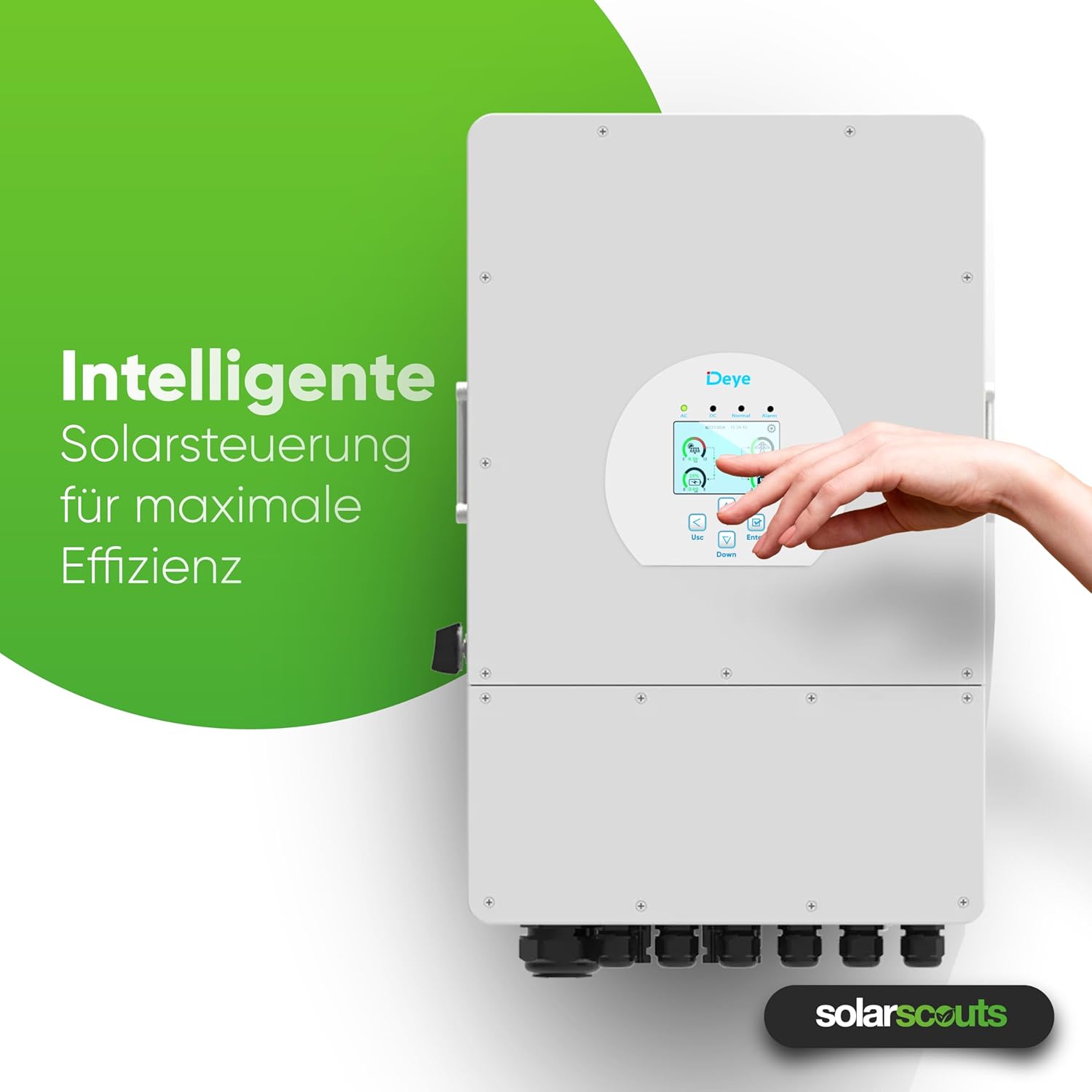
รูปที่ 7: A hand interacting with the inverter's intelligent solar control display. This demonstrates the user-friendly interface for managing solar power and maximizing system efficiency.
5.3 โหมดการทำงานและการตั้งค่า
The inverter offers various operating modes and configurable settings, including:
- Battery Charge/Discharge: Configure up to 6 periods for charging and discharging the battery.
- Grid-Tie Mode: Injects excess solar power into the grid.
- โหมดออฟกริด: Provides power to loads from PV and battery during grid outagใช่
- Smart Load Function: Manages connected loads intelligently.
- Grid-Peak-Shave Function: Optimizes energy usage to reduce peak demand from the grid.
Refer to the detailed sections in the full user manual for specific parameter settings and advanced configurations.
5.4 Smart Monitoring Platform
The integrated WLAN module allows connection to the Deye intelligent monitoring platform. This platform enables:
- Remote shutdown in case of emergencies.
- Remote parameter adjustment.
- Remote firmware updates.
- Real-time performance monitoring of the PV system.
6. การบำรุงรักษา
การบำรุงรักษาอย่างสม่ำเสมอจะช่วยให้เครื่องแปลงกระแสไฟฟ้าของคุณมีอายุการใช้งานยาวนานและทำงานได้อย่างมีประสิทธิภาพสูงสุด
- การทำความสะอาด: Periodically clean the inverter's exterior to remove dust and debris. Ensure ventilation openings are clear. Use a soft, dry cloth. Do not use liquid cleaners.
- การตรวจสอบ: Regularly check all electrical connections for tightness and signs of corrosion or damage. Inspect cables for wear and tear.
- การระบายอากาศ : Ensure that the area around the inverter remains clear to allow for proper airflow and cooling.
- อัพเดตเฟิร์มแวร์: Keep the inverter's firmware updated through the smart monitoring platform to benefit from performance improvements and new features.
คำเตือน: Disconnect all power sources before performing any maintenance or cleaning.
7 การแก้ไขปัญหา
This section provides solutions for common issues you might encounter. For more complex problems, contact technical support.
| ปัญหา | สาเหตุที่เป็นไปได้ | สารละลาย |
|---|---|---|
| อินเวอร์เตอร์ไม่เปิดเครื่อง | DC switch off, AC breaker off, no PV input, battery disconnected/low voltage | Check DC switch, AC breaker, PV connections, and battery voltage. |
| ไม่มีกำลังขับออก | Grid disconnected, overload, inverter fault | Check grid connection, reduce load, check display for error codes. |
| ปัญหาการเชื่อมต่อ WLAN | Incorrect network settings, weak signal, module not inserted correctly | Verify WLAN settings, ensure strong signal, reinsert WLAN module. |
| แบตเตอรี่ไม่ชาร์จ/ไม่คายประจุ | Incorrect battery settings, BMS communication error, battery fault | Check battery type and settings, verify BMS connection, inspect battery. |
8. ข้อมูลจำเพาะทางเทคนิค
The following table provides detailed technical specifications for the DEYE SUN-12K-SG04LP3-EU Hybrid Inverter.

รูปที่ 8: A detailed table outlining the technical specifications of the DEYE Hybrid Inverter. This includes data on battery input, PV input, AC output, efficiency, protection, and general characteristics.
| พารามิเตอร์ | ค่า |
|---|---|
| แบบอย่าง | ซัน-12K-SG04LP3-EU |
| เฟสต่างๆ | สามเฟส |
| External AC Output Power | 12000 วัตต์ |
| กำลังไฟฟ้าเข้า DC (สูงสุด) | 15600 วัตต์ |
| MPPT | 2 |
| ปริมาณแบตเตอรี่tage | 40 V - 60 V (48 V nominal) |
| ประเภทแบตเตอรี่ | Lead-Acid or Lithium-Ion |
| แม็กซ์ กระแสไฟชาร์จ / คายประจุ | 240 ก |
| ระดับการป้องกัน | IP65 |
| อุณหภูมิในการทำงาน | -40°C ถึง 60°C |
| ขนาด (กว้าง x ยาว x สูง) | 42.2 ซม. x 69.9 ซม. x 27.9 ซม. |
| น้ำหนัก | 33.6 กก. |
| การเชื่อมต่อแบบขนาน | แม็กซ์ 10 ยูนิต |
9. การรับประกันและการสนับสนุน
DEYE provides a comprehensive warranty for its products.

รูปที่ 9: The DEYE Hybrid Inverter displayed with a badge indicating a 10-year warranty, signifying product quality and reliability.
- ระยะเวลารับประกัน: The DEYE SUN-12K-SG04LP3-EU Hybrid Inverter comes with a 10-year warranty. Please refer to the official warranty document for detailed terms and conditions.
- การสนับสนุนด้านเทคนิค: For technical assistance, troubleshooting beyond this manual, or warranty claims, please contact your local DEYE distributor or visit the official DEYE webเว็บไซต์สำหรับข้อมูลการติดต่อฝ่ายสนับสนุน
- การอัปเดตซอฟต์แวร์: Guaranteed software updates are available for the product.


