การแนะนำ
This manual provides comprehensive instructions for the installation, operation, maintenance, and troubleshooting of the Grandstream GDS3712 Single Button HD IP Video Door System. Please read this manual thoroughly before attempting to install or operate the device to ensure proper functionality and safety.
The Grandstream GDS3712 is an HD IP Video Door System designed for secure access control and monitoring. It features powerful video resolution, robust construction, and SIP video streaming capabilities, making it suitable for various security applications.
ข้อมูลด้านความปลอดภัย
ปฏิบัติตามข้อควรระวังด้านความปลอดภัยต่อไปนี้ระหว่างการติดตั้งและการใช้งาน:
- Ensure all power connections are secure and meet local electrical codes.
- อย่าให้อุปกรณ์สัมผัสกับอุณหภูมิ ความชื้น หรือแสงแดดโดยตรง
- ควรหลีกเลี่ยงการวางอุปกรณ์ไว้ใกล้สนามแม่เหล็กไฟฟ้าที่มีความเข้มสูง
- ใช้เฉพาะอุปกรณ์เสริมที่ผู้ผลิตกำหนดเท่านั้น
- อย่าพยายามเปิดหรือซ่อมแซมอุปกรณ์ด้วยตนเอง แนะนำให้ส่งช่างผู้ชำนาญเข้ารับบริการทั้งหมด
- สวมอุปกรณ์ป้องกันส่วนบุคคล (PPE) ที่เหมาะสมระหว่างการติดตั้ง
เนื้อหาแพ็คเกจ
ตรวจสอบว่ามีรายการทั้งหมดอยู่ในแพ็คเกจของคุณ:
- Grandstream GDS3712 Unit
- ตัวยึดและสกรู
- ชุดสายไฟ
- Quick Installation Guide (This manual serves as the detailed guide)
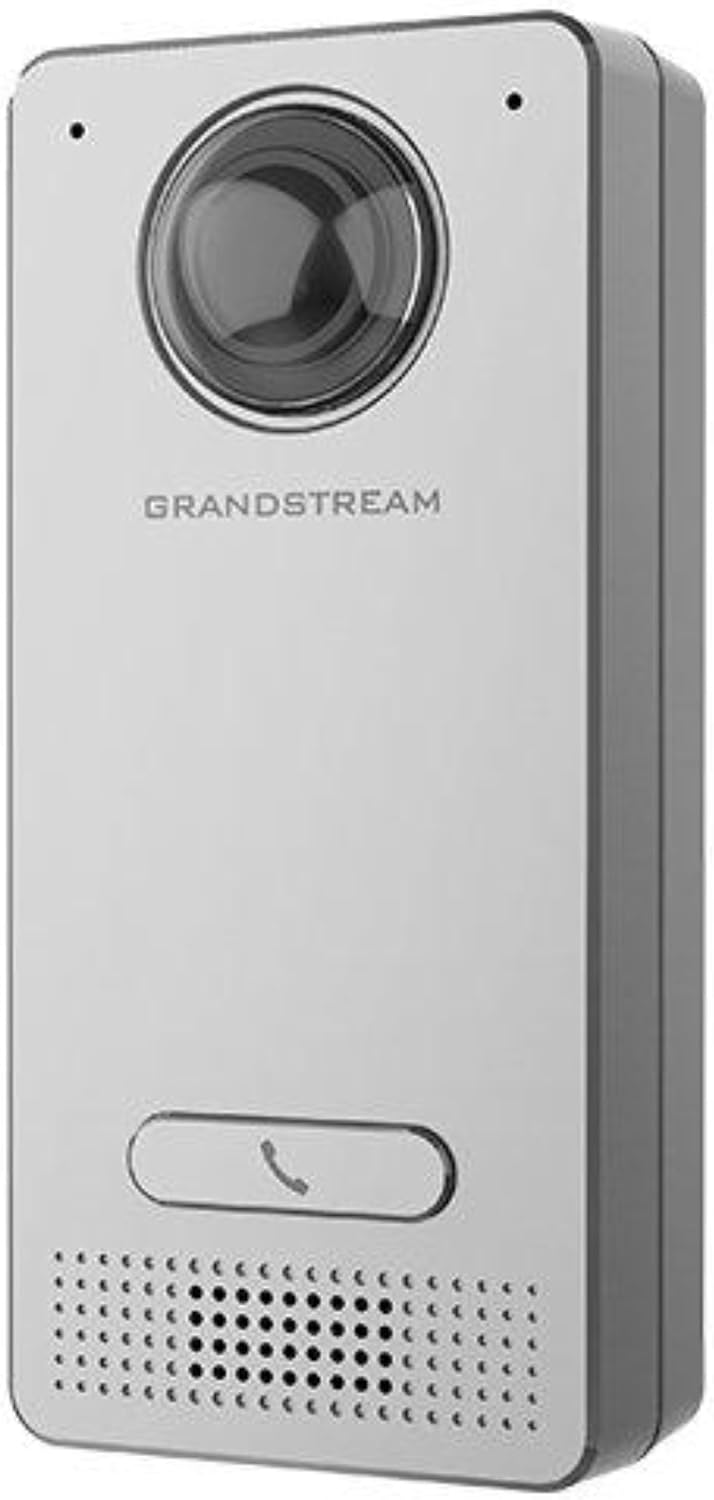
Image: Grandstream GDS3712 unit with included mounting accessories.
สินค้าเกินview
The GDS3712 is a robust IP video door system designed for reliable access control and surveillance. Key features include:
- วิดีโอความละเอียดสูง: Supports resolutions up to 1080p for clear visual identification.
- Integrated Relays: Two relays for electric lock and alarm output, and two alarm inputs for exit buttons and door sensors.
- SIP Compatibility: Enables video streaming to NVRs, video intercom stations, IP phones, and smartphones simultaneously.
- โครงสร้างทนทาน: โลหะ casing provides weatherproof and vandal-resistant protection.
- ทุ่งกว้างของ View: Built-in hemispheric camera offers 180-degree wall-to-wall coverage.

ภาพ: ด้านหน้า view of the GDS3712, highlighting the camera lens, call button, and speaker/microphone grille.
การติดตั้งและการตั้งค่า
1. การติดตั้งอุปกรณ์
- เลือกสถานที่: Select a suitable outdoor or indoor location, ensuring clear line of sight for the camera and easy access for visitors. Consider mounting height for optimal facial recognition.
- เตรียมเดินสายไฟ: Route necessary Ethernet (PoE recommended) and control wiring through the wall to the mounting point.
- วงเล็บยึดที่ปลอดภัย: Use the provided screws to securely attach the mounting bracket to the wall.
- การเชื่อมต่อสายไฟ: Connect the Ethernet cable to the GDS3712's RJ45 port. If using external power, connect the power adapter. Connect alarm inputs/outputs and electric lock relays as required. Refer to the wiring diagram in the full technical datasheet for detailed connections.
- อุปกรณ์เชื่อมต่อ: Carefully align the GDS3712 unit with the mounting bracket and secure it in place.
2 การกำหนดค่าเครือข่ายเบื้องต้น
- เปิดเครื่อง: Apply power to the GDS3712. The device will boot up.
- ค้นพบอุปกรณ์: Use Grandstream's GDS Manager software or a network scanner to discover the GDS3712's IP address on your local network.
- เข้าถึง Web ยูไอ: เปิด web browser and enter the device's IP address. Log in using the default credentials (usually admin/admin).
- กำหนดค่าการตั้งค่าเครือข่าย: Set a static IP address, subnet mask, gateway, and DNS server if required by your network.
- อัปเดตเฟิร์มแวร์: Check for and install the latest firmware updates from the Grandstream webเว็บไซต์นี้ออกแบบมาเพื่อประสิทธิภาพและความปลอดภัยสูงสุด
3. การลงทะเบียนบัญชี SIP
- Navigate to the SIP settings in the web UI
- Configure the SIP server address, SIP User ID, Authenticate ID, and Password as provided by your SIP service provider or IP PBX administrator.
- Ensure the SIP status shows "Registered" after applying settings.
คำแนะนำการใช้งาน
1. การโทรออก
- Visitor Initiated Call: A visitor presses the single call button on the GDS3712. The device will dial the pre-configured SIP extension(s).
- Receiving Call: The call can be received on a compatible IP phone, video intercom station, or smartphone application.
2. การเปิดประตูจากระยะไกล
- During an active call, the recipient can enter a DTMF code (e.g., a PIN) on their receiving device to trigger the electric lock relay, opening the door.
- The specific DTMF code is configured in the GDS3712's web อินเทอร์เฟซ
3. การตรวจสอบด้วยวิดีโอ
- The GDS3712's video stream can be accessed via an NVR, compatible IP video phone, or a dedicated surveillance application.
- Refer to your NVR or surveillance software documentation for instructions on adding an IP camera.
4. Alarm Inputs/Outputs
- สัญญาณเตือนภัย: Connect an exit button or door sensor to the alarm input ports. These can trigger events such as initiating a call or sending an alert.
- เอาต์พุตแจ้งเตือน: The alarm output can be configured to activate external devices (e.g., a siren) based on specific events detected by the GDS3712.
การซ่อมบำรุง
- การทำความสะอาด: Periodically clean the camera lens and the device's exterior with a soft, damp ผ้า. อย่าใช้สารเคมีที่รุนแรงหรือน้ำยาทำความสะอาดที่มีฤทธิ์กัดกร่อน
- อัพเดตเฟิร์มแวร์: ตรวจสอบ Grandstream เป็นประจำ website for new firmware versions. Keeping the firmware updated ensures optimal performance, security, and access to new features.
- การตรวจสอบสายเคเบิล: Periodically inspect all cables and connections for signs of wear or damage.
- การกำหนดค่าการสำรองข้อมูล: It is recommended to regularly back up the device's configuration settings through the web อินเทอร์เฟซ
การแก้ไขปัญหา
| ปัญหา | สาเหตุที่เป็นไปได้ | สารละลาย |
|---|---|---|
| อุปกรณ์ไม่เปิดเครื่อง | No power, faulty power adapter, or PoE issue. | Check power source, power adapter, and PoE switch/injector. Ensure cables are securely connected. |
| ไม่สามารถเข้าถึงได้ web อินเทอร์เฟซ | ที่อยู่ IP ไม่ถูกต้อง ปัญหาการเชื่อมต่อเครือข่าย หรือไฟร์วอลล์ปิดกั้นการเข้าถึง | Verify IP address. Check network cable. Ensure device and computer are on the same network segment. Temporarily disable firewalls. |
| SIP account fails to register. | Incorrect SIP server details, wrong credentials, or network issues preventing SIP communication. | Double-check SIP server address, user ID, and password. Verify network connectivity to the SIP server. Check firewall settings. |
| No video stream. | Network bandwidth issues, incorrect video settings, or NVR/client configuration. | Check network load. Verify video encoding settings in the GDS3712 web UI. Ensure NVR/client is configured correctly to receive the stream. |
| Door lock does not open remotely. | Incorrect DTMF code, relay wiring issue, or lock malfunction. | Verify the DTMF code in the GDS3712 settings. Check wiring between the GDS3712 and the electric lock. Test the electric lock independently. |
ข้อมูลจำเพาะ
| คุณสมบัติ | รายละเอียด |
|---|---|
| แบบอย่าง | GDS3712 |
| ผู้ผลิต | แกรนด์สตรีม |
| ความละเอียดวิดีโอ | สูงถึง 1080p |
| รีเลย์ | 2 (for Electric Lock and Alarm Out) |
| อินพุตสัญญาณเตือน | 2 (for Exit button and Door sensor) |
| กล้อง | Hemispheric, 180-degree coverage |
| Casing | Metal, Weatherproof, Vandal Resistant |
| การใช้พลังงาน | 3 วัตต์ |
| น้ำหนักสินค้า | 6 ออนซ์ (170 กรัม) |
| ประเภทการแจ้งเตือน | การเคลื่อนไหวเท่านั้น |
การรับประกันและการสนับสนุน
For warranty information, please refer to the official Grandstream website or the warranty card included with your product. Technical support can be obtained through Grandstream's official support channels, including their webข้อมูลเว็บไซต์ ฐานความรู้ และข้อมูลติดต่อฝ่ายบริการลูกค้า
Always provide your product model number (GDS3712) and serial number when contacting support.


