1. บทนำ
This manual provides essential information for the safe and efficient operation of your KLIM K9000 Portable Air Conditioner. Please read it thoroughly before use and retain it for future reference. The KLIM K9000 is a versatile 3-in-1 unit offering cooling, dehumidification, and fan functions.
2. คำแนะนำด้านความปลอดภัย
To reduce the risk of fire, electrical shock, or injury, always follow these basic precautions:
- อ่านคำแนะนำทั้งหมดก่อนใช้เครื่องใช้ไฟฟ้า
- ตรวจสอบให้แน่ใจว่าแหล่งจ่ายไฟตรงกับปริมาตรtage ระบุไว้บนฉลากการจัดอันดับ
- อย่าใช้งานเครื่องด้วยสายไฟหรือปลั๊กที่ชำรุด
- เก็บเครื่องให้ห่างจากแหล่งความร้อนและแสงแดดโดยตรง
- ห้ามปิดกั้นช่องรับหรือช่องระบายอากาศ
- ถอดปลั๊กเครื่องทุกครั้งก่อนทำความสะอาดหรือซ่อมบำรุง
- เครื่องใช้ไฟฟ้าตัวนี้ไม่ได้มีวัตถุประสงค์เพื่อให้บุคคล (รวมทั้งเด็ก) ที่มีความบกพร่องทางร่างกาย ทางประสาทสัมผัส หรือทางจิตใจ หรือขาดประสบการณ์และความรู้ ใช้งาน เว้นแต่จะมีการดูแลหรือคำแนะนำเกี่ยวกับการใช้เครื่องใช้ไฟฟ้าโดยบุคคลที่รับผิดชอบด้านความปลอดภัยของบุคคลดังกล่าว
- ห้ามใช้เครื่องในสภาพแวดล้อมที่เปียกชื้นหรือใกล้แหล่งน้ำ
- ใช้เฉพาะอุปกรณ์เสริมที่ผู้ผลิตแนะนำเท่านั้น
3. เนื้อหาบรรจุภัณฑ์
ตรวจสอบว่ามีรายการทั้งหมดอยู่ในแพ็คเกจ:
- KLIM K9000 Air Conditioner Unit
- รีโมทคอนโทรล
- ท่อไอเสีย
- พอร์ตไอเสีย
- ขั้วต่อท่อร่วมไอเสีย
- ท่อระบายน้ำ
- Window Seal Fixing Plate
- Window Cover Extension
- 2 AAA Alkaline Batteries (for remote control, if included)
4. สินค้าหมดview
The KLIM K9000 is a compact and efficient portable air conditioner designed to provide comfort in various environments. It integrates three primary functions: cooling, dehumidification, and fan operation.

รูปที่ 4.1: KLIM K9000 Portable Air Conditioner unit with remote control, illustrating air circulation.
Its 3-in-1 functionality allows it to cool rooms, circulate air as a fan, and reduce humidity levels, making it suitable for various climate control needs.

รูปที่ 4.2: The KLIM K9000 offers 3-in-1 comfort: cooling, dehumidifying, and fan functions, with a 9000 BTU cooling capacity.
5. การตั้งค่าและการติดตั้ง
Proper installation is crucial for optimal performance. Follow these steps for quick setup:
- การวางตำแหน่ง: Place the unit on a flat, stable surface, ensuring at least 30 cm (12 inches) of space around it for proper airflow.
- ติดตั้งท่อไอเสีย: Connect the exhaust hose to the unit's exhaust port. Extend the hose and connect the window seal fixing plate or window cover extension.
- การติดตั้งหน้าต่าง: Secure the window seal fixing plate or extension in a compatible window opening (sliding windows). For tilt windows, a separate seal kit is required and sold separately. Ensure the hot air is expelled outdoors.
- การเชื่อมต่อไฟฟ้า: เสียบสายไฟเข้ากับเต้ารับไฟฟ้าที่มีสายดิน
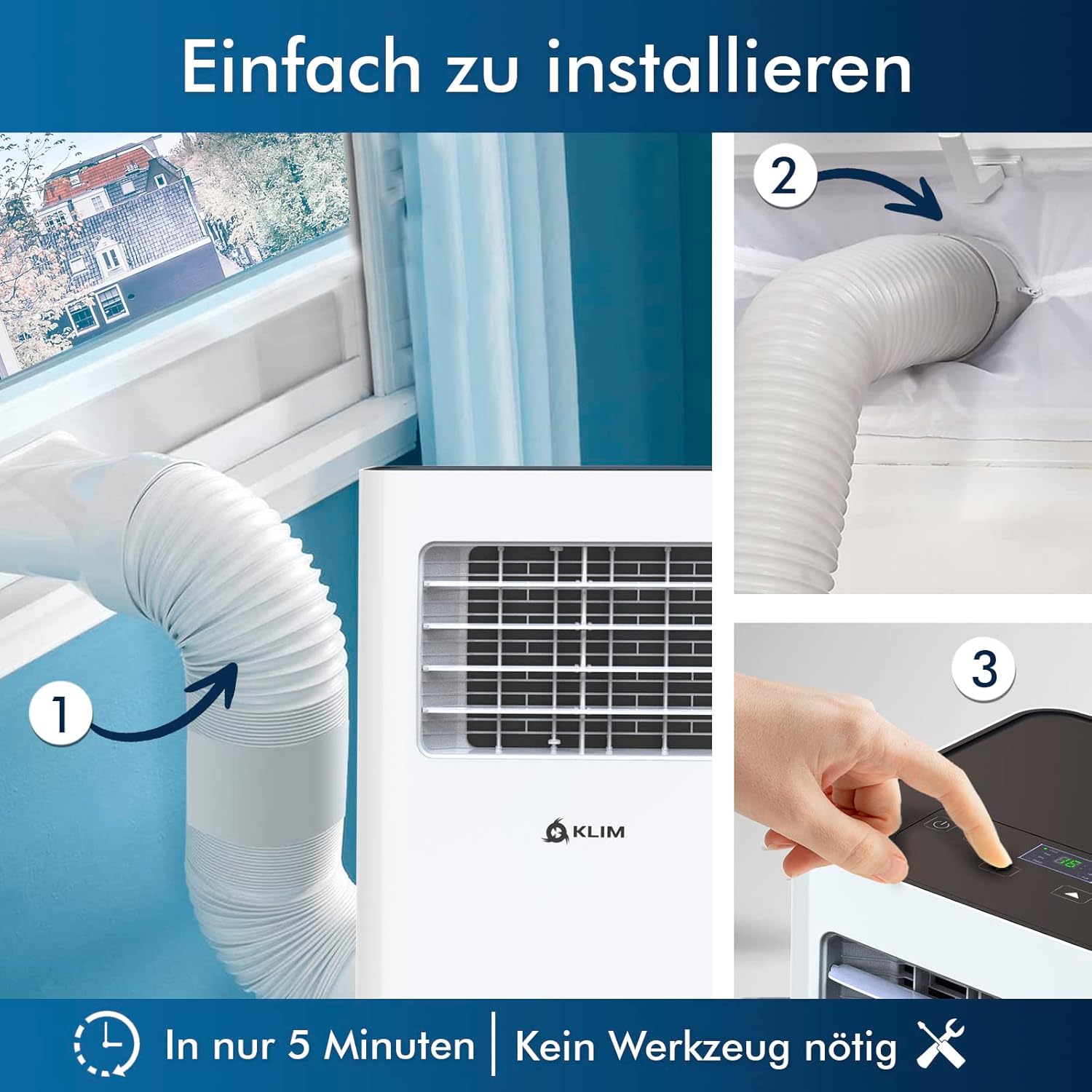
รูปที่ 5.1: Visual guide for quick installation, typically completed in 5 minutes without special tools.

รูปที่ 5.2: Illustration of window kit compatibility, showing options for sliding windows and mentioning a separate seal for tilt windows.
6. คู่มือการใช้งาน
The KLIM K9000 can be operated via the control panel on the unit or the included remote control.
6.1. แผงควบคุมและรีโมทคอนโทรล
The remote control allows convenient operation from a distance. Ensure AAA batteries are correctly inserted. The control panel on the unit provides direct access to all functions.
6.2. โหมดการทำงาน
- โหมดทำความเย็น: Activates the compressor to cool the room. Set your desired temperature (down to 16°C). This mode is effective for rooms up to 20 m² (80 m³).
- โหมดพัดลม: Circulates air without cooling. Adjustable fan speeds are available.
- โหมดเครื่องลดความชื้น: Removes excess moisture from the air. In this mode, the unit collects water, which will need to be drained.
- โหมดสลีป: Designed for quiet operation during rest. The unit operates at a reduced noise level (approx. 65 dB) and may adjust temperature settings automatically for comfort.

รูปที่ 6.1: The sleep mode provides a cool and quiet environment for restful sleep, operating at approximately 65 dB.
To switch between modes, press the "Mode" button on the control panel or remote control.
7. การบำรุงรักษา
Regular maintenance ensures the longevity and efficiency of your KLIM K9000.
7.1. การทำความสะอาดตัวกรองอากาศ
The air filter should be cleaned every two weeks or more frequently depending on usage. A dirty filter can reduce cooling efficiency and airflow.
- ถอดปลั๊กเครื่องปรับอากาศออกจากเต้าเสียบไฟฟ้า
- ค้นหาและถอดตัวกรองอากาศ (โดยปกติจะอยู่ที่ด้านหลังหรือด้านข้างของเครื่อง)
- ล้างตัวกรองด้วยน้ำอุ่นผสมสบู่ ล้างให้สะอาดและปล่อยให้แห้งสนิทก่อนใส่กลับเข้าไปใหม่
- ติดตั้งตัวกรองแห้งกลับเข้าไปและเสียบปลั๊กเครื่องกลับเข้าไป
7.2. การระบายน้ำ
The unit features an auto-evaporation system in cooling mode, reducing the need for frequent drainage. However, in high humidity or dehumidifier mode, water will accumulate and needs to be drained.
- การระบายน้ำอย่างต่อเนื่อง: For continuous dehumidification, attach the drainage hose to the drain outlet and direct it to a suitable container or floor drain.
- การระบายน้ำด้วยตนเอง: When the internal water tank is full, the unit may stop operating and display an indicator. To drain manually, unplug the unit, place a shallow pan or tray under the drain plug, and remove the plug. Be aware that the internal water container can be cumbersome to empty, and it may require two people to safely tilt the unit for complete drainage if using the bottom drain.
8 การแก้ไขปัญหา
โปรดดูหัวข้อนี้เพื่อดูปัญหาทั่วไปและวิธีแก้ไข
| ปัญหา | สาเหตุที่เป็นไปได้ | สารละลาย |
|---|---|---|
| เครื่องไม่เปิด | ไม่มีไฟ เบรกเกอร์สะดุด ถังน้ำเต็ม | ตรวจสอบสายไฟ รีเซ็ตเบรกเกอร์ ระบายน้ำในถัง |
| ระบายความร้อนไม่เพียงพอ | Dirty air filter, blocked air intake/outlet, open windows/doors, room too large, exhaust hose not properly installed. | Clean filter, clear obstructions, close windows/doors, ensure proper exhaust hose installation. |
| หน่วยมีเสียงดัง | Normal operation sound (compressor/fan), unit not on a level surface. | The unit operates at approximately 65 dB, which is normal. Ensure it is on a flat surface. |
| น้ำรั่ว. | Drain plug not securely closed, drainage hose improperly connected. | Check drain plug, ensure drainage hose is securely attached and not kinked. |
หากปัญหายังคงมีอยู่หลังจากพยายามแก้ไขปัญหาเหล่านี้แล้ว โปรดติดต่อฝ่ายสนับสนุนลูกค้า
9. ข้อมูลจำเพาะ
| ยี่ห้อ | คลิม |
| หมายเลขรุ่น | K9000WH |
| ความสามารถในการทำความเย็น | 9000 บีทียู |
| ขนาดห้องที่แนะนำ | สูงสุด 20 ตารางเมตร (80 ลูกบาศก์เมตร) |
| ฟังก์ชั่น | เครื่องทำความเย็น, เครื่องลดความชื้น, พัดลม |
| ระดับประสิทธิภาพการใช้พลังงาน | A |
| ปริมาณการใช้ไฟฟ้าประจำปี | 960 วัตต์ |
| ระดับเสียง | 65 เดซิเบล |
| สารทำความเย็น | R-290 (Natural Refrigerant) |
| ขนาด (กว้าง x ยาว x สูง) | 29.5 x 32.5 x 70.4 ซม. |
| น้ำหนัก | 25.58 กก. |
| วัสดุ | เอบีเอส |
| แหล่งพลังงาน | สายไฟฟ้า |

รูปที่ 9.1: The KLIM K9000's high energy efficiency (Class A) contributes to cost savings and environmental protection.
10. การรับประกันและการสนับสนุน
The KLIM K9000 Portable Air Conditioner comes with a รับประกัน 5 ปีเพื่อให้คุณอุ่นใจทั้งในเรื่องคุณภาพและประสิทธิภาพ
For technical assistance, warranty claims, or any questions not covered in this manual, please contact KLIM customer support through their official website or the retailer where the product was purchased. Please have your model number (K9000WH) and purchase date ready.


