User Manual: AXIS P1468-LE Compact Outdoor Camera
Model: 02342-001 | Brand: Axis Communications
การแนะนำ
The AXIS P1468-LE is a robust, outdoor-ready network camera designed for advanced surveillance scenarios. It delivers excellent image quality and incorporates deep learning-based analytics at the edge, enhancing its capabilities for intelligent monitoring. This camera also features built-in cybersecurity measures to ensure secure operation. This manual provides essential information for the setup, operation, and maintenance of your AXIS P1468-LE camera.
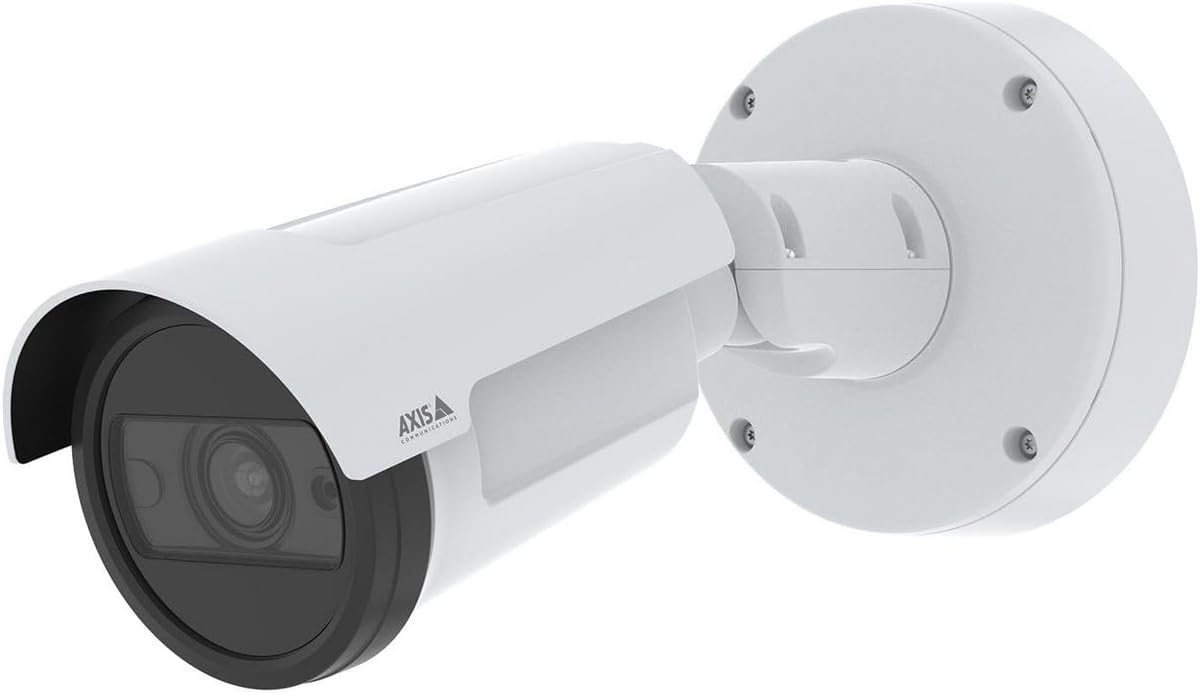
รูปที่ 1: The AXIS P1468-LE Compact Outdoor Camera, showcasing its white cylindrical body, integrated sunshield, and wall-mount bracket. The camera features a dark lens housing and the Axis Communications logo on its side.
การตั้งค่า
1. เนื้อหาบรรจุภัณฑ์
ก่อนที่จะเริ่มการติดตั้ง ตรวจสอบว่าส่วนประกอบทั้งหมดมีครบ:
- กล้องเครือข่าย AXIS P1468-LE
- คู่มือการติดตั้ง
- ขายึดและฮาร์ดแวร์
- เจาะแม่แบบ
- Resistorx® T20 tool
2. การติดตั้งกล้อง
The AXIS P1468-LE is designed for wall or ceiling mounting. Ensure the mounting surface is strong enough to support the camera's weight and withstand environmental conditions.
- เลือกสถานที่: เลือกสถานที่ที่ตรงกับความต้องการด้านต่างๆ ที่ต้องการ view and is within reach of network and power connections.
- เตรียมพื้นผิว: ใช้แม่แบบเจาะที่ให้มาเพื่อทำเครื่องหมายตำแหน่งรูเจาะบนพื้นผิวที่จะติดตั้ง
- ติดตั้งวงเล็บ: Secure the mounting bracket using appropriate screws and anchors for your surface type.
- ติดกล้อง: Mount the camera body onto the bracket, ensuring it is securely fastened. Adjust the camera's angle for optimal viewการไอเอ็นจี
3 การเชื่อมต่อเครือข่ายและแหล่งจ่ายไฟ
Connect the camera to your network and power source. The camera supports Power over Ethernet (PoE) for simplified installation.
- สายอีเธอร์เน็ต: Connect a standard Ethernet cable from your network switch (preferably PoE-enabled) to the camera's Ethernet port.
- พลังงาน (ไม่จำเป็น): If PoE is not used, connect a compatible power adapter (not included) to the camera's power input. Refer to specifications for voltagข้อกำหนดอี
4. การกำหนดค่าเริ่มต้น
หลังจากติดตั้งเสร็จแล้ว ให้เข้าถึงกล้อง web อินเทอร์เฟซสำหรับการตั้งค่าเริ่มต้น
- ค้นพบกล้องถ่ายรูป: ใช้โปรแกรม AXIS IP Utility หรือ AXIS Device Manager เพื่อค้นหากล้องในเครือข่ายของคุณ
- เข้าถึง Web อินเทอร์เฟซ: เปิด web เปิดเบราว์เซอร์และป้อนที่อยู่ IP ของกล้อง
- Set Root Password: For security, you will be prompted to set a new root password upon first access.
- กำหนดค่าการตั้งค่า: Follow the on-screen wizard to configure basic settings such as IP address, date/time, and video stream settings.
การใช้งานกล้อง
1. สด View และการบันทึก
เข้าชมภาพสดจากกล้อง view and manage recording settings through its web อินเทอร์เฟซหรือซอฟต์แวร์จัดการวิดีโอ (VMS) ที่ใช้งานร่วมกันได้
- สด View: ไปที่ "ถ่ายทอดสด" View" tab to see the real-time video feed.
- การบันทึก: Configure recording schedules, motion detection triggers, and storage locations (e.g., SD card, network storage) under the "Recordings" or "Events" section.
2. คุณสมบัติขั้นสูง
The AXIS P1468-LE offers several advanced features for enhanced surveillance:
- Deep Learning Analytics: Utilize built-in analytics for object classification, motion detection, and other intelligent event triggers. Configure these under the "Applications" or "Analytics" menu.
- Cybersecurity Features: The camera includes features like signed firmware and secure boot to prevent unauthorized access and ensure system integrity. Regularly check for firmware updates to maintain security.
- การส่องสว่างด้วยอินฟราเรด: The integrated IR LEDs provide clear video in low-light or complete darkness. This feature is typically automatic but can be adjusted in video settings.
การซ่อมบำรุง
1. การทำความสะอาดกล้อง
การทำความสะอาดเป็นประจำช่วยให้ได้คุณภาพของภาพที่ดีที่สุดและยืดอายุการใช้งานของกล้อง
- เลนส์: Gently wipe the lens with a soft, lint-free cloth moistened with a mild cleaning solution or lens cleaner. Avoid abrasive materials.
- ที่อยู่อาศัย: ทำความสะอาดตัวกล้องด้วยโฆษณาamp ผ้า. อย่าใช้ผงซักฟอกหรือตัวทำละลายที่มีฤทธิ์รุนแรง
2. การอัปเดตเฟิร์มแวร์
Keep the camera's firmware updated to benefit from the latest features, performance improvements, and security patches.
- ตรวจสอบการอัปเดต: Visit the Axis Communications website or use AXIS Device Manager to check for available firmware updates for your model.
- การติดตั้ง: Follow the instructions provided by Axis for safe firmware installation. Ensure a stable power supply during the update process.
การแก้ไขปัญหา
| ปัญหา | สาเหตุที่เป็นไปได้ | สารละลาย |
|---|---|---|
| ไม่มีฟีดวิดีโอ | ปัญหาด้านไฟฟ้า, สายเคเบิลเครือข่ายหลุด, ที่อยู่ IP ไม่ถูกต้อง | Check power supply/PoE, ensure Ethernet cable is securely connected, verify camera's IP address and network settings. |
| คุณภาพของภาพไม่ดี | Dirty lens, improper focus, low light conditions, incorrect video settings. | Clean the lens, adjust focus via web interface, ensure IR illumination is active in low light, check resolution and compression settings. |
| ไม่สามารถเข้าถึงได้ web อินเทอร์เฟซ | ที่อยู่ IP ไม่ถูกต้อง ปัญหาการเชื่อมต่อเครือข่าย ไฟร์วอลล์ปิดกั้นการเข้าถึง | Verify IP address, check network connection, temporarily disable firewall to test, reset camera to factory defaults if necessary. |
ข้อมูลจำเพาะ
| คุณสมบัติ | รายละเอียด |
|---|---|
| ยี่ห้อ | แอ็กซิส คอมมิวนิเคชั่นส์ |
| ชื่อรุ่น | AXIS P1468-LE - Netzwerk-Überwachungskam |
| หมายเลขรุ่นสินค้า | 02342-001 |
| ASIN | B0BNZ1MW19 |
| การใช้งานภายใน/ภายนอกอาคาร | กลางแจ้ง |
| เทคโนโลยีการเชื่อมต่อ | มีสาย |
| โปรโตคอลการเชื่อมต่อ | โฮมปลั๊ก |
| ประเภทตัวควบคุม | ไอริส |
| ประเภทการติดตั้ง | ติดผนัง |
| สี | สีขาว |
| จำนวนรายการ | 1 |
| ส่วนประกอบที่รวมอยู่ | กล้อง/อุปกรณ์เสริม |
| จำนวนช่องสัญญาณ | 4 |
| เทคโนโลยีการสื่อสารไร้สาย | ไวไฟ |
| วัสดุ | โลหะ |
| วัดtage | 16 วัตต์ |
| ขนาดรายการ (LxWxH) | 19.69 x 19.69 x 11.02 นิ้ว |
| จำเป็นต้องใช้แบตเตอรี่หรือไม่? | เลขที่ |
| น้ำหนักสินค้า | 1.5 กิโลกรัม (3.3 ปอนด์) |
| ประเภทการซูม | ซูมออปติคอล |
| ประเภทการแจ้งเตือน | การเคลื่อนไหวเท่านั้น |
| ประเภทห้อง | สำนักงาน |
| ประเภทแหล่งกำเนิดแสง | อินฟราเรด |
| รูปแบบการจับภาพวิดีโอ | MPEG-4 |
| จำนวนหน่วย | 1.0 จำนวน |
| เทคโนโลยีโฟโต้เซนเซอร์ | ซีมอส |
| การให้คะแนนการคุ้มครองระหว่างประเทศ | IP66, IP67 |
| วิธีการควบคุม | แอป |
| ระบบปฏิบัติการ | ไอโอเอส |
| ผู้ผลิต | แกน - กล้อง |
| วันที่พร้อมใช้งานครั้งแรก | 31 กรกฎาคม 2022 |
| การใช้งานที่แนะนำสำหรับผลิตภัณฑ์ | การเฝ้าระวัง |
| คุณสมบัติพิเศษ | Mac, Netcam, PC, Wireless connectivit |
การรับประกันและการสนับสนุน
1. การรับประกันสินค้า
Axis Communications products typically come with a limited hardware warranty. For specific warranty terms and conditions applicable to your AXIS P1468-LE camera, please refer to the warranty documentation included with your purchase or visit the official Axis Communications webเว็บไซต์.
2. การสนับสนุนด้านเทคนิค
For technical assistance, troubleshooting, or further inquiries regarding your AXIS P1468-LE camera, please contact Axis Communications support:
- การสนับสนุนทางออนไลน์: เยี่ยมชม Axis Communications Support Portal for FAQs, documentation, and software downloads.
- ข้อมูลติดต่อ: Find regional contact details for phone or email support on the official Axis Communications webเว็บไซต์.
When contacting support, please have your camera's model number (02342-001) and serial number ready.


