1. บทนำ
Thank you for choosing the Nexxt Indoor Smart Camera. This manual provides essential information for the safe and efficient use of your new device. Please read it thoroughly before installation and operation, and retain it for future reference.
This 1080p HD fixed room camera is designed to provide reliable indoor surveillance with features such as night vision, two-way audio communication, motion detection, and seamless integration with smart home ecosystems like Amazon Alexa and Google Assistant.
2. ข้อมูลด้านความปลอดภัย
- Ensure the camera is powered by the provided power adapter. Using unauthorized adapters may damage the device and void the warranty.
- Do not expose the camera to water, moisture, or extreme temperatures. It is designed for indoor use only.
- หลีกเลี่ยงการวางกล้องไว้กลางแสงแดดโดยตรงหรือใกล้แหล่งความร้อน
- อย่าพยายามถอดประกอบหรือซ่อมแซมกล้องด้วยตนเอง โปรดติดต่อช่างผู้ชำนาญเพื่อขอรับบริการ
- เก็บกล้องและอุปกรณ์เสริมให้พ้นมือเด็กและสัตว์เลี้ยง
- Ensure stable Wi-Fi connectivity for optimal performance.
3. เนื้อหาบรรจุภัณฑ์
ตรวจสอบว่ามีรายการทั้งหมดอยู่ในแพ็คเกจ:
- NEXXT Indoor Smart Camera (NHC-I710)
- อะแดปเตอร์แปลงไฟ
- ยืน
- คู่มือการใช้งาน (เอกสารนี้)

Image: The retail packaging of the NEXXT Indoor Smart Camera, showing the camera and key features.
4. สินค้าหมดview
The Nexxt Indoor Smart Camera offers a range of features for comprehensive home monitoring:
- ความละเอียด Full HD 1080p: ให้ภาพวิดีโอที่ชัดเจนและมีรายละเอียดtage.
- ระบบมองเห็นกลางคืนอัตโนมัติ: Integrated infrared LEDs enable clear monitoring in low-light conditions up to 30 feet.
- การสื่อสารสองทาง: Built-in microphone and speaker allow for real-time audio interaction.
- การตรวจจับการเคลื่อนไหว: แจ้งเตือนคุณถึงการเคลื่อนไหวที่ตรวจพบภายในขอบเขตของกล้อง view.
- ที่เก็บข้อมูลท้องถิ่นและคลาวด์: Supports microSD cards (sold separately) and Microsoft Azure cloud storage (subscription sold separately) for recording.
- การรวมระบบบ้านอัจฉริยะ: Compatible with Amazon Alexa and Google Assistant for voice control and integration into smart routines.
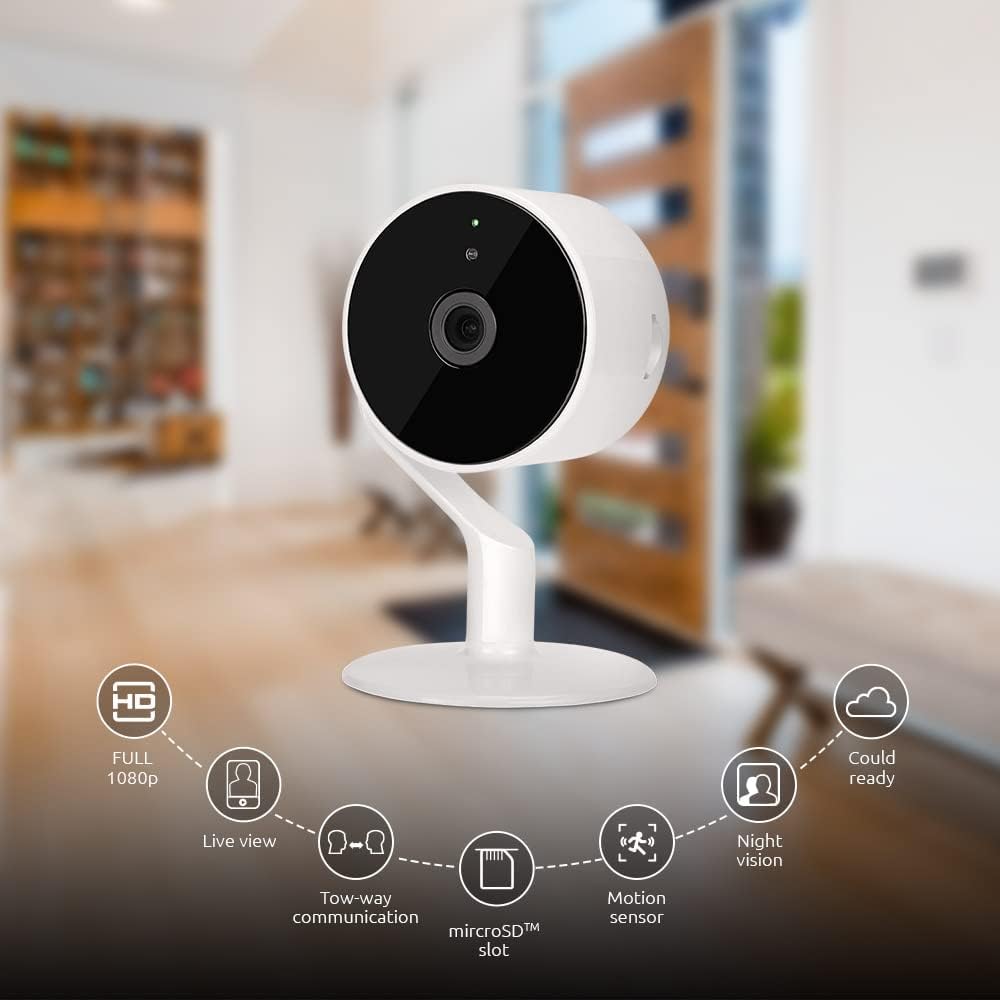
Image: The NEXXT Indoor Smart Camera highlighting its key features: Full HD 1080p, Live View, Two-way communication, microSD slot, Motion sensor, Night vision, and Cloud ready.
5. การตั้งค่า
5.1 การเปิดเครื่อง
- Place the camera on a stable, flat surface or mount it using appropriate hardware (not included).
- เชื่อมต่ออะแดปเตอร์ไฟฟ้าเข้ากับพอร์ตอินพุตไฟฟ้าของกล้อง
- Plug the power adapter into a standard electrical outlet. The camera will power on and its indicator light will begin to flash, indicating it's ready for pairing.
5.2 การติดตั้งและการจับคู่แอป
To control and monitor your camera, you need to download the Nexxt Home App:
- ดาวน์โหลด แอพเน็กซ์โฮม จาก ร้านค้า Google Play (สำหรับอุปกรณ์ Android) หรือ แอปสโตร์ของแอปเปิล (สำหรับอุปกรณ์ iOS)
- Open the Nexxt Home App and create a new account or log in if you already have one.
- แตะไอคอน "+" หรือ "เพิ่มอุปกรณ์" เพื่อเริ่มกระบวนการจับคู่
- Select "Camera" or the specific camera model from the list of devices.
- Follow the on-screen instructions in the app to connect the camera to your home Wi-Fi network. This typically involves scanning a QR code displayed on your phone with the camera.
- Once connected, the camera's indicator light will turn solid, and you will see the camera added to your app.

Image: Illustration showing the NEXXT Indoor Smart Camera being set up to function as a webcam, connecting to a laptop.
6. คู่มือการใช้งาน
6.1 สด View
From the Nexxt Home App, tap on your camera's name to access the live video feed. You can view ฟูแบบเรียลไทม์tage of your monitored area.

Image: The NEXXT Indoor Smart Camera on a desk, with text indicating "Full HD resolution" and its ability to provide 1080p high-quality video day or night.
6.2 การสนทนาสองทาง
ขณะถ่ายทอดสด view, tap the microphone icon in the app to enable two-way audio. You can speak through your phone, and your voice will be projected through the camera's speaker. Tap the icon again to end communication.

Image: An illustration depicting communication between a person using a phone and another person near the camera, symbolizing the two-way talk feature.
6.3 การมองเห็นตอนกลางคืน
The camera automatically switches to night vision mode in low-light conditions. You can also manually toggle night vision on/off within the app settings for the camera.

Image: A split image showing a room in daylight on one side and the same room in night vision on the other, demonstrating the camera's night vision capability.

Image: A smartphone screen displaying the Nexxt Home app interface with a night vision toggle switch, overlaid on a room scene, indicating active night vision monitoring.
6.4 การตรวจจับการเคลื่อนไหวและการแจ้งเตือน
Configure motion detection sensitivity and alert preferences in the app. When motion is detected, you will receive notifications on your smartphone.

Image: A person sleeping in bed with a motion detection icon overlaid, indicating advanced motion detection with an effective range of up to 30 feet.

Image: A woman holding a smartphone displaying the Nexxt Home app, with text indicating that advanced human identification technology helps reduce false alarms and unwanted notifications.
6.5 การบันทึกและจัดเก็บข้อมูล
The camera supports local storage via a microSD card (up to 128GB, not included) and cloud storage via Microsoft Azure (subscription required, sold separately). Insert the microSD card into the designated slot on the camera. Manage recording settings and view บันทึกเสียงฟูtage through the Nexxt Home App.
6.6 การแบ่งปันการเข้าถึง
You can securely share your camera's security feed with multiple approved devices, allowing family members or trusted individuals to also monitor your home.

Image: Two smartphones displaying the Nexxt Home app, with text stating "Everyone Can Keep Watch" and explaining that the security feed can be securely shared with multiple approved devices.
6.7 การรวมระบบบ้านอัจฉริยะ
The Nexxt Indoor Smart Camera is compatible with Amazon Alexa and Google Assistant. Follow the instructions in your Alexa or Google Home app to link your Nexxt Home account and enable voice commands for your camera.
7. การบำรุงรักษา
- การทำความสะอาด: ใช้ผ้าแห้งนุ่มเช็ดทำความสะอาดเลนส์และตัวกล้อง ห้ามใช้น้ำยาทำความสะอาดหรือสเปรย์กระป๋อง
- พื้นที่จัดเก็บ: หากจะเก็บกล้องไว้เป็นเวลานาน ควรตัดการเชื่อมต่อจากแหล่งจ่ายไฟและเก็บไว้ในที่แห้งและเย็น
- อัพเดตเฟิร์มแวร์: Regularly check the Nexxt Home App for available firmware updates to ensure optimal performance and security.
8 การแก้ไขปัญหา
- กล้องไม่เชื่อมต่อกับ Wi-Fi:
- ตรวจสอบให้แน่ใจว่าเครือข่าย Wi-Fi ของคุณเป็น 2.4GHz กล้องไม่รองรับ Wi-Fi 5GHz
- ตรวจสอบรหัสผ่าน Wi-Fi ของคุณเพื่อความถูกต้อง
- ย้ายกล้องให้เข้าใกล้เราเตอร์ Wi-Fi ของคุณมากขึ้น
- รีสตาร์ทเราเตอร์และกล้องของคุณ
- ไม่มีการถ่ายทอดสด view or choppy video:
- ตรวจสอบความเร็วในการเชื่อมต่ออินเตอร์เน็ตของคุณ
- Ensure the camera has a strong Wi-Fi signal.
- Close and reopen the Nexxt Home App.
- ไม่ได้รับการแจ้งเตือนการเคลื่อนไหว:
- ตรวจสอบให้แน่ใจว่าได้เปิดใช้งานการตรวจจับการเคลื่อนไหวในการตั้งค่าแอปแล้ว
- Check your phone's notification settings for the Nexxt Home App.
- ปรับความไวในการตรวจจับการเคลื่อนไหว
- ระบบเสียงสองทางไม่ทำงาน:
- Ensure your phone's microphone is enabled for the Nexxt Home App.
- ตรวจสอบการตั้งค่าระดับเสียงบนโทรศัพท์และในแอปพลิเคชัน
9. ข้อมูลจำเพาะ
| คุณสมบัติ | ข้อมูลจำเพาะ |
|---|---|
| ชื่อรุ่น | NHC-I710 |
| ความละเอียดในการจับภาพวิดีโอ | ความคมชัดระดับ HD 1080p |
| การใช้งานภายใน/ภายนอกอาคาร | ในร่ม |
| เทคโนโลยีการเชื่อมต่อ | ไร้สาย (Wi-Fi) |
| โปรโตคอลการเชื่อมต่อ | ไวไฟ (2.4GHz) |
| แหล่งพลังงาน | สายไฟ |
| ช่วงการมองเห็นตอนกลางคืน | 30 ฟุต |
| ประเภทตัวควบคุม | Amazon Alexa, Google Assistant |
| ประเภทการติดตั้ง | ที่วางบนโต๊ะ |
| ขนาดรายการ (ยาว x กว้าง x สูง) | 3 x 7 x 3 นิ้ว |
| น้ำหนักสินค้า | 6.7 ออนซ์ (0.19 กิโลกรัม) |
| ยูพีซี | 798302056152 |
| การให้คะแนนการคุ้มครองระหว่างประเทศ | IP65 |
10. การรับประกันและการสนับสนุน
The Nexxt Indoor Smart Camera comes with a รับประกัน 2 ปี นับจากวันที่ซื้อ โปรดเก็บหลักฐานการซื้อไว้เพื่อใช้ในการเคลมประกัน
For technical support, troubleshooting assistance, or warranty inquiries, please visit the official Nexxt Solutions website or contact their customer support through the Nexxt Home App.
เน็กซ์โซลูชั่น Webเว็บไซต์: www.nextsolutions.com


