1. บทนำ
This manual provides essential instructions for the installation, operation, and maintenance of your PNI Greenhouse SC1800C PRO 3KW Hybrid Solar Inverter. This multi-functional inverter/charger combines the functions of an inverter, solar charger, and battery charger to offer uninterrupted power support in a portable design. Please read this manual thoroughly before installation and use to ensure optimal performance and safety.
2. คำแนะนำด้านความปลอดภัย
WARNING: This section contains critical safety information. Failure to follow these instructions may result in serious injury or damage to the equipment.
- การติดตั้งและการเดินสายไฟต้องดำเนินการโดยบุคลากรที่มีคุณสมบัติเหมาะสมเท่านั้น
- Do not attempt to disassemble or repair the unit yourself. Refer all servicing to authorized service personnel.
- ให้เด็กอยู่ห่างจากอินเวอร์เตอร์
- ตรวจสอบให้แน่ใจว่ามีการระบายอากาศที่เหมาะสมรอบๆ อินเวอร์เตอร์เพื่อป้องกันความร้อนสูงเกินไป
- Do not expose the inverter to rain, snow, spray, or any type of liquid.
- Before connecting or disconnecting any wiring, ensure all power sources (AC, solar, battery) are disconnected.
- Use appropriate circuit breakers and fuses as required by local electrical codes.

รูปที่ 1 : ด้านหน้า view of the inverter showing the caution label.
3. สินค้าหมดview
3.1 คุณสมบัติหลัก
- Multi-functional inverter/charger with integrated MPPT solar charge controller.
- สัญญาณเอาต์พุตแบบคลื่นไซน์บริสุทธิ์ เหมาะสำหรับอุปกรณ์อิเล็กทรอนิกส์ที่ต้องการความไวสูง
- อินพุตที่กำหนดได้ voltagผลิตภัณฑ์หลากหลายประเภทสำหรับเครื่องใช้ไฟฟ้าภายในบ้านและคอมพิวเตอร์ส่วนบุคคล
- สามารถปรับกระแสไฟชาร์จแบตเตอรี่ได้ตามการใช้งาน
- สามารถตั้งค่าลำดับความสำคัญของเครื่องชาร์จ AC/พลังงานแสงอาทิตย์ได้ผ่านการตั้งค่าบนหน้าจอ LCD
- ใช้ได้กับเมนโวลุ่มtage หรือเครื่องกำเนิดไฟฟ้า
- ระบบจะรีสตาร์ทอัตโนมัติขณะที่เครื่องปรับอากาศกำลังกู้คืนข้อมูล
- ระบบป้องกันการโอเวอร์โหลด อุณหภูมิสูงเกิน และการลัดวงจร
- การออกแบบเครื่องชาร์จแบตเตอรี่อัจฉริยะเพื่อประสิทธิภาพแบตเตอรี่ที่เหมาะสมที่สุด
- ฟังก์ชั่นการสตาร์ทขณะเย็น
- Monitoring with PC software (USB cable included) and optional WiFi dongle for remote monitoring.
3.2 เนื้อหาบรรจุภัณฑ์
ในแพ็คเกจประกอบด้วย:
- PNI Greenhouse SC1800C PRO Hybrid Solar Inverter
- สายสื่อสาร USB
- คู่มือการใช้งาน
3.3 คำอธิบายทางกายภาพ
รูปที่ 2 : ด้านหน้า view ของอินเวอร์เตอร์
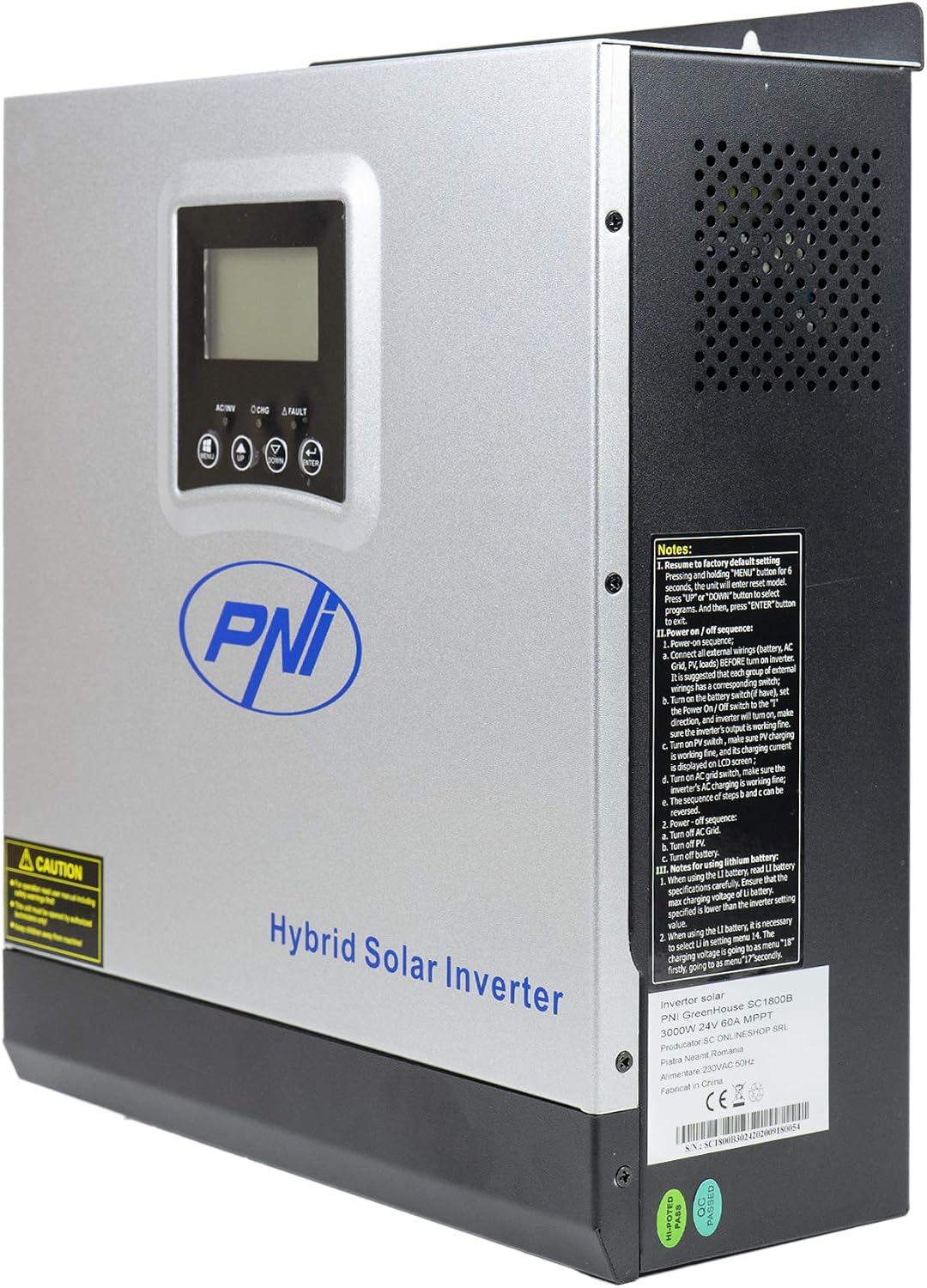
รูปที่ 3: ด้านข้าง view of the inverter, highlighting ventilation and general notes.

Figure 4: Rear panel connections. 1: AC Input, 2: AC Output, 3: ON/OFF Switch, 4: Input Breaker, 5: Battery Terminals (DC+ DC-), 6: PV Input Terminals (PV+ PV-).

Figure 5: Side panel communication ports: COM, USB, and optional WiFi port.
3.4 แผนผังการสมัคร

Figure 6: Basic application diagram. 1: Solar panels, 2: Utility grid, 3: Generator, 4: Off-Grid solar inverter, 5: Battery, 6: Home loads. Note: Generator, PV modules, WiFi module, and battery are not included.
4. การตั้งค่าและการติดตั้ง
4.1 การติดตั้งอินเวอร์เตอร์
The inverter is designed for wall mounting. Choose a suitable location that is:
- Indoors and protected from direct sunlight, rain, and dust.
- มีการระบายอากาศที่ดีเพื่อช่วยระบายความร้อน
- สามารถเข้าถึงได้ง่ายสำหรับการเดินสายไฟและการบำรุงรักษา
- Strong enough to support the inverter's weight (approximately 7.75 kg).
4.2 การเชื่อมต่อสายไฟ
All wiring must comply with local electrical codes and regulations. Ensure all power sources are disconnected before making any connections.
- การเชื่อมต่อแบตเตอรี่: Connect the 24V battery bank to the DC+ and DC- terminals (5 in Figure 4). Ensure correct polarity. The inverter supports AGM, lead-acid, GEL, and user-defined lithium-ion batteries.
- การเชื่อมต่ออินพุต AC: Connect the utility grid or generator AC input to the AC INPUT terminals (1 in Figure 4).
- การเชื่อมต่อเอาต์พุต AC: Connect your home loads to the AC OUTPUT terminals (2 in Figure 4).
- การเชื่อมต่ออินพุต PV: Connect your solar panels to the PV+ and PV- terminals (6 in Figure 4). Ensure the PV input voltage (30-120 VDC) and current (max 30A) are within the inverter's specifications.
IMPORTANT: Double-check all connections for correct polarity and secure fastening before powering on the unit.
5. การดำเนินการ
5.1 แผงควบคุม

Figure 7: Control Panel. 1: Function Buttons (MENU, UP, DOWN, ENTER), 2: LCD Display, 3: AC/INV Indicator, 4: CHG Indicator, 5: FAULT Indicator.
The LCD display shows system information such as input/output voltage, สถานะแบตเตอรี่, เปอร์เซ็นต์การโหลดtage, and operating mode. The function buttons allow you to navigate menus and configure settings.
5.2 การเปิด/ปิดเครื่อง
- การเปิดเครื่อง:
a. Ensure all wiring connections are secure.
b. Turn on the battery breaker (if installed).
c. Turn on the PV input breaker (if installed).
d. Turn on the AC input breaker (if connected to utility/generator).
e. Press the ON/OFF switch (3 in Figure 4) on the inverter to the 'ON' position. The inverter will perform a self-test and the LCD will light up. - วิธีปิดเครื่อง:
a. Disconnect all AC loads from the inverter.
b. Press the ON/OFF switch to the 'OFF' position.
c. Turn off the AC input breaker.
d. Turn off the PV input breaker.
e. Turn off the battery breaker.
5.3 โหมดการทำงาน
The inverter supports various operating modes, configurable via the LCD menu:
- SBU (Solar-Battery-Utility) Priority: พลังงานแสงอาทิตย์เป็นแหล่งพลังงานหลัก รองลงมาคือแบตเตอรี่ และสุดท้ายคือระบบไฟฟ้าจากโครงข่ายไฟฟ้า
- UTI (Utility) Priority: Utility grid is the primary source, followed by solar, then battery.
- SOL (Solar) Priority: พลังงานแสงอาทิตย์เป็นแหล่งพลังงานหลัก รองลงมาคือไฟฟ้าจากโครงข่ายไฟฟ้า และสุดท้ายคือแบตเตอรี่

Figure 8: Illustration of various operating and charging modes.
5.4 Monitoring and Communication
- การเชื่อมต่อผ่าน USB: Connect the inverter to a PC using the provided USB cable (Figure 5) to monitor system status and configure advanced settings via dedicated software.
- Optional WiFi Dongle: For remote monitoring via mobile app or PC, an optional WiFi dongle can be connected to the designated port (Figure 5).
6. การบำรุงรักษา
การบำรุงรักษาอย่างสม่ำเสมอจะช่วยให้เครื่องแปลงกระแสไฟฟ้าของคุณมีอายุการใช้งานยาวนานและทำงานได้อย่างมีประสิทธิภาพสูงสุด
- การทำความสะอาด: Periodically clean the exterior of the inverter and ensure ventilation openings are free from dust and debris. Use a dry cloth.
- การเชื่อมต่อ: ควรตรวจสอบความแน่นหนาของจุดเชื่อมต่อไฟฟ้าทั้งหมดและร่องรอยการกัดกร่อนเป็นประจำทุกปี
- สุขภาพแบตเตอรี่: ตรวจสอบปริมาณแบตเตอรี่tage and health, especially for lead-acid batteries, to ensure they are functioning correctly.
- สิ่งแวดล้อม: ตรวจสอบให้แน่ใจว่าสภาพแวดล้อมในการทำงานคงอยู่ในช่วงอุณหภูมิที่กำหนด (-26°C ถึง +80°C) และระดับความชื้นที่กำหนด
CAUTION: Disconnect all power sources before performing any maintenance.
7 การแก้ไขปัญหา
ส่วนนี้จะนำเสนอขั้นตอนการแก้ไขปัญหาเบื้องต้นสำหรับปัญหาทั่วไป สำหรับปัญหาที่ซับซ้อนกว่านี้ โปรดติดต่อฝ่ายสนับสนุนด้านเทคนิค
| ปัญหา | สาเหตุที่เป็นไปได้ | สารละลาย |
|---|---|---|
| อินเวอร์เตอร์ไม่เปิด | ไม่มีการต่อแบตเตอรี่; ปริมาณแบตเตอรี่tage too low; ON/OFF switch is off | Check battery connections; Charge battery; Turn ON/OFF switch to 'ON' |
| ไม่มีเอาท์พุต AC | โอเวอร์โหลด; ไฟฟ้าลัดวงจร; อินเวอร์เตอร์ขัดข้อง | Reduce load; Check for short circuits; Restart inverter; Contact support if fault persists |
| แบตเตอรี่ไม่ชาร์จ | PV input too low/disconnected; AC input disconnected; Charger fault | Check PV connections and sunlight; Check AC input; Verify charger settings; Contact support |
| เสียงสัญญาณเตือน | Low battery; Overload; Over-voltage; Disconnected battery | Check battery level; Reduce load; Check input voltage; Reconnect battery |
8. ข้อมูลจำเพาะ
| คุณสมบัติ | ข้อมูลจำเพาะ |
|---|---|
| ชื่อรุ่น | SC1800C PRO |
| กำลังไฟที่กำหนด | 3000 วัตต์ / 3000 VA |
| พลังสูงสุด | 6000 VA (0.5 seconds) |
| ปริมาณแบตเตอรี่tage | 24 โวลต์ |
| แบตเตอรี่ที่ใช้ร่วมกันได้ | AGM, Lead-acid, GEL, Lithium-ion (user-defined) |
| Minimum Start-up Voltage | 23 V (cold start) |
| รูปคลื่น | เพียวไซน์เวฟ |
| ความถี่เอาต์พุต | 50, 60 เฮิรตซ์ |
| อินพุต AC Voltage | 230 โวลต์ |
| กำลังอินพุต PV สูงสุด | 2000 วัตต์ |
| อินพุต PV สูงสุด Voltagอี (วีเอ็มพี) | 30 - 120 โวลต์ดีซี |
| กระแสไฟชาร์จพลังงานแสงอาทิตย์สูงสุด | 60 ก |
| ประเภทเครื่องชาร์จพลังงานแสงอาทิตย์ | เอ็มพีพีที |
| กระแสไฟชาร์จ AC สูงสุด | 30 ก |
| ประสิทธิภาพของอินเวอร์เตอร์ | 90% ~ 93% |
| ระยะเวลาการโอน | 10 ms (UPS), 20 ms (APL) |
| อุณหภูมิในการทำงาน | -26°C ~ +80°C |
| ขนาด (กว้าง x ยาว x สูง) | 350 x 290 x 120 mm (Product description) / 330 x 290 x 100 mm (Specifications) |
| น้ำหนัก | 6.9 kg (Product description) / 7.75 kg (Specifications) |
| การบริโภคสแตนด์บาย | ~25 W (~12.5 W in energy saving mode) |
| การสื่อสาร | USB, optional WiFi module |
9. การรับประกันและการสนับสนุน
9.1 ข้อมูลการรับประกัน
The PNI Greenhouse SC1800C PRO Hybrid Solar Inverter comes with a manufacturer's warranty. Please refer to the warranty card included with your product or contact your retailer for specific warranty terms and conditions. Keep your purchase receipt as proof of purchase.
9.2 การสนับสนุนด้านเทคนิค
For technical assistance, troubleshooting beyond this manual, or service inquiries, please contact PNI customer support or your authorized dealer. Have your product model number and serial number ready when contacting support.


