การแนะนำ
โซนิคเค้ก Amphonix QAP-10 is a portable, rechargeable plug-in headphone amplifier designed for electric guitars. It features multiple built-in effects, including clean, overdrive, distortion, modulation, delay, and reverb, allowing for versatile tone shaping. With Bluetooth audio and an auxiliary input, it provides a convenient solution for silent practice and jamming along with backing tracks.

รูปที่ 1: โซนิเค้ก Amphonix QAP-10 Guitar Headphone Ampชีวิต
This image displays the compact, black SONICAKE Amphonix QAP-10 headphone amplifier with its 1/4-inch jack plugged in, showing the illuminated effect indicators.
การตั้งค่า
การชาร์จอุปกรณ์
การ Amphonix QAP-10 is USB-rechargeable and provides up to 5 hours of continuous operation on a full charge. Use the included USB charging cable to connect the device to a standard USB power source (e.g., computer USB port, USB wall adapter).
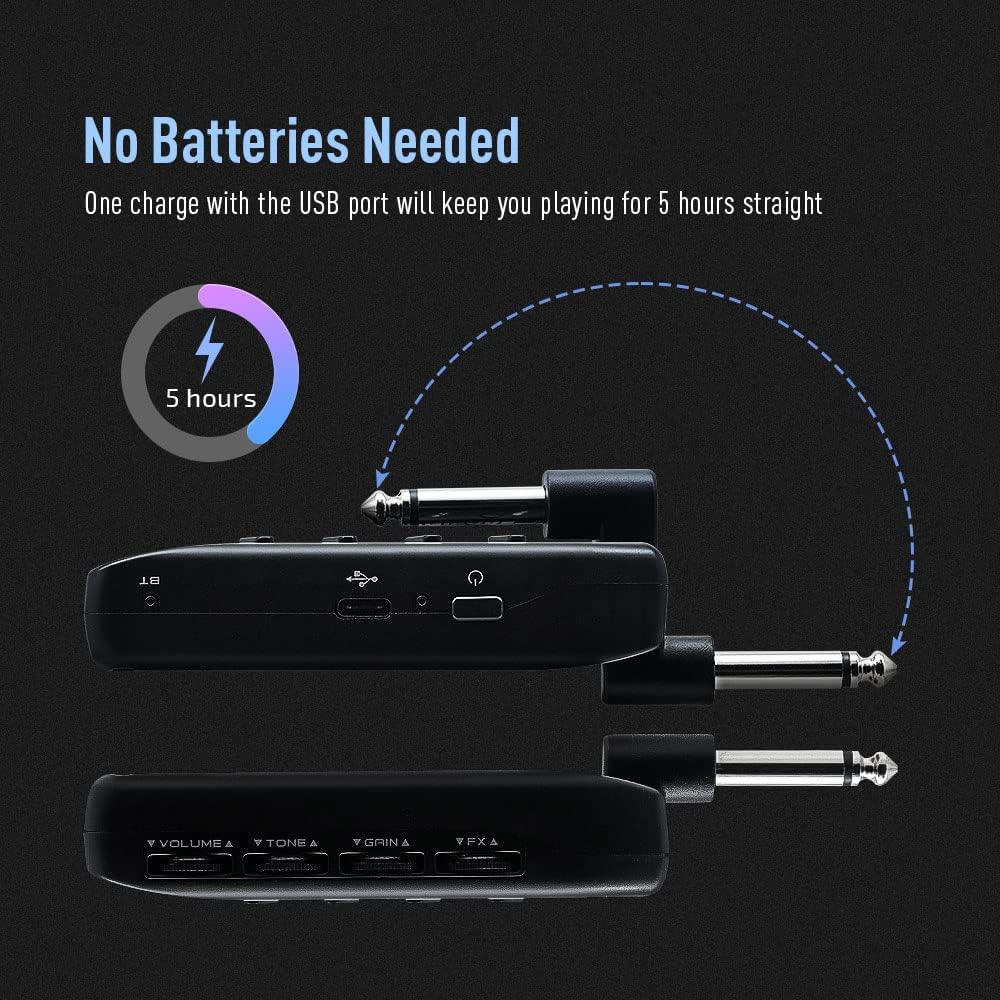
Figure 2: Charging the Amphonix QAP-10
This illustration shows the Amphonix QAP-10 being charged via a USB cable, highlighting its 5-hour battery life.
Connecting to Your Guitar and Headphones
- เสียบแจ็คขนาด 1/4 นิ้วของ Amphonix QAP-10 directly into your electric guitar's output jack.
- Connect your wired headphones to the headphone output jack on the Amphonix QAP-10.
- To use an external audio source, connect it to the AUX input jack.

รูปที่ 3: การเชื่อมต่อ Amphonix QAP-10
ภาพนี้แสดงให้เห็น Amphonix QAP-10 connected to a guitar and headphones, illustrating the various input and output ports.
จับคู่บลูทู ธ
การ Amphonix QAP-10 supports Bluetooth audio input for playing along with backing tracks. To pair:
- เปิดเครื่อง Amphonix QAP-10. The Bluetooth indicator light will flash.
- On your smartphone or computer, enable Bluetooth and search for available devices.
- เลือก "Amphonix" from the list to pair. Once paired, the Bluetooth indicator light will become solid.
- Audio from your paired device will now play through your headphones along with your guitar signal.
Video 1: Sonicake Amphonix Bluetooth headphone guitar amplifier มากกว่าview
This video demonstrates the features and connectivity of the Sonicake Amphonix, including its Bluetooth capabilities for playing along with music.
การดำเนินการ Ampชีวิต
การ Amphonix QAP-10 features intuitive controls for adjusting your tone and effects.
ควบคุมมากกว่าview

รูปที่ 4: Amphonix QAP-10 Controls
This image highlights the four control dials (Volume, Tone, Gain, FX) and the effect module buttons on the Amphonix QAP-10.
- ปริมาณ: ปรับระดับเสียงโดยรวมที่ส่งออกไปยังหูฟังของคุณ
- โทนสี : Shapes the tonal characteristics, from darker to brighter sounds.
- ได้รับ: ควบคุมปริมาณการบิดเบือนหรือโอเวอร์ไดรฟ์
- ฟอเร็กซ์: Adjusts the intensity or parameter of the selected effect.
- AMP/MOD/DLY/RVB Buttons: Press these buttons to cycle through the different amplifier models and effect types within each module. The illuminated LEDs indicate the currently selected setting.
Amplifier and Effect Modules
การ Amphonix QAP-10 features 6 AMP modules and 18 effects across Modulation (MOD), Delay (DLY), and Reverb (RVB) modules. These can be used simultaneously.
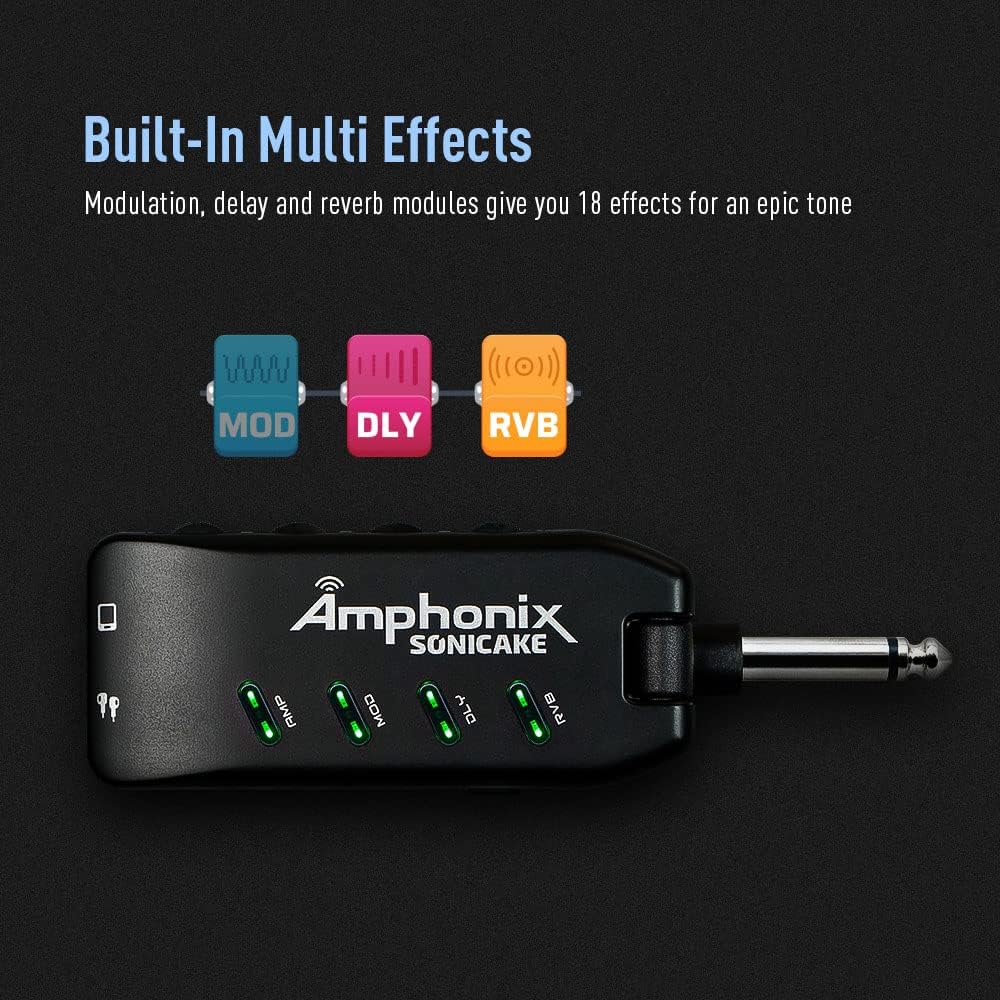
Figure 5: Effect Module Indicators
This image shows the illuminated AMP, MOD, DLY, and RVB indicators on the Amphonix QAP-10, signifying active effect modules.
| โมดูล | สี | ชื่อ | Description / Based On |
|---|---|---|---|
| AMP | สีเขียว | คลีน 1 | Fender Bassman* |
| สีฟ้า | คลีน 2 | แจ๊สระดับตำนาน Amp* | |
| สีแดง | โอเวอร์ไดรฟ์ 1 | Orange Rockerverb 50* | |
| ไซยาน | โอเวอร์ไดรฟ์ 2 | Marshall JCM 800* | |
| สีเหลือง | ความบิดเบี้ยว 1 | Mesa/Boogie Dual Rectifier* | |
| สีชมพู | ความบิดเบี้ยว 2 | ENGL Powerball II* | |
| ม็อด | สีเขียว | ประสานเสียง | Produces a vintage chorus sound |
| สีฟ้า | โรตารี่ | Produces a rotary speaker sound | |
| สีแดง | ลูกคอ | สร้างเสียงลูกคอแบบออปติคัลแบบคลาสสิก | |
| ไซยาน | การสั่นเสียง | Produces a natural vibrato sound | |
| สีเหลือง | ฟแลนเจอร์ | สร้างโทนเสียงแฟลนเจอร์สุดคลาสสิก | |
| สีชมพู | Phaser | ให้สีที่สดใสและคมชัดasinโทนเสียงจี | |
| ด.ช | สีเขียว | เสียงสะท้อนที่อบอุ่น | ทำให้เกิดความอบอุ่น วินtage เอฟเฟกต์การหน่วงเวลาเสียงแบบอะนาล็อก |
| สีฟ้า | เพียวเอคโค่ | สร้างเอฟเฟกต์การหน่วงเวลาที่แม่นยำและบริสุทธิ์ | |
| สีแดง | เทปก้อง | จำลองเสียงสะท้อนจากเครื่องเทป | |
| ไซยาน | มดเอคโค่ | สร้างดีเลย์อย่างแท้จริงพร้อมเอฟเฟกต์คอรัส | |
| สีเหลือง | เสียงสะท้อนแห่งความมืด | ให้เอฟเฟกต์ดีเลย์ที่นุ่มนวลและกลมกล่อม | |
| สีชมพู | สแลปแบ็ค | จำลองโทนเสียงสะท้อนแบบ slapback แบบคลาสสิก | |
| อาร์วีบี | สีเขียว | สตูดิโอ | จำลองเสียงของสตูดิโอ |
| สีฟ้า | ห้อง | จำลองเสียงของห้อง | |
| สีแดง | ห้องโถง บี | จำลองเสียงของห้องโถงที่มีการสลายตัวที่สว่างยิ่งขึ้น | |
| ไซยาน | Hall D | จำลองเสียงของห้องโถงที่มีการเสื่อมโทรมลง | |
| สีเหลือง | คริสตจักร | Simulates the acoustics of a church | |
| สีชมพู | จาน | จำลองแผ่นสะท้อนกลับ |
*ผู้ผลิตและชื่อผลิตภัณฑ์ที่กล่าวถึงข้างต้นเป็นเครื่องหมายการค้าหรือเครื่องหมายการค้าจดทะเบียนของเจ้าของที่เกี่ยวข้อง เครื่องหมายการค้าเหล่านี้ใช้เพื่อระบุลักษณะเสียงของผลิตภัณฑ์เท่านั้น
Video 2: Pocket Guitar Amplifier with Bluetooth Multi-Effects demonstration
This video showcases the various amplifier models and multi-effects available on the SONICAKE Amphonix, demonstrating their sonic capabilities.
การซ่อมบำรุง
- การทำความสะอาด: ใช้ผ้าแห้งเนื้อนุ่มเช็ดทำความสะอาดภายนอกของอุปกรณ์ หลีกเลี่ยงการใช้สารทำความสะอาดที่มีฤทธิ์กัดกร่อนหรือตัวทำละลาย
- พื้นที่จัดเก็บ: จัดเก็บ Amphonix QAP-10 in a cool, dry place away from direct sunlight and extreme temperatures.
- การดูแลแบตเตอรี่ เพื่อยืดอายุการใช้งานแบตเตอรี่ ควรหลีกเลี่ยงการปล่อยให้แบตเตอรี่หมดจนเกลี้ยงบ่อยๆ ควรชาร์จแบตเตอรี่เป็นประจำ แม้ว่าจะไม่ได้ใช้งานเป็นเวลานานก็ตาม
การแก้ไขปัญหา
| ปัญหา | สาเหตุที่เป็นไปได้ | สารละลาย |
|---|---|---|
| ไม่มีเสียงจากหูฟัง | Headphones not fully plugged in; low battery; incorrect volume setting; device not powered on. | Ensure headphones are securely connected. Charge the device. Increase the Volume knob. Press the power button to turn on. |
| เสียงผิดเพี้ยนหรือไม่ชัดเจน | Gain or Volume set too high; incorrect effect setting; low battery. | Reduce Gain or Volume. Adjust effect settings. Charge the device. |
| ปัญหาการจับคู่บลูทูธ | Device not in pairing mode; "Amphonix" not selected; interference. | Ensure the Bluetooth indicator is flashing. Re-scan for devices on your phone/computer. Move closer to the device. |
| No sound after turning on (requires gain adjustment). | Specific device behavior or setting. | As noted by some users, try slightly adjusting the Gain knob after powering on to activate the sound. |
| Constant buzzing/hissing sound. | Interference; high gain setting; faulty cable/headphones. | Try different headphones or cables. Reduce the Gain setting. Ensure no strong electromagnetic interference sources are nearby. |
ข้อมูลจำเพาะ
| คุณสมบัติ | รายละเอียด |
|---|---|
| ยี่ห้อ | โซนิเคก |
| หมายเลขรุ่น | คิวเอพี-10 |
| น้ำหนักสินค้า | 2.22 ออนซ์ |
| ขนาดสินค้า | 1.61 x 5.16 x 4.65 นิ้ว |
| ประเทศต้นกำเนิด | จีน |
| แบตเตอรี่ | ต้องใช้แบตเตอรี่ลิเธียมโพลิเมอร์ 1 ก้อน |
| สี | สีดำ |
| อุปกรณ์ที่รองรับ | กีตาร์ |
| ประเภทขั้วต่อ | ปลั๊กอิน |
| ประเภทวัสดุ | โลหะ |
| เอาท์พุต วัดtage | 5 วัตต์ |
| แหล่งพลังงาน | ใช้พลังงานจากแบตเตอรี่ |
การรับประกันและการสนับสนุน
For detailed warranty information, please refer to the documentation included with your product or contact SONICAKE customer support directly. Protection plans may be available for purchase separately.
แหล่งข้อมูลเพิ่มเติม:
- คู่มือผู้ใช้อย่างเป็นทางการ (PDF): ดาวน์โหลด PDF
- Visit the SONICAKE Store: SONICAKE Amazon Store


