1. สินค้าหมดview
The Sharp RP-TT70 is a 12-inch vinyl record player turntable designed to deliver a rich audio experience with modern convenience. It features a classic wooden cabinet and comes with stereo bookshelf speakers. This belt-drive turntable supports multiple playback speeds and offers versatile connectivity options, including dual Bluetooth functionality.

Figure 1.1: Sharp RP-TT70 Turntable and Speakers. The turntable features a stylish wooden finish and a clear dust cover, flanked by two matching stereo bookshelf speakers.
2. สิ่งที่รวมอยู่
กรุณาตรวจสอบเนื้อหาในแพ็คเกจเพื่อให้แน่ใจว่ามีสินค้าครบทั้งหมด:
- Sharp RP-TT70 Turntable Unit
- ลำโพงสเตอริโอแบบวางบนชั้น (2 ตัว)
- ผ้าคลุมป้องกันฝุ่น
- อะแดปเตอร์แปลงไฟ
- คู่มือการใช้งาน (เอกสารนี้)
3. คำแนะนำในการตั้งค่า
Follow these steps to set up your Sharp RP-TT70 turntable:
- การจัดวาง: Place the turntable on a stable, level surface away from direct sunlight, heat sources, and excessive dust. Ensure adequate ventilation around the unit.
- การเชื่อมต่อลำโพง: Connect the included stereo bookshelf speakers to the "SPEAKER OUT" terminals on the rear of the turntable. Ensure correct polarity (positive to positive, negative to negative).
- การเชื่อมต่อไฟฟ้า: Connect the power adapter to the "POWER IN DC 12V" port on the rear of the turntable, then plug the adapter into a wall outlet.
- ฝาปิดป้องกันฝุ่น: ติดฝาครอบกันฝุ่นเข้ากับบานพับด้านหลังของเครื่องเล่นแผ่นเสียงอย่างระมัดระวัง

Figure 3.1: Rear Panel Connections. This image highlights the AUX-IN Jack, RCL (R&L) Speaker Out, Pitch (+)(-) Speed Calibration, and Power In DC 12V ports, crucial for proper setup.
4. คู่มือการใช้งาน
4.1 การเล่นแผ่นเสียงไวนิล
- เปิดเครื่อง: Turn the power knob to activate the turntable.
- เลือกความเร็ว: Adjust the speed selector to match the record's RPM (33 1/3, 45, or 78 RPM). For 45 RPM records, place the included 45 RPM adapter on the spindle.
- บันทึกสถานที่: วางแผ่นเสียงไวนิลของคุณลงบนแท่นหมุนอย่างระมัดระวัง
- ยกแขนโทนอาร์ม: ค่อยๆ ยกแขนโทนอาร์มขึ้นโดยใช้คันโยกสำหรับยกหัวอ่าน
- ตำแหน่งสไตลัส: เลื่อนแขนจับหัวอ่านไปที่ร่องเริ่มต้นที่ต้องการของแผ่นเสียง
- แขนโทนอาร์มส่วนล่าง: ค่อยๆ ลดแขนโทนอาร์มลงโดยใช้คันโยก หัวเข็มจะสัมผัสกับแผ่นเสียง และการเล่นจะเริ่มต้นขึ้น
- การปรับระดับเสียง: Adjust the volume using the volume knob on the turntable.
- คุณสมบัติหยุดอัตโนมัติ: The turntable features an auto-stop function that will automatically stop the platter rotation when the record reaches its end.
4.2 การเชื่อมต่อบลูทูธ
The Sharp RP-TT70 supports dual Bluetooth connectivity, allowing you to stream music in two ways:
- Streaming Vinyl to External Bluetooth Device:
- ตรวจสอบให้แน่ใจว่าเครื่องเล่นแผ่นเสียงเปิดอยู่
- Activate Bluetooth pairing mode on your external Bluetooth speaker or headphones.
- The turntable will automatically search for and connect to nearby Bluetooth devices. The Bluetooth indicator light will illuminate when connected.
- Once connected, audio from your vinyl record will play through the external Bluetooth device.
- Streaming Music from Your Phone to Turntable Speakers:
- ตรวจสอบให้แน่ใจว่าเครื่องเล่นแผ่นเสียงเปิดอยู่
- On your smartphone or other Bluetooth-enabled device, search for "Sharp RP-TT70" in the Bluetooth settings.
- Select the turntable to pair. The Bluetooth indicator light will illuminate when connected.
- Once connected, audio from your phone will play through the turntable's included stereo speakers.
4.3 Auxiliary Input (AUX-IN)
Connect external audio devices such as smartphones, tablets, or MP3 players using a 3.5mm audio cable (not included) to the AUX-IN jack on the rear of the turntable. Switch the input mode to AUX to play audio through the turntable's speakers.
แจ็คหูฟัง 4.4
For private listening, connect headphones to the headphone jack located on the front panel of the turntable.
5. การบำรุงรักษา
Proper maintenance ensures the longevity and optimal performance of your turntable:
- ฝาปิดป้องกันฝุ่น: Always keep the dust cover closed when the turntable is not in use to prevent dust accumulation on the platter and stylus.
- การทำความสะอาดสไตลัส: Gently clean the stylus regularly using a soft brush designed for turntable styli. Brush from back to front.
- การทำความสะอาดเครื่องเล่นแผ่นเสียง: Wipe the turntable and speakers with a soft, dry cloth. Do not use abrasive cleaners or solvents.
- Cartridge and Stylus Replacement: The RP-TT70 uses a changeable ceramic cartridge and stylus. If sound quality degrades or the stylus is damaged, replace it with a compatible Sharp replacement part.
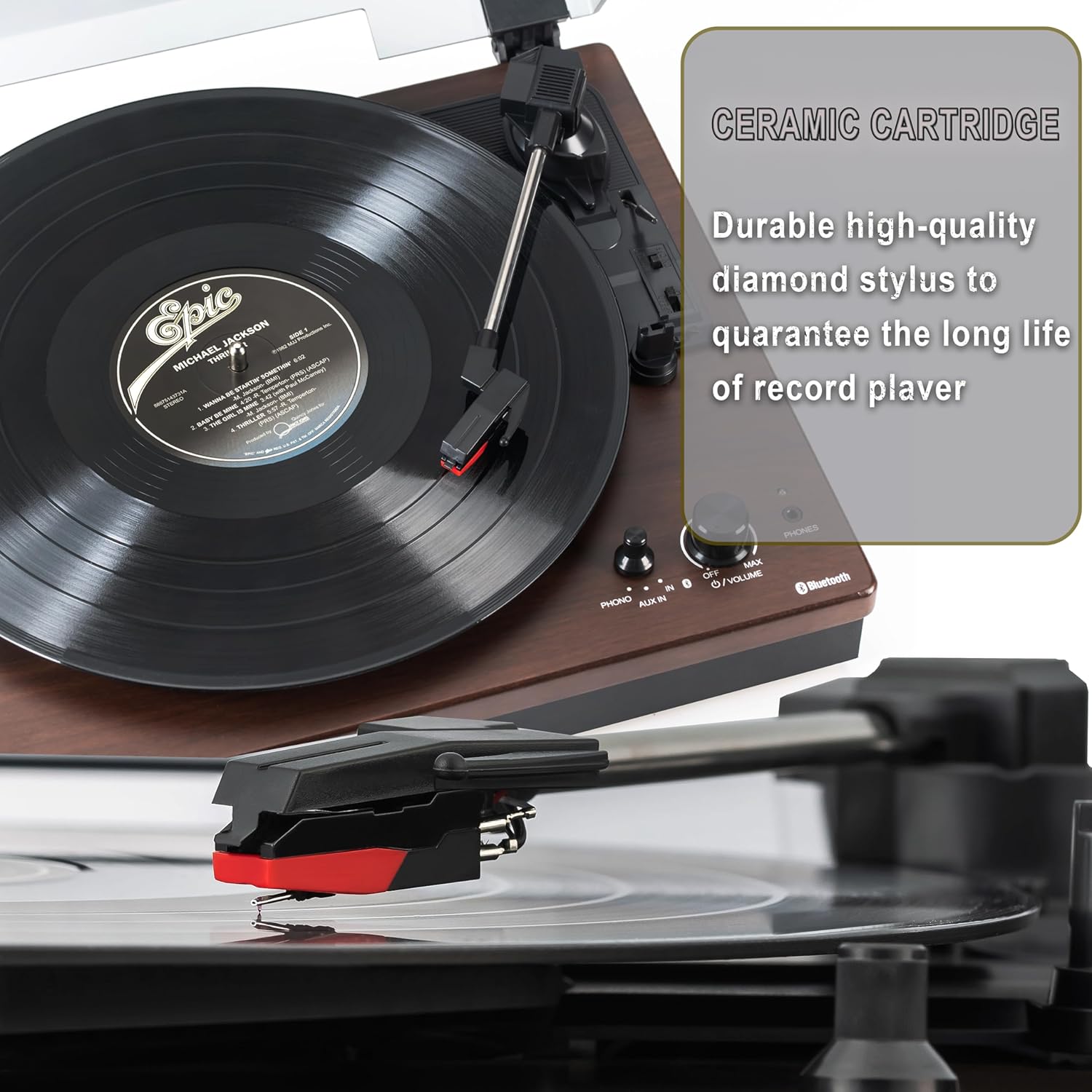
Figure 5.1: Ceramic Cartridge. The turntable is equipped with a durable high-quality diamond stylus designed for extended record playback life.
6 การแก้ไขปัญหา
If you encounter issues with your Sharp RP-TT70, refer to the following common problems and solutions:
| ปัญหา | สาเหตุที่เป็นไปได้ | สารละลาย |
|---|---|---|
| ไม่มีไฟฟ้า | ไม่ได้เสียบอะแดปเตอร์แปลงไฟ หรือปลั๊กไฟไม่ทำงาน | Ensure power adapter is securely plugged into the turntable and a working wall outlet. |
| ไม่มีเสียงจากลำโพง | Speakers not connected correctly; Volume too low; Incorrect input mode. | Check speaker cable connections and polarity. Increase volume. Ensure turntable is in PHONO or AUX mode as appropriate. |
| Poor Sound Quality / Skipping | Dirty or worn stylus; Dirty record; Turntable not level. | Clean the stylus and record. Ensure the turntable is on a stable, level surface. Consider replacing the stylus if worn. |
| ปัญหาการจับคู่บลูทูธ | Device too far; Bluetooth not enabled on external device; Interference. | Ensure devices are within range (approx. 30 ft). Confirm Bluetooth is enabled on the external device. Try restarting both devices. |
| Platter Not Spinning | Belt dislodged; Auto-stop engaged prematurely. | Check if the drive belt is properly seated around the platter and motor pulley. If auto-stop is causing issues, ensure the record is placed correctly. |
7. ข้อมูลจำเพาะ
| คุณสมบัติ | รายละเอียด |
|---|---|
| หมายเลขรุ่น | RP-TT70 |
| ยี่ห้อ | คม |
| ขนาดสินค้า | 16.8 x 13.5 x 2.8 นิ้ว |
| น้ำหนักสินค้า | 18.6 ปอนด์ |
| เทคโนโลยีการเชื่อมต่อ | Bluetooth (Bi-directional) |
| ความเร็วที่รองรับ | 33 1/3, 45, 78 รอบต่อนาที |
| ส่วนประกอบที่รวมอยู่ | Turntable, Stereo Bookshelf Speakers |
| วัสดุ | พลาสติก, ไม้ |
| สี | Black (with wooden finish) |
| ประเภทตลับหมึก | Changeable Ceramic Cartridge and Stylus |
| คุณสมบัติ | Belt-drive, Auto-return, Pitch control, Dust cover |
8. การรับประกันและการสนับสนุน
For warranty information and technical support, please refer to the official Sharp webหรือติดต่อฝ่ายบริการลูกค้าโดยตรง โปรดเก็บใบเสร็จรับเงินไว้เป็นหลักฐานการซื้อสำหรับการเรียกร้องการรับประกัน


