สินค้าเกินview
SwitchBot Blind Tilt เป็นมอเตอร์สำหรับม่านไฟฟ้าอัจฉริยะที่ออกแบบมาเพื่อเปลี่ยนม่านแนวนอนที่มีอยู่ให้เป็นระบบมอเตอร์ได้อย่างง่ายดาย มีคุณสมบัติเด่นคือ ระบบควบคุมระยะไกลผ่านบลูทูธ ใช้พลังงานแสงอาทิตย์เพื่อยืดอายุการใช้งานแบตเตอรี่ และมีเซ็นเซอร์ตรวจจับแสงเพื่อปรับระดับอัตโนมัติ เมื่อใช้งานร่วมกับ SwitchBot Hub Mini (จำหน่ายแยกต่างหาก) จะสามารถใช้งานร่วมกับผู้ช่วยอัจฉริยะ เช่น Alexa และ Google Home เพื่อควบคุมระยะไกลและจัดการกลุ่มได้
สิ่งที่รวมอยู่
ชุดนี้ประกอบด้วยอุปกรณ์ที่จำเป็นทั้งหมดสำหรับการติดตั้งและการใช้งาน:
- หน่วยหลัก × 1
- แผงโซลาร์เซลล์ (แบบปรับเอียงได้) × 1
- สายไฟ Type-C × 1
- เทปกาวสองหน้าสำรอง (สำหรับติดตั้งฐาน A) × 1
- อุปกรณ์เสริมอื่นๆ × 15 (ประกอบด้วยอะแดปเตอร์ต่างๆ ฐานยึด ที่เก็บสายไฟ ข้อต่อแบบยืดหยุ่น คู่มือผู้ใช้ ผ้าเช็ดทำความสะอาดแบบเปียก การ์ดจัดแนว สติกเกอร์ หมุดดันชิ้นงาน เทปวัดระยะ)

ภาพ: ส่วนประกอบทั้งหมดที่รวมอยู่ในชุด SwitchBot Blind Tilt วางเรียงอยู่บนพื้นผิว
ข้อมูลด้านความปลอดภัย
- ถอดปลั๊กอุปกรณ์ทุกครั้งก่อนการติดตั้งหรือทำความสะอาด
- ควรวางอุปกรณ์ให้ห่างจากแหล่งความร้อนและความชื้น
- ห้ามติดตั้งอุปกรณ์นี้กับมู่ลี่ที่ไม่ได้ยึดติดอย่างแน่นหนา
- เก็บอุปกรณ์ให้ห่างจากมือเด็กและสัตว์เลี้ยง
- ปฏิบัติตามคำแนะนำที่ให้มาพร้อมกับอุปกรณ์เสมอ
การติดตั้งและการตั้งค่า
SwitchBot Blind Tilt ออกแบบมาให้ติดตั้งได้โดยไม่ต้องใช้เครื่องมือ ทำให้การเปลี่ยนม่านบังแดดแบบเดิมให้เป็นม่านบังแดดอัจฉริยะทำได้ง่าย
- การตรวจสอบความเข้ากันได้: ตรวจสอบให้แน่ใจว่ามู่ลี่ของคุณมีแกนปรับเอียงที่มีเส้นผ่านศูนย์กลางระหว่าง 0.25 นิ้วถึง 0.5 นิ้ว (6.3 มม. ถึง 12 มม.) และเป็นมู่ลี่แนวนอน (ไม่ใช่แนวตั้งหรือแบบมีโซ่ลูกปัด) ขนาดมู่ลี่ที่เหมาะสมควรมีความยาวไม่เกิน 3 เมตร
- เตรียมความพร้อมสำหรับผู้พิการทางสายตา: ทำความสะอาดบริเวณมู่ลี่ที่จะติดตั้งอุปกรณ์ ใช้เทปวัดที่ให้มาเพื่อกำหนดขนาดอะแดปเตอร์ที่ถูกต้อง (S, M, L, XL) สำหรับก้านปรับเอียงของมู่ลี่ของคุณ
- ติดตั้งอะแดปเตอร์และข้อต่อ: เลือกอะแดปเตอร์ที่เหมาะสมและต่อเข้ากับข้อต่อแบบยืดหยุ่นที่เปิดอยู่ จากนั้นยึดให้แน่นรอบแกนปรับเอียงของม่าน
- ติดตั้งตัวเครื่องหลัก: วางตัวเครื่องหลักลงบนฐานยึด ตรวจสอบให้แน่ใจว่าเฟืองตรงกับข้อต่อบนแกนเอียง ตัวเครื่องควรจะล็อคเข้าที่
- ติดตั้งแผงโซล่าเซลล์: ติดแผงโซลาร์เซลล์เข้ากับกระจกหน้าต่างโดยใช้เทปกาว ตรวจสอบให้แน่ใจว่าแผงโซลาร์เซลล์ได้รับแสงแดดอย่างเพียงพอ ampใช้แสงแดดเพื่อการชาร์จอย่างต่อเนื่อง เสียบสาย Type-C ของแผงโซลาร์เซลล์เข้ากับตัวเครื่องหลัก
- ดาวน์โหลดและปรับเทียบ: ดาวน์โหลดแอป SwitchBot จาก App Store ของคุณ ทำตามคำแนะนำในแอปเพื่อเพิ่มอุปกรณ์ Blind Tilt ของคุณและทำการปรับเทียบ โดยคุณจะต้องปรับม่านด้วยตนเองไปยังตำแหน่งปิดสนิท เปิดแนวนอนจนสุด และปิดสนิท เพื่อสอนให้อุปกรณ์เรียนรู้ช่วงการเคลื่อนไหวของมัน

ภาพ: คู่มือแสดงตัวอย่างมู่ลี่แนวนอนที่ใช้งานร่วมกับก้านปรับระดับได้ และมู่ลี่แนวตั้งหรือมู่ลี่แบบโซ่ลูกปัดที่ไม่สามารถใช้งานร่วมกันได้

ภาพ: ผู้ใช้กำลังวัดขนาดแกนปรับความเอียงของม่านบังตาด้วยเครื่องมือที่ให้มา เพื่อเลือกขนาดอะแดปเตอร์ที่ถูกต้อง

ภาพ: มือที่กำลังประกอบอะแดปเตอร์และข้อต่อเข้ากับแกนปรับเอียงของม่านบังตา

ภาพ: ตัวเครื่องหลักกำลังถูกติดตั้งเข้ากับรางหัวม่าน โดยเชื่อมต่อกับกลไกก้านปรับเอียง

ภาพ: แผงโซลาร์เซลล์ที่ติดอยู่กับกระจกหน้าต่าง วางตำแหน่งให้รับแสงแดด
วิดีโอ: คู่มือโดยละเอียดเกี่ยวกับการแกะกล่อง การติดตั้ง และการตั้งค่า SwitchBot Blind Tilt รวมถึงขั้นตอนการปรับเทียบผ่านแอปพลิเคชันบนมือถือ
คำแนะนำการใช้งาน
ควบคุมการเอียงของม่าน SwitchBot ด้วยวิธีการต่างๆ ที่สะดวกสบาย:
- แอปมือถือ: ใช้แอป SwitchBot เพื่อเปิด ปิด หรือปรับม่านบังแดดของคุณให้ได้เปอร์เซ็นต์ที่ต้องการtage. แอปนี้ยังอนุญาตให้ปรับแต่งการทำงานและควบคุมม่านบังแดดหลายบานพร้อมกันได้อีกด้วย
- ตัวจับเวลาและกำหนดการ: ตั้งค่าตารางเวลาประจำวันภายในแอปเพื่อเปิดหรือปิดม่านโดยอัตโนมัติในเวลาที่กำหนด เพื่อให้สอดคล้องกับกิจวัตรประจำวันของคุณ
- การควบคุมด้วยเซ็นเซอร์แสง: เซ็นเซอร์วัดแสงในตัวสามารถปรับม่านบังตาโดยอัตโนมัติตามความเข้มของแสงภายนอก ช่วยรักษาระดับแสงภายในอาคารให้คงที่ และอาจช่วยประหยัดพลังงานได้
- การควบคุมด้วยเสียง (ผ่าน Hub Mini): เชื่อมต่อกับ SwitchBot Hub Mini (จำหน่ายแยกต่างหาก) เพื่อเปิดใช้งานคำสั่งเสียงผ่าน Alexa, Google Home และ Siri
- รีโมตคอนโทรล (อุปกรณ์เสริม): นอกจากนี้ ยังสามารถควบคุมม่านบังแดดผ่านรีโมท SwitchBot (จำหน่ายแยกต่างหาก) เพื่อการปรับแต่งที่รวดเร็วได้อีกด้วย

ภาพ: ภาพหน้าจอของแอป SwitchBot แสดงตัวเลือกการควบคุมต่างๆ สำหรับม่านบังแดด รวมถึงเปอร์เซ็นต์tagอี การปรับ

ภาพ: ภาพหน้าจอของแอป SwitchBot ที่แสดงตัวเลือกในการตั้งค่าตารางเวลาประจำวันสำหรับการเปิดและปิดม่าน

ภาพ: ภาพหน้าจอแอป SwitchBot แสดงการตั้งค่าการตรวจจับแสง ซึ่งช่วยให้ปรับระดับแสงโดยอัตโนมัติ
วิดีโอ: สาธิตการควบคุม SwitchBot Blind Tilt ด้วยคำสั่งเสียงผ่าน Alexa
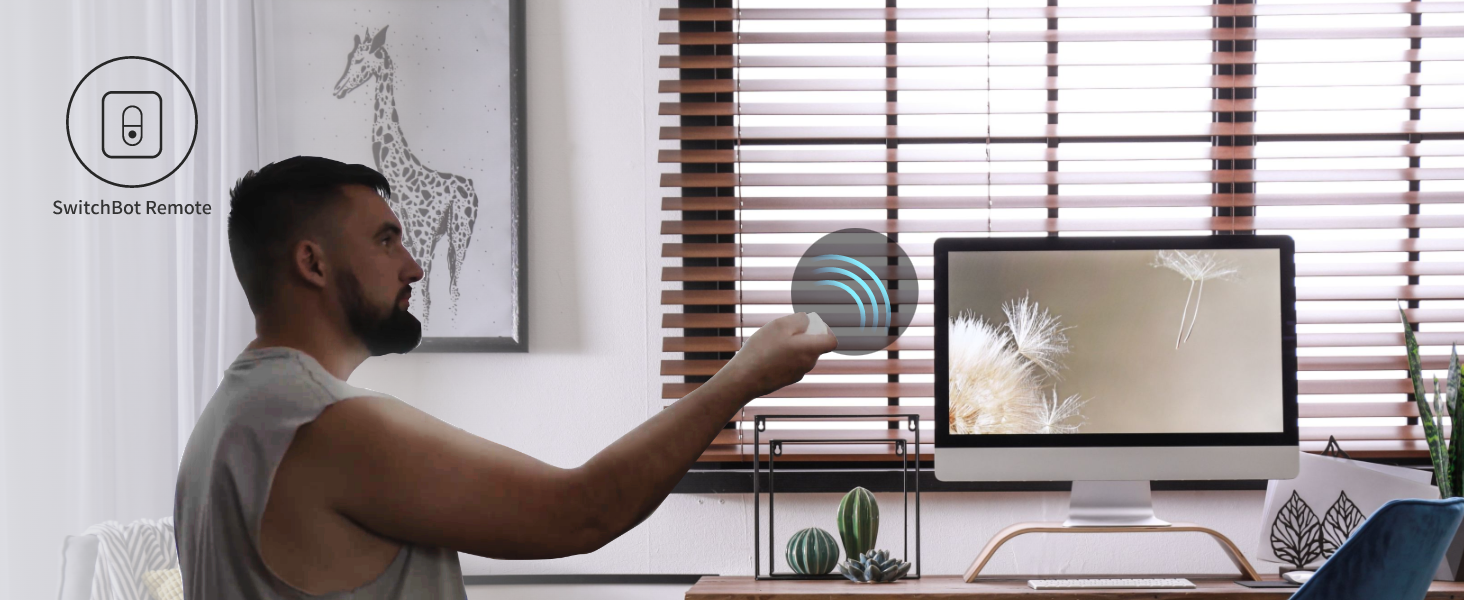
ภาพ: บุคคลกำลังใช้รีโมท SwitchBot ควบคุมม่านบังแดด
การซ่อมบำรุง
สำหรับการทำความสะอาด ให้เช็ดทำความสะอาดเฉพาะจุดที่จำเป็นเท่านั้น ตรวจสอบให้แน่ใจว่าแผงโซลาร์เซลล์สะอาดอยู่เสมอเพื่อเพิ่มประสิทธิภาพการชาร์จให้สูงสุด
การแก้ไขปัญหา
- อุปกรณ์ไม่ตอบสนอง: ตรวจสอบระดับแบตเตอรี่ในแอป ตรวจสอบให้แน่ใจว่าแผงโซลาร์เซลล์ได้รับแสงแดดเพียงพอ หรือชาร์จอุปกรณ์ผ่านสาย Type-C
- ปัญหาการสอบเทียบ: หากม่านปรับไม่ขึ้นลงอย่างถูกต้อง ให้ปรับเทียบอุปกรณ์ใหม่ผ่านแอปพลิเคชัน ตรวจสอบให้แน่ใจว่าการปรับด้วยตนเองระหว่างการปรับเทียบนั้นแม่นยำ
- ปัญหาการเชื่อมต่อ: ตรวจสอบให้แน่ใจว่าได้เปิดใช้งานบลูทูธบนโทรศัพท์ของคุณแล้ว และอยู่ในระยะที่บลูทูธใช้งานได้ หากใช้ Hub Mini โปรดตรวจสอบให้แน่ใจว่าได้เปิดเครื่องและเชื่อมต่อกับเครือข่ายของคุณแล้ว
- เสียงรบกวนระหว่างการทำงาน: อุปกรณ์นี้ทำงานได้ที่ระดับเสียงต่ำกว่า 35 เดซิเบล หากได้ยินเสียงดังเกินไป โปรดตรวจสอบให้แน่ใจว่าได้ติดตั้งอุปกรณ์อย่างแน่นหนาและแกนปรับเอียงไม่ถูกกีดขวาง
ภาพ: ภาพประกอบแสดงให้เห็นถึงการทำงานที่เงียบของ SwitchBot Blind Tilt ซึ่งมีระดับเสียงต่ำกว่า 35 เดซิเบล
ข้อมูลจำเพาะ
| คุณสมบัติ | รายละเอียด |
|---|---|
| ยี่ห้อ | สวิตซ์บอท |
| ชื่อรุ่น | การเอียงตาบอด |
| หมายเลขรุ่นสินค้า | W2701600 |
| สี | สีขาว |
| วัสดุ | พลาสติก (ABS+PC เคลือบสารกันรังสียูวี) |
| ขนาดสินค้า | ยาว 1.92 นิ้ว x กว้าง 11.5 นิ้ว |
| น้ำหนักสินค้า | 13 ออนซ์ |
| แบตเตอรี่ | แบตเตอรี่ลิเธียมในตัวขนาด 2000mAh (สามารถชาร์จใหม่ได้ผ่านแผงโซลาร์เซลล์หรือพอร์ต Type-C) |
| การเชื่อมต่อ | บลูทูธ 5.0 |
| คุณสมบัติพิเศษ | ติดตั้งง่าย ไม่ต้องใช้เครื่องมือ ควบคุมด้วยเซ็นเซอร์แสง |
การรับประกันและการสนับสนุน
SwitchBot Blind Tilt มาพร้อมการรับประกัน 1 ปีจากผู้ผลิต สำหรับคำแนะนำการใช้งานและการสนับสนุนโดยละเอียด โปรดดูคู่มือผู้ใช้ฉบับทางการที่มีให้ในรูปแบบเอกสาร PDF
คุณสามารถเข้าถึงคู่มือผู้ใช้ฉบับเต็มได้ที่นี่ ที่นี่.


