การแนะนำ
The SmallRig P108 RGB Video Light is a portable and versatile LED camera light designed for various content creation needs, including YouTube, vlogging, and photography. It features 108 high-quality lamp beads, offering 360° full-color adjustment, a wide color temperature range, and multiple special effects. Its compact size and long battery life make it an ideal companion for on-the-go shooting.

Image: The SmallRig P108 RGB Video Light, highlighting its compact design and vibrant RGB capabilities.
มีอะไรอยู่ในกล่อง
- ไฟวิดีโอ RGB
- สายชาร์จแบบ USB Type-C
- คู่มือการใช้งาน (เอกสารนี้)

Image: Contents of the SmallRig P108 RGB Video Light package.
การตั้งค่า
1. การชาร์จอุปกรณ์
Before first use, fully charge the SmallRig P108 RGB Video Light. The device has a built-in 2500mAh lithium battery.
- Connect the included USB Type-C charging cable to the USB-C port on the light.
- เชื่อมต่อปลายสายอีกด้านหนึ่งเข้ากับอะแดปเตอร์ไฟ USB ที่ใช้งานร่วมกันได้ (ไม่รวมอยู่ด้วย)
- The indicator lights will show charging progress. Four white lights indicate 100% power when fully charged.
- A full charge provides approximately 130 minutes of usage at maximum power.

Image: Charging the SmallRig P108 RGB Video Light.
2. การติดตั้งไฟ
The P108 offers multiple mounting options for versatile use.
- Standard 1/4"-20 Screw: Use the integrated 1/4"-20 screw mount at the bottom to attach the light to tripods, camera cages, or other accessories.
- ฐานยึดแบบ Cold Shoe: The light features a built-in standard cold shoe interface at the bottom for direct attachment to cameras or mobile phone expansion frames. Additionally, there are three cold shoe seats on the sides for splicing multiple lights together or expanding with other accessories like microphones.

Image: Various mounting options for the SmallRig P108 RGB Video Light.
คำแนะนำการใช้งาน
1. เปิด/ปิดเครื่อง
- To turn on the light, press and hold the power button (located on the top left) for 2-3 seconds.
- To turn off the light, press and hold the power button for 2-3 seconds again.
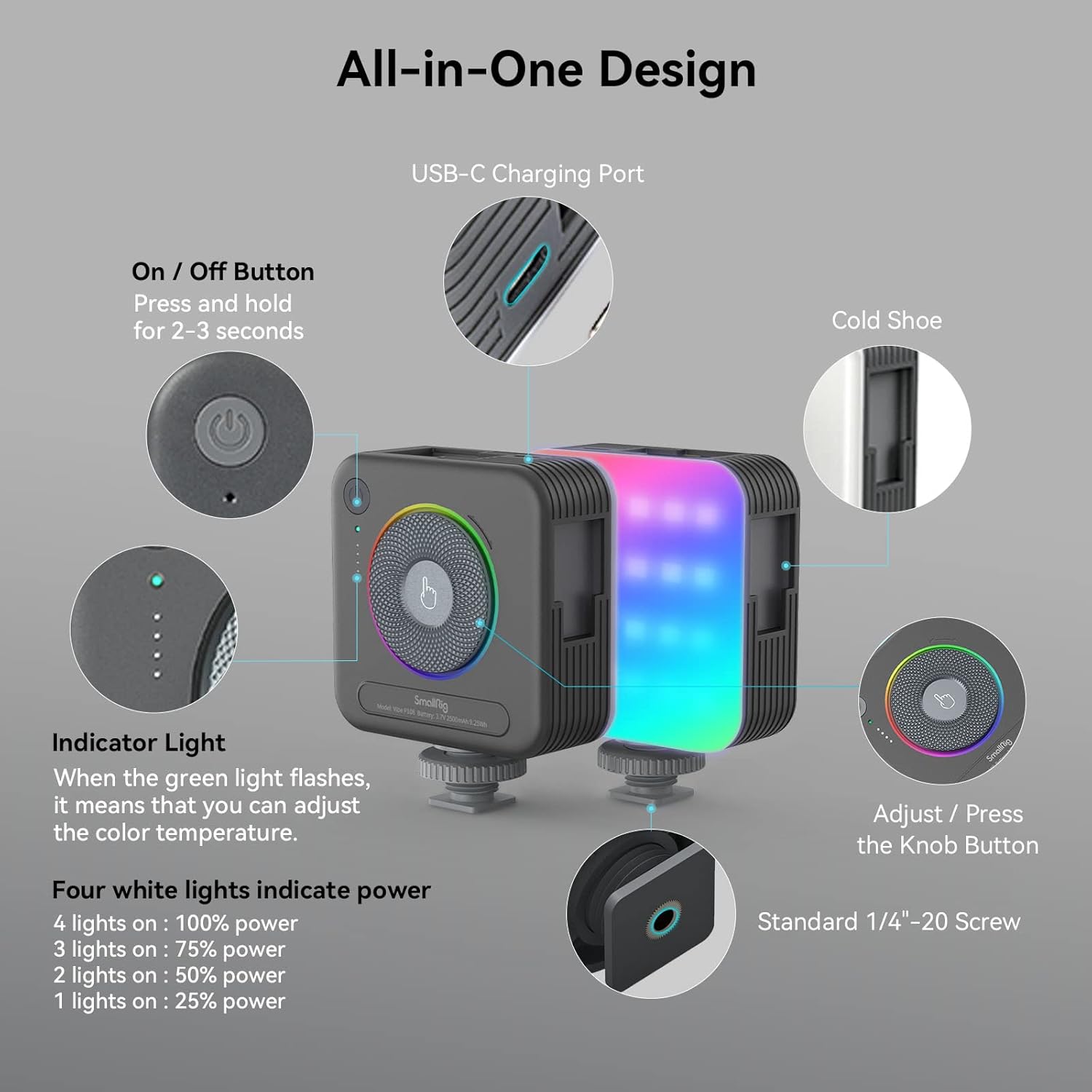
ภาพ: เหนือview of the SmallRig P108 controls.
2. Adjusting Color Temperature (CCT Mode)
The P108 offers a color temperature range of 2700K (warm light) to 6500K (cold light).
- Ensure the light is in CCT mode (indicated by the green indicator light).
- Rotate the central knob clockwise to increase the color temperature (cooler light).
- Rotate the central knob counter-clockwise to decrease the color temperature (warmer light).

Image: Color temperature and full color range of the light.
3. การปรับความสว่าง
Brightness can be adjusted from 0% to 100% in both CCT and RGB modes.
- In CCT mode, the four white indicator lights show the current power level: 1 light (25%), 2 lights (50%), 3 lights (75%), 4 lights (100%).
- To adjust brightness, rotate the central knob.
- Press the power button briefly to cycle through preset brightness levels (25%, 50%, 75%, 100%).

Image: One-handed control via the step-less knob.
4. Special Effects (FX) Modes
The P108 includes 12 FX light effect modes for various photography needs.
- To enter FX mode, press the central knob. Continue pressing to cycle through the 12 effects.
- Rotate the central knob to adjust the brightness or speed of the selected effect.
- Examples of FX modes include Police Car, Fire Truck, RGB Slow Gradient, Pulsing, Lightning, TV, Candlelight, Firework, Breathing, Disco, Paparazzi, and Faulty Bulb.
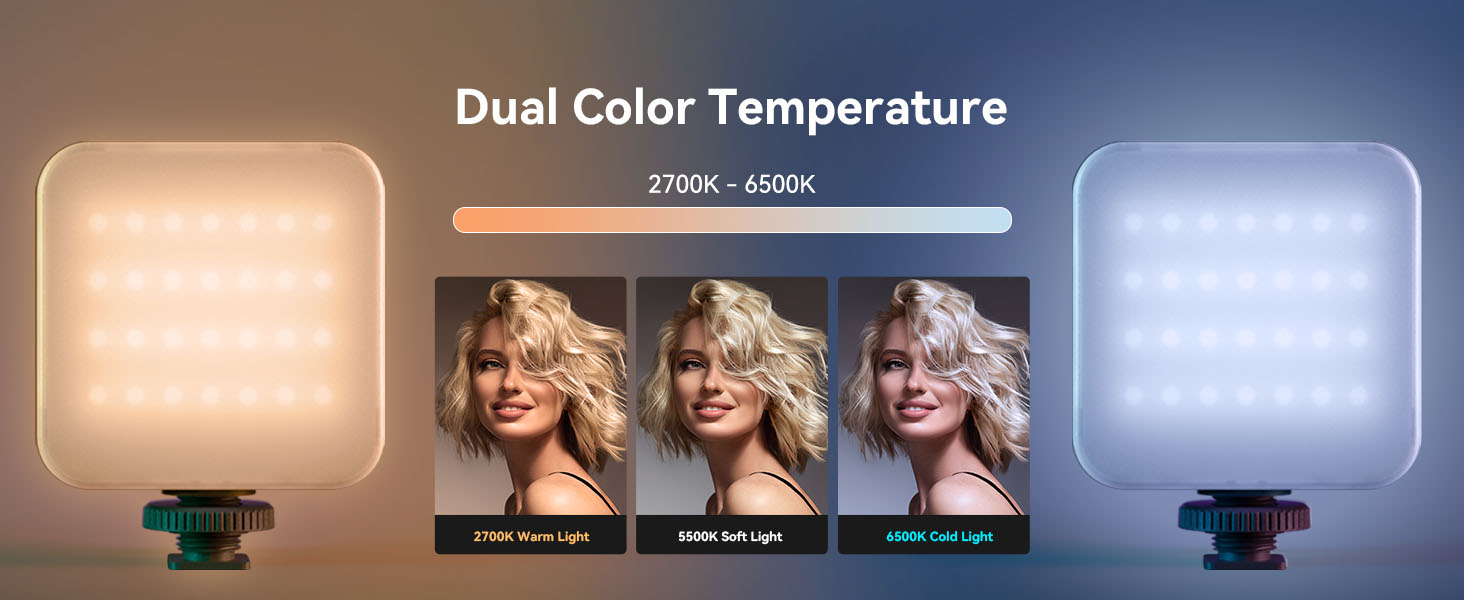
Image: Visual representation of various FX modes.
5. โหมด RGB
The light features a 360° full-color design, allowing adjustment of hue and saturation.
- To enter RGB mode, press the central knob until the RGB indicator light is active.
- Rotate the central knob to cycle through 360° of colors.
- Press the power button briefly to adjust the brightness within the selected color.
วิดีโอผลิตภัณฑ์อย่างเป็นทางการ: วิธีใช้
Video: A detailed guide on how to use the SmallRig P108 RGB Video Light, covering its features and modes.
การซ่อมบำรุง
- การทำความสะอาด: Use a soft, dry cloth to clean the surface of the light. Do not use harsh chemicals or abrasive materials.
- พื้นที่จัดเก็บ: เก็บอุปกรณ์ไว้ในที่แห้งและเย็น หลีกเลี่ยงแสงแดดโดยตรงและอุณหภูมิที่สูงหรือต่ำเกินไป
- การดูแลแบตเตอรี่ เพื่อยืดอายุการใช้งานแบตเตอรี่ ควรหลีกเลี่ยงการปล่อยให้แบตเตอรี่หมดจนเกลี้ยงบ่อยๆ ชาร์จอุปกรณ์เป็นประจำ แม้ว่าจะไม่ได้ใช้งาน เพื่อรักษาสุขภาพของแบตเตอรี่
- การจัดการ: Handle the light with care to prevent drops or impacts, which could damage internal components.
การแก้ไขปัญหา
| ปัญหา | สาเหตุที่เป็นไปได้ | สารละลาย |
|---|---|---|
| ไฟไม่เปิด | แบตเตอรี่เหลือน้อย; กดปุ่มเปิด/ปิดไม่ค้างไว้นานพอ | ชาร์จอุปกรณ์ให้เต็ม กดปุ่มเปิด/ปิดค้างไว้ 2-3 วินาที |
| แสงที่ออกมาไม่เพียงพอหรือไม่สม่ำเสมอ | แบตเตอรี่เหลือน้อย; ตั้งค่าความสว่างไม่ถูกต้อง | Recharge the light. Adjust brightness using the central knob or power button. |
| ไม่สามารถเปลี่ยนโหมดหรือสีได้ | Incorrect button press; Device malfunction. | Ensure you are pressing the central knob to cycle modes. If issue persists, contact support. |
| อุปกรณ์ไม่ชาร์จ | Faulty cable or adapter; USB-C port issue. | Try a different USB-C cable and power adapter. Ensure the cable is fully inserted. |
ข้อมูลจำเพาะ
| คุณสมบัติ | รายละเอียด |
|---|---|
| ขนาดสินค้า | 2.83 x 3.5 x 1.24 นิ้ว |
| น้ำหนักสินค้า | 5.9 ออนซ์ |
| ลูกปัดแสง | 108 (28 RGB, 40+40 cold/warm) |
| ซีอาร์ไอ | ≥ 95 |
| ช่วงอุณหภูมิสี | 2700K - 6500K |
| โหมดสี | 360° Full Color (RGB) |
| FX Light Effects | 12 modes (e.g., Police Car, Fire Truck, Lightning, TV) |
| ความจุของแบตเตอรี่ | แบตเตอรี่ลิเธียม 2500mAh |
| อายุการใช้งานแบตเตอรี่ (กำลังไฟสูงสุด) | 130 นาที |
| พอร์ตชาร์จ | ยูเอสบี ไทป์ ซี |
| ตัวเลือกการติดตั้ง | Standard 1/4"-20 Screw, 3 Cold Shoe Mounts |
การรับประกันและการสนับสนุน
SmallRig products are designed for durability and performance. For warranty information, technical support, or service inquiries, please refer to the official SmallRig webหรือติดต่อฝ่ายบริการลูกค้าโดยตรง เก็บใบเสร็จรับเงินไว้เพื่อใช้ในการเคลมประกัน
แหล่งข้อมูลออนไลน์:


