1. บทนำ
The INSTRUKART Keller LEO Record Manometer is an autonomous, battery-powered digital manometer designed for precise pressure measurement and recording. It features a digital display and utilizes a robust piezoresistive pressure cell. This instrument is specifically engineered as an intrinsically safe version, making it suitable for use in hazardous area installations. It offers high measuring accuracy, resolution, and robustness, along with secure data storage in a non-volatile memory.
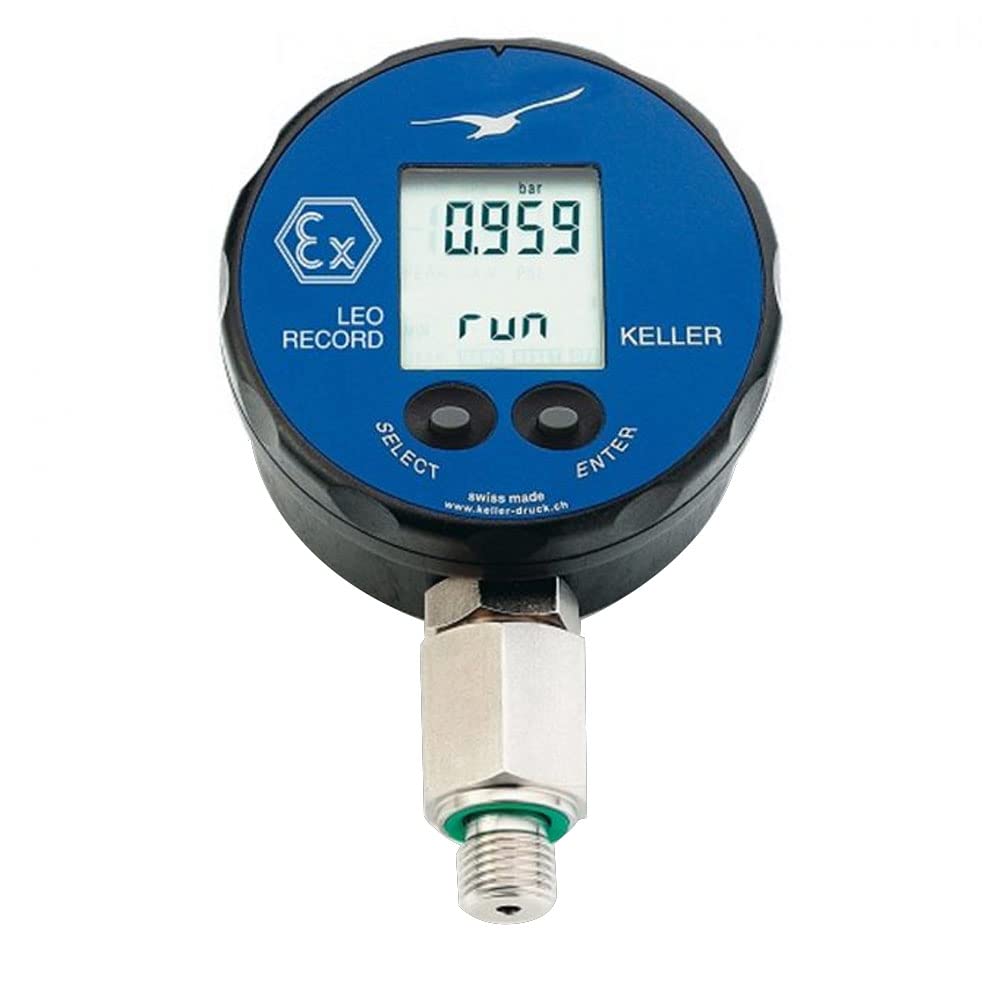
ภาพที่ 1.1: ด้านหน้า view of the Keller LEO Record Manometer. This image displays the device's digital screen showing a pressure reading, along with "SELECT" and "ENTER" buttons at the bottom. The device is round with a pressure connection at the bottom.

ภาพที่ 1.2: มุม view of the Keller LEO Record Manometer. This perspective shows the device from a slight angle, emphasizing its compact form factor and the robust pressure connection.
2. ข้อมูลด้านความปลอดภัย
This device is designed for hazardous area installations and is intrinsically safe. Adherence to all safety guidelines is paramount to prevent injury or damage to the instrument. Always ensure the device is used within its specified operating conditions and pressure ranges. Do not attempt to open or repair the device in a hazardous environment. Refer to the device's certifications (e.g., ATEX, IECEx) for specific safety parameters and installation requirements in classified areas.
- Always verify the intrinsic safety rating is appropriate for the specific hazardous area classification.
- Ensure proper grounding and electrical connections as per local regulations and installation standards.
- Do not exceed the specified overpressure limits.
- Handle the device with care to avoid physical damage, which could compromise its intrinsic safety.
- ใช้เฉพาะอุปกรณ์เสริมและชิ้นส่วนอะไหล่ที่ได้รับการรับรองเท่านั้น
3. คุณสมบัติของผลิตภัณฑ์
- ความแม่นยำสูง: Offers high measuring accuracy, resolution, and robustness for reliable readings.
- ความปลอดภัยของข้อมูล: Features high data security due to the use of a non-volatile memory, ensuring recorded data is retained even without power.
- ฟังก์ชั่นการบันทึก: Capable of recording pressure and temperature values. Data can be analyzed using the included Software Logger 5.
- การจัดเก็บข้อมูล: Allows for storage of installation data and comments directly within the instrument.
- Wide Pressure Ranges: Available in various pressure ranges, from -14.5 to 43.5 psi up to 0 to 14503 psi, with corresponding resolutions.
- โครงสร้างแข็งแรงทนทาน: Media-contacting parts are made of Stainless Steel (AISI 316L) for durability and compatibility with various media.
- อายุการใช้งานแบตเตอรี่ยาวนาน: Powered by a 3.6 V Lithium battery, providing approximately 2 years of battery life.
- อินเทอร์เฟซ: Equipped with an RS485 interface for communication and data transfer.
- ระดับการป้องกัน: Rated IP65, offering protection against dust and low-pressure water jets.
4. Components and Supply Scope
The standard supply scope for the Keller LEO Record Manometer includes the following items:
- 1 unit of Keller LEO Record Manometer
- Protective rubber covering
- คู่มือการใช้งาน (เอกสารนี้)
Optional accessories, such as specific interface cables (e.g., K103-A/USB) or carrying bags, may be available separately.
5. การตั้งค่าและการติดตั้ง
5.1. การติดตั้งแบตเตอรี่
The LEO Record Manometer is powered by a 3.6 V Lithium battery. To install or replace the battery, carefully open the battery compartment located on the rear of the device. Insert the battery, ensuring correct polarity. Close the compartment securely to maintain the IP65 protection rating.
5.2. การเชื่อมต่อแรงดัน
The device features a G1/4" pressure connection. Before connecting to a pressure source, ensure the connection point is clean and free of debris. Use appropriate sealing materials (e.g., PTFE tape) if necessary, and tighten the connection firmly but without excessive force to prevent damage. Verify that the pressure medium is compatible with the device's stainless steel (AISI 316L) wetted parts.
5.3. การเปิดเครื่องครั้งแรก
After battery installation and pressure connection, the device should power on automatically or by pressing one of the control buttons. The digital display will show the current pressure reading. Allow a few moments for the device to stabilize.
6. การดำเนินการ
The LEO Record Manometer is operated using two buttons: เลือก และ เข้า. The left key (เลือก) is used to turn the instrument on, to select functions, and to scroll through options. The right key (เข้า) executes the selected function or unit.
6.1. ฟังก์ชั่นหลัก
- ศูนย์: The ZERO function allows you to set any value as a new zero reference. This is useful for relative pressure measurements.
- หน่วย: All standard measurement units are calibrated in the instrument. The pressure can be displayed in various units, such as bar, mbar/hPa, kPa, MPa, psi, kp/cm², mH₂O. Use the เลือก button to cycle through available units and เข้า เพื่อยืนยันการเลือกของคุณ
- บันทึก: The record function can be started or ended with the operating keys. The configuration of the record takes place via the interface/software.

Image 6.1: Excerpt from the official manual detailing the ZERO, UNITS, and RECORD functions, along with a specifications table for the LEO Record (EI) model.
7. ข้อมูลจำเพาะ
The following table provides detailed technical specifications for the Keller LEO Record Manometer:
| พารามิเตอร์ | ค่า |
|---|---|
| Pressure Ranges (Exampเลอ) | -14.5 to 43.5 psi (Resolution: 0.0145 psi); -14.5 to 435.1 psi (Resolution: 0 to 145 psi); 0 to 4351 psi (Resolution: 1.45 psi); 0 to 14503 psi (Resolution: 1.45 psi) |
| Overpressure (Exampเลอ) | 145.0 psi (for 43.5 psi range); 870.2 psi (for 435.1 psi range); 5801 psi (for 4351 psi range); 14503 psi (for 14503 psi range) |
| อุณหภูมิในการจัดเก็บ | -10 ถึง 60 °C (14 ถึง 140 °F) |
| อุณหภูมิในการทำงาน | 0 ถึง 50 °C (32 ถึง 122 °F) |
| หน่วยความจำ | 57,000 measuring values (at ≤15 s interval); 28,000 measuring values (at >15 s interval) |
| แหล่งจ่ายไฟ | แบตเตอรี่ลิเธียม 3.6 โวลต์ |
| อายุการใช้งานแบตเตอรี่ | Approx. 2 years (at 1 recording every 10 seconds) |
| การเชื่อมต่อแรงดัน | จี1/4" |
| อินเทอร์เฟซ | RS485 (rear-sided mating plug "Fischer" compatible with PC-converter cable K103-A (RS232) and K104-A(USB)) |
| Media Contact Material | Stainless steel (AISI 316L) |
| ระดับการป้องกัน | IP65 |
| ขนาด (โดยประมาณ) | Diameter x Height x Depth: 76 x 120 x 55 mm (LEO Record) |
| Total Error Band (10 to 40 °C) | ± 0.2 %FS |
| Long Term Stability (Type) | ± 0.1 มิลลิบาร์ |
| Intrinsic Safety Version | 94/9/CE and IECEx (suitable for hazardous area installations) |
8. การบำรุงรักษา
Proper maintenance ensures the longevity and accuracy of your LEO Record Manometer. Always disconnect the device from any pressure source before performing maintenance.
8.1. การทำความสะอาด
ทำความสะอาดภายนอกของอุปกรณ์ด้วย d . ที่อ่อนนุ่มamp ผ้า อย่าใช้น้ำยาทำความสะอาดที่มีฤทธิ์กัดกร่อนหรือตัวทำละลาย เพราะอาจทำให้ผ้าเสียหายได้asing or display. Ensure no liquid enters the pressure connection or battery compartment.
8.2. การเปลี่ยนแบตเตอรี่
Replace the 3.6 V Lithium battery when the low battery indicator appears on the display or when the device fails to power on. Refer to Section 5.1 for battery installation instructions. Dispose of old batteries according to local environmental regulations.
8.3. การจัดเก็บ
When not in use for extended periods, store the manometer in a clean, dry environment within the specified storage temperature range (-10 to 60 °C). It is recommended to store the device with the protective rubber covering to prevent physical damage.
9 การแก้ไขปัญหา
This section provides guidance for common issues you might encounter with your LEO Record Manometer. For problems not listed here, or if issues persist, please contact INSTRUKART customer support.
| ปัญหา | สาเหตุที่เป็นไปได้ | สารละลาย |
|---|---|---|
| อุปกรณ์ไม่เปิดเครื่อง | Depleted battery or incorrect battery installation. | Replace the battery (refer to Section 8.2). Ensure correct polarity. |
| การอ่านค่าแรงดันไม่แม่นยำ | Device not zeroed, incorrect unit selected, or sensor contamination. | Perform a ZERO function (refer to Section 6.1). Verify the correct unit is selected. Check pressure connection for leaks or blockages. |
| หน้าจอแสดงข้อความ "ข้อผิดพลาด" หรืออักขระผิดปกติ | ความผิดปกติภายในหรือปัญหาเซ็นเซอร์ | Power off the device and restart. If the error persists, contact customer support. |
| ไม่สามารถถ่ายโอนข้อมูลไปยังพีซีได้ | Incorrect cable, driver issues, or software not running. | Ensure you are using the correct RS485 interface cable (e.g., K103-A/USB). Install necessary drivers. Verify Logger 5 software is running and configured correctly. |
10. Software: Logger 5
The LEO Record Manometer is designed to work seamlessly with the Logger 5 software, which is included in the delivery. This software allows you to configure the device, read recorded data, and perform comprehensive analysis.
10.1. Key Functions of Logger 5
- การรวบรวมข้อมูล: Configure and read autonomous KELLER data loggers.
- จอแสดงผลการวัด: Measurement data can be displayed in graphic form, exported, or compensated for air pressure. The online function displays current device values.
- โหมดการบันทึก: Supports various recording modes including continuous, event-controlled, and combination of continuous and event-controlled recording.
- การจัดการข้อมูล: Simple export of measurement data and graphics to programs like Microsoft Office. Supports various file formats (CSV, TXT, XML, DXF, WMF, BMP, JPG, GIF).
- ข้อมูลสถานี: Installation data and comments of the measuring station can be stored in the instrument and managed within the software.
The Logger 5 software is compatible with Windows operating systems. The software and necessary interface converter cables are included, and the software can also be downloaded from the manufacturer's website (www.keller-druck.com).

Image 10.1: Excerpt from the official manual providing an overview of the Logger 5 software's functions and capabilities, including screenshots of its interface.
11. การรับประกันและการสนับสนุน
For warranty information, please refer to the specific warranty terms provided with your purchase or visit the INSTRUKART official webไซต์ โดยทั่วไปการรับประกันจะครอบคลุมถึงข้อบกพร่องในวัสดุและฝีมือการผลิตภายใต้การใช้งานปกติ
For technical support, troubleshooting assistance, or service requests, please contact INSTRUKART customer service. Have your product model and serial number ready when contacting support to expedite the process.
INSTRUKART Customer Support:
- Please refer to your purchase documentation or the INSTRUKART webเว็บไซต์นี้ใช้สำหรับตรวจสอบรายละเอียดการติดต่อล่าสุด


