1. บทนำ
This manual provides essential information for the safe installation, operation, and maintenance of your Philips LED Slim Flood Light, model PTF150-NW-G1-Y-FL-8-BZ. Please read this manual thoroughly before installation and retain it for future reference.
The Philips LED Slim Flood Light is designed for outdoor applications such as sign lighting, building facades, security lighting, and general area illumination. Its robust construction and efficient LED technology ensure reliable performance.
2. ข้อมูลด้านความปลอดภัย
WARNING: Risk of electric shock. Installation should be performed by a qualified electrician or trained personnel in accordance with all applicable electrical codes.
- ตัดกระแสไฟที่เบรกเกอร์หรือกล่องฟิวส์ก่อนทำการติดตั้งหรือซ่อมบำรุง
- ตรวจสอบปริมาณอุปทานtage is compatible with the fixture's requirements (120V AC).
- ห้ามใช้งานอุปกรณ์หากสายไฟหรือชิ้นส่วนชำรุด
- หลีกเลี่ยงการสบตาโดยตรงกับแหล่งกำเนิดแสงเมื่อมีการส่องสว่าง
- The fixture's housing acts as a heat sink and may become hot during operation. Allow adequate cooling time before handling.
- Ensure all connections are secure and properly sealed, especially the IP66 liquid-tight connector for the power cord, to maintain water resistance.
- Do not modify the fixture. Any modifications may void the warranty and create safety hazards.
3. เนื้อหาบรรจุภัณฑ์
ตรวจสอบว่าส่วนประกอบทั้งหมดมีอยู่ก่อนเริ่มการติดตั้ง:
- Philips LED Slim Flood Light (1 unit)
- Integrated Yoke Mount (pre-attached)
- Power Cord (3-foot, STW 16 gauge)
- IP66 Liquid Tight Connector (pre-attached to cord exit)

ภาพที่ 1: Philips LED Slim Flood Light. This image shows the front view of the flood light with its integrated yoke mount and power cord connection point.
4. ข้อมูลจำเพาะ
| ข้อมูลจำเพาะ | รายละเอียด |
|---|---|
| หมายเลขรุ่น | PTF150-NW-G1-Y-FL-8-BZ |
| ยี่ห้อ | Signify (Philips) |
| วัดtage | 150 วัตต์ |
| เอาท์พุตของลูเมน | 18600 ลูเมน |
| อุณหภูมิสี | 4000K สีขาวเย็น |
| ประสิทธิภาพ | 124 ลูเมนต่อวัตต์ |
| เล่มที่tage | 120 โวลต์ (AC) |
| ประเภทการติดตั้ง | Yoke Mount (Surface Mount) |
| เสร็จ | บรอนซ์ |
| วัสดุ | Die-cast aluminum housing, tempered glass lens |
| ระดับการป้องกันน้ำเข้า (IP) | IP65 (fixture), IP66 (connector) |
| น้ำหนักสินค้า | 4 ปอนด์ |
| ขนาด (โดยประมาณ) | 16.93" H x 11.41" W x 2.36" D (430mm H x 289.8mm W x 59.9mm D) |
5. การตั้งค่าและการติดตั้ง
The Philips LED Slim Flood Light is designed for surface mounting using its integrated yoke. Follow these steps for proper installation:
- การตระเตรียม: Ensure power is disconnected at the main circuit breaker. Gather necessary tools (drill, screwdriver, wire strippers, electrical tape, mounting hardware suitable for your surface).
- ตำแหน่งการติดตั้ง: Select a sturdy surface (wall, pole, ground) capable of supporting the fixture's weight and providing adequate clearance for light distribution.
- การทำเครื่องหมายและการเจาะ: Use the yoke mount as a template to mark the drilling points on the mounting surface. Drill appropriate pilot holes for your chosen mounting hardware. Refer to the dimension diagram for precise measurements.
- ยึดอุปกรณ์ให้แน่น: Attach the yoke mount securely to the prepared surface using appropriate screws or bolts (not included). Ensure the fixture is stable and cannot vibrate loose. The yoke includes a bolt to lock in the aiming angle after adjustment.
- การเชื่อมต่อไฟฟ้า:
- The fixture comes with a 3-foot watertight STW 16 gauge cord exiting the housing via an IP66 liquid-tight connector.
- Connect the fixture's power cord to your main power supply wiring. This connection must be made by a qualified electrician and comply with all local and national electrical codes.
- Ensure all wire connections are properly insulated and protected from moisture.
- Aiming Adjustment: Loosen the bolt on the yoke mount, adjust the flood light to the desired aiming angle, and then securely tighten the bolt to lock the position.
- คืนค่าพลัง: เมื่อการติดตั้งเสร็จสมบูรณ์และการเชื่อมต่อทั้งหมดปลอดภัยแล้ว ให้จ่ายไฟอีกครั้งที่เบรกเกอร์
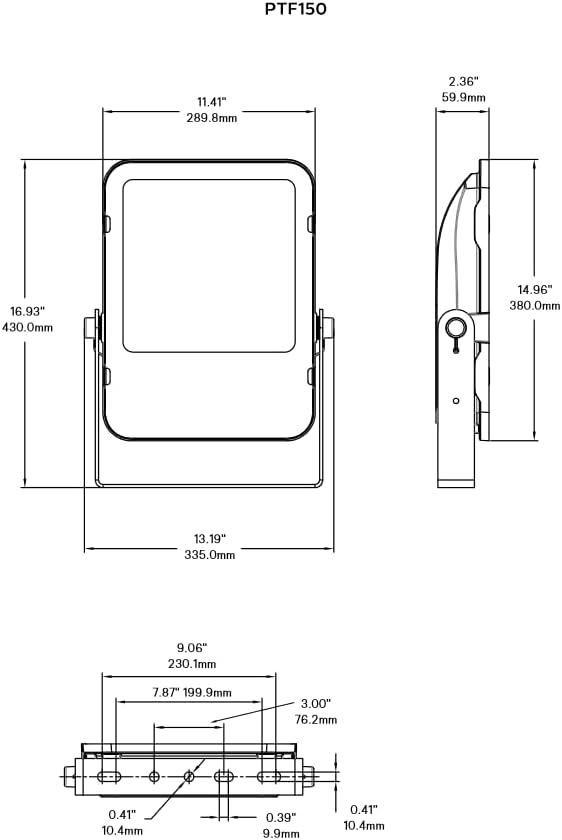
ภาพที่ 2: Philips LED Slim Flood Light Dimension Diagram. This diagram provides detailed measurements for the flood light, including height, width, depth, and mounting hole spacing, crucial for accurate installation.
6. คู่มือการใช้งาน
The Philips LED Slim Flood Light operates upon receiving power. There are no user-adjustable controls on the fixture itself.
- เปิด/ปิดเครื่อง: Control the light by switching the connected power circuit on or off. This can be done via a wall switch, timer, or photocell (not included).
- การทำงานอัตโนมัติ: For automated operation, connect the flood light to an external timer, motion sensor, or photocell switch (purchased separately) according to their respective installation instructions.
7. การบำรุงรักษา
The Philips LED Slim Flood Light is designed for minimal maintenance. Regular inspection and cleaning will ensure optimal performance and longevity.
- การทำความสะอาด: Periodically clean the lens and housing with a soft, damp cloth to remove dirt, dust, and debris. Do not use abrasive cleaners or solvents, as these can damage the finish or lens. Ensure power is off before cleaning.
- การตรวจสอบ: Annually inspect the fixture for any signs of damage, loose connections, or wear on the power cord. Address any issues promptly.
- การเปลี่ยนส่วนประกอบ: The LED light source is integrated and not user-replaceable. If the fixture malfunctions, contact customer support.
8 การแก้ไขปัญหา
If your Philips LED Slim Flood Light is not functioning as expected, refer to the following common issues and solutions:
| ปัญหา | สาเหตุที่เป็นไปได้ | สารละลาย |
|---|---|---|
| ไฟไม่เปิด | ไม่มีพลังงานให้กับโคม การเชื่อมต่อสายไฟหลวม Faulty circuit breaker/fuse. | ตรวจสอบแหล่งจ่ายไฟ Verify all wiring connections are secure (consult a qualified electrician). รีเซ็ตเบรกเกอร์หรือเปลี่ยนฟิวส์ |
| ไฟกระพริบหรือสลัว | Inconsistent power supply. สายไฟหลวม. Fixture damage. | Ensure stable power. ตรวจสอบการเชื่อมต่อสายไฟ If damage is suspected, discontinue use and contact support. |
| น้ำภายในอุปกรณ์ | Improperly sealed connections. Damaged housing/lens. | Immediately disconnect power. Inspect and re-seal all connections, especially the IP66 connector. If housing or lens is damaged, the IP rating may be compromised; contact support. |
หากขั้นตอนการแก้ไขปัญหาข้างต้นไม่สามารถแก้ปัญหาได้ โปรดติดต่อฝ่ายบริการลูกค้า
9. การรับประกันและการสนับสนุน
For warranty information and technical support, please refer to the official Signify (Philips) webหรือติดต่อฝ่ายบริการลูกค้า เก็บใบเสร็จรับเงินไว้เป็นหลักฐานการซื้อ
ผู้ผลิต: บ่งบอก
หมายเลขรุ่น: PTF150-NW-G1-Y-FL-8-BZ
ข้อมูลติดต่อ: Please visit the official Signify webไซต์สำหรับรายละเอียดการติดต่อและทรัพยากรสนับสนุนล่าสุด


