การแนะนำ
Thank you for choosing the Havit Gaming Mouse MS955. This optical gaming mouse features a USB interface, adjustable DPI settings, and RGB backlighting, designed to enhance your gaming experience. This manual provides essential information for setting up, operating, and maintaining your mouse.
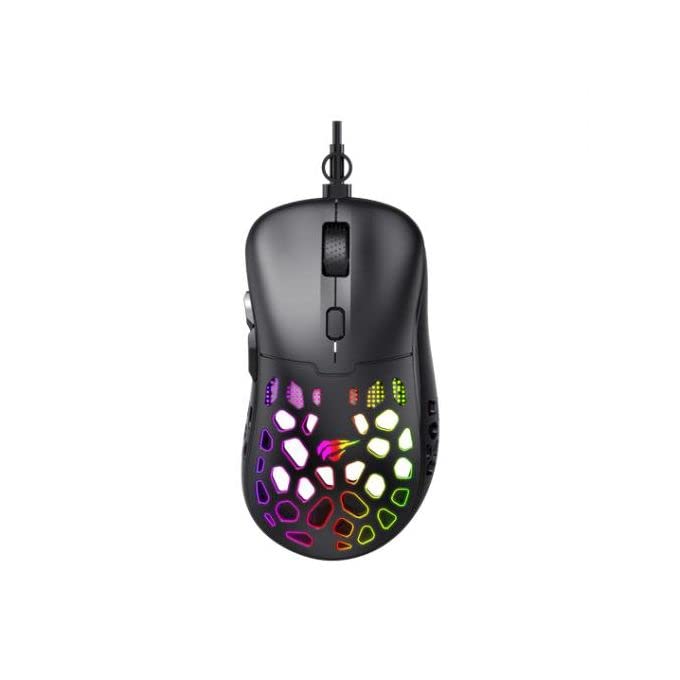
ภาพ: จากบนลงล่าง view of the Havit Gaming Mouse MS955, showcasing its ergonomic design and vibrant RGB lighting through the honeycomb shell.
การตั้งค่า
- แกะกล่องเมาส์: Carefully remove the Havit Gaming Mouse MS955 from its packaging.
- เชื่อมต่อกับคอมพิวเตอร์: Locate an available USB port on your computer. Insert the USB connector of the mouse into the USB port.
- การติดตั้งไดร์เวอร์: เมาส์ตัวนี้ใช้งานง่าย เพียงแค่เสียบปลั๊กก็ใช้งานได้เลย ระบบปฏิบัติการของคุณ (Windows XP, Windows 7, Linux ฯลฯ) จะตรวจจับและติดตั้งไดรเวอร์ที่จำเป็นโดยอัตโนมัติ โดยปกติแล้วไม่จำเป็นต้องติดตั้งซอฟต์แวร์เพิ่มเติมสำหรับการใช้งานพื้นฐาน
- ทดสอบฟังก์ชันการทำงาน: เมื่อเชื่อมต่อเสร็จแล้ว ให้ขยับเมาส์และคลิกปุ่มต่างๆ เพื่อตรวจสอบว่าใช้งานได้อย่างถูกต้องหรือไม่
คำแนะนำการใช้งาน
The Havit Gaming Mouse MS955 features 6 programmable buttons and adjustable DPI settings for precise control.

ภาพ: ด้านข้าง view of the Havit Gaming Mouse MS955, highlighting the left-side buttons and scroll wheel.
- ปุ่มคลิกซ้าย: Primary button for selection and interaction.
- ปุ่มคลิกขวา: Secondary button for context menus and alternative actions.
- ล้อเลื่อน: ใช้สำหรับเลื่อนดูเอกสารและ web pages. It also functions as a clickable middle button.
- ปุ่มปรับ DPI: Located behind the scroll wheel. Press this button to cycle through different DPI sensitivity levels (800-1200-2400-3200 DPI). Each press changes the sensitivity, allowing you to adapt to various gaming or work scenarios.
- ปุ่มด้านข้าง: Two buttons are located on the left side of the mouse. These are typically used for 'forward' and 'backward' navigation in web browsers or can be programmed for in-game actions.
ไฟ RGB
The Havit Gaming Mouse MS955 features an integrated RGB backlight system. The lighting effects are typically automatic and may change with DPI settings or cycle through various colors. There are no dedicated buttons for controlling the RGB lighting directly on the mouse.
การซ่อมบำรุง
- การทำความสะอาด: To clean the mouse, disconnect it from your computer. Use a soft, dry cloth to wipe the surface. For stubborn dirt, a slightly damp cloth can be used, ensuring no liquid enters the mouse. Do not use harsh chemicals or abrasive cleaners.
- พื้นที่จัดเก็บ: เก็บเมาส์ไว้ในที่สะอาดและแห้ง หลีกเลี่ยงอุณหภูมิที่สูงหรือต่ำเกินไป และแสงแดดโดยตรง
- การดูแลสายเคเบิล: หลีกเลี่ยงการงอหรือบิดสาย USB มากเกินไปเพื่อป้องกันความเสียหาย
การแก้ไขปัญหา
- เมาส์ไม่ตอบสนอง:
- ตรวจสอบให้แน่ใจว่าเสียบสาย USB เข้ากับพอร์ต USB ที่ใช้งานได้บนคอมพิวเตอร์ของคุณอย่างแน่นหนา
- ลองเสียบเมาส์เข้ากับพอร์ต USB อื่น
- รีสตาร์ทเครื่องคอมพิวเตอร์ของคุณ
- ค่า DPI ไม่เปลี่ยนแปลง:
- Press the DPI button firmly. Ensure you are pressing the correct button.
- The mouse cycles through fixed DPI settings; there is no visual indicator other than cursor speed change.
- ไฟ RGB ไม่ทำงาน:
- ตรวจสอบว่าเมาส์เชื่อมต่อกับคอมพิวเตอร์ของคุณอย่างถูกต้อง
- The RGB lighting is automatic; if the mouse is functioning otherwise, the lighting should also be active.
ข้อมูลจำเพาะ
| คุณสมบัติ | รายละเอียด |
|---|---|
| ยี่ห้อ | ฮาวิท |
| แบบอย่าง | MS955 |
| ประเภทอินเทอร์เฟซ | ยูเอสบี |
| ขนาด | 115.2 x 63 x 37.6 มม. |
| จำนวนคีย์ | 6 |
| ชิปเซ็ต | เอ็นเอสที5311 |
| DPI ความละเอียด | 800-1200-2400-3200 DPI |
| ปฏิบัติการฉบับที่tage | 5V |
| อายุการใช้งานที่สำคัญ | 3,000,000 คลิก |
| ความยาวสายเคเบิล | 1.5 เมตร |
| การตรวจจับการเคลื่อนไหว | ออฟติคอล |
| การวางแนวมือ | ขวา |
| ข้อแนะนำการใช้ | การเล่นเกม |
| ระบบปฏิบัติการ | ลินุกซ์, วินโดวส์ 7, วินโดวส์ XP |
| สี | สีดำ |
การรับประกันและการสนับสนุน
For warranty information or technical support, please refer to the documentation included with your purchase or visit the official Havit webไซต์นี้ โปรดเก็บหลักฐานการซื้อไว้เพื่อใช้ยืนยันการรับประกัน


