1. บทนำ
This manual provides essential information for the installation, operation, and maintenance of your ASUS ROG Strix GeForce RTX 4080 OC Edition Gaming Graphics Card. Designed with NVIDIA's Ada Lovelace architecture, this graphics card delivers advanced performance for gaming and creative applications. Please read this manual thoroughly before installation and use to ensure optimal performance and safety.
2. ข้อมูลด้านความปลอดภัย
- ควรตัดการเชื่อมต่อพลังงานจากคอมพิวเตอร์ของคุณทุกครั้งก่อนติดตั้งหรือถอดส่วนประกอบใดๆ
- สวมสายรัดข้อมือป้องกันไฟฟ้าสถิตย์หรือสัมผัสวัตถุโลหะที่ต่อสายดินบ่อยๆ เพื่อป้องกันความเสียหายจากการคายประจุไฟฟ้าสถิตย์ (ESD) ต่อส่วนประกอบต่างๆ
- จับการ์ดจอโดยจับที่ขอบเพื่อหลีกเลี่ยงการสัมผัสส่วนประกอบที่อ่อนไหว
- ตรวจสอบให้แน่ใจว่ามีการระบายอากาศที่เหมาะสมภายในเคสคอมพิวเตอร์ของคุณเพื่อป้องกันความร้อนสูงเกินไป
- อย่าให้การ์ดจอโดนความชื้นหรือโดนอุณหภูมิที่สูงหรือสูงเกินไป
- Refer to your power supply unit (PSU) manual to ensure it meets the power requirements for this graphics card.
3. เนื้อหาบรรจุภัณฑ์
ตรวจสอบว่ามีรายการทั้งหมดอยู่ในแพ็คเกจของคุณ:
- ROG-STRIX-RTX4080-O16G-GAMING Graphics card
- การ์ดสะสม
- ROG ตีนตุ๊กแก
- คู่มือการตั้งค่าความเร็ว
- อะแดปเตอร์
- ที่วางการ์ดกราฟิก ROG
- การ์ดขอบคุณ

4. การตั้งค่าและการติดตั้ง
4.1 การติดตั้งทางกายภาพ
- ปิดเครื่องคอมพิวเตอร์ของคุณและถอดสายเคเบิลทั้งหมดออก
- เปิดเคสคอมพิวเตอร์ของคุณ
- Locate an available PCI Express 4.0 x16 slot on your motherboard.
- ถอดฝาปิดช่องเสียบอุปกรณ์เสริมที่จำเป็นออกจากเคสคอมพิวเตอร์ของคุณ
- Carefully align the graphics card with the PCIe slot and press down firmly until it is securely seated.
- ยึดการ์ดกราฟิกเข้ากับเคสด้วยสกรู
- Connect the required power cables from your power supply unit (PSU) to the graphics card's power connectors. This model typically requires multiple 8-pin PCIe power connectors.
- ปิดเคสคอมพิวเตอร์ของคุณ

4.2 การติดตั้งไดรเวอร์
- Connect your display to one of the graphics card's output ports (HDMI 2.1a or DisplayPort 1.4a).
- เปิดเครื่องคอมพิวเตอร์ของคุณ
- Download the latest NVIDIA drivers for your GeForce RTX 4080 from the official NVIDIA webงาน (www.nvidia.com/drivers).
- ปฏิบัติตามคำแนะนำบนหน้าจอเพื่อดำเนินการติดตั้งไดรเวอร์ให้เสร็จสมบูรณ์

4.3 Software Installation (GPU Tweak III)
For advanced monitoring and customization, install the ASUS GPU Tweak III software:
- Download GPU Tweak III from the official ASUS support webเว็บไซต์.
- Install the software and follow the prompts.
- GPU Tweak III allows for intuitive performance tweaking, thermal controls, and system monitoring.
5. การใช้งานการ์ดจอของคุณ
5.1 คุณสมบัติหลักและเทคโนโลยี
- NVIDIA Ada Lovelace Architecture: Provides up to 2x performance and power efficiency compared to previous generations.
- หน่วยประมวลผล Tensor Core รุ่นที่ 4: Delivers up to 2X AI performance for tasks like DLSS.
- หน่วยประมวลผล RT รุ่นที่ 3: Offers up to 2X ray tracing performance for realistic lighting and shadows.
- พัดลม Axial-tech: Redesigned with larger blades for 23% more airflow, ensuring efficient cooling.
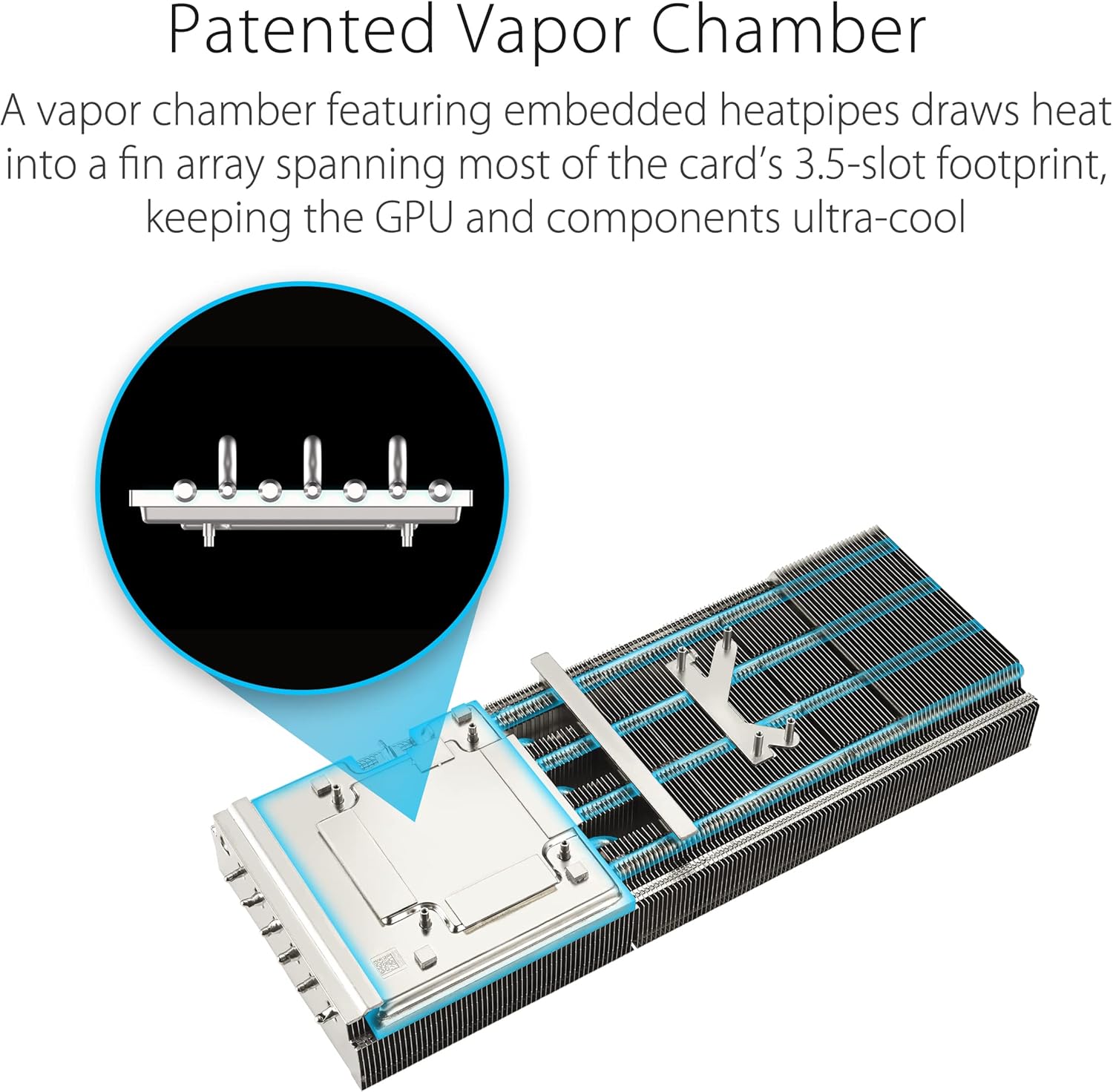
- ห้องไอระเหยที่ได้รับการจดสิทธิบัตร: Features a milled heatspreader for enhanced heat transfer and lower GPU temperatures.
- 3.5-Slot Design: A massive fin array optimized for airflow from the three Axial-tech fans.
- Diecast Shroud, Frame, and Backplate: Adds rigidity and includes vents to maximize airflow and heat dissipation.
- การควบคุมพลังงานแบบดิจิทัล: กำลังไฟฟ้ากระแสสูงtages and 15K capacitors ensure stable power delivery for maximum performance.


5.2 Performance (P) Mode and Quiet (Q) Mode
Your graphics card features a dual BIOS switch, allowing you to select between two operating modes:
- Performance (P) Mode: Prioritizes maximum clock speeds and fan performance for the highest possible frame rates. Fan noise may be more noticeable in this mode.
- Quiet (Q) Mode: Optimizes fan curves for quieter operation, potentially at slightly reduced clock speeds. Ideal for users who prioritize low noise levels.
To switch modes, ensure your computer is powered off, then locate the switch on the side of the graphics card and toggle it to your desired setting. Restart your computer for the changes to take effect.

5.3 วิดีโอผลิตภัณฑ์อย่างเป็นทางการ
ชมวิดีโอผลิตภัณฑ์อย่างเป็นทางการเพื่อดูรายละเอียดเพิ่มเติมview of the ASUS ROG Strix GeForce RTX 4080:
Learn more about ASUS NVIDIA Power AI features:
6. การบำรุงรักษา
- การทำความสะอาด: Periodically clean the fans and heatsink with compressed air to remove dust buildup, which can impede cooling performance. Ensure the computer is powered off and unplugged before cleaning.
- การอัปเดตไดรเวอร์: Regularly check the official NVIDIA website for the latest graphics drivers. Keeping your drivers updated ensures optimal performance, stability, and access to new features.
- การอัปเดตซอฟต์แวร์: Keep your GPU Tweak III software updated for the best experience and access to the latest features and optimizations.
7 การแก้ไขปัญหา
- ไม่มีการแสดงผล:
- ตรวจสอบให้แน่ใจว่าสายเคเบิลจอภาพเชื่อมต่อกับการ์ดจอและจอภาพอย่างแน่นหนา
- ตรวจสอบว่าการ์ดกราฟิกเสียบอยู่ในสล็อต PCIe อย่างสมบูรณ์
- ตรวจสอบให้แน่ใจว่าสายไฟทั้งหมดเชื่อมต่อกับการ์ดจออย่างถูกต้องแล้ว
- ทดสอบด้วยสายจอแสดงผลหรือจอภาพอื่นหากเป็นไปได้
- ความไม่เสถียรของระบบหรือเกิดการขัดข้อง:
- ตรวจสอบให้แน่ใจว่าไดร์เวอร์กราฟิกของคุณเป็นเวอร์ชันล่าสุด
- Check for proper ventilation and ensure the card is not overheating. Monitor temperatures using GPU Tweak III.
- Verify your PSU meets the minimum power requirements for the graphics card.
- ประสิทธิภาพต่ำในเกม/แอปพลิเคชัน:
- ตรวจสอบให้แน่ใจว่าไดร์เวอร์กราฟิกของคุณเป็นเวอร์ชันล่าสุด
- ตรวจสอบการตั้งค่าในเกม ลดความละเอียดหรือคุณภาพกราฟิกหากจำเป็น
- Confirm the graphics card is operating in Performance (P) Mode if desired.
- Monitor GPU utilization and temperatures to identify potential bottlenecks or thermal throttling.
8. ข้อมูลจำเพาะ
| คุณสมบัติ | รายละเอียด |
|---|---|
| โคโปรเซสเซอร์กราฟิก | การ์ดจอ NVIDIA GeForce RTX 4080 |
| ยี่ห้อ | เอซุส |
| ชุด | ROG-STRIX-RTX4080-O16G-GAMING |
| หมายเลขรุ่นสินค้า | ROG-STRIX-RTX4080-O16G-GAMING |
| ขนาดแรมการ์ดจอ | 16GB GDDR6X ความจุ |
| ความเร็วหน่วยความจำ | 4000 MHz (Effective) |
| ความเร็วสัญญาณนาฬิกา GPU | Up to 2.66 GHz (Boost) |
| ความละเอียดหน้าจอสูงสุด | ขนาด 7680x4320 |
| อินเทอร์เฟซเอาท์พุตวิดีโอ | 3x DisplayPort 1.4a, 2x HDMI 2.1a |
| น้ำหนักสินค้า | 5.5 ปอนด์ |
| ขนาดสินค้า (กxยxส) | 14.1 x 5.9 x 2.8 นิ้ว |
9. การรับประกันและการสนับสนุน
Your ASUS ROG Strix GeForce RTX 4080 OC Edition Gaming Graphics Card comes with a manufacturer's warranty. Please refer to the warranty card included in your package for specific terms and conditions, including warranty duration and coverage details.
สำหรับความช่วยเหลือด้านเทคนิค การดาวน์โหลดไดรเวอร์ และข้อมูลผลิตภัณฑ์เพิ่มเติม โปรดเยี่ยมชมเว็บไซต์สนับสนุนอย่างเป็นทางการของ ASUS webเว็บไซต์:
เว็บไซต์ www.asus.com/support/
You may also contact ASUS customer service directly for assistance.


