1. บทนำ
This manual provides essential information for the safe and correct operation of your Vonyx VMM100 4-Channel DJ Mixer. Please read this manual thoroughly before using the device to ensure optimal performance and to prevent damage. Keep this manual for future reference.
2. คำแนะนำด้านความปลอดภัย
- ตรวจสอบแหล่งจ่ายไฟ voltagตรงตามข้อกำหนดที่ระบุไว้สำหรับอุปกรณ์นั้น
- Do not expose the device to rain or moisture to avoid electric shock.
- หลีกเลี่ยงการวางอุปกรณ์ใกล้แหล่งความร้อนหรือแสงแดดโดยตรง
- อย่าเปิดcasing; ไม่มีชิ้นส่วนใดที่ผู้ใช้สามารถซ่อมแซมเองได้ภายในเครื่อง โปรดส่งต่อเครื่องให้กับช่างผู้ชำนาญการเท่านั้น
- Disconnect the power adapter during thunderstorms or when not in use for extended periods.
- เก็บอุปกรณ์ให้ห่างจากเด็ก
3. คุณสมบัติของผลิตภัณฑ์
- Compact 4-channel analog mixer.
- การเชื่อมต่อบลูทูธสำหรับการสตรีมเสียงแบบไร้สาย
- Integrated USB MP3 player with digital display.
- Adjustable delay effect with dedicated volume control.
- Effect send/return on channels 1 and 2.
- High and low tone controls for each channel.
- USB power supply (5V) for mobile use, compatible with power banks.
- Channels 1 and 2 feature +48V phantom power for condenser microphones.
- LED VU meter and peak indicators for signal monitoring.
- Includes USB power adapter and USB cable.
4. เนื้อหาบรรจุภัณฑ์
กรุณาตรวจสอบว่าสินค้ามีครบทั้งหมดเมื่อแกะกล่อง:
- Vonyx VMM100 4-Channel DJ Mixer
- อะแดปเตอร์ USB Power
- สาย USB
- คู่มือการใช้งาน (เอกสารนี้)
5. การควบคุมและฟังก์ชั่น
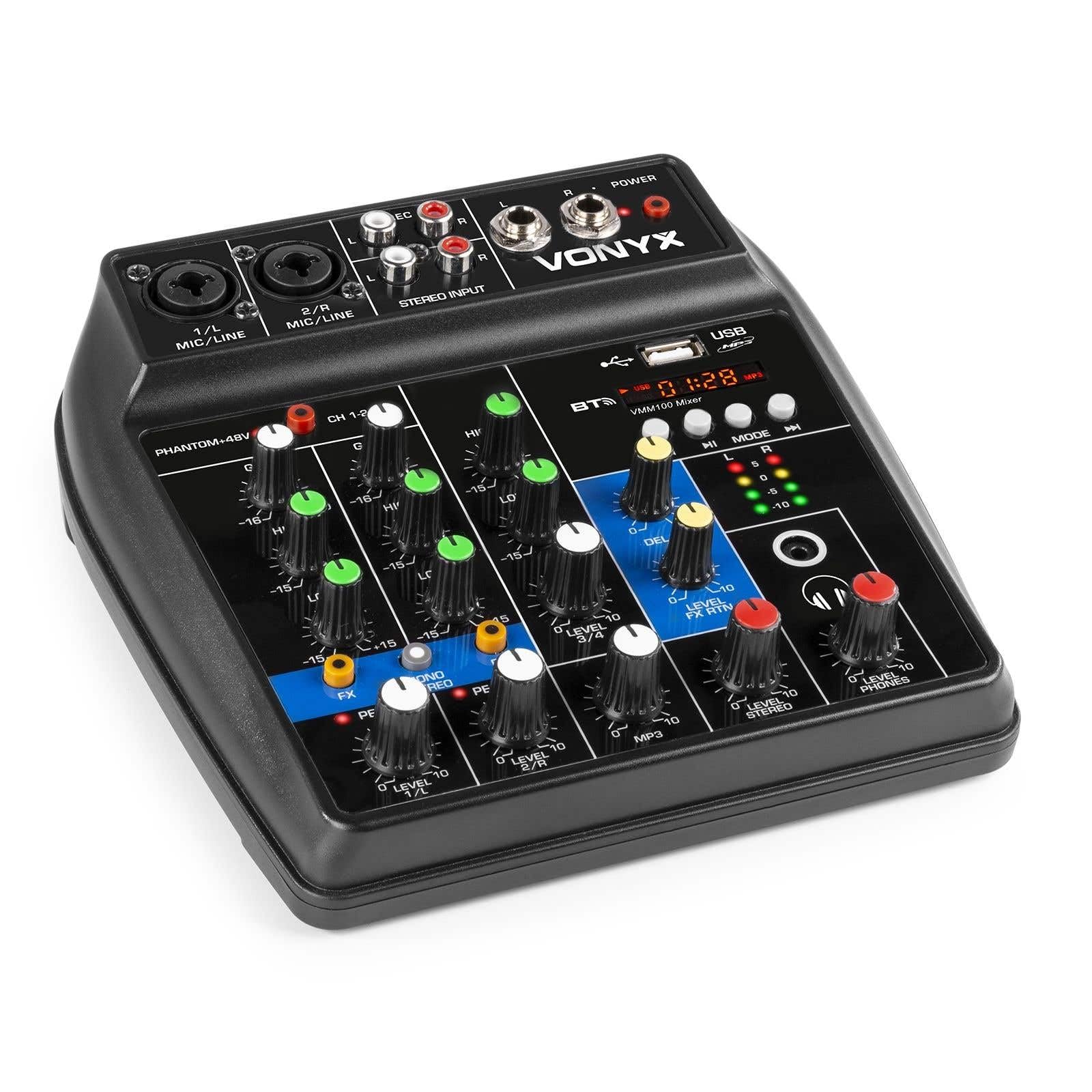
รูปที่ 1: โดยรวม view of the Vonyx VMM100 mixer, highlighting the layout of all controls, inputs, and outputs.

รูปที่ 2: Close-up of the mixer's control panel, showing individual channel controls, EQ, gain, and effect knobs.
5.1 Input Channels (1 & 2)
- Combi XLR / 6.3mm Jack: Connect microphones (XLR) or line-level instruments (6.3mm jack).
- สวิตช์ Phantom +48V: Activates phantom power for condenser microphones on channels 1 and 2.
- กำไรลูกบิด: Adjusts the input sensitivity for the connected device.
- ปุ่มปรับระดับสูง: Adjusts the high-frequency (treble) level for the channel.
- ปุ่มปรับระดับต่ำ: Adjusts the low-frequency (bass) level for the channel.
- ปุ่ม FX: Controls the amount of delay effect applied to the channel.
- ไฟ LED สูงสุด: Illuminates when the input signal is too high, indicating potential clipping. Adjust GAIN to prevent this.
- ปุ่มปรับระดับ: ปรับระดับเอาต์พุตโดยรวมของช่องสัญญาณ
5.2 Stereo Input (Channel 3)
- ช่องต่อ RCA (ซ้าย/ขวา): Connect external stereo audio sources such as CD players or other line-level devices.
- ปุ่มปรับระดับ: Adjusts the output level of the stereo input.
5.3 MP3/Bluetooth Channel (Channel 4)

รูปที่ 3: USB port with a USB drive, demonstrating media playback capability.

รูปที่ 4: Bluetooth and USB player section, showing the display and control buttons.
- พอร์ต USB: เสียบแฟลชไดรฟ์ USB เพื่อเล่นไฟล์ MP3
- แสดง: Shows track information, playback time, and mode.
- Control Buttons (Play/Pause, Skip, Mode): Navigate tracks and switch between USB and Bluetooth modes.
- Bluetooth (BT) Indicator: ไฟจะสว่างขึ้นเมื่อเปิดใช้งานและจับคู่บลูทูธแล้ว
- ปุ่มปรับระดับ: Adjusts the output level of the MP3/Bluetooth channel.
5.4 หัวข้อหลัก
- ปุ่ม DELAY: Adjusts the overall intensity of the delay effect.
- ปุ่มปรับระดับเสียง LEVEL FX RTN: Controls the return level of the delay effect.
- LEVEL STEREO Knob: Master volume control for the main stereo output.
- LEVEL PHONES Knob: ปรับระดับเสียงเอาต์พุตหูฟัง
- VU Meter (LED): Displays the main output level.
- Main Output (6.3mm Jack L/R): เชื่อมต่อกับ amplifiers หรือลำโพงขับเคลื่อน
- เอาท์พุตบันทึก (RCA L/R): Connects to recording devices.
- เอาต์พุตหูฟัง (แจ็ค 6.3 มม.): Connects stereo headphones.
- ไฟ LED: Indicates when the mixer is powered on.
5.5 อินพุตพลังงาน

รูปที่ 5: ด้านข้าง view of the mixer, illustrating the 5V DC USB power input port.
- 5V DC USB Input: Connect the provided USB power adapter or a compatible USB power source (e.g., power bank) to power the mixer.
6. การตั้งค่า
6.1 การเชื่อมต่อสายไฟ
- Connect the supplied USB cable to the 5V DC USB input on the mixer.
- ต่อปลายอีกด้านของสาย USB เข้ากับอะแดปเตอร์แปลงไฟ USB ที่ให้มา
- Plug the USB power adapter into a suitable wall outlet. The POWER LED on the mixer will illuminate.
6.2 การเชื่อมต่อแหล่งเสียง
- Microphones/Line Instruments: Connect microphones via XLR or line-level instruments via 6.3mm jack to channels 1 and 2. If using condenser microphones, activate the +48V phantom power switch.
- Stereo Line Devices: Connect devices like CD players to the RCA inputs of channel 3.
- ยูเอสบีไดรฟ์: ใส่แฟลชไดรฟ์ USB ที่มี MP3 files into the USB port on channel 4.
6.3 การเชื่อมต่อเอาท์พุต
- เอาต์พุตหลัก: Connect the 6.3mm jack main outputs (L/R) to your amplifier, powered speakers, or PA system.
- หูฟัง: Connect your headphones to the 6.3mm headphone jack.
- อุปกรณ์บันทึกเสียง: Connect the RCA record outputs (L/R) to an external recording device if desired.
7. คู่มือการใช้งาน
7.1 การผสมพื้นฐาน
- Ensure all LEVEL and GAIN knobs are set to their minimum positions before powering on.
- Power on the mixer and any connected audio equipment.
- Gradually increase the GAIN knob for each active input channel until the PEAK LED flashes only occasionally during the loudest parts of the signal.
- Adjust the HIGH and LOW EQ knobs for each channel to shape the tone as desired.
- Use the individual LEVEL knobs to balance the volume of each channel.
- Adjust the main STEREO LEVEL knob to control the overall output volume. Monitor the VU meter to avoid clipping.
- Adjust the PHONES LEVEL knob for comfortable headphone monitoring.
7.2 การทำงานของบลูทูธ
- Press the MODE button on the MP3/Bluetooth channel until the display shows "BT" or the Bluetooth indicator flashes.
- On your smartphone, tablet, or PC, search for Bluetooth devices and select "Vonyx VMM100".
- Once paired, the Bluetooth indicator will glow steadily. You can now stream audio wirelessly to the mixer.
- Use the playback controls on the mixer or your device to manage audio.
7.3 การเล่น MP3 ผ่าน USB
- ใส่แฟลชไดรฟ์ USB ที่มี MP3 fileลงในพอร์ต USB
- Press the MODE button on the MP3/Bluetooth channel until the display shows track information.
- Use the playback controls (Play/Pause, Skip) to navigate and play tracks.
7.4 การใช้เอฟเฟ็กต์
- Turn the FX knob on channels 1 and 2 to send a portion of that channel's signal to the internal delay effect.
- Adjust the main DELAY knob to control the overall intensity and characteristics of the delay.
- Use the LEVEL FX RTN knob to control how much of the processed effect signal is mixed back into the main output.
8. การบันทึก
The VMM100 mixer allows for easy recording of your mix. Connect the RCA record outputs (L/R) to the input of a suitable recording device (e.g., computer audio interface, dedicated recorder). Ensure your recording software or device is configured to receive audio from the connected inputs. The signal sent to the record output is a stereo mix of all active channels, post-fader.
9. การบำรุงรักษา
- การทำความสะอาด: ใช้ผ้านุ่มและแห้งเช็ดทำความสะอาดภายนอกของเครื่องผสม ห้ามใช้น้ำยาทำความสะอาดหรือตัวทำละลายที่มีฤทธิ์กัดกร่อน
- พื้นที่จัดเก็บ: เก็บเครื่องผสมไว้ในที่แห้งและเย็น หลีกเลี่ยงแสงแดดโดยตรงและอุณหภูมิที่สูงหรือต่ำเกินไป
- การจัดการ: หลีกเลี่ยงการทำตกหรือให้เครื่องผสมได้รับแรงกระแทกรุนแรง
10 การแก้ไขปัญหา
| ปัญหา | สาเหตุที่เป็นไปได้ | สารละลาย |
|---|---|---|
| ไม่มีไฟฟ้า | อะแดปเตอร์ไฟไม่ได้เชื่อมต่อหรือมีข้อบกพร่อง | Check power connections. Try a different USB port or adapter. |
| ไม่มีเสียงออก | Incorrect cable connections; volume knobs too low; incorrect input selection. | Verify all audio cables are securely connected. Increase channel LEVEL and STEREO LEVEL knobs. Ensure correct input mode (e.g., USB/BT). |
| เสียงเพี้ยน | Input GAIN too high; output level too high. | Reduce GAIN for the affected channel until the PEAK LED stops flashing excessively. Lower STEREO LEVEL. |
| บลูทูธไม่จับคู่ | มิกเซอร์ไม่ได้อยู่ในโหมดบลูทูธ อุปกรณ์อยู่ไกลเกินไป อุปกรณ์ที่เคยจับคู่ไว้ก่อนหน้านี้เชื่อมต่ออยู่แล้ว | Ensure mixer is in BT mode. Move device closer. Disconnect from other Bluetooth devices. |
| การเล่น USB ไม่ทำงาน | ไดรฟ์ USB ไม่ได้รับการฟอร์แมตอย่างถูกต้อง ไม่รองรับ file ประเภท; มิกเซอร์ไม่ได้อยู่ในโหมด USB | ตรวจสอบให้แน่ใจว่าไดรฟ์ USB ฟอร์แมตเป็น FAT32 และมีไฟล์ MP3 อยู่ files. Press MODE to select USB. |
11. ข้อมูลจำเพาะ
- ข้อมูลอินพุต:
- Channels 1 & 2: Combi XLR / 6.3mm Jack (Line or Microphone)
- Channel 3: RCA (Stereo)
- Channel 4: Bluetooth or USB MP3 Player
- เอาท์พุต:
- Main: 6.3mm Jack (Stereo)
- Record: RCA (Stereo)
- Headphone: 6.3mm Jack
- ช่วงความถี่: 20 เฮิรตซ์ - 20,000 เฮิรตซ์
- Equalizer: 2-band (High, Low) per channel
- พลังปีศาจ: +48V (Channels 1 & 2)
- การเชื่อมต่อฉบับที่tage: 5V DC (ผ่าน USB)
- ขนาด (ยาว x กว้าง x สูง): 18 x 19.5 x 5.8 ซม. (7.09 x 7.68 x 2.28 นิ้ว)
- น้ำหนัก: 0.5 กก. (1.1 ปอนด์)
- วัสดุ: ไนลอน
12. การรับประกันและการสนับสนุน
Vonyx products are designed and manufactured to the highest quality standards. In the unlikely event of a problem with your product, please contact your retailer for warranty service. Please retain your proof of purchase. For technical support or further inquiries, refer to the official Vonyx webเว็บไซต์หรือติดต่อฝ่ายบริการลูกค้าของพวกเขา


