การแนะนำ
ขอบคุณสำหรับการซื้อasing the Nedis Alarm Clock with Wireless Charger. This device combines a digital alarm clock with a Qi-certified wireless charging pad, a USB-A charging port, a dimmable display, dual alarm settings, and a color-changing night light. This manual provides essential information for safe and efficient use of your new device.
ข้อมูลด้านความปลอดภัย
- อ่านคำแนะนำทั้งหมดอย่างละเอียดก่อนใช้งาน
- เก็บอุปกรณ์ให้ห่างจากน้ำ ความชื้น และอุณหภูมิที่สูงเกินไป
- อย่าพยายามถอดประกอบหรือซ่อมแซมอุปกรณ์ด้วยตนเอง แนะนำให้ส่งช่างผู้ชำนาญการไปรับบริการทั้งหมด
- Ensure the power adapter used is compatible with the device's power requirements. For fast charging, a QC3.0 power adapter (not included) is recommended.
- Avoid placing metal objects on the wireless charging pad, as this may interfere with charging or cause overheating.
เนื้อหาแพ็คเกจ
- Nedis Alarm Clock with Wireless Charger (Model WCACQ30WT)
- Power Adapter (if included, otherwise sold separately)
- คู่มือการใช้งาน
สินค้าเกินview
Familiarize yourself with the various components of your alarm clock:

ภาพที่ 1: ด้านหน้า View. This image displays the front of the alarm clock, featuring the large digital time display and the touch-sensitive control buttons located above it. The buttons include controls for display brightness, time setting, and alarm adjustments.
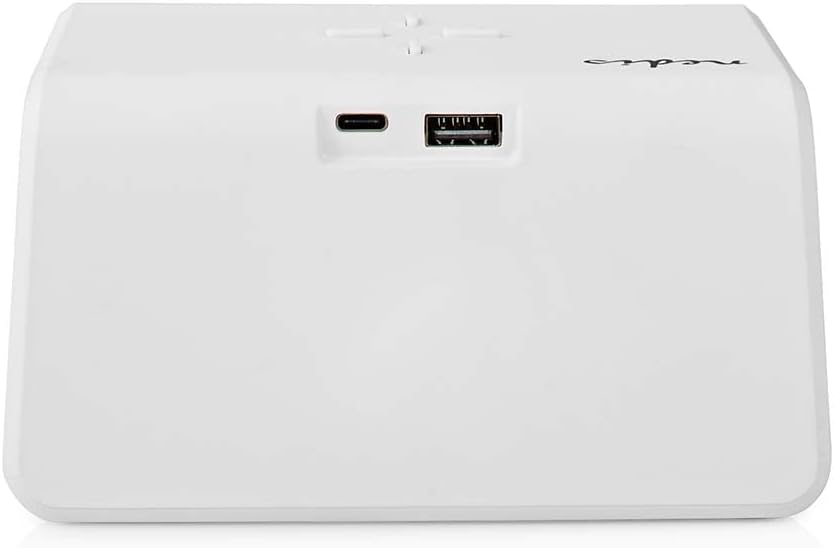
ภาพที่ 2: ด้านหลัง View. The back of the alarm clock is shown, highlighting the USB-C port for power input and a standard USB-A port for charging external devices.
- จอแสดงผลดิจิตอล: แสดงเวลา สถานะการปลุก และตัวบ่งชี้อื่นๆ
- ปุ่มควบคุม: (Located on top)
- Light Button: Controls night light.
- Time/Alarm Set Button: For setting time and alarms.
- +/- Buttons: Adjust values.
- แผ่นชาร์จไร้สาย: (Top surface) For Qi-compatible devices.
- อินพุต USB-C: (Rear) For connecting the power adapter.
- เอาต์พุต USB-A: (Rear) For charging other devices via cable.
- Night Light Panel: (Side/Rear) Emits ambient light.
การตั้งค่า
- เชื่อมต่อพลังงาน: Plug the provided power adapter into the USB-C input port on the back of the alarm clock. Connect the other end to a wall outlet. The display will light up.
- การตั้งเวลาเริ่มต้น: The clock may display a default time. Proceed to the 'Operating Instructions' section to set the correct time.
คำแนะนำการใช้งาน
1. การตั้งเวลา
- กดปุ่มค้างไว้ Time/Alarm Set button (usually marked with a clock icon) until the hour digits start flashing.
- ใช้ + or - ปุ่มเพื่อปรับชั่วโมง
- กดปุ่ม Time/Alarm Set button again to switch to minute adjustment. The minute digits will flash.
- ใช้ + or - ปุ่มปรับนาที
- กดปุ่ม Time/Alarm Set กดปุ่มอีกครั้งเพื่อยืนยันและออกจากโหมดตั้งเวลา
2. การตั้งค่าสัญญาณเตือน (สัญญาณเตือน 1 และ สัญญาณเตือน 2)
This device supports two independent alarm times.
- กดปุ่ม Time/Alarm Set button once to enter Alarm 1 setting mode. The alarm icon and hour digits for Alarm 1 will flash.
- ใช้ + or - buttons to adjust the hour for Alarm 1.
- กดปุ่ม Time/Alarm Set button again to switch to minute adjustment for Alarm 1.
- ใช้ + or - buttons to adjust the minutes for Alarm 1.
- กดปุ่ม Time/Alarm Set button again to confirm Alarm 1 and move to Alarm 2 setting mode (if applicable). Repeat steps 2-4 for Alarm 2.
- After setting Alarm 2, press the Time/Alarm Set ปุ่มสำหรับยืนยันและออกจากโหมดตั้งค่าสัญญาณเตือน
- To activate/deactivate an alarm, short press the Time/Alarm Set button until the desired alarm icon (e.g., 'AL1' or 'AL2') appears or disappears on the display.
3. ฟังก์ชั่นเลื่อนปลุก
When an alarm sounds, press any button (except the alarm off button, if present) to activate the snooze function. The alarm will temporarily stop and sound again after a few minutes (typically 5-10 minutes, refer to specific model details if available). To turn off the alarm completely, press the designated alarm off button or follow the instructions for deactivating the alarm.
4. Wireless Charging (Qi)
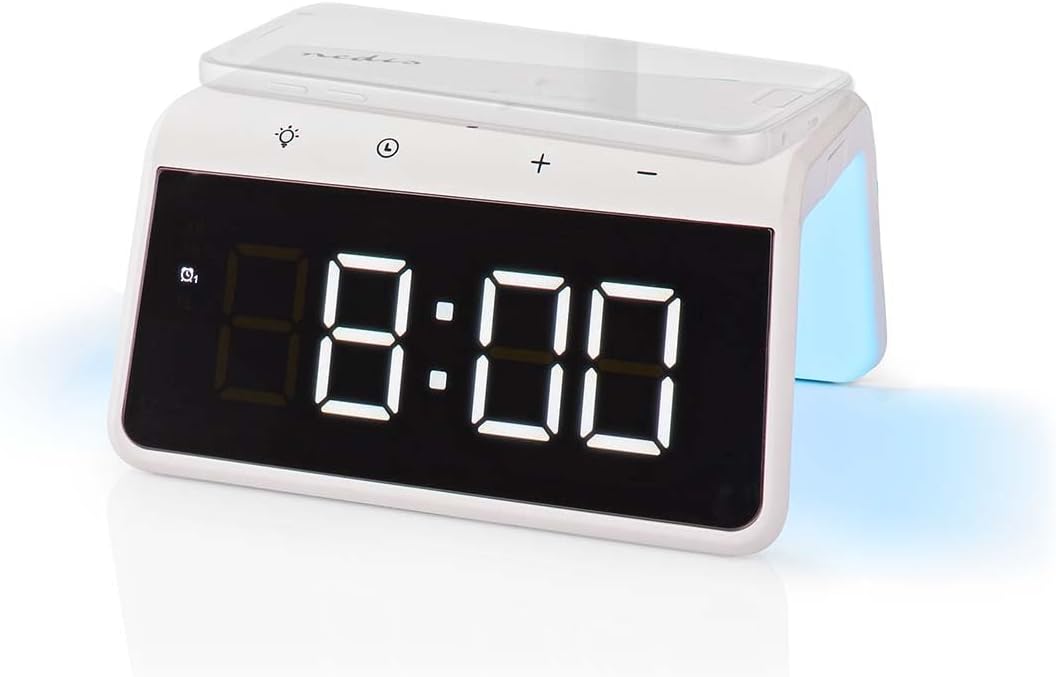
Image 3: Wireless Charging. A smartphone is shown resting on the top surface of the alarm clock, which functions as a Qi wireless charging pad.
- Place your Qi-compatible smartphone or device directly onto the wireless charging pad located on the top surface of the alarm clock.
- Ensure the device is centered on the charging pad for optimal performance.
- A charging indicator (e.g., an icon on the display or an LED light) will typically illuminate to confirm that charging has begun.
- The charger supports 5W, 7.5W, 10W, and 15W output, automatically adjusting to your device's requirements. For 15W fast charging, a QC3.0 power adapter (not included) is required.
5. USB-A Charging Output
The alarm clock features an additional USB-A port for charging devices that are not Qi-compatible or for simultaneous charging.
- Connect your device's USB charging cable to the USB-A output port on the back of the alarm clock.
- เชื่อมต่อปลายสายอีกด้านเข้ากับอุปกรณ์ของคุณ
- การชาร์จจะเริ่มโดยอัตโนมัติ
6. ฟังก์ชันไฟกลางคืน

Image 4: Night Light. This image shows the side of the alarm clock with its integrated night light emitting a soft glow.
- กดปุ่ม แสงสว่าง button (usually marked with a light bulb icon) to turn the night light on or off.
- กดปุ่มซ้ำๆ แสงสว่าง button to cycle through different color modes or to set a specific color. The night light can display a diverse changing color palette.
- The night light can be set to remain on or to be manually activated as needed.
7. การปรับความสว่างของจอแสดงผล
The digital display features dimmable backlighting for comfortable viewในสภาพแสงต่างๆ
- Look for a dedicated brightness button or a combination of buttons (e.g., a short press of the Light button or +/- buttons when not in setting mode) to adjust the display brightness.
- Cycle through available brightness levels (e.g., high, medium, low, off).
การซ่อมบำรุง
- การทำความสะอาด: เช็ดอุปกรณ์ด้วยผ้าเนื้อนุ่ม แห้ง หรือชื้นเล็กน้อยamp ผ้า ห้ามใช้สารทำความสะอาดที่มีฤทธิ์กัดกร่อนหรือตัวทำละลาย
- พื้นที่จัดเก็บ: เมื่อไม่ได้ใช้งานเป็นระยะเวลานาน ให้ถอดปลั๊กอุปกรณ์และเก็บไว้ในที่แห้งและเย็น
การแก้ไขปัญหา
- อุปกรณ์ไม่เปิดเครื่อง: Ensure the power adapter is securely connected to both the alarm clock and a working power outlet.
- การชาร์จแบบไร้สายไม่ทำงาน:
- Verify your device is Qi-compatible.
- Ensure your device is centered on the charging pad.
- Remove any thick phone cases or metal objects between the phone and the charging pad.
- USB-A charging not working: Check the USB cable for damage and ensure it is properly connected to both the alarm clock and your device.
- สัญญาณเตือนภัยไม่ดัง: Ensure the alarm is activated (check for the alarm icon on the display) and the volume is not set to zero (if adjustable).
- จอแสดงผลมืด/สว่างเกินไป: Adjust the display brightness using the dedicated controls.
ข้อมูลจำเพาะ
| คุณสมบัติ | ข้อมูลจำเพาะ |
|---|---|
| หมายเลขรุ่น | WCACQ30WT |
| ยี่ห้อ | เนดิส |
| ขนาดสินค้า | 14 x 3.81 x 7 ซม. |
| น้ำหนักสินค้า | 242 กรัม |
| เอาท์พุทชาร์จไร้สาย | 5W / 7.5W / 10W / 15W (Qi Certified) |
| เอาต์พุต USB-A | ใช่ |
| ประเภทจอภาพ | ดิจิตอล |
| คุณสมบัติพิเศษ | Alarm, Charging Port, Dimmable Display, Night Light (Color Changing) |
| แหล่งพลังงาน | สายไฟ |
| สี | สีขาว |
การรับประกันและการสนับสนุน
Nedis products are manufactured to high quality standards. In the unlikely event of a defect during the warranty period, please contact your retailer for support. The warranty period is subject to the terms and conditions of the retailer and local consumer laws.
For further assistance or technical support, please refer to the official Nedis webหรือติดต่อฝ่ายบริการลูกค้าโดยตรง โปรดเก็บใบเสร็จรับเงินไว้เป็นหลักฐานการซื้อ


