1. คำแนะนำด้านความปลอดภัยที่สำคัญ
Please read all instructions carefully before using the SIGMA PCC 565 document shredder. Keep this manual for future reference.
- Always keep the shredder out of reach of children and pets.
- Do not insert fingers, loose clothing, jewelry, or long hair into the paper or media entry slots.
- Unplug the shredder from the power outlet when not in use, before cleaning, or before moving.
- Do not shred metal objects, adhesive labels, or plastic materials other than CDs/DVDs/credit cards as specified.
- Do not open the shredder casinก. ไม่มีชิ้นส่วนใดที่ผู้ใช้สามารถซ่อมบำรุงเองได้ภายใน แนะนำให้ช่างผู้ชำนาญการซ่อมบำรุงนำชิ้นส่วนทั้งหมดไปซ่อม
- ตรวจสอบให้แน่ใจว่าวางเครื่องทำลายเอกสารไว้บนพื้นผิวที่มั่นคงและเรียบเสมอกัน
- Do not operate the shredder if the power cord or plug is damaged.
2. สินค้าหมดview
The SIGMA PCC 565 is a versatile document shredder designed for home or small office use. It features a separate entry for CDs, DVDs, and credit cards, and includes automatic start/stop, overload, and overheat protection.
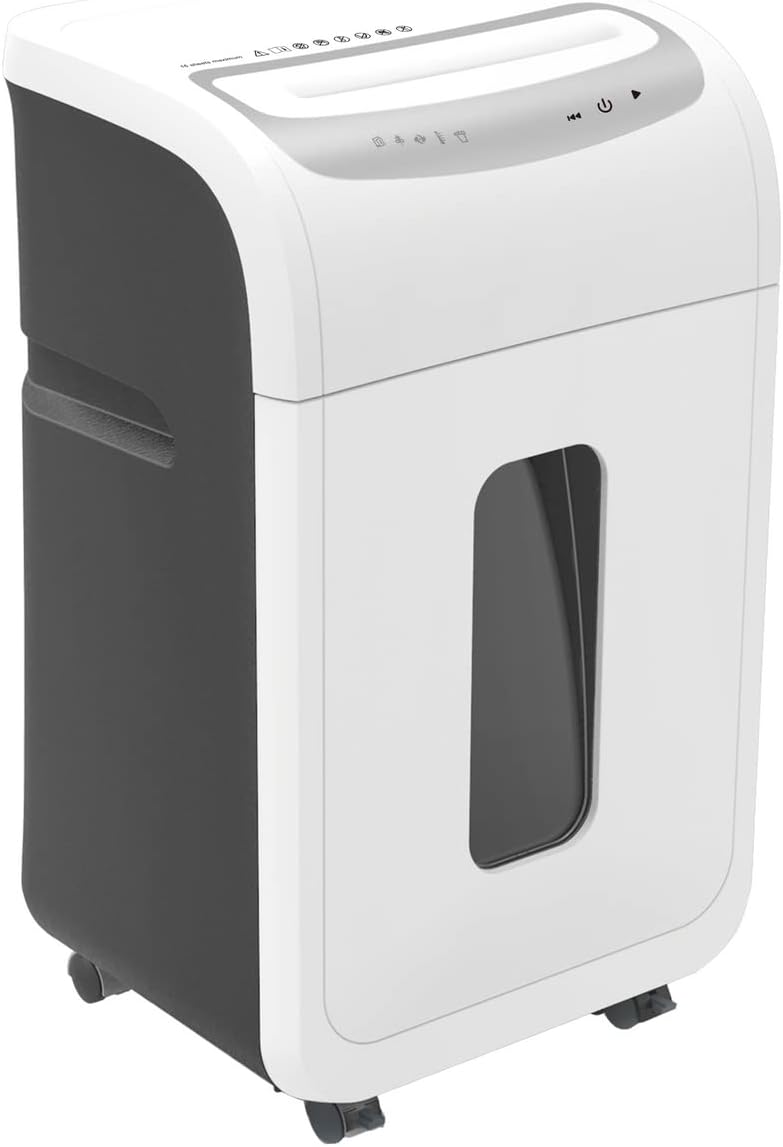
ภาพ: ด้านหน้า view of the SIGMA PCC 565 Document Shredder. It features a white and dark grey casing, with a transparent window on the front to view the waste bin level. The top panel includes control buttons and paper/media entry slots.
คุณสมบัติหลัก:
- Shreds up to 16 sheets of 80 gsm paper simultaneously.
- Separate entry for CDs, DVDs, and credit cards.
- ฟังก์ชันเริ่ม/หยุดอัตโนมัติ
- Overload protection to prevent paper jams.
- Overheat protection for motor longevity.
- Suitable for DIN A4 documents.
3. การตั้งค่า
3.1 การแกะกล่อง
- นำเครื่องทำลายเอกสารออกจากบรรจุภัณฑ์อย่างระมัดระวัง
- Remove any protective materials or plastic bags.
- Ensure all components are present: shredder head, waste bin, and user manual.
3.2 การจัดวาง
Place the shredder on a flat, stable surface. Ensure there is sufficient space around the unit for ventilation and to access the power outlet.
3.3 การประกอบ
Carefully place the shredder head onto the top of the waste bin, ensuring it is securely seated. The shredder will not operate if the head is not correctly positioned.
3.4 การเชื่อมต่อสายไฟ
Plug the power cord into a standard electrical outlet. The shredder is now ready for operation.
4. คู่มือการใช้งาน
4.1 การควบคุม
The control panel is located on the top of the shredder head. It typically includes:
- Auto (I): The shredder is in standby mode and will automatically start when paper is inserted.
- ปิด (O): The shredder is powered off.
- Reverse (<<): Manually reverses the shredding action to clear paper jams.
4.2 การฉีกกระดาษ
- Ensure the shredder is plugged in and the switch is set to 'Auto' (I).
- Insert up to 16 sheets of 80 gsm paper straight into the paper entry slot. Do not exceed the maximum capacity.
- The shredder will automatically start and shred the paper. Once shredding is complete, it will stop.
4.3 Shredding CDs/DVDs/Credit Cards
- Ensure the shredder is plugged in and the switch is set to 'Auto' (I).
- Insert one CD, DVD, or credit card into the separate media entry slot.
- The shredder will automatically start and shred the media. Once shredding is complete, it will stop.
4.4 Overload and Overheat Protection
- ระบบป้องกันการโอเวอร์โหลด: If too much paper is inserted, the shredder may stop. Remove some sheets and try again. Use the 'Reverse' function if a jam occurs.
- การป้องกันความร้อนสูงเกินไป: For continuous operation, the shredder may automatically shut off to prevent overheating. If this happens, allow the shredder to cool down for approximately 20-30 minutes before resuming operation.
5. การบำรุงรักษา
5.1 การล้างถังขยะ
- ถอดปลั๊กเครื่องทำลายเอกสารออกจากเต้ารับไฟฟ้า
- ค่อยๆ ยกหัวเครื่องทำลายเอกสารออกจากถังขยะ
- Empty the shredded material from the bin into a suitable recycling container.
- Replace the shredder head securely onto the waste bin.
5.2 Cleaning and Oiling
Regular cleaning and oiling help maintain shredder performance and extend its lifespan.
- การทำความสะอาดภายนอก: Unplug the shredder. Wipe the exterior with a soft, damp ผ้า ห้ามใช้สารทำความสะอาดที่มีฤทธิ์กัดกร่อนหรือตัวทำละลาย
- การหล่อลื่นใบมีด: For optimal performance, oil the shredder blades regularly (e.g., after every 30 minutes of cumulative shredding or when performance decreases). Use shredder oil sheets or liquid shredder oil applied to a sheet of paper and shred it.
6 การแก้ไขปัญหา
If you encounter issues with your shredder, refer to the table below for common problems and solutions.
| ปัญหา | สาเหตุที่เป็นไปได้ | สารละลาย |
|---|---|---|
| เครื่องทำลายเอกสารไม่ทำงาน | Not plugged in; Power switch off; Shredder head not seated correctly; Overheat protection active. | Ensure power cord is securely plugged in; Set switch to 'Auto' (I); Re-seat shredder head; Allow shredder to cool down for 20-30 minutes. |
| กระดาษติด. | Too much paper inserted; Paper inserted crookedly. | Press 'Reverse' (<<) to clear paper. If necessary, unplug, remove shredder head, and carefully remove paper manually. Do not force. |
| เครื่องทำลายเอกสารหยุดทำงานระหว่างการใช้งาน | Overheat protection active; Waste bin full. | Allow shredder to cool down; Empty the waste bin. |
| Poor shredding performance / Loud noise. | Blades need oiling; Waste bin too full. | Oil the shredder blades as per maintenance instructions; Empty the waste bin. |
7. ข้อมูลจำเพาะ
| แบบอย่าง | PCC 565 |
| ยี่ห้อ | ซิกม่า |
| สี | สีขาว |
| ประเภทฉีก | Cross-cut (for paper, CDs/DVDs, credit cards) |
| Paper Shred Capacity | 16 แผ่น (80 แกรม) |
| Media Shred Capacity | 1 CD/DVD or 1 Credit Card |
| ความกว้างของรายการกระดาษ | Compatible with DIN A4 documents |
| Media Entry | Separate slot for CDs/DVDs/Credit Cards |
| ขนาด (สูง) | 60.2 ซม. |
| แหล่งพลังงาน | สายไฟฟ้า |
| โหมดการทำงาน | อัตโนมัติ |
| คุณสมบัติด้านความปลอดภัย | Overload protection, Overheat protection, Auto-disconnect |
8. การรับประกันและการสนับสนุน
For warranty information, please refer to the warranty card included with your product or contact the retailer where you purchased the shredder. For technical support or service inquiries, please contact Sigma customer service or your local distributor.
Please have your model number (PCC 565) and purchase date ready when contacting support.


