1. สินค้าหมดview
The KIDOMO F03 Drone is a foldable RC quadcopter equipped with a 4K GPS camera, designed for ease of use and stable flight. It features a brushless motor for extended lifespan, dual cameras for versatile shooting, and advanced GPS and Optical Flow positioning for precise control and automatic return functions. This manual provides essential information for safe operation, maintenance, and troubleshooting.

Figure 1: KIDOMO F03 Drone, remote controller, and two modular batteries.
2. คำแนะนำด้านความปลอดภัย
Always prioritize safety when operating the drone. Failure to follow these guidelines may result in injury, damage to the drone, or property damage.
- การตรวจสอบก่อนบิน: Ensure all components are securely attached, batteries are fully charged, and propellers are free from damage before each flight.
- สภาพแวดล้อม : Avoid flying in strong winds, rain, snow, or fog. Maintain a clear line of sight to the drone at all times.
- พื้นที่บิน: Fly in open areas away from people, animals, buildings, and power lines. Do not fly near airports or restricted airspace.
- ความปลอดภัยของแบตเตอรี่: Use only original KIDOMO batteries and chargers. Do not overcharge or puncture batteries. Store batteries in a cool, dry place.
- ความปลอดภัยของใบพัด: ให้มือ ใบหน้า และเสื้อผ้าหลวมๆ ออกห่างจากใบพัดที่กำลังหมุน
- Responsible Operation: Do not operate the drone under the influence of alcohol or drugs. Respect privacy and local regulations.
3. เนื้อหาบรรจุภัณฑ์
ตรวจสอบว่ามีรายการทั้งหมดอยู่ในแพ็คเกจของคุณ:
- KIDOMO F03 Drone
- รีโมทคอนโทรล
- 2 x Lithium Polymer Batteries (7.4V 2200mAh)
- สายชาร์จ USB
- ใบพัดสำรอง (จำนวนอาจแตกต่างกันไป)
- ไขควง
- คู่มือการใช้งาน
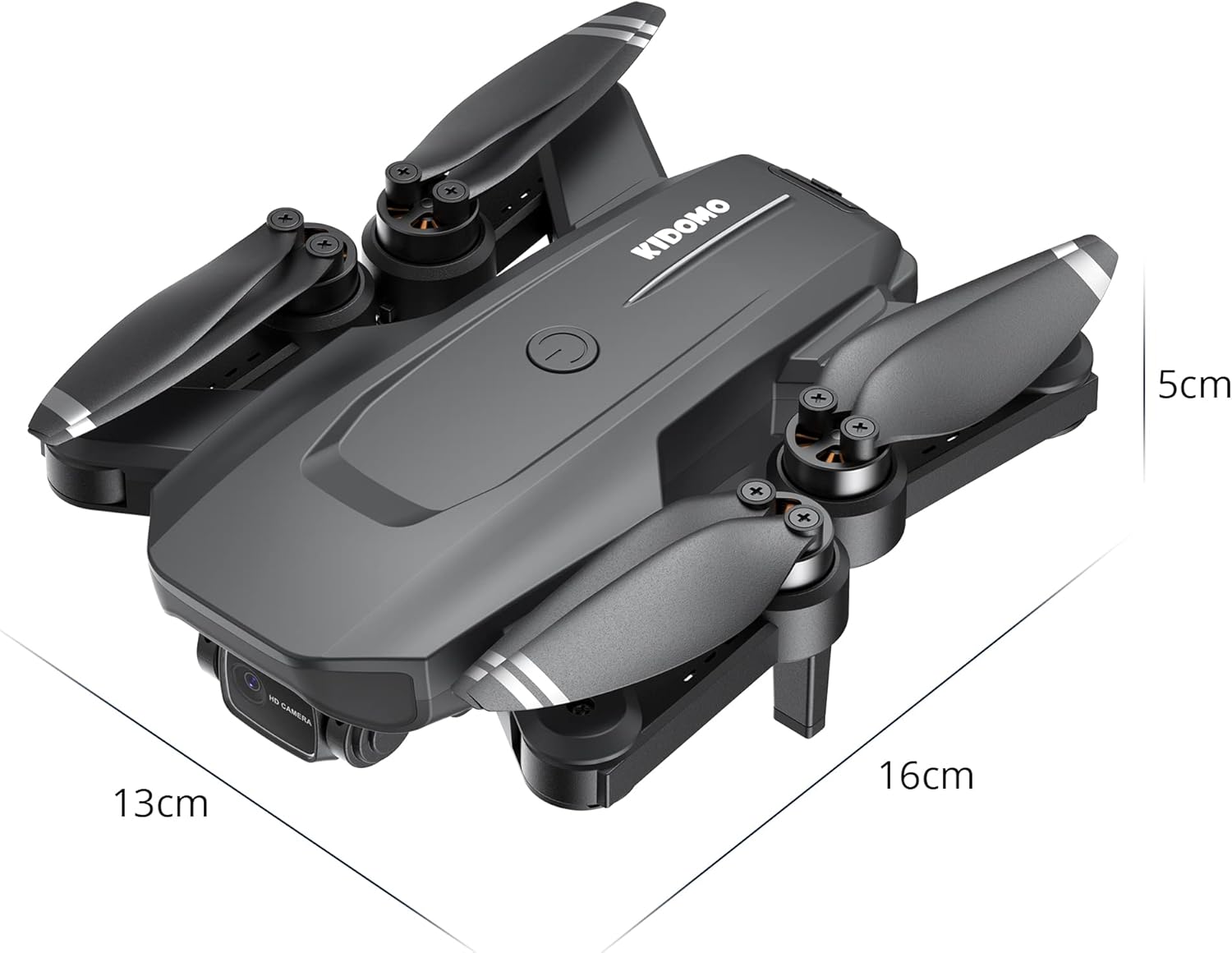
Figure 2: Folded dimensions of the KIDOMO F03 Drone (approx. 13cm x 16cm x 5cm).
4. คู่มือการติดตั้ง
4.1. การชาร์จแบตเตอรี่
Before first use, fully charge both drone batteries and the remote controller battery (if applicable).
- เชื่อมต่อสายชาร์จ USB เข้ากับแบตเตอรี่โดรน
- เสียบปลายอีกด้านของสาย USB เข้ากับอะแดปเตอร์แปลงไฟ USB 5V/2A (ไม่ได้รวมอยู่ในชุด)
- The indicator light on the battery will be green during charging and will turn off when fully charged.
- Charging time is approximately 3-4 hours per battery.

Figure 3: The 7.4V 2200mAh Li-ion modular batteries provide up to 56 minutes of total flight time.
4.2. Installing Drone Batteries
- ตรวจสอบให้แน่ใจว่าโดรนปิดอยู่
- Insert a fully charged battery into the battery compartment on the drone until it clicks into place.
4.3. กางโดรนออก
- Gently unfold the front arms first, then the rear arms until they are fully extended.
- Ensure all arms are locked into position before flight.
4.4. การตั้งค่ารีโมทคอนโทรล
- Install 3 x AA batteries (not included) into the remote controller.
- Pull out the phone holder and securely mount your smartphone.
4.5. การติดตั้งและการเชื่อมต่อแอป
- Scan the QR code in the manual (or search "KIDOMO F03 App" on your app store) to download the official control application.
- เปิดโดรนก่อน จากนั้นจึงเปิดรีโมทคอนโทรล
- On your smartphone, connect to the drone's Wi-Fi network (e.g., "KIDOMO-F03-XXXX").
- Open the app. The app should automatically connect to the drone, displaying the live camera feed.
5. คู่มือการใช้งาน
5.1. Pairing and Calibration
- วางโดรนไว้บนพื้นผิวเรียบ
- เปิดโดรนก่อน จากนั้นจึงเปิดรีโมทคอนโทรล
- Push the left joystick up then down to pair the remote with the drone. The drone lights will stop flashing and become solid.
- Perform gyroscope calibration by pushing both joysticks to the bottom-right corner simultaneously until the drone lights flash rapidly and then become solid.
- Perform compass calibration (for GPS mode):
- Press the GPS calibration button on the remote (refer to remote diagram in app).
- Hold the drone horizontally and rotate it 360 degrees until the lights change.
- Hold the drone vertically with the camera facing down and rotate it 360 degrees until the lights become solid. Calibration is complete.
5.2. การขึ้นและลงจอด
- การบินขึ้นด้วยปุ่มเดียว: Press the one-key take-off/landing button on the remote or in the app. The drone will automatically ascend to a safe height.
- การถอดแบบแมนนวล: Push both joysticks to the bottom-left/right corners (depending on model) to arm the motors. Then slowly push the left joystick up to ascend.
- การลงจอดด้วยปุ่มเดียว: Press the one-key take-off/landing button again. The drone will automatically descend and land.
- หยุดฉุกเฉิน: In an emergency, press and hold the one-key landing button for 3 seconds to immediately stop the motors. Use only in emergencies.
5.3. โหมดการบินและคุณสมบัติ
The KIDOMO F03 drone offers various intelligent flight modes:
- GPS Positioning Mode: Provides precise outdoor positioning, stable hovering, and accurate return-to-home functions. Essential for intelligent flight modes.
- Optical Flow Positioning Mode: Ideal for indoor flight or areas without GPS signal. Uses a downward-facing camera to maintain position.
- Automatic Return (RTH):
- สมาร์ท RTH: Press the Return-to-Home button on the remote or in the app. The drone will return to its recorded take-off point.
- RTH แบตเตอรี่ต่ำ: The drone will automatically return when the battery is critically low.
- สัญญาณขาดหาย RTH: If the connection between the drone and remote is lost, the drone will automatically return to the take-off point.
- โหมดติดตามฉัน: In GPS mode, enable "Follow Me" in the app. The drone will automatically follow the remote controller (and thus the user's smartphone) at a set distance.
- Surround Mode (Point of Interest): In GPS mode, select a point of interest in the app. The drone will circle around that point at a specified radius and altitude.
- เที่ยวบินตามจุดหมาย (เที่ยวบินตามเส้นทาง): Draw a path on the map in the app. The drone will automatically fly along the designated route.

Figure 4: The drone utilizes Optical Flow Positioning for stable indoor flight and GPS Positioning for precise outdoor flight.

Figure 5: GPS precise localization ensures the drone can automatically return home under various conditions.

Figure 6: The drone's intelligent flight modes, such as Follow Me and Waypoint Flight, allow for dynamic aerial photography.
5.4. การทำงานของกล้อง
The F03 drone features a dual-camera system:
- กล้องหน้า 4K: Captures high-resolution photos and videos. The camera angle can be adjusted remotely from 0-90 degrees via the app or remote controller.
- กล้องล่างความละเอียด 480P: Used for Optical Flow Positioning and can also capture images/videos from a different perspective.

Figure 7: The drone features a 4K front camera with 90-degree adjustable angle and a 480P bottom camera.
- ถ่ายรูป: Press the photo button on the remote or in the app.
- การบันทึกวิดีโอ: Press the video button on the remote or in the app to start/stop recording.
- ที่เก็บสื่อ: Photos and videos are saved directly to your smartphone via the app.
6. การบำรุงรักษา
- การทำความสะอาด: Use a soft, dry cloth to clean the drone body and camera lenses. Do not use liquid cleaners.
- การตรวจสอบใบพัด: Regularly check propellers for cracks, bends, or damage. Replace damaged propellers immediately using the provided screwdriver.
- การดูแลมอเตอร์: มอเตอร์ไร้แปรงถ่านได้รับการออกแบบมาเพื่อความทนทาน โปรดระวังอย่าให้ฝุ่นและสิ่งสกปรกเข้าไปใกล้
- การจัดเก็บแบตเตอรี่: If storing the drone for an extended period, charge batteries to approximately 50-60% and store them in a cool, dry place. Remove batteries from the drone and remote controller.
- อัพเดตเฟิร์มแวร์: Check the official KIDOMO website or app for any available firmware updates to ensure optimal performance.
7 การแก้ไขปัญหา
| ปัญหา | สาเหตุที่เป็นไปได้ | สารละลาย |
|---|---|---|
| โดรนไม่สามารถเปิดเครื่องได้ | แบตเตอรี่ไม่ได้ชาร์จหรือใส่ไม่ถูกต้อง | ตรวจสอบให้แน่ใจว่าแบตเตอรี่ชาร์จเต็มและใส่เข้าที่อย่างแน่นหนา |
| รีโมทคอนโทรลเชื่อมต่อไม่ได้ | Remote batteries low; not paired correctly. | Replace remote batteries; re-pair drone and remote (Section 5.1). |
| โดรนลอยไปมาระหว่างบิน | Gyroscope not calibrated; strong wind. | Perform gyroscope calibration (Section 5.1); avoid flying in strong winds. |
| ไม่มีการถ่ายทอดสดวิดีโอในแอป | ไม่ได้เชื่อมต่อกับ Wi-Fi ของโดรน และแอปไม่ได้เปิดอยู่ | Ensure phone is connected to drone's Wi-Fi; restart app. |
| สัญญาณ GPS อ่อน/ใช้งานไม่ได้ | Flying indoors or in an area with obstructions. | Move to an open outdoor area; ensure clear sky view. |
| Drone does not respond to commands. | อยู่นอกระยะ; สัญญาณรบกวน; แบตเตอรี่เหลือน้อย | Fly within range (max 1000m); avoid areas with strong interference; check drone battery level. |
8. ข้อมูลจำเพาะ
| แบบอย่าง | เอฟ03 |
| ยี่ห้อ | คิโดโมะ |
| ขนาด (พับ) | ประมาณ 13 x 16 x 5 ซม. |
| น้ำหนัก | 950 กรัม |
| เวลาบิน | สูงสุด 56 นาที (พร้อมแบตเตอรี่ 2 ก้อน) |
| ประเภทแบตเตอรี่ | แบตเตอรี่ลิเธียมโพลิเมอร์ 7.4 โวลต์ 2200 มิลลิแอมป์ |
| เวลาในการชาร์จ | ใช้งานได้ประมาณ 3-4 ชั่วโมงต่อแบตเตอรี่หนึ่งก้อน |
| ช่วงการควบคุม | สูงสุด 1000 เมตร |
| ความละเอียดวิดีโอ | 4K (กล้องหน้า), 480P (กล้องล่าง) |
| การเชื่อมต่อ | 5G FPV Wi-Fi, APP Control |
| ประเภทมอเตอร์ | มอเตอร์แบบไม่มีแปรงถ่าน |
| ระบบการจัดตำแหน่ง | GPS, Optical Flow Positioning |
9. การรับประกันและการสนับสนุน
KIDOMO products come with a standard manufacturer's warranty. Please refer to the warranty card included in your package for specific terms and conditions. For technical support, troubleshooting assistance, or warranty claims, please contact KIDOMO customer service:
- อีเมล: support@kidomo.com
- Webเว็บไซต์: www.kidomo.com
- โปรดเตรียมหมายเลขรุ่น (F03) และวันที่ซื้อให้พร้อมเมื่อติดต่อฝ่ายสนับสนุน


