1. บทนำ
Thank you for choosing the Beafon SL605 Silverline Flip Phone. This manual provides essential information for setting up, operating, and maintaining your device. The SL605 is designed with ease of use in mind, featuring large buttons, a clear display, and an SOS emergency call function, making it ideal for seniors.

Figure 1.1: Beafon SL605 Silverline Flip Phone (Closed)
This image shows the Beafon SL605 flip phone in its closed state, displaying the external screen with the current time and date. The phone has a sleek black and silver design.
2. เนื้อหาบรรจุภัณฑ์
กรุณาตรวจสอบสิ่งของภายในกล่องเมื่อแกะกล่อง หากมีสินค้าใดสูญหายหรือเสียหาย โปรดติดต่อตัวแทนจำหน่ายของคุณ
- Beafon SL605 Flip Phone
- แบตเตอรี่ลิเธียมไอออนแบบชาร์จไฟได้
- สายชาร์จ
- Charging Cradle (if included with your model)
- คู่มือการใช้งาน (เอกสารนี้)
3. อุปกรณ์โอเวอร์view
Familiarize yourself with the key components of your Beafon SL605.

Figure 3.1: Beafon SL605 Silverline Flip Phone (Open)
This image displays the Beafon SL605 flip phone in its open position, revealing the internal color display and the large, illuminated keypad. The keypad features clearly marked buttons for easy dialing and navigation.
3.1 ด้านหน้า View (ปิด)
- จอแสดงผลภายนอก: Shows time, date, battery status, and incoming call information.
- ไฟ LED แจ้งเตือน: Indicates new messages or missed calls.
3.2 ด้านหน้า View (เปิด)
- จอแสดงผลภายใน: หน้าจอสีขนาด 2.4 นิ้ว สำหรับแสดงเมนู รายชื่อผู้ติดต่อ และข้อความ
- ปุ่มกด: Large, illuminated buttons for dialing and navigation. Includes dedicated call, end call, and SOS buttons.
- ปุ่มนำทาง: Up, Down, Left, Right, and OK/Confirm buttons.
- Photo Contact Indicator: Feature to display contact photos.
3.3 ด้านหลัง View

รูปที่ 3.2: ด้านหลัง View of Beafon SL605
This image shows the back of the Beafon SL605 flip phone, highlighting the prominent SOS emergency call button and the speaker grille at the bottom.
- ปุ่มฉุกเฉิน SOS: Press and hold to activate the emergency call sequence.
- ผู้บรรยาย: For loud ringtones and hands-free calls.
3.4 ด้านข้าง View
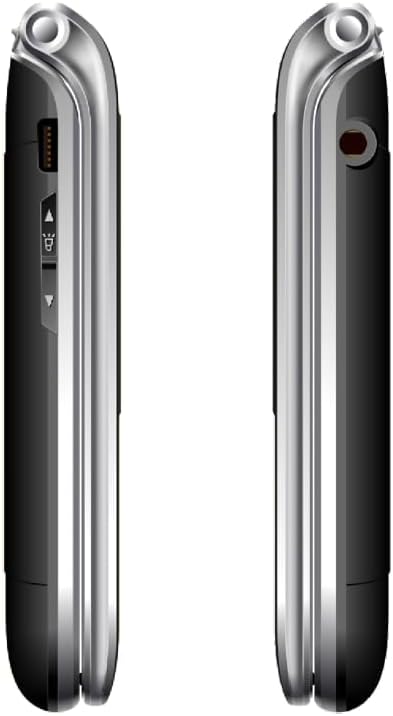
รูปที่ 3.3: ด้านข้าง View of Beafon SL605
This image presents a side view of the Beafon SL605 flip phone, illustrating the charging port and volume control buttons located on the side of the device.
- พอร์ตชาร์จ: For connecting the charging cable or placing in the charging cradle.
- ปุ่มปรับระดับเสียง: Adjust call volume and ringtone volume.
- แจ็คหูฟัง: 3.5 mm port for headphones.
4. การตั้งค่า
4.1 การติดตั้งแบตเตอรี่และซิมการ์ด
- ถอดฝาหลังโทรศัพท์ออกโดยงัดเบาๆ ให้เปิดออกจากรอยบาก
- Insert your SIM card into the designated slot. Ensure the gold contacts face downwards and the cut corner aligns with the slot.
- Insert the Lithium-ion battery, aligning the contacts with those in the phone.
- ใส่ฝาหลังกลับเข้าไปโดยกดให้แน่นจนกระทั่งล็อคเข้าที่
4.2 การชาร์จแบตเตอรี่
ก่อนใช้งานครั้งแรก ควรชาร์จแบตเตอรี่โทรศัพท์ให้เต็ม
- Connect the charging cable to the phone's charging port or place the phone in its charging cradle.
- เสียบปลายอีกด้านของสายเคเบิลเข้ากับเต้ารับไฟฟ้า
- The battery icon on the display will indicate charging status. A full charge typically takes 2-3 hours.
4.3 การเปิด/ปิดเครื่อง
- การเปิดเครื่อง: กดปุ่มค้างไว้ สิ้นสุดการโทร/พลังงาน ปุ่มจนกว่าหน้าจอจะสว่างขึ้น
- วิธีปิดเครื่อง: กดปุ่มค้างไว้ สิ้นสุดการโทร/พลังงาน button until a power-off prompt appears, then confirm.
5. คู่มือการใช้งาน
5.1 การโทรออกและรับสาย
- To Dial: Open the phone, enter the phone number using the keypad, and press the เรียก ปุ่ม.
- จากผู้ติดต่อ: Navigate to the "Contacts" menu, select a contact, and press the เรียก ปุ่ม.
- คำตอบ: เมื่อโทรศัพท์ดัง ให้เปิดฝาพับหรือกดปุ่ม เรียก ปุ่ม.
- วิธีวางสาย: กดปุ่ม วางสาย button or close the flip.
5.2 SOS Emergency Call Function
The SOS button is located on the back of the phone. It allows you to quickly contact pre-set emergency numbers.
- การตั้งหมายเลข SOS: ไปที่ Menu > SOS Settings to add up to 5 emergency contacts.
- การเปิดใช้งาน SOS: กดปุ่มค้างไว้ ปุ่ม SOS on the back of the phone for 3 seconds.
- The phone will automatically call the first number in the SOS list. If unanswered, it will call the next number, and so on, cycling through the list up to 3 times.
- An emergency SMS message will also be sent to all SOS contacts.
5.3 Messaging (SMS)
- To Send: ไปที่ Menu > Messages > Write Message. Enter your message and select a recipient from contacts or enter a number.
- To Read: New messages will be indicated by a notification. Go to Menu > Messages > Inbox ที่จะอ่าน
5.4 การตั้งค่าโทรศัพท์
Access various settings via the เมนู ปุ่ม.
- ระดับความดังของเสียงเรียกเข้า: Adjust using the side volume buttons or in เมนู > การตั้งค่า > Profiles.
- Number Announcement: Enable or disable the feature that announces dialed numbers by button press in Menu > Settings > Call Settings.
- ภาษา: The device supports multiple languages. Change the interface language in Menu > Settings > Phone Settings > Language. (Note: Some models may have limited language options, such as German as a primary language.)

Figure 5.1: Beafon SL605 Photo Contact Feature
This image shows two open Beafon SL605 phones side-by-side. The phone on the right demonstrates the photo contact feature, where a contact's picture is displayed on the screen, making it easier to identify callers.
6. การบำรุงรักษาและการดูแล
- ควรเก็บโทรศัพท์ให้แห้ง ของเหลวอาจกัดกร่อนวงจรไฟฟ้าได้
- อย่าใช้สารเคมีรุนแรง น้ำยาทำความสะอาด หรือผงซักฟอกที่มีฤทธิ์กัดกร่อนในการทำความสะอาดโทรศัพท์ ให้เช็ดด้วยผ้าเนื้อนุ่มและอ่อนโยนamp ผ้า.
- Do not store the phone in high temperatures, as this can shorten the life of electronic devices, damage batteries, and warp or melt certain plastics.
- Do not store the phone in cold temperatures, as moisture can form inside the phone when it returns to normal temperature, which could damage the electronic circuit boards.
- Do not drop, knock, or shake the phone. Rough handling can break internal circuit boards and fine mechanics.
- The phone has IP54 protection against dust and splashes. While it offers some protection, it is not waterproof and should not be submerged in water.
7 การแก้ไขปัญหา
| ปัญหา | สาเหตุที่เป็นไปได้ | สารละลาย |
|---|---|---|
| โทรศัพท์ไม่สามารถเปิดเครื่องได้ | แบตเตอรี่หมดหรือติดตั้งไม่ถูกต้อง | ชาร์จแบตเตอรี่ ตรวจสอบให้แน่ใจว่าใส่แบตเตอรี่ถูกต้องแล้ว |
| ไม่สามารถโทรออกหรือรับสายได้ | No SIM card, SIM card not inserted correctly, or no network signal. | Ensure SIM card is properly inserted. Check network signal strength. Contact your service provider if issues persist. |
| Sound is too low/high. | Volume settings are incorrect. | Adjust volume using the side buttons during a call or in the phone's settings. |
| ปุ่ม SOS ใช้งานไม่ได้ | SOS numbers not set or incorrect. | Verify that SOS emergency numbers are correctly configured in the settings. |
| External display is blank or white. | Possible software glitch or hardware issue. | Try restarting the phone. If the problem persists, contact customer support. |
8. ข้อมูลจำเพาะ
- แบบอย่าง: บีฟอน SL605
- ประเภทสินค้า : โทรศัพท์มือถือพับได้
- สี: สีดำ
- ระบบปฏิบัติการ: Beafon OS
- จอแสดงผลภายใน: 2.4 inches (6.09 cm) Color LCD
- จอแสดงผลภายนอก: 1.44 inches (3.65 cm) Color LCD
- เทคโนโลยีเซลลูล่าร์: 2G
- การเชื่อมต่อ: Bluetooth, 3.5 mm Jack
- คุณสมบัติพิเศษ: IP54 Dust and Splash Protection, Rubberized Surface, Ergonomic Design, Extra Large Illuminated Buttons, Extra Loud Ringtone, Photo Contact Indicator, Number Announcement (optional)
- แบตเตอรี่: ลิเธียมไอออน (รวมอยู่ด้วย)
- ความจุหน่วยความจำ: 32GB
- ผู้ผลิต: บีฟอน
- ประเทศต้นกำเนิด: จีน
9. การรับประกันและการสนับสนุน
For warranty information, please refer to the warranty card included in your product packaging or contact your point of purchase. Beafon provides customer support for product inquiries and technical assistance.
การสนับสนุนทางออนไลน์: Visit the official Beafon webไซต์สำหรับคำถามที่พบบ่อย การอัปเดตซอฟต์แวร์ และข้อมูลการติดต่อ
บริการลูกค้า: Contact details for customer service can typically be found on the manufacturer's webไซต์หรือในเอกสารการซื้อของคุณ
10. ข้อมูลด้านความปลอดภัยที่สำคัญ
- Do not attempt to disassemble or modify the phone. This can void the warranty and cause damage.
- ใช้เฉพาะแบตเตอรี่ เครื่องชาร์จ และอุปกรณ์เสริมที่ได้รับอนุมัติเท่านั้น
- Dispose of the phone and battery responsibly according to local regulations. Do not dispose of them in household waste.
- Avoid using the phone in extreme temperatures or highly humid environments.
- Keep the phone away from pacemakers and other medical devices.
- อย่าใช้โทรศัพท์ขณะขับรถหรือใช้งานเครื่องจักรหนัก
11. วิดีโอผลิตภัณฑ์อย่างเป็นทางการ
ไม่พบวิดีโอผลิตภัณฑ์อย่างเป็นทางการจากผู้ขายสำหรับรุ่นนี้ในข้อมูลที่ให้ไว้


