1. สินค้าหมดview
The AOPUTTRIVER AP-6000GH is a high-precision HVAC anemometer designed for measuring wind speed, wind temperature, and air volume. Featuring a waterproof touch-screen, rechargeable battery, and various measurement units, it is suitable for a wide range of applications including HVAC installation, CFM calculations, duct ventilation, shooting, boat sailing, kite flying, climbing, and drone operation.
คุณสมบัติหลัก:
- Measures wind speed in 5 units: m/s, km/h, ft/min, mph, Knots.
- Measures wind temperature: -10-45°C (14-113°F) with °C/°F units.
- Air volume range: 0-999900 m³/min, configurable for CMM/CMS/CMF.
- Touch-screen interface with anti-interference buttons for ease of use.
- ดีไซน์กันน้ำและกันฝุ่น
- ไฟแบ็คไลท์ช่วยเพิ่มทัศนวิสัยในสภาพแสงน้อย
- Adjustable auto-off time (default 5 minutes without operation) to save battery.
- Rechargeable 400mAh battery (40 mins full charge, approx. 30 hours continuous use) via Type-C interface.
- ไฟแสดงสถานะแบตเตอรี่ต่ำ
- Integrated tripod hole for hands-free operation (tripod not included).
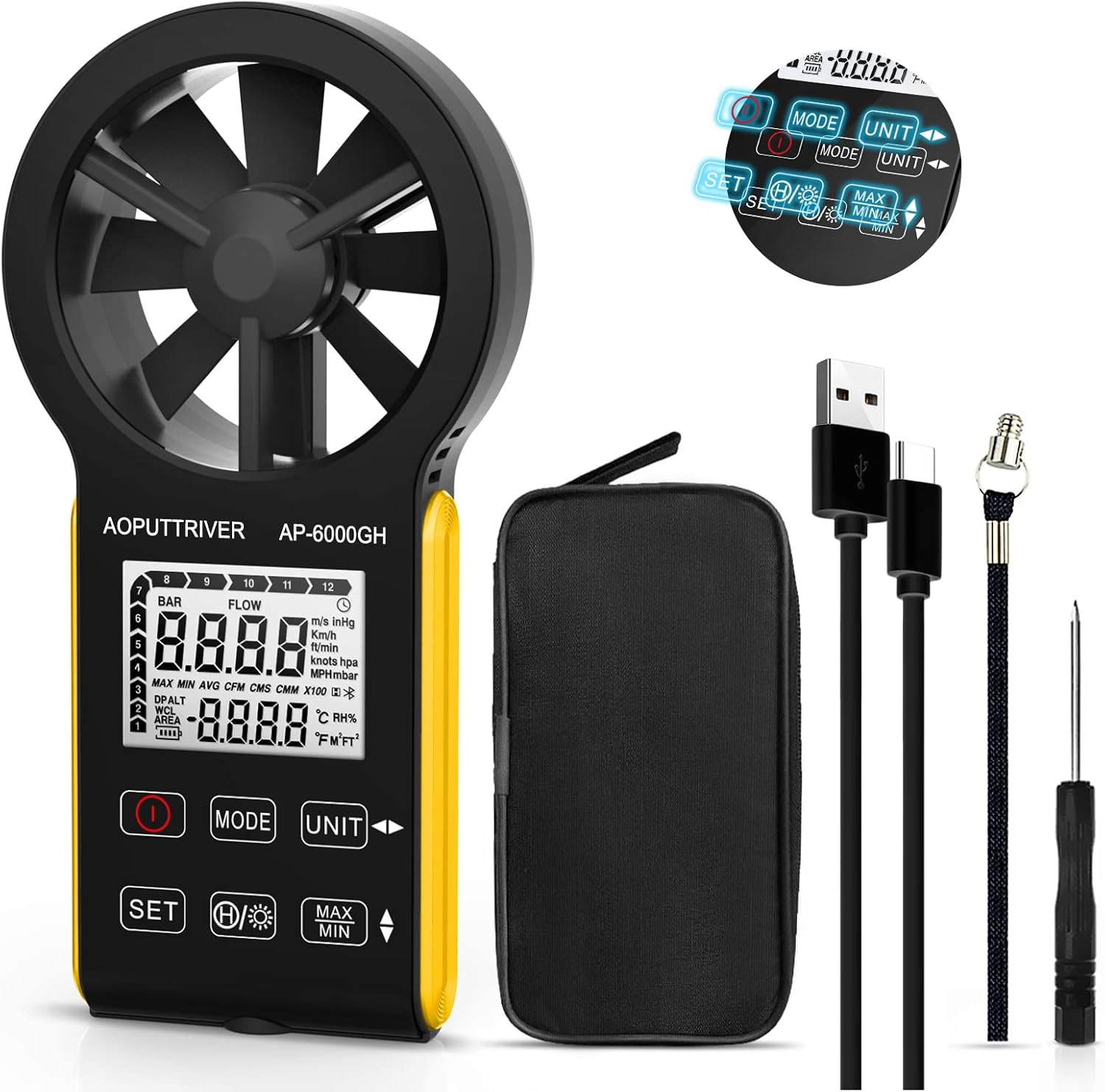
Figure 1: AOPUTTRIVER AP-6000GH HVAC Anemometer
2. เนื้อหาบรรจุภัณฑ์
เมื่อเปิดบรรจุภัณฑ์ โปรดตรวจสอบว่าสินค้าทั้งหมดที่ระบุไว้ด้านล่างมีอยู่และอยู่ในสภาพดี:
- 1 x AP-6000GH CFM Anemometer
- 1 x คู่มือผู้ใช้
- สายเคเบิล Type-C 1 เส้น
- ไขควงขนาดเล็ก 1 อัน
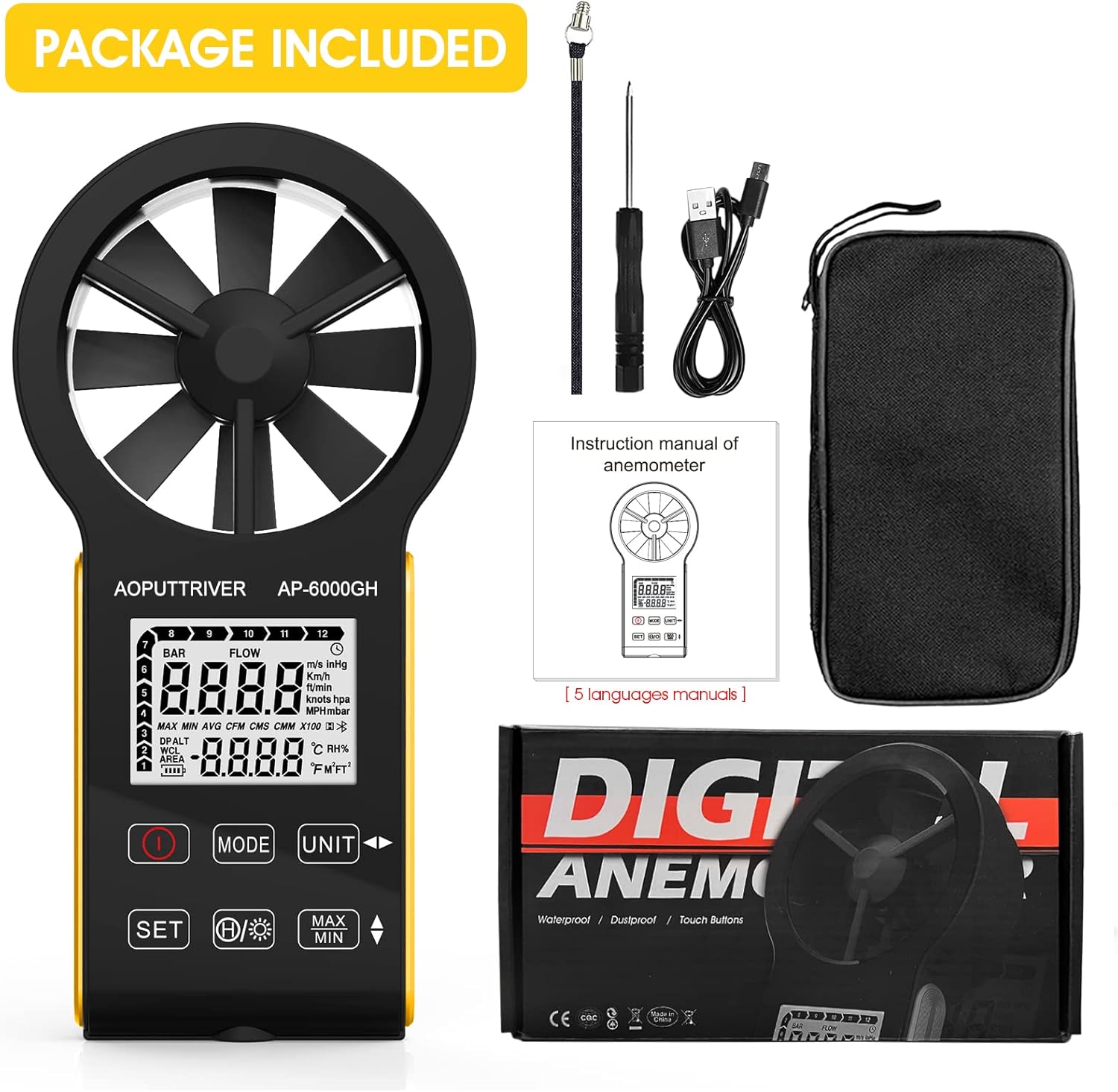
Figure 2: All items included in the AP-6000GH package.
3. การตั้งค่า
3.1 การติดตั้งแบตเตอรี่
The AP-6000GH anemometer comes with a pre-installed rechargeable battery. However, for initial use, you may need to connect the battery line interface.
- Use the provided small screwdriver to unscrew the battery cover on the back of the device.
- Connect the battery line interface if it is disconnected.
- Tighten the battery cover securely.

Figure 3: Steps for connecting the battery line interface.
3.2 การชาร์จอุปกรณ์
The device features a fast-charging 400mAh battery. A full charge takes approximately 40 minutes and provides about 30 hours of continuous use.
- Connect the provided Type-C cable to the charging port on the device and to a suitable USB power source.
- The battery sign on the display will flash while charging. It will stop flashing when fully charged.
- A low battery indicator light will notify you when charging is needed.

Figure 4: Charging the AP-6000GH anemometer via Type-C cable.
4. คู่มือการใช้งาน
4.1 เปิด/ปิดเครื่อง
กดปุ่ม พลัง ปุ่ม (โดยปกติจะมีเครื่องหมายเป็นวงกลมและเส้นแนวตั้ง) สำหรับเปิดหรือปิดอุปกรณ์
4.2 ฟังก์ชันหลักเหนือview

รูปที่ 5: เกินview of AP-6000GH display and button functions.
- ปุ่มเปิดปิด: เปิด/ปิดอุปกรณ์
- รหัสโหมด: Switches between wind speed/air volume modes.
- UNIT Key: Cycles through different measurement units for wind speed (m/s, km/h, ft/min, mph, Knots).
- รหัสชุด: Used to set air volume area or temperature units (°C/°F).
- Data Hold/Backlight Key: Short press to hold current data on display. Long press to activate/deactivate backlight.
- MAX/MIN Keys: Displays maximum or minimum recorded values during a measurement session.
4.3 Unit Switching and Backlight Demonstration
The following video demonstrates how to switch between different measurement units for wind speed and activate the backlight feature on the anemometer.
Video 1: Demonstration of unit switching and backlight activation on a handheld wind speed meter.
4.4 Basic Operation and Applications
วิดีโอนี้ให้ภาพรวมอย่างรวดเร็วview of the anemometer's ease of use and its suitability for various tasks.
Video 2: Quick demonstration of the anemometer's easy operation.
4.5 Hands-Free Operation with Tripod
The anemometer includes a tripod hole at the bottom, allowing for stable, hands-free measurements. This is particularly useful for HVAC installations, CFM calculations, or outdoor activities where continuous monitoring is required.

Figure 6: Tripod mounting hole located at the bottom of the anemometer.

รูปที่ 7: อดีตamples of applications for the AP-6000GH anemometer.
5. ข้อมูลจำเพาะ
| ข้อมูลจำเพาะ | ค่า |
|---|---|
| ขนาดสินค้า | 6.69 x 3.39 x 1.3 นิ้ว |
| น้ำหนักสินค้า | 5.3 ออนซ์ (150 กรัม) |
| ผู้ผลิต | AOPUTRIVER |
| วัสดุ | พลาสติก |
| ต้องใช้แบตเตอรี่ | ไม่ (แบบชาร์จไฟได้) |
| ส่วนประกอบที่รวมอยู่ | ถุง |
6. การบำรุงรักษา
To ensure the longevity and accuracy of your AOPUTTRIVER AP-6000GH anemometer, please follow these maintenance guidelines:
- รักษาความสะอาดของอุปกรณ์ด้วยการเช็ดด้วยผ้านุ่มและแห้ง หลีกเลี่ยงการใช้น้ำยาทำความสะอาดหรือสารละลายที่มีฤทธิ์กัดกร่อน
- Ensure the fan blades are free from dust and debris to maintain accurate readings.
- ควรเก็บอุปกรณ์ไว้ในกล่องหรือซองป้องกันเมื่อไม่ใช้งาน เพื่อป้องกันความเสียหาย
- หลีกเลี่ยงการวางอุปกรณ์ไว้ในอุณหภูมิที่สูงหรือต่ำเกินไปหรือถูกแสงแดดโดยตรงเป็นเวลานาน
- ควรชาร์จแบตเตอรี่เป็นประจำ แม้ว่าจะไม่ได้ใช้งานอุปกรณ์บ่อยนัก เพื่อรักษาอายุการใช้งานของแบตเตอรี่
7 การแก้ไขปัญหา
If you encounter any issues with your AP-6000GH anemometer, please refer to the following common troubleshooting steps:
- อุปกรณ์ไม่เปิดเครื่อง: ตรวจสอบให้แน่ใจว่าแบตเตอรี่เชื่อมต่ออย่างถูกต้องและชาร์จจนเต็ม
- การอ่านค่าที่ไม่ถูกต้อง: Check if the fan blades are obstructed or dirty. Ensure the device is held correctly in the airflow direction.
- ปัญหาการแสดงผล: If the display is dim, activate the backlight. If the display is unresponsive, try restarting the device.
- CFM/Air Volume calculation errors: Double-check the entered air area settings. Refer to the user manual for detailed instructions on setting air area.
หากปัญหายังคงมีอยู่ โปรดติดต่อฝ่ายสนับสนุนลูกค้าเพื่อขอความช่วยเหลือเพิ่มเติม
8. การสนับสนุนและการรับประกัน
The AOPUTTRIVER AP-6000GH anemometer comes with 365 days of technical support. If you experience any problems with your product, please contact AOPUTTRIVER customer service. They are committed to responding and resolving issues as quickly as possible.
For support, please refer to the contact information provided in your product packaging or visit the official AOPUTTRIVER webเว็บไซต์.


