การแนะนำ
ขอบคุณสำหรับการซื้อasing the R2B Mobile Phone Holder with Wireless Charger, Model Alkmaar. This device is designed to securely hold your mobile phone in your vehicle while providing convenient 15W wireless fast charging. It features an intelligent infrared sensor for automatic opening and closing, and a 360-degree rotation function for optimal viewing angles. This manual provides detailed instructions for setup, operation, maintenance, and troubleshooting.

Image: The R2B Mobile Phone Holder, showcasing its main unit with the suction cup base attached, and a separate ventilation clip. The holder is black with the R2B logo and a wireless charging symbol.
เนื้อหาแพ็คเกจ
โปรดตรวจสอบว่าสินค้าทั้งหมดมีอยู่ในแพ็คเกจของคุณ:
- R2B Mobile Phone Holder Unit
- ถ้วยคัพดูด
- Ventilation Clip Attachment
- สายชาร์จ USB-C (ไม่ได้ระบุไว้ชัดเจน แต่โดยนัยแล้วสามารถใช้สำหรับการชาร์จได้)
- คู่มือการใช้งาน (เอกสารนี้)
การติดตั้งและการตั้งค่า
The R2B Mobile Phone Holder offers two primary installation methods: suction cup for dashboards/windshields and a clip for air vents.
1. Suction Cup Installation (Dashboard/Windshield)
- Ensure the surface (dashboard or windshield) is clean, dry, and smooth.
- กดตัวดูดให้แน่นกับพื้นผิวที่ต้องการ
- Push down the locking lever on the suction cup base to create a secure vacuum seal.
- Adjust the arm and holder angle as needed using the adjustable joints.

Image: A person's hands demonstrating the attachment of the R2B phone holder to a car dashboard using its suction cup base, highlighting the ease of installation.
2. Ventilation Clip Installation
- Attach the ventilation clip accessory to the back of the phone holder unit.
- Carefully insert the ventilation clip into a suitable air vent slat in your vehicle. Ensure it is securely fastened.
- Adjust the holder angle for optimal viewการไอเอ็นจี

Image: A close-up of a person's hands attaching the R2B phone holder to a car's air conditioning vent using the included ventilation clip, demonstrating an alternative mounting option.
3. การเชื่อมต่อไฟฟ้า
Connect the provided USB-C charging cable to the port on the bottom of the phone holder and plug the other end into a USB power source in your car (e.g., car charger adapter, car's USB port). The holder requires power for wireless charging and the infrared sensor to function.

Image: A hand connecting a USB-C cable to the bottom of the R2B phone holder, illustrating the power connection required for its wireless charging and infrared functions.
คำแนะนำการใช้งาน
1. Automatic Phone Placement (Infrared Sensor)
The holder is equipped with an infrared sensor. When your phone approaches the holder, the sensor detects its presence, and the mounting arms will automatically open. Simply place your phone into the holder, and the arms will automatically close to secure it.
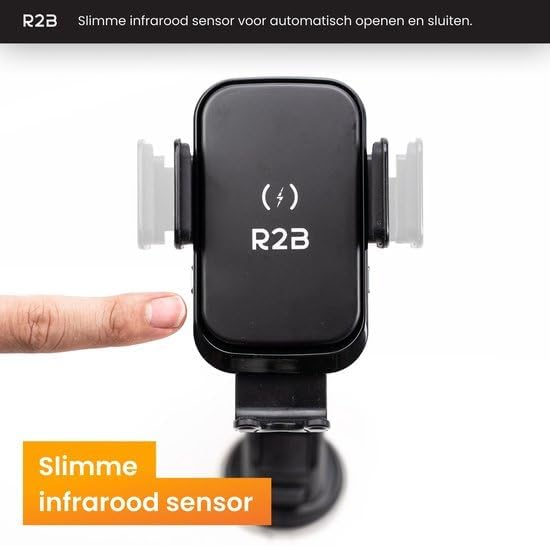
Image: A finger pointing towards the side of the R2B phone holder, indicating the location of the smart infrared sensor that enables automatic opening and closing of the mounting arms.
2. Wireless Fast Charging
Once your QI-certified phone is securely placed in the holder and the holder is powered, wireless charging will begin automatically. The holder supports 15W fast charging, ensuring your device charges efficiently while you drive. Ensure your phone is centered on the charging pad for optimal performance.
Note: Your phone must be QI certified for fast and safe charging.
3. การหมุน 360 องศา
The holder features a 360-degree rotation function, allowing you to adjust your phone to any desired orientation (portrait or landscape) for navigation, calls, or media viewing. Simply rotate the phone holder unit to achieve your ideal viewมุมอิง
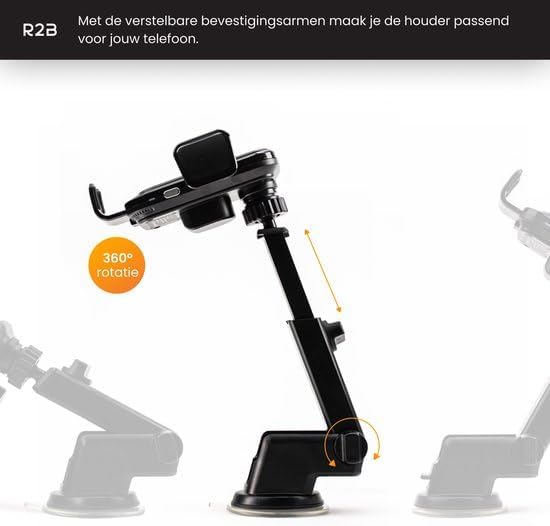
Image: The R2B phone holder shown from multiple angles, illustrating its 360-degree rotation capability for flexible viewตำแหน่งการจัดงาน
การซ่อมบำรุง
To ensure the longevity and optimal performance of your R2B Mobile Phone Holder, follow these simple maintenance guidelines:
- การทำความสะอาด: Use a soft, dry cloth to wipe down the holder. For stubborn dirt, a slightly damp cloth can be used, but ensure no moisture enters the charging port or internal components.
- ถ้วยดูด: Periodically clean the suction cup with water and let it air dry to maintain its adhesive properties.
- หลีกเลี่ยงสิ่งที่เกินขอบเขต: Do not expose the holder to extreme temperatures (very hot or very cold) or direct prolonged sunlight, as this can affect the plastic material and electronic components.
- การดูแลสายเคเบิล: Handle the USB-C cable gently. Avoid sharp bends or pulling on the cable to prevent damage.
การแก้ไขปัญหา
If you encounter any issues with your R2B Mobile Phone Holder, please refer to the following common problems and solutions:
- ปัญหา: Phone is not charging wirelessly.
สารละลาย:- Ensure your phone is QI-certified.
- Check if the USB-C cable is securely connected to both the holder and the power source.
- Verify that the car's USB port or charger is providing power.
- Ensure your phone is centered on the holder's charging area.
- ถอดเคสโทรศัพท์หนาๆ ที่อาจขัดขวางการชาร์จไร้สายออก
- ปัญหา: Mounting arms do not open/close automatically.
สารละลาย:- Ensure the holder is powered via the USB-C cable.
- Check for any obstructions around the infrared sensor.
- Clean the sensor area if it appears dirty.
- ปัญหา: Suction cup is not sticking to the surface.
สารละลาย:- ตรวจสอบให้แน่ใจว่าพื้นผิวสะอาด แห้ง และเรียบเนียน
- Press the suction cup firmly before engaging the locking lever.
- Clean the suction cup with water and let it air dry.
- ปัญหา: Phone is loose in the holder.
สารละลาย:- Ensure the phone's width is within the supported range (6cm to 8.5cm).
- Verify that the automatic arms have fully closed around the phone.
ข้อมูลจำเพาะ
| คุณสมบัติ | รายละเอียด |
|---|---|
| ยี่ห้อ | R2B |
| แบบอย่าง | Alkmaar |
| เอาท์พุทชาร์จไร้สาย | 15 วัตต์ |
| ประเภทขั้วต่อ | USB ประเภท C |
| คุณสมบัติพิเศษ | Wireless Charging, Infrared Sensor, 360-degree Rotation |
| ความกว้างของโทรศัพท์ที่รองรับ | 6 cm to 8.5 cm (approx. 2.36 in to 3.35 in) |
| วัสดุ | พลาสติก |
| สี | สีดำ |
| ขนาดสินค้า | 12 x 10 x 8 cm (approx. 4.7 x 3.9 x 3.1 in) |
| น้ำหนักสินค้า | 310 กรัม (ประมาณ 0.68 ปอนด์) |
| แบตเตอรี่ที่จำเป็น | เลขที่ |
การรับประกันและการสนับสนุน
For specific warranty information, return policies, or technical support, please refer to the retailer where you purchased this product or visit the official R2B webไซต์ เก็บหลักฐานการซื้อของคุณไว้เพื่อใช้ในกรณีเรียกร้องการรับประกัน


