1. บทนำ
This user manual provides comprehensive instructions for the installation, operation, and maintenance of your Weiser SmartCode Keypad Electronic Deadbolt. This advanced keyless entry system offers enhanced security and convenience for your home.
The SmartCode deadbolt features a sleek design, a backlit keypad for visibility, and the ability to store up to 50 user codes. It operates on 4 AA batteries and includes SmartKey re-key technology for added security and flexibility.
2. ข้อมูลด้านความปลอดภัย
Please read and understand all instructions before installing and using this product. Keep this manual for future reference.
- Do not attempt to disassemble or modify the lock. This may cause damage to the product and void the warranty.
- Use only the specified battery type (4 AA alkaline batteries). Do not mix old and new batteries or different types of batteries.
- ตรวจสอบให้แน่ใจว่าใส่แบตเตอรี่โดยให้ขั้วถูกต้อง
- Keep all keys and user codes in a secure location.
- Avoid exposing the lock to extreme temperatures or direct moisture.
- Regularly check the lock's functionality and battery level.
3. เนื้อหาบรรจุภัณฑ์
ตรวจสอบว่าส่วนประกอบทั้งหมดมีอยู่ก่อนเริ่มการติดตั้ง:

Image: Complete package contents of the Weiser SmartCode Keypad Electronic Deadbolt.
- Electronic Deadbolt (Exterior Keypad Assembly)
- Electronic Deadbolt (Interior Battery Unit)
- สลัก
- จานตี
- แผ่นยึด
- อุปกรณ์ติดตั้ง (สกรู)
- 2 คีย์
- เครื่องมือสมาร์ทคีย์
- คู่มือการติดตั้ง (เอกสารนี้)
Note: 4 AA batteries are required and not included in the package.
4. การตั้งค่าและการติดตั้ง
The Weiser SmartCode deadbolt is designed for easy installation. For a seamless setup experience, it is highly recommended to use the free BILT app, which provides step-by-step interactive 3D instructions with voice and video guidance.
4.1 ความเข้ากันได้กับประตู
This lock is designed to fit standard doors 1-3/8" to 1-3/4" (35 mm - 44 mm) thick with an adjustable backset (2-3/8" or 2-3/4"). It is ideal for most exterior and interior residential doors.
4.2 ขั้นตอนการติดตั้ง (มากกว่าview)
- เตรียมประตู: Ensure your door is properly drilled and aligned for a deadbolt installation.
- ติดตั้งสลัก: Insert the latch into the door edge, ensuring the correct backset is selected.
- ติดตั้งชุดประกอบภายนอก: ติดตั้งชุดแป้นพิมพ์ภายนอกเข้ากับประตู โดยสอดสายเคเบิลผ่านรูที่เจาะไว้
- ติดตั้งแผ่นยึด: ยึดแผ่นยึดเข้ากับประตูโดยใช้สกรูที่ให้มา ตรวจสอบให้แน่ใจว่าสายเคเบิลลอดผ่านแผ่นยึดนั้น
- เชื่อมต่อสายเคเบิลและติดตั้งชุดประกอบภายใน: Connect the cable from the exterior assembly to the interior battery unit. Mount the interior unit to the mounting plate.
- ติดตั้งแบตเตอรี่: Insert 4 AA alkaline batteries into the interior unit, observing polarity.
- ดำเนินการขั้นตอนการรับส่งประตู: This crucial step teaches the lock the orientation of your door. Follow the specific instructions in the full manual or BILT app.
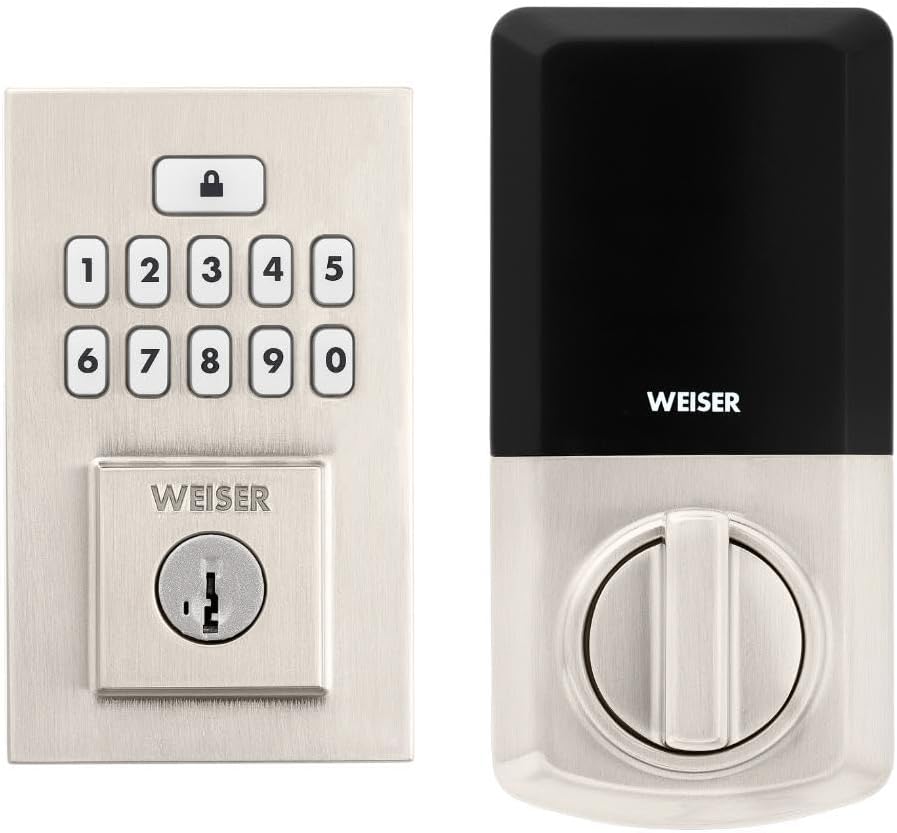
Image: Assembled Weiser SmartCode Keypad Electronic Deadbolt, showing both exterior and interior components.

Image: Close-up of the exterior keypad, featuring the backlit numeric buttons and keyhole.
5. คู่มือการใช้งาน
5.1 การล็อคประตู
- การล็อคด้วยปุ่มเดียว: Press the Lock button (top button with padlock icon) on the keypad. The deadbolt will extend.
- คุณสมบัติล็อคอัตโนมัติ: If enabled, the deadbolt will automatically extend after a set period (e.g., 30 seconds) once unlocked.
5.2 การปลดล็อคประตู
- การใช้รหัสผู้ใช้: Enter your personalized 4-8 digit user code on the keypad. The deadbolt will retract.
- การใช้กุญแจ: เสียบกุญแจจริงเข้าไปในรูกุญแจแล้วหมุนเพื่อปลดล็อก
5.3 การเขียนโปรแกรมโค้ดผู้ใช้
The lock supports up to 50 user codes and 1 master code. Refer to the detailed programming instructions in the full manual for adding, deleting, or modifying codes.
- รหัสหลัก: The master code is used to add and delete user codes. It does not unlock the door.
- รหัสผู้ใช้: These codes are used to unlock the door.


Image: Icons illustrating user management, programming, and auto-lock features.
5.4 SmartKey Re-key Technology
The SmartKey re-key technology allows you to re-key your lock in seconds, maintaining key control and protecting against lost, stolen, or unauthorized keys without removing the lock from your door. Use the provided SmartKey tool and follow the instructions carefully.

Image: SmartKey Security feature, demonstrating how to re-key the lock.
6. การบำรุงรักษา
6.1 การเปลี่ยนแบตเตอรี่
The lock operates on 4 AA alkaline batteries. When the batteries are low, the lock will provide an audible and/or visual low battery warning. Replace all four batteries simultaneously to ensure optimal performance.
- ถอดฝาครอบแบตเตอรี่จากตัวเครื่องภายใน
- ถอดแบตเตอรี่เก่าและทิ้งอย่างเหมาะสม
- ใส่แบตเตอรี่อัลคาไลน์ AA ใหม่ โดยตรวจสอบให้แน่ใจว่าขั้วถูกต้อง (+/-)
- เปลี่ยนฝาครอบแบตเตอรี่
Note: Battery life can vary based on usage frequency and environmental conditions. If the auto-lock feature is frequently used, battery life may be shorter.
6.2 การทำความสะอาด
ทำความสะอาดตัวล็อคด้วยผ้าเนื้อนุ่มและแห้งamp cloth. Avoid using abrasive cleaners, solvents, or chemical sprays, as these can damage the finish and electronic components.
7 การแก้ไขปัญหา
| ปัญหา | สาเหตุที่เป็นไปได้ | สารละลาย |
|---|---|---|
| Lock does not respond or keypad is not lit. | แบตเตอรี่หมด | เปลี่ยนแบตเตอรี่ AA ทั้งสี่ก้อน |
| Lock beeps 3 times during programming or code entry. | Incorrect code, programming error, or lock not handed correctly. | Verify the code. Re-attempt programming steps carefully. Perform the door handing process again. If issues persist, reset the unit to factory settings (refer to full manual). |
| Deadbolt extends when door is open (Auto-lock issue). | The lock does not have a sensor to detect if the door is open or closed. Auto-lock activates after the set time regardless of door position. | This is normal operation. Ensure the door is closed before the auto-lock time expires, or disable the auto-lock feature if it causes inconvenience. |
| Keypad is difficult to see at night. | Backlight not active. | The keypad is backlit and stays lit for 30 seconds after inactivity. Ensure there is enough battery power. |
| Lock is not operating smoothly. | Misalignment of door or strike plate, or internal mechanism issue. | Check door and frame alignment. Ensure the strike plate is correctly installed. If the issue persists, contact customer support. |
8. ข้อมูลจำเพาะ
| คุณสมบัติ | รายละเอียด |
|---|---|
| หมายเลขรุ่น | 9GED92600-003 |
| ขนาดสินค้า | 6.99 x 2.86 x 13.97 ซม. (2.75 x 1.13 x 5.5 นิ้ว) |
| น้ำหนักสินค้า | 454 กรัม (1 ปอนด์) |
| สี | นิกเกิลซาติน |
| สไตล์ | ร่วมสมัย |
| เสร็จ | ปัด |
| วัสดุ | โลหะ |
| ประเภทล็อค | กลอนประตูอิเล็กทรอนิกส์ |
| แป้นพิมพ์ตัวเลข | 10-Button, Backlit |
| รหัสผู้ใช้ | รหัสผู้ใช้สูงสุด 50 รหัส และรหัสหลัก 1 รหัส |
| แหล่งพลังงาน | แบตเตอรี่ AA 4 ก้อน (ไม่รวม) |
| ความเข้ากันได้ของความหนาของประตู | 1-3/8" to 1-3/4" (35 mm - 44 mm) |
| เจาะตลับกุญแจ | ปรับได้ 2-3/8" หรือ 2-3/4" |
| คุณสมบัติพิเศษ | ทนทานต่อสภาพอากาศ ป้องกันการกระแทก ล็อกอัตโนมัติ ล็อกด้วยปุ่มเดียว แป้นพิมพ์เรืองแสง ระบบรักษาความปลอดภัย SmartKey |
| เกรด ANSI | ชั้นประถมศึกษาปีที่ 2 |
| ประเทศต้นกำเนิด | จีน |
9. การรับประกันและการสนับสนุน
9.1 ข้อมูลการรับประกัน
The Weiser SmartCode Keypad Electronic Deadbolt comes with a รับประกัน 1 ปี นับจากวันที่ซื้อ การรับประกันนี้ครอบคลุมข้อบกพร่องด้านวัสดุและฝีมือการผลิตภายใต้การใช้งานปกติ โปรดเก็บหลักฐานการซื้อไว้เพื่อขอรับสิทธิ์การรับประกัน
For full warranty details and limitations, please refer to the official Weiser webไซต์หรือติดต่อฝ่ายสนับสนุนลูกค้า
9.2 การสนับสนุนลูกค้า
For technical assistance, troubleshooting, or warranty inquiries, please contact Weiser customer support:
- การสนับสนุนทางออนไลน์: เยี่ยมชมเว็บไซต์ทางการของ Weiser webเว็บไซต์นี้รวบรวมคำถามที่พบบ่อย (FAQ) วิดีโอแนะนำการใช้งาน และแบบฟอร์มติดต่อ
- การสนับสนุนทางโทรศัพท์: Refer to the contact information provided on the Weiser packaging or website for phone support hours.
- แอป BILT: Utilize the BILT app for interactive 3D installation and programming guidance.
When contacting support, please have your product model number (9GED92600-003) and purchase date available.


