การแนะนำ
This manual provides detailed instructions for setting up, operating, and maintaining your litokam 2K Indoor Pan/Tilt Home Security Camera. Please read this guide thoroughly before use to ensure proper functionality and safety.

Figure 1: litokam 2K Indoor Pan/Tilt Security Cameras
มีอะไรอยู่ในกล่อง
- litokam 2K Indoor Pan/Tilt Camera (2 units)
- อะแดปเตอร์แปลงไฟ (2 ชิ้น)
- USB Cable (2 units)
- อุปกรณ์สำหรับติดตั้ง (สกรู, พุกติดผนัง)
- คู่มือการใช้งาน
สินค้าเกินview
The litokam 2K Indoor Camera offers advanced surveillance features for home security, pet monitoring, and baby monitoring. Key features include:
- ความละเอียด 2K HD: Provides clear and detailed video.
- 360° Pan/Tilt: Offers comprehensive coverage with remote control via the app.
- การตรวจจับและติดตามการเคลื่อนไหว: Alerts you to movement and tracks subjects automatically.
- ปรับปรุงการมองเห็นในตอนกลางคืน: ชัดเจน viewing up to 33 feet in low light conditions.
- เสียงสองทาง: Allows for real-time communication.
- ที่เก็บข้อมูลภายในเครื่องและบนคลาวด์: Supports Micro SD card (up to 128GB, not included) and cloud storage options.
- บูรณาการของ Alexa: สามารถใช้งานร่วมกับ Amazon Alexa เพื่อควบคุมด้วยเสียงได้
คำแนะนำการตั้งค่า
- การเชื่อมต่อไฟฟ้า: เชื่อมต่อกล้องเข้ากับแหล่งจ่ายไฟโดยใช้สาย USB และอะแดปเตอร์แปลงไฟที่ให้มา กล้องจะเปิดใช้งานโดยอัตโนมัติ
- ดาวน์โหลดแอป: Download the 'little elf smart' app from your smartphone's app store (iOS or Android).
- การลงทะเบียนบัญชี: เปิดแอปพลิเคชันและทำตามคำแนะนำบนหน้าจอเพื่อลงทะเบียนบัญชีใหม่ หรือเข้าสู่ระบบหากคุณมีบัญชีอยู่แล้ว
- เพิ่มอุปกรณ์: Tap the '+' icon in the app to add a new device. Select your camera model and follow the in-app prompts to connect it to your 2.4GHz Wi-Fi network. Note: This camera supports 2.4GHz Wi-Fi only.
- การติดตั้ง (ทางเลือก): If wall mounting, use the provided mounting accessories. Ensure the camera is securely fastened and has a clear field of view.
คำแนะนำการใช้งาน
1. สด View and Pan/Tilt/Zoom
Once connected, access the live feed through the 'little elf smart' app. Use the on-screen controls to pan (horizontal rotation), tilt (vertical movement), and digitally zoom the camera to adjust your viewมุมอิง

Figure 2: 360° Panoramic Navigation via App
2. การตรวจจับและติดตามการเคลื่อนไหว
The camera utilizes Smart Perceive Technology for motion detection. When motion is detected, you will receive an alert notification on your phone. You can adjust the motion detection sensitivity within the app settings. Enable auto movement tracking to have the camera follow detected objects.

รูปที่ 3: การแจ้งเตือนการตรวจจับการเคลื่อนไหว
3. เสียงสองทาง
Use the built-in microphone and speaker to communicate with individuals or pets near the camera. Tap the microphone icon in the app to speak, and listen through the app's speaker.

รูปที่ 4: การสื่อสารด้วยเสียงสองทาง
4. การมองเห็นในเวลากลางคืน
The camera automatically switches to night vision mode in low light conditions using its intelligent IR-Cut switch. It provides clear black and white video up to 33 feet in complete darkness.

Figure 5: Enhanced Night Vision in operation
5. พื้นที่จัดเก็บวิดีโอ
Recordings can be saved in two ways:
- การ์ด Micro SD: Insert a Micro SD card (up to 128GB, not included) into the camera's slot for local storage.
- การเก็บข้อมูลบนคลาวด์: Subscribe to the optional cloud storage service through the app for secure, remote video backup.

Figure 6: Micro SD Card Slot for Storage
6. Multi-User & Multiple View
Share camera access with family and friends through the app. The 'little elf smart' app supports viewing up to 16 live video feeds on one screen from multiple cameras.
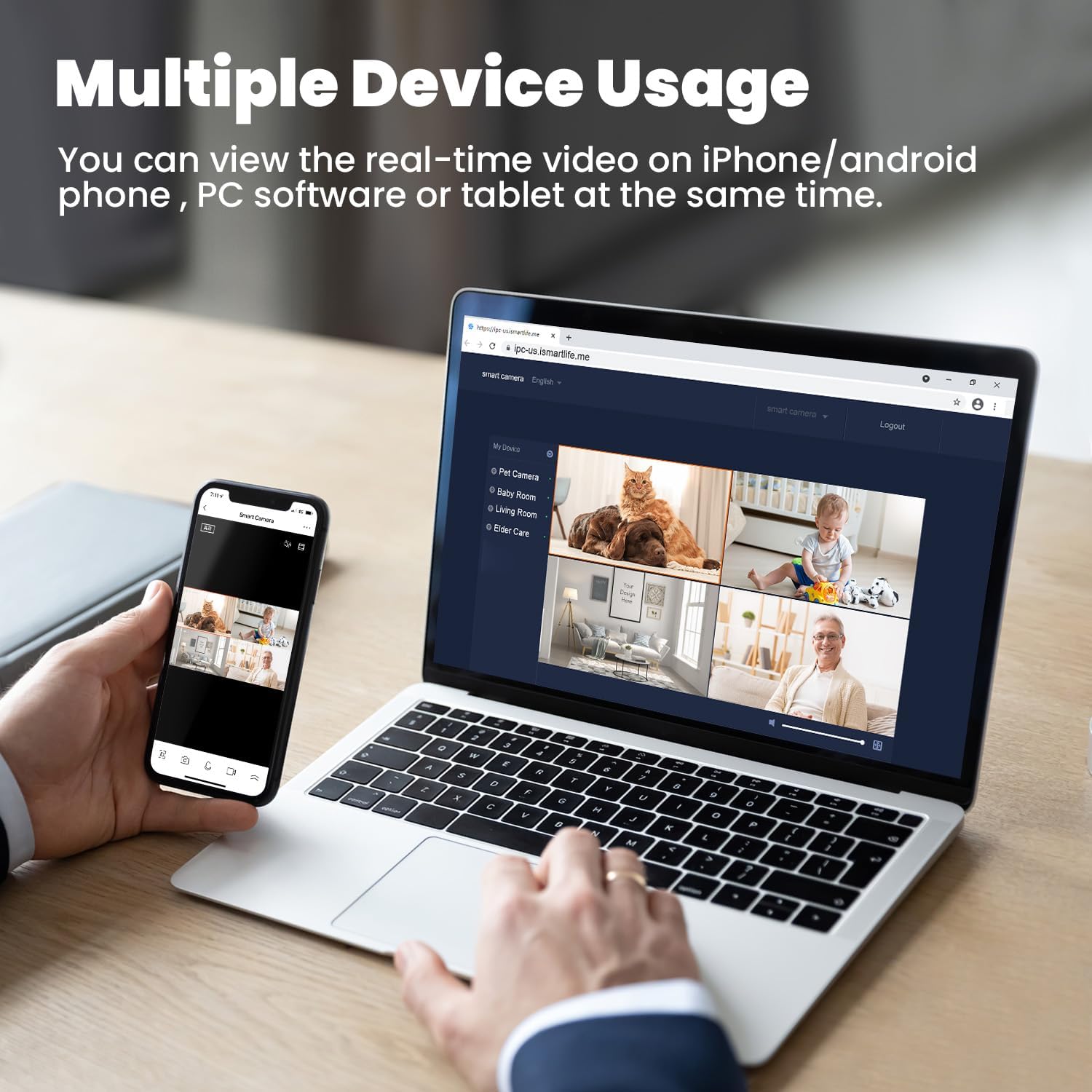
Figure 7: Multiple Device Viewกำลังทำ
7. การผสานรวม Alexa
The litokam camera is compatible with Amazon Alexa. You can use voice commands to view แสดงภาพจากกล้องของคุณบนอุปกรณ์ที่รองรับ Alexa

Figure 8: Alexa Integration
8. การตรวจจับเสียงร้องไห้
The camera can detect baby crying and send notifications to your phone. This feature can be configured in the app settings, offering two options for crying or sound detection.

Figure 9: Baby Cry Detection Notification
การซ่อมบำรุง
- การทำความสะอาด: ใช้ผ้านุ่มและแห้งเช็ดเลนส์และตัวกล้อง หลีกเลี่ยงการใช้สารเคมีรุนแรงหรือวัสดุที่มีฤทธิ์กัดกร่อน
- การอัปเดตซอฟต์แวร์: Regularly check the 'little elf smart' app for firmware updates to ensure optimal performance and security.
- การจัดวาง: ตรวจสอบให้แน่ใจว่าได้วางกล้องไว้ในตำแหน่งที่มั่นคง ห่างจากแสงแดดโดยตรง แหล่งความร้อน และความชื้น
การแก้ไขปัญหา
- กล้องไม่ได้เชื่อมต่อกับ Wi-Fi:
- ตรวจสอบให้แน่ใจว่าเครือข่าย Wi-Fi ของคุณเป็น 2.4GHz กล้องไม่รองรับ Wi-Fi 5GHz
- ตรวจสอบรหัสผ่าน Wi-Fi ของคุณเพื่อความถูกต้อง
- ย้ายกล้องให้เข้าใกล้เราเตอร์ Wi-Fi ของคุณมากขึ้น
- รีสตาร์ทกล้องและเราเตอร์ของคุณ
- Frequent Motion Detection Alerts:
- Adjust the motion detection sensitivity in the app settings to a lower level.
- Ensure the camera is not pointed at areas with constant, non-critical movement (e.g., curtains near a window, tree branches).
- คุณภาพของภาพต่ำ:
- ตรวจสอบให้แน่ใจว่าเลนส์กล้องสะอาด
- Check your internet connection speed. A stable connection is required for optimal 2K streaming.
- ปัญหาเสียงสองทาง:
- Ensure your phone's microphone and speaker are enabled and not muted.
- Check the volume settings in the app.
ข้อมูลจำเพาะ
| คุณสมบัติ | ข้อมูลจำเพาะ |
|---|---|
| หมายเลขรุ่น | LF-P1t |
| ความละเอียดในการจับภาพวิดีโอ | 2K (Effective Still Resolution 2 MP) |
| โปรโตคอลการเชื่อมต่อ | Wi-Fi (2.4GHz เท่านั้น) |
| Pan/Tilt Field of View | 360 องศา (แนวนอน) |
| ซูมดิจิตอล | 3x |
| ช่วงการมองเห็นตอนกลางคืน | สูงถึง 33 ฟุต |
| ตัวเลือกการจัดเก็บข้อมูล | การ์ด Micro SD (สูงสุด 128GB), พื้นที่จัดเก็บข้อมูลบนคลาวด์ |
| ระบบเสียงสองทาง | ใช่ |
| ประเภทตัวควบคุม | อเมซอนอเล็กซา |
| แหล่งพลังงาน | เครื่องใช้ไฟฟ้าแบบมีสาย (10 โวลต์, 10 วัตต์) |
| ขนาดรายการ (ยาว x กว้าง x สูง) | 3.54 x 3.54 x 4.33 นิ้ว |
| น้ำหนักสินค้า | 1.54 ปอนด์ |
| การใช้งานภายใน/ภายนอกอาคาร | ในร่ม |
การรับประกันและการสนับสนุน
Your litokam 2K Indoor Pan/Tilt Home Security Camera comes with a รับประกัน 2 ปี. We also offer a รับประกันคืนเงินภายใน 30 วัน เพื่อความสบายใจของคุณ
For technical assistance or any inquiries, please contact our customer support team:
- 24/7 Live Service: พร้อมให้ความช่วยเหลือทันที
- แชทสด: Access through the 'little elf smart' app or our official webเว็บไซต์.
- คอลเซ็นเตอร์ : Contact us by phone for direct support.
- Online Email: Send your queries via email for detailed responses.
Please refer to the contact information provided in the product packaging or on the official litokam website for specific support channels.
ข้อมูลด้านความปลอดภัย
- Do not expose the camera to extreme temperatures, humidity, or direct water.
- ใช้เฉพาะอะแดปเตอร์ไฟฟ้าที่ให้มาเท่านั้นเพื่อป้องกันความเสียหาย
- เก็บกล้องและอุปกรณ์เสริมให้พ้นมือเด็กและสัตว์เลี้ยง
- Do not attempt to disassemble or repair the camera yourself. Contact support for service.
- Ensure proper ventilation around the camera to prevent overheating.


