1. บทนำ
The PROSTER ET612 is a multi-functional network cable tester designed for comprehensive network maintenance and troubleshooting. It combines capabilities for network cable testing, Power over Ethernet (POE) testing, wire tracking, continuity testing, and voltage measurement. This manual provides detailed instructions for the safe and effective use of your ET612 device.
2. ข้อมูลด้านความปลอดภัย
- โปรดอ่านและทำความเข้าใจคู่มือนี้ก่อนใช้งานอุปกรณ์ทุกครั้ง
- Do not attempt to test live circuits exceeding 60V to prevent damage to the device and personal injury.
- Ensure batteries are correctly installed according to polarity markings.
- อย่าให้อุปกรณ์สัมผัสกับความชื้นหรืออุณหภูมิที่สูงเกินไป
- เก็บอุปกรณ์ให้ห่างจากเด็ก
3. เนื้อหาบรรจุภัณฑ์
ตรวจสอบว่ามีรายการทั้งหมดอยู่ในแพ็คเกจของคุณ:
- PROSTER ET612 Main Tester Unit
- PROSTER ET612 Wire Tracker Receiver
- สายอะแดปเตอร์ RJ45
- Alligator Clip Test Cable
- Cable Stripper Tool
- กระเป๋าเก็บของ
- แบตเตอรี่ AAA (มีให้ 3 ก้อน)

Image 3.1: PROSTER ET612 Network Cable Tester with its accessories, including the main unit, receiver, cables, stripper, and storage bag.
4. สินค้าหมดview
The PROSTER ET612 consists of a main tester unit and a wire tracker receiver. Familiarize yourself with the components and controls as shown below:

Image 4.1: Detailed diagram showing the labeled parts of the PROSTER ET612 main unit and receiver.
- ขั้วต่อโพรบภายนอก
- สวิตซ์ไฟฟ้า
- เล่มที่tage Detecting Button (V)
- Cable Testing Button (TEST)
- จอแสดงผล (หน้าจอ LCD)
- Cable Tracing Button (SCAN)
- Continuity Test Button (Ω)
- Signal Selection Button (HZ)
- Pairing Speed Adjusting Button (SLOW/FAST)
- Battery Door (Main Unit)
- RJ45 Connector (Receiver)
- Indicators (Receiver LEDs)
- Mode Button (Receiver)
- Flashlight Switch (Receiver)
- Scan Ready Indicator (Receiver)
- Flashlight (Receiver)
- Volume Adjusting Wheel (Receiver)
- Tracing Probe (Receiver)
- Battery Door (Receiver)
5. การตั้งค่า
5.1 การติดตั้งแบตเตอรี่
The PROSTER ET612 requires 3 AAA batteries for operation (included). To install or replace batteries:
- Locate the battery door on the back of both the main unit (10) and the receiver (19).
- เปิดฝาครอบแบตเตอรี่
- ใส่แบตเตอรี่ AAA 3 ก้อน โดยตรวจสอบให้แน่ใจว่าขั้ว (+/-) ถูกต้องตามที่ระบุภายในช่อง
- ปิดฝาแบตเตอรี่ให้แน่น
5.2 การเปิด/ปิดเครื่อง
To power on the main unit, press and hold the Power Switch (2) for approximately 5 seconds until the LCD screen illuminates. To power off, press and hold the Power Switch (2) again until the screen turns off.
The receiver unit typically powers on when its mode button is pressed or when the flashlight is activated.
6. คู่มือการใช้งาน
6.1 Network Cable Collation (RJ45)
This function tests the physical connection status of network cables (RJ45), identifying open circuits, short connections, miswires, and reverse connections.
- Connect one end of the network cable to the RJ45 port on the main unit.
- Connect the other end of the network cable to the RJ45 port on the receiver (11).
- กดปุ่ม ทดสอบ button (4) on the main unit.
- The LCD display on the main unit and the LED indicators (12) on the receiver will show the wiring sequence. A correct connection will show matching numbers on both units. Discrepancies indicate faults.
- ใช้ ช้า or เร็ว buttons (9) to adjust the scanning speed.

Image 6.1: The main unit and receiver connected for a network cable test, displaying the wire map.
6.2 POE Testing Function
This function allows testing of standard and non-standard Power over Ethernet (POE) devices, including POE voltage, power supply polarity, and power supply mode.
- Connect the network cable from the POE device (e.g., POE switch) to the โพอี port on the main unit.
- กดปุ่ม V button (3) to enter the voltagโหมดทดสอบอี
- กดปุ่ม V button (3) again to switch to POE test mode.
- The LCD display (5) will show the POE voltage, power supply line (flashing numbers indicate positive, non-flashing indicate negative), and power supply mode.

Image 6.2: The main unit connected to a POE switch, showing POE voltage and line information on the display.
6.3 Wire Tracking / Line Finder
The wire tracking function helps quickly locate specific cable pairs among numerous cables. It supports both analog and digital signals.
- Connect one end of the target cable to the RJ45 port on the main unit.
- กดปุ่ม สแกน button (6) on the main unit to activate the tracing signal.
- บนเครื่องรับสัญญาณ ให้กดปุ่ม โหมด button (13) to select between Blue (Digital) or Red (Analog) signal indication.
- Use the tracing probe (18) of the receiver to scan the cables. The receiver will emit an audible tone, and the indicators (12) will light up when the target cable is detected.
- Adjust the Volume Adjusting Wheel (17) on the receiver for comfortable listening.
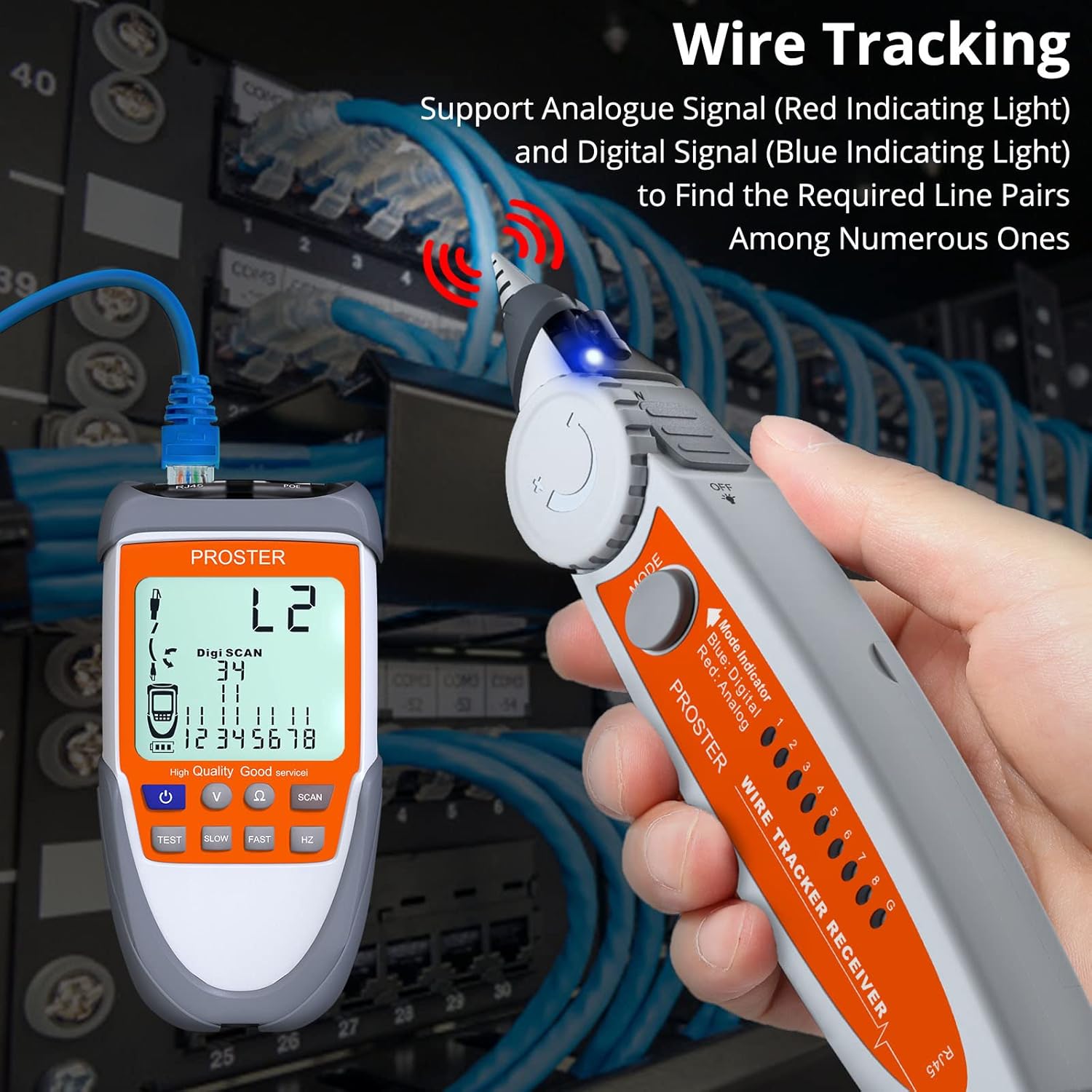
Image 6.3: The wire tracker receiver in use, identifying a specific cable within a bundle.
6.4 Continuity Test (RJ11 and other metal wires)
This function checks for open or short circuits in telephone lines (RJ11) and other metal wires using the alligator clip test cable.
- Connect the alligator clip test cable to the External Probe Connector (1) on the main unit.
- Attach the alligator clips to the two ends of the wire or to the specific pins of the RJ11 connector you wish to test.
- กดปุ่ม Ω button (7) on the main unit.
- The LCD display (5) will show "00Ω" for a continuous circuit (good connection) or "OL" for an open circuit (no connection).

Image 6.4: The main unit conducting a continuity test, displaying "00Ω" for a closed circuit.
6.5 ฉบับtagฟังก์ชันทดสอบ
This function measures battery voltage and checks voltage polarity (up to 60V).
- Connect the alligator clip test cable to the External Probe Connector (1) on the main unit.
- Attach the alligator clips to the positive and negative terminals of the battery or voltagแหล่งที่มา
- กดปุ่ม V button (3) on the main unit.
- The LCD display (5) will show the voltage. Flashing numbers indicate positive polarity, while non-flashing numbers indicate negative polarity.

Image 6.5: The main unit displaying the voltage of a 9V battery during a voltagอีทดสอบ
ไฟฉาย LED 6.6 ดวง
The receiver unit includes an LED flashlight (16) for use in dark environments.
- To turn on the flashlight, slide the Flashlight Switch (14) on the receiver.
- Slide the switch again to turn it off.

Image 6.6: The receiver's LED flashlight in use, providing illumination in a low-light setting.
7. การบำรุงรักษา
- การทำความสะอาด: เช็ดอุปกรณ์ด้วยผ้านุ่มและแห้ง ห้ามใช้น้ำยาทำความสะอาดที่มีฤทธิ์กัดกร่อนหรือตัวทำละลาย
- พื้นที่จัดเก็บ: Store the device in its protective bag in a cool, dry place when not in use. Remove batteries if storing for extended periods to prevent leakage.
- การเปลี่ยนแบตเตอรี่: Replace batteries when the low battery indicator appears on the LCD screen or when the device performance degrades.
8 การแก้ไขปัญหา
| ปัญหา | สาเหตุที่เป็นไปได้ | สารละลาย |
|---|---|---|
| อุปกรณ์ไม่เปิดเครื่อง | Low or dead batteries; Power button not held long enough. | Replace batteries. Press and hold the power button for approximately 5 seconds. |
| Inaccurate cable test results. | การเชื่อมต่อไม่ดี; สายเคเบิลชำรุด; เลือกโหมดไม่ถูกต้อง | Ensure cables are securely connected. Inspect cables for damage. Verify the correct test mode is selected. |
| Wire tracker receiver emits constant noise or no signal. | Interference; Main unit not transmitting; Low receiver battery. | Move away from sources of electromagnetic interference. Ensure the main unit is in SCAN mode. Replace receiver batteries. |
| จอ LCD มืดลงหรือไม่สามารถอ่านได้ | แบตเตอรี่อ่อน | เปลี่ยนแบตเตอรี่ในตัวเครื่องหลัก |
9. ข้อมูลจำเพาะ
| คุณสมบัติ | รายละเอียด |
|---|---|
| หมายเลขรุ่น | อีที612 |
| ยี่ห้อ | โปรสเตอร์ |
| แหล่งพลังงาน | ใช้พลังงานจากแบตเตอรี่ (ต้องใช้แบตเตอรี่ AAA 3 ก้อนรวมอยู่ด้วย) |
| นาที. ฉบับปฏิบัติการtage | 9 โวลต์ |
| ประเภทการวัด | โวลต์มิเตอร์ |
| ขนาดสินค้า (กว้าง x ยาว x สูง) | 22 x 14.8 x 5 cm (Main Unit & Receiver combined) |
| น้ำหนักสินค้า | 0.39 กิโลกรัม |
| สี | ส้ม |
10. การรับประกันและการสนับสนุน
For warranty information or technical support, please refer to the PROSTER official website or contact your retailer. You can also visit the official PROSTER store on Amazon for more product information: PROSTER Store.


