1. บทนำ
This manual provides essential information for the proper setup, operation, and maintenance of your Sharp 32FG6EA 32-inch HD Android TV. The Sharp 32FG6EA offers a wide range of connection options and features the Android TV operating system, providing a modern and intuitive television experience. It functions as an all-in-one entertainment hub, integrating Google Assistant for a smarter viewing experience. Users can quickly access entertainment, control smart devices, and obtain on-screen information using voice commands.
2. ข้อมูลด้านความปลอดภัย
โปรดอ่านคำแนะนำด้านความปลอดภัยทั้งหมดอย่างละเอียดก่อนใช้งานโทรทัศน์ เก็บคู่มือนี้ไว้เพื่อใช้อ้างอิงในอนาคต
- แหล่งจ่ายไฟ: ตรวจสอบให้แน่ใจว่าทีวีเชื่อมต่อกับแหล่งจ่ายไฟที่มีแรงดันไฟฟ้าถูกต้องtagง. ห้ามใช้ไฟเกินพิกัดเต้าเสียบ
- การระบายอากาศ : อย่าปิดกั้นช่องระบายอากาศ เว้นระยะห่างรอบทีวีให้เพียงพอเพื่อให้อากาศถ่ายเทได้สะดวก ป้องกันความร้อนสูงเกินไป
- น้ำและความชื้น: Do not expose the TV to rain, moisture, or excessive humidity. Avoid placing objects filled with liquids on or near the TV.
- การทำความสะอาด: ถอดปลั๊กทีวีก่อนทำความสะอาด ใช้ผ้าแห้งนุ่มๆ เช็ด ห้ามใช้น้ำยาทำความสะอาดหรือสเปรย์กระป๋อง
- การจัดวาง: วางทีวีบนพื้นผิวที่มั่นคงและเรียบ หากติดตั้งบนผนัง ตรวจสอบให้แน่ใจว่าขาตั้งติดตั้งแน่นหนาและสามารถรับน้ำหนักของทีวีได้
- การบริการ: อย่าพยายามซ่อมแซมทีวีด้วยตนเอง แนะนำให้ซ่อมแซมทั้งหมดโดยช่างผู้ชำนาญการ
3. เนื้อหาบรรจุภัณฑ์
ตรวจสอบว่ามีสินค้าทั้งหมดอยู่ในบรรจุภัณฑ์:
- Sharp 32FG6EA 32-inch HD Android TV
- รีโมทคอนโทรล (พร้อมแบตเตอรี่ AAA 2 ก้อน)
- Stand Type Base
- คู่มือการใช้งาน
- สายไฟ
4. การตั้งค่า
4.1 การแกะกล่อง
Carefully remove the TV and all accessories from the packaging. Retain the packaging materials for future transport or servicing.
4.2 การติดตั้งขาตั้ง
If you are not wall-mounting the TV, attach the included stand base:
- วางจอทีวีลงบนพื้นผิวที่นุ่มและเรียบเพื่อป้องกันความเสียหาย
- จัดฐานขาตั้งให้ตรงกับรูสำหรับติดตั้งที่ด้านล่างของทีวี
- ยึดขาตั้งด้วยสกรูที่ให้มา ตรวจสอบให้แน่ใจว่าขาตั้งยึดติดแน่น
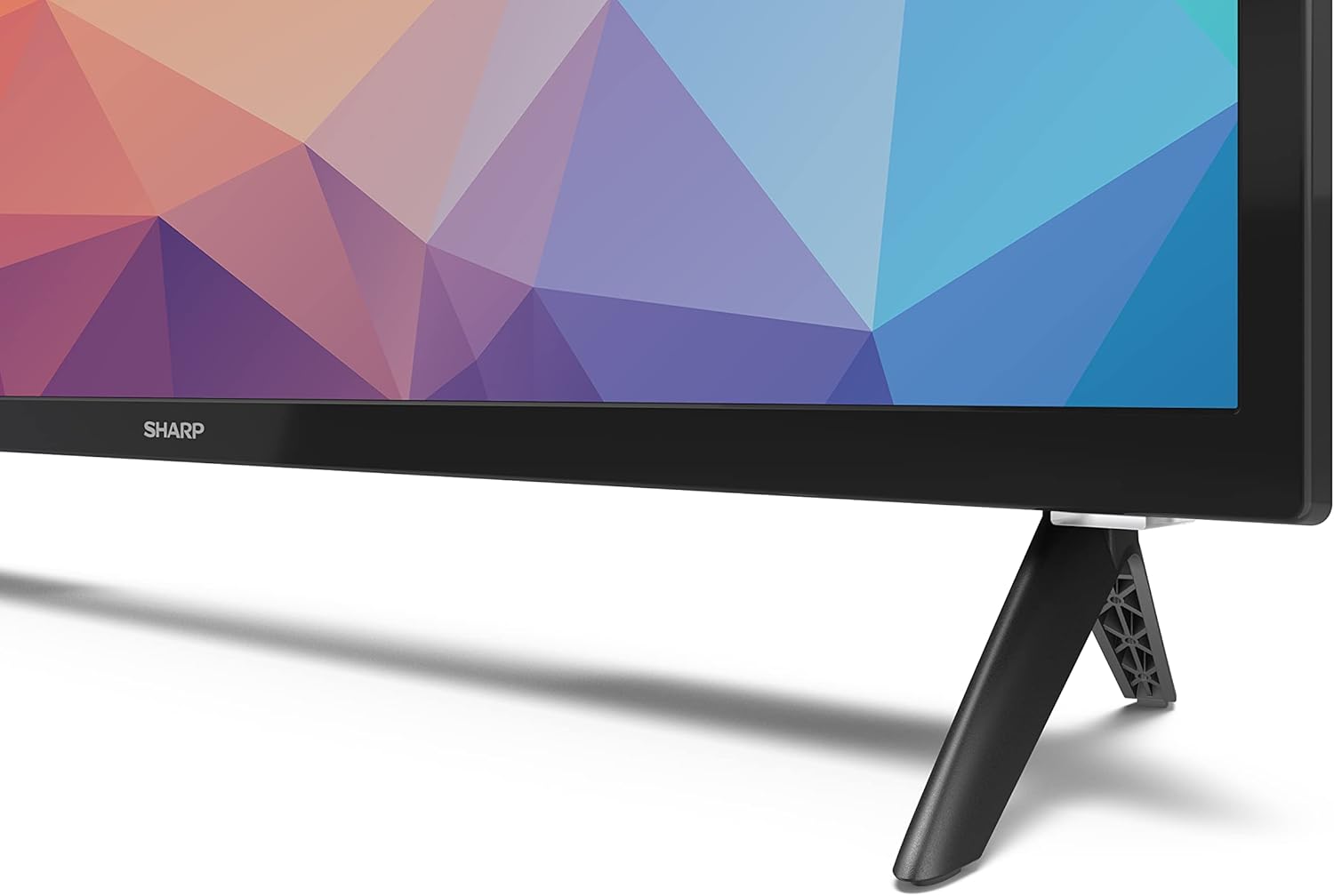
Image: Close-up of the TV stand attachment.
4.3 การติดตั้งบนผนัง
The Sharp 32FG6EA supports VESA wall mounts with dimensions of 75 x 75 mm. Wall mount hardware is not included. Follow the instructions provided with your wall mount kit.
4.4 การเชื่อมต่ออุปกรณ์ภายนอก
ทีวีของคุณมีพอร์ตหลายช่องสำหรับเชื่อมต่ออุปกรณ์ต่างๆ:
- ช่องต่อ HDMI: Connect Blu-ray players, game consoles, or set-top boxes to the 2 HDMI ports.
- ยูเอสบี: เชื่อมต่ออุปกรณ์จัดเก็บข้อมูล USB สำหรับเล่นสื่อเข้ากับพอร์ต USB ทั้ง 2 พอร์ต
- เสาอากาศ/สายเคเบิล: เชื่อมต่อเสาอากาศหรือแหล่งสัญญาณเคเบิลทีวีเพื่อรับชมช่องรายการออกอากาศ
- อีเธอร์เน็ต: สำหรับการเชื่อมต่ออินเตอร์เน็ตแบบใช้สาย
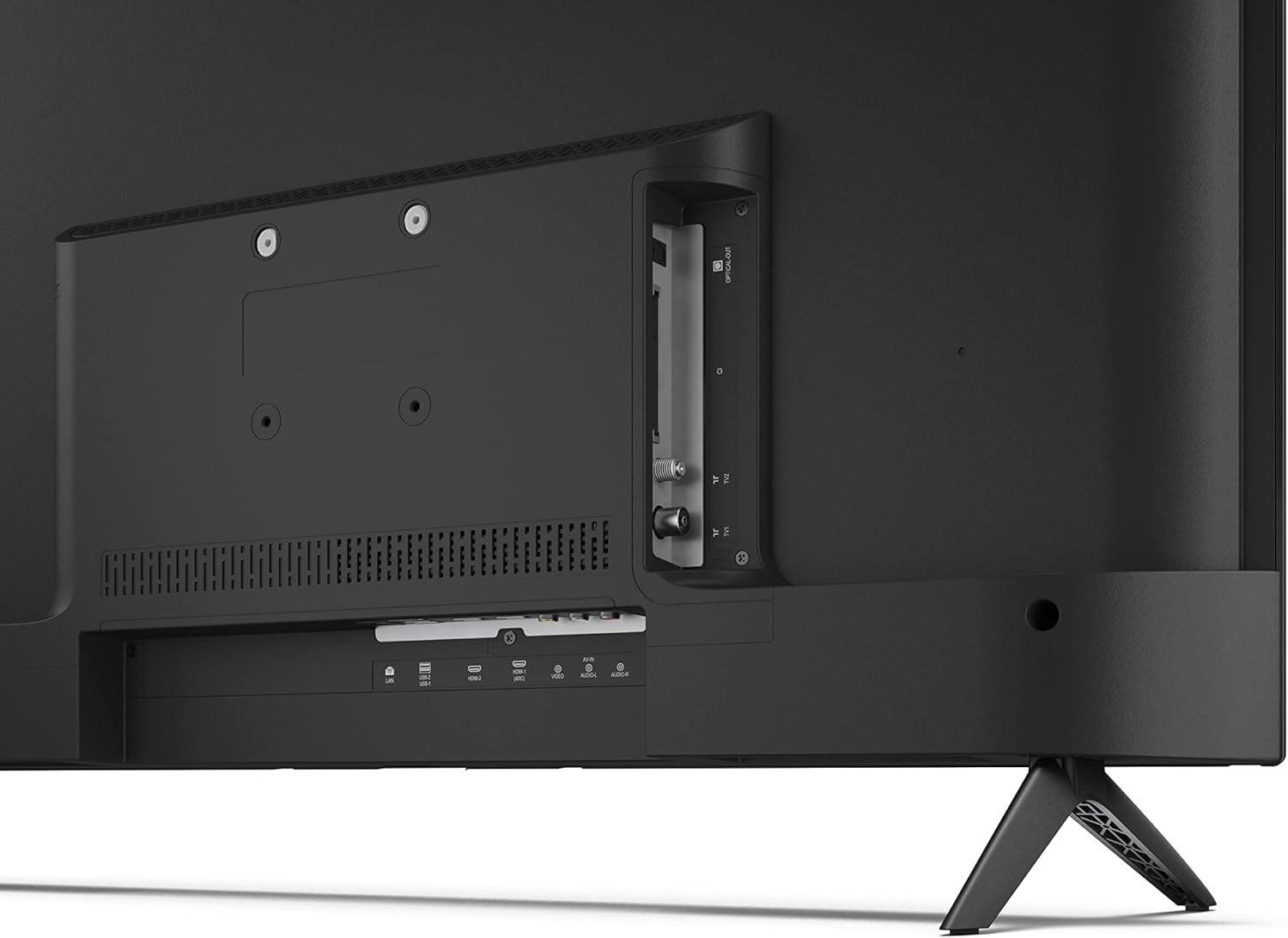
ภาพ: ด้านหลัง view ของทีวีที่มีพอร์ตเชื่อมต่อ
4.5 การเชื่อมต่อสายไฟ
After connecting all necessary devices, plug the power cable into the TV and then into a wall outlet.
4.6 ตัวช่วยการตั้งค่าเริ่มต้น
เมื่อเปิดเครื่องครั้งแรก ทีวีจะแนะนำคุณตามขั้นตอนการตั้งค่าเบื้องต้น ซึ่งรวมถึง:
- การเลือกภาษา
- การเชื่อมต่อเครือข่าย (Wi-Fi หรือ Ethernet)
- Google account sign-in (required for full Android TV features).
- การสแกนช่อง
5. ปฏิบัติการ
5.1 การควบคุมระยะไกลจบลงview
The included remote control allows you to navigate the TV's features. Insert the 2 AAA batteries into the remote control before use.
- ปุ่มเปิด/ปิด: เปิดหรือปิดทีวี
- Directional Pad (D-Pad) & OK Button: นำทางเมนูและยืนยันการเลือก
- ปุ่มย้อนกลับ: กลับไปยังหน้าจอที่แล้ว
- ปุ่มโฮม: เข้าถึงหน้าจอหลักของ Android TV
- เพิ่ม/ลดระดับเสียง: ปรับระดับเสียง
- ช่องขึ้น/ลง: เปลี่ยนช่องทีวี
- ปุ่ม Google Assistant: เปิดใช้งานการควบคุมด้วยเสียง
- ปุ่มลัดแอป: Dedicated buttons for popular streaming services like Netflix, Prime Video, and YouTube.
5.2 ระบบนำทางอินเทอร์เฟซ Android TV
The Android TV home screen provides access to your installed apps, recommended content, and settings. Use the directional pad on your remote to navigate through the interface.
ผู้ช่วย Google 5.3 คน
Press the Google Assistant button on your remote and speak into the microphone to:
- ค้นหา ภาพยนตร์ รายการโทรทัศน์ หรือข้อมูลต่างๆ
- ควบคุมอุปกรณ์บ้านอัจฉริยะ
- เปิดแอปพลิเคชัน
- ปรับการตั้งค่าทีวี
5.4 Chromecast ในตัว
The TV includes Chromecast built-in, allowing you to cast content from compatible apps on your smartphone, tablet, or computer directly to the TV screen.
5.5 การเชื่อมต่อบลูทูธ
Connect Bluetooth devices such as headphones or speakers to your TV for a personalized audio experience. Navigate to the TV's settings menu to pair new Bluetooth devices.
5.6 การตั้งค่าเสียง
The TV supports Dolby Audio with 2 x 6 W RMS speakers. You can adjust audio settings, including sound modes and equalizer, through the TV's settings menu.
6. การบำรุงรักษา
6.1 การทำความสะอาดทีวี
การทำความสะอาดหน้าจอและตู้ทีวี:
- ถอดสายไฟออกจากเต้าเสียบที่ผนัง
- Use a soft, lint-free cloth to gently wipe the screen and surfaces.
- สำหรับรอยฝังแน่น ให้ลบออกเล็กน้อยampเทน้ำหรือน้ำยาทำความสะอาดหน้าจอชนิดพิเศษลงบนผ้า (อย่าเทลงบนหน้าจอโดยตรง)
- ห้ามใช้น้ำยาทำความสะอาดที่มีฤทธิ์กัดกร่อน ขี้ผึ้ง หรือตัวทำละลาย
6.2 การอัปเดตซอฟต์แวร์
Your Android TV may receive periodic software updates to improve performance and add new features. Ensure your TV is connected to the internet to receive these updates. You can check for updates manually in the TV's settings menu.
7 การแก้ไขปัญหา
หากคุณประสบปัญหาเกี่ยวกับทีวี โปรดดูปัญหาทั่วไปและวิธีแก้ไขต่อไปนี้:
- ไม่มีไฟฟ้า: ตรวจสอบให้แน่ใจว่าเสียบสายไฟเข้ากับทีวีและเต้ารับที่ใช้งานได้สนิทแล้ว ลองเสียบเข้ากับเต้ารับอื่นดู
- ไม่มีภาพ/เสียง: ตรวจสอบให้แน่ใจว่าได้เลือกแหล่งสัญญาณเข้าที่ถูกต้องแล้ว ตรวจสอบว่าสายเคเบิลทั้งหมด (HDMI, เสาอากาศ) เชื่อมต่ออย่างถูกต้องแล้ว
- รีโมทคอนโทรลไม่ทำงาน: ตรวจสอบแบตเตอรี่และใส่แบตเตอรี่ให้ถูกต้อง ชี้รีโมทไปที่เซ็นเซอร์อินฟราเรดของทีวีโดยตรง
- คุณภาพภาพไม่ดี: Check antenna/cable connections. Adjust picture settings in the TV menu. For streaming content, ensure a stable internet connection.
- ไม่มีการเชื่อมต่ออินเทอร์เน็ต: Verify Wi-Fi password or Ethernet cable connection. Restart your router and the TV.
- แอปใช้งานไม่ได้: Ensure the TV's software is up to date. Try clearing the app's cache or reinstalling the app.
If problems persist, consult the Sharp support webเว็บไซต์หรือติดต่อฝ่ายบริการลูกค้า
8. ข้อมูลจำเพาะ
| คุณสมบัติ | ข้อมูลจำเพาะ |
|---|---|
| หมายเลขรุ่น | 32FG6EA |
| ยี่ห้อ | คม |
| ขนาดหน้าจอ | 32 นิ้ว (เส้นทแยงมุม 81 ซม.) |
| เทคโนโลยีการแสดงผล | นำ |
| ปณิธาน | 720p (1366 x 768 พิกเซล) |
| อัตราส่วนภาพ | 16:9 น. |
| อัตราการรีเฟรช | 50 เฮิรตซ์ |
| ระบบปฏิบัติการ | แอนดรอยด์ทีวี 11 |
| คุณสมบัติพิเศษ | Android TV, Google Assistant, Chromecast built-in |
| เอาท์พุตเสียง | 2 x 6 W RMS, Dolby Audio |
| พอร์ต HDMI | 2 |
| พอร์ต USB | 2 |
| การเชื่อมต่อ | ไวไฟ, บลูทูธ, อีเทอร์เน็ต |
| ขาแขวนติดผนัง VESA | 75 x 75 มม. |
| ขนาดพร้อมขาตั้ง (กว้าง x สูง x ลึก) | 731 x 486 x 177 มม. |
| ขนาดไม่รวมขาตั้ง (กว้าง x สูง x ลึก) | 731 x 433 x 68 มม. |
| ขนาดสินค้า (ลึก x กว้าง x สูง) | 16 x 73 x 46.4 cm (approximate, with stand) |
| น้ำหนัก | 3.9 กก. |
| ระดับประสิทธิภาพการใช้พลังงาน | E |

Image: TV dimensions diagram.

Image: Energy Label. For more details, visit ฐานข้อมูล EPREL.
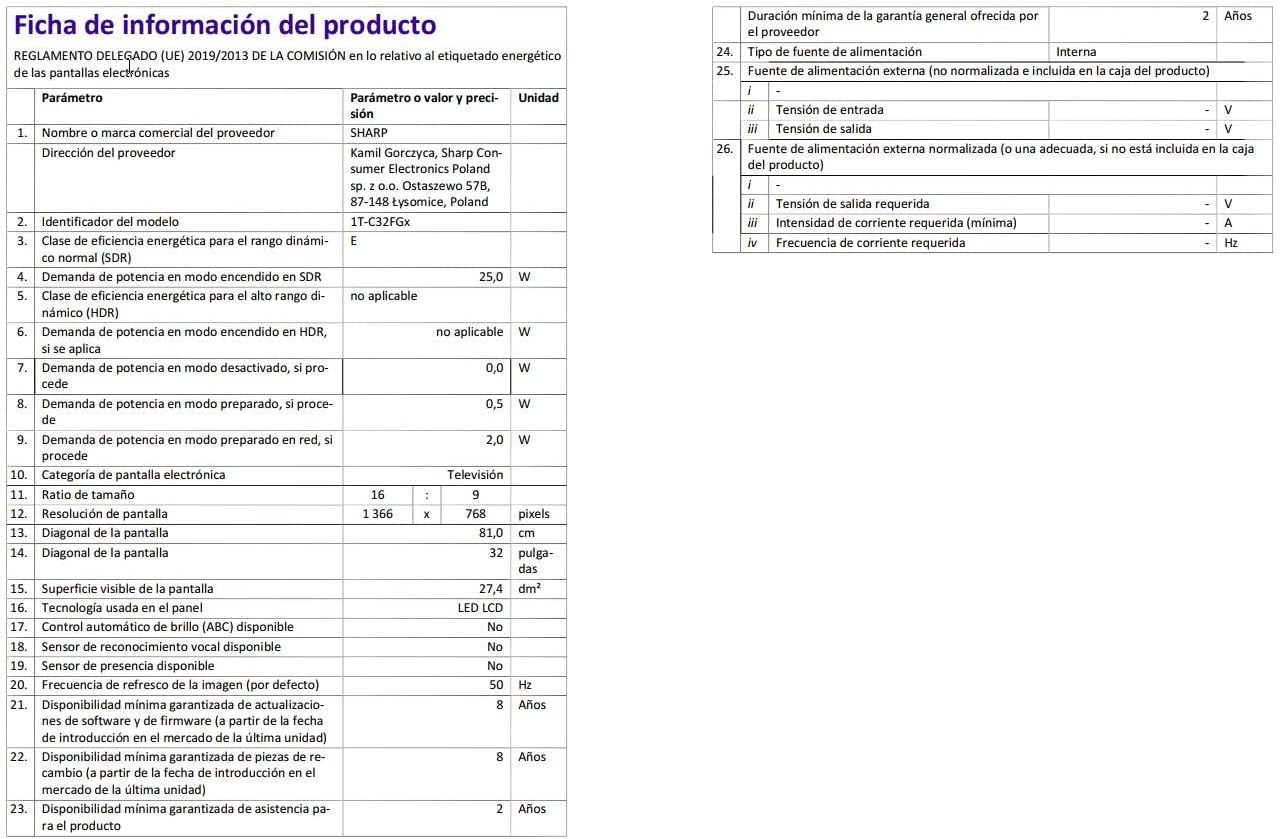
Image: Detailed product information sheet.
9. การรับประกันและการสนับสนุน
The Sharp 32FG6EA television comes with a minimum general warranty duration of 2 years from the provider.
For technical support, warranty claims, or further assistance, please refer to the contact information provided with your purchase documentation or visit the official Sharp support webเว็บไซต์สำหรับภูมิภาคของคุณ


