1. บทนำ
This manual provides detailed instructions for the CallToU Caregiver Pager Wireless Call Button Vibration Pager (Model CC21). This system is designed to assist caregivers and individuals who are hard of hearing, elderly, or disabled by providing a reliable and portable alert mechanism. Please read this manual thoroughly before using the product to ensure proper setup and operation.
2. สินค้าหมดview
2.1 ส่วนประกอบ
- 1 x ตัวรับ หน่วย
- 2 x SOS Panic Call Buttons
- สายคล้องสำหรับปุ่มกดเรียก
- Adhesive Pads for Call Buttons
- คู่มือการใช้งาน
2.2 คุณสมบัติหลัก
- ระยะสัญญาณไร้สาย: Up to 1000 feet (305 meters) in open areas, approximately 500 feet indoors.
- โหมดการแจ้งเตือนหลายแบบ: Ringtone, Vibration, Flashing Light, or combinations thereof.
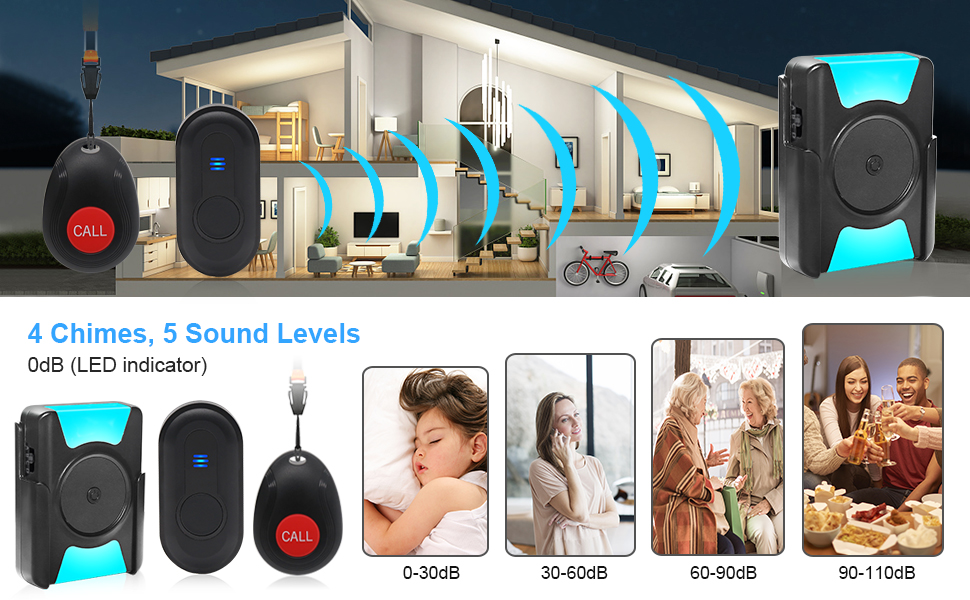
- ปริมาณที่ปรับได้: 5 levels (0-110dB) to suit various needs, including a silent mode with only LED indication.
- ปุ่มกดเรียกฉุกเฉินกันน้ำ: IP55 rated for use in bathrooms or near water.
- เครื่องรับสัญญาณแบบพกพา: Equipped with a belt clip for easy carrying.
- จับคู่ง่าย: Simple setup process for connecting call buttons to the receiver.
2.3 แผนผังผลิตภัณฑ์

The receiver unit features clearly marked buttons for mode selection, volume control, and ringtone changes. It also includes an LED indicator for visual alerts and a back clip for portability. The call buttons are compact and designed for easy activation.

This image displays the main components of the system: the portable receiver and two call buttons, one with a lanyard and another without, highlighting their compact design.
2.4 Range and Waterproof Features

The system offers extensive coverage, allowing the caregiver to move freely within a large home or yard while remaining connected. The signal strength is designed for reliable transmission through various indoor environments.

The waterproof design of the call buttons ensures durability and functionality even when exposed to moisture, providing peace of mind for users in various settings.
3. การตั้งค่า
3.1 การติดตั้งแบตเตอรี่
- ผู้รับ: The receiver unit requires 3 AAA 1.5V batteries (not included). Open the battery compartment on the back of the receiver and insert the batteries, ensuring correct polarity.
- ปุ่มเรียก: Each call button comes with a pre-installed 12V battery. If replacement is needed, carefully open the button casing and replace the 12V battery.

Ensure batteries are inserted correctly to avoid damage to the devices. The call button battery is typically long-lasting.
3.2 การจับคู่ปุ่มกดเรียกกับตัวรับสัญญาณ
The call buttons are usually pre-paired with the receiver. If re-pairing is necessary or if you add new call buttons:
- เปิดเครื่องรับ
- กดปุ่มค้างไว้ ลดระดับเสียง button on the receiver for approximately 5 seconds until the LED indicator flashes rapidly. This indicates pairing mode.
- Press the call button you wish to pair. The receiver will emit a sound and the LED will flash, confirming successful pairing.
- To exit pairing mode, press any other button on the receiver or wait for 10 seconds.
3.3 การติดตั้งปุ่มกดเรียก
Call buttons can be installed using the provided lanyard or adhesive pads.
- เชือกเส้นเล็ก: Attach the lanyard to the call button for wearing around the neck or wrist.
- Adhesive Pads: For fixed locations (e.g., bedside, bathroom wall), use the adhesive pads to mount the call button. Ensure the surface is clean and dry before applying.

Strategic placement ensures the call button is always within reach when needed.
4. การดำเนินการ
4.1 Activating an Alert
To send an alert, simply press the เรียก button on the panic button. The receiver will activate according to its set mode.
This visual demonstrates the primary function: a user pressing the call button to alert their caregiver, who is then notified by the receiver's audible and visual signals.
4.2 Receiver Modes
The receiver offers four distinct alert modes, selectable via the "Mode Selection" switch (A, B, C, D) on the side of the unit:
- โหมด A: Ringtone + Vibration
- โหมด ข: Ringtone + Strobe (Flashing Light)
- โหมด C: Ringtone + Vibration + Strobe (All three combined)
- โหมดดี: Ringtone Only

The LED indicator provides a visual cue for the active mode, enhancing usability for caregivers.
4.3 การปรับระดับเสียง
ใช้ เพิ่มระดับเสียง และ ลดระดับเสียง buttons on the receiver to adjust the alert volume. There are 5 volume levels, ranging from 0dB (silent, LED only) to 110dB (loudest).

This feature allows customization for various situations, such as silent monitoring during sleep or loud alerts in noisy environments.
4.4 การเลือกริงโทน
กดปุ่ม ริงโทน button on the receiver to cycle through the available melodies. There are 4 distinct ringtones to choose from.
4.5 การสาธิตผ่านวิดีโอ
Video 1: Demonstrates how the CallToU Hearing Impaired Doorbell (similar to the pager) functions, showing quick signal transmission and various alert types.
Video 2: Shows the CallToU Wireless Doorbell in use for home, classroom, elderly, and kids, highlighting its versatility.
Video 3: Illustrates the CallToU Wireless Caregiver Pager as a portable doorbell for home use, emphasizing its convenience.
Video 4: Features the CallToU Waterproof Portable Deaf Doorbell with flashing light, demonstrating its accessibility features.
Video 5: Shows the CallToU Wireless Doorbell for the hearing impaired in a home setting, focusing on its practical application.
5. การบำรุงรักษา
- การทำความสะอาด: Wipe the receiver and call buttons with a soft, dry cloth. Do not use abrasive cleaners or immerse the receiver in water.
- การเปลี่ยนแบตเตอรี่: Replace batteries in the receiver when the alert signals become weak or inconsistent. Replace the 12V battery in the call button if it fails to trigger the receiver.
- พื้นที่จัดเก็บ: เก็บอุปกรณ์ไว้ในที่แห้งและเย็นเมื่อไม่ได้ใช้งานเป็นเวลานาน
6 การแก้ไขปัญหา
| ปัญหา | สาเหตุที่เป็นไปได้ | สารละลาย |
|---|---|---|
| Receiver does not alert. | Low or dead batteries in receiver or call button. Not paired. Out of range. | Replace batteries. Re-pair the call button. Move receiver closer to the call button. |
| Alert is too quiet or too loud. | การตั้งค่าระดับเสียงไม่ถูกต้อง | ปรับระดับเสียงโดยใช้ปุ่มเพิ่ม/ลดระดับเสียง |
| Receiver does not vibrate or flash. | เลือกโหมดไม่ถูกต้อง | Change the mode selection switch (A, B, C, D) to include vibration or strobe. |
| ปุ่มโทรไม่ตอบสนอง | Low or dead battery. Button malfunction. | Replace call button battery. If issue persists, contact customer support. |
7. ข้อมูลจำเพาะ
- แบบอย่าง: ซีซี21
- ระยะสัญญาณไร้สาย: 1000ft (305m) open area, 500ft (150m) indoor
- กำลังรับ: แบตเตอรี่ AAA 1.5V จำนวน 3 ก้อน (ไม่รวมอยู่ในชุด)
- Call Button Power: แบตเตอรี่ 1 x 12V (รวมอยู่ด้วย)
- Waterproof Rating (Call Button): IP55
- ระดับเสียง: 5 (0-110dB)
- เสียงเรียกเข้า: 4 ท่วงทำนอง
- โหมดการแจ้งเตือน: Ringtone + Vibration, Ringtone + Strobe, Ringtone + Vibration + Strobe, Ringtone Only
- ขนาด (ตัวรับ): ประมาณ 3.74 x 3.35 x 2.95 นิ้ว
- น้ำหนักสินค้า: 7 ออนซ์ (รวมแพ็คเกจ)
8. การรับประกันและการสนับสนุน
CallToU products are designed for reliability and performance. For warranty information, technical support, or any product-related inquiries, please refer to the contact details provided on the product packaging or visit the official CallToU webเว็บไซต์.
ผู้ผลิต: CallToU
บริการลูกค้า: Please contact CallToU Direct for assistance.


