1. สินค้าหมดview
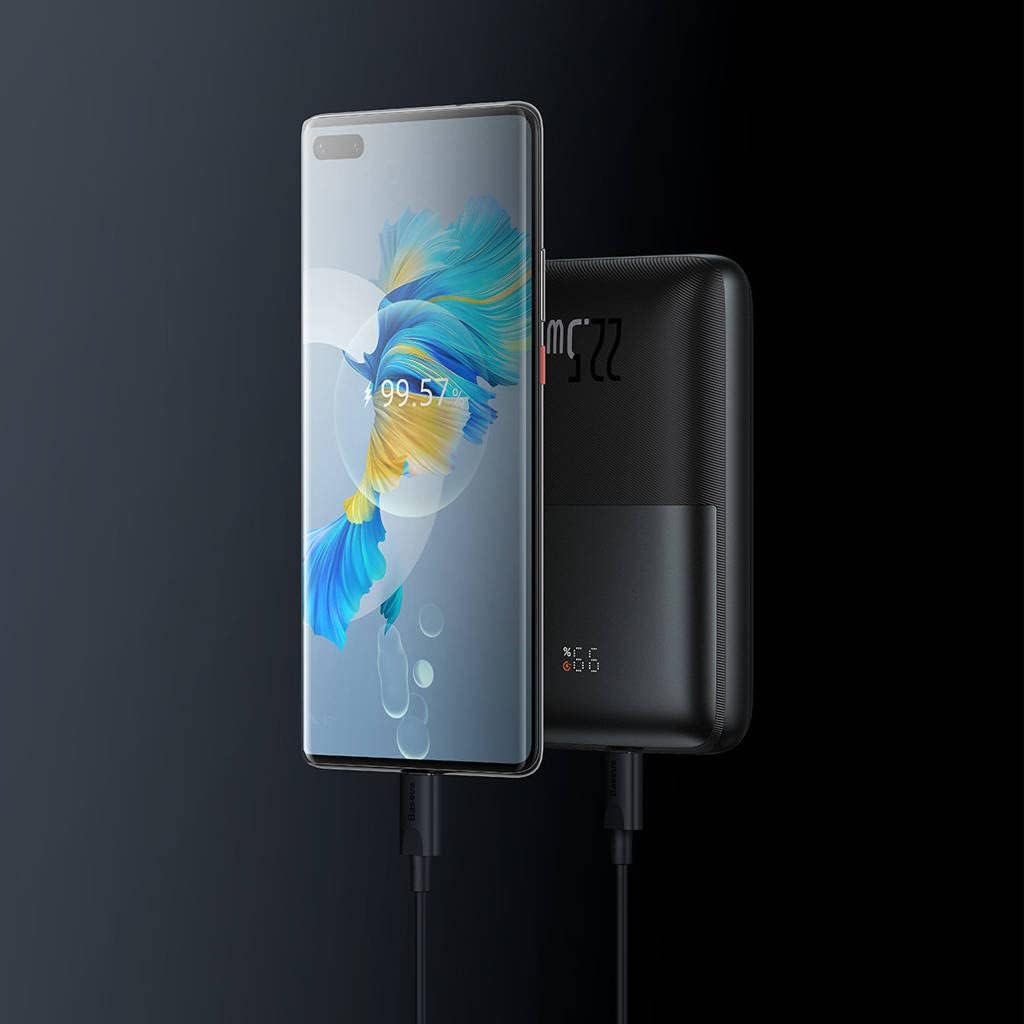
The Baseus PPBD2 BIPOW Pro is a high-capacity portable power bank designed to charge your electronic devices on the go. Featuring a digital display for real-time battery status and 22.5W fast charging capabilities, it provides reliable power for smartphones, tablets, and other USB-powered gadgets.


2. เนื้อหาบรรจุภัณฑ์
- Baseus PPBD2 BIPOW Pro 22.5W Digital Display Power Bank
- สายชาร์จ USB-A ถึง USB-C
- คู่มือการใช้งาน (เอกสารนี้)

3. การตั้งค่าและการใช้งานเบื้องต้น
3.1 การชาร์จพาวเวอร์แบงค์
Before first use, fully charge the power bank. Use the provided USB-A to USB-C cable or a compatible USB-C cable with a wall adapter (not included).
- Connect the USB-C end of the cable to the Type-C port on the power bank.
- Connect the USB-A end (or other compatible end) to a USB wall charger or computer USB port.
- หน้าจอแสดงผลดิจิทัลจะแสดงเปอร์เซ็นต์การชาร์จtage. When it reaches 100%, the power bank is fully charged.
It is recommended to fully charge the power bank every three months if not in regular use to maintain battery health.
3.2 การตรวจสอบระดับแบตเตอรี่
กดปุ่มเปิด/ปิดหนึ่งครั้งเพื่อเปิดใช้งานจอแสดงผลดิจิทัล view เปอร์เซ็นต์แบตเตอรี่ปัจจุบันtage.
4. คู่มือการใช้งาน
4.1 การชาร์จอุปกรณ์ของคุณ
The power bank features multiple output ports for charging various devices simultaneously.
- Connect your device's charging cable to one of the USB-A output ports (USB 1 or USB 2) or the Type-C port on the power bank.
- เชื่อมต่อปลายสายอีกด้านเข้ากับอุปกรณ์ของคุณ
- พาวเวอร์แบงค์จะเริ่มชาร์จอุปกรณ์ของคุณโดยอัตโนมัติ หากไม่เป็นเช่นนั้น ให้กดปุ่มเปิด/ปิดหนึ่งครั้งเพื่อเริ่มการชาร์จ
- จอแสดงผลดิจิตอลจะแสดงเปอร์เซ็นต์แบตเตอรี่ที่เหลืออยู่tage of the power bank during charging.

4.2 Digital Display Indicators
The digital display provides important information about the power bank's status:
- เปอร์เซ็นtagอี (%): Indicates the remaining battery charge level.
- ไฟแสดงสถานะการชาร์จอย่างรวดเร็ว: An icon (often a lightning bolt or similar) may appear to indicate fast charging is active.

5. การบำรุงรักษาและการดูแล
- เก็บพาวเวอร์แบงค์ให้ห่างจากน้ำ ความชื้น และอุณหภูมิที่สูงหรือต่ำมาก
- Do not expose the power bank to direct sunlight for prolonged periods.
- หลีกเลี่ยงการทำพาวเวอร์แบงค์ตกหรือกระแทกแรงๆ
- ทำความสะอาดพื้นผิวด้วยผ้านุ่มและแห้ง ห้ามใช้สารเคมีรุนแรงหรือวัสดุขัดถู
- เก็บไว้ในที่แห้งและเย็นเมื่อไม่ได้ใช้งาน
6 การแก้ไขปัญหา
| ปัญหา | สาเหตุที่เป็นไปได้ | สารละลาย |
|---|---|---|
| พาวเวอร์แบงค์ชาร์จไม่เข้า | สายเคเบิลไม่ได้เชื่อมต่ออย่างถูกต้อง; สายเคเบิล/อะแดปเตอร์ชำรุด; พาวเวอร์แบงค์แบตหมดเกลี้ยง | Ensure connections are secure. Try a different cable or wall adapter. Allow a few minutes for the power bank to respond if completely drained. |
| อุปกรณ์ไม่ได้ชาร์จจากพาวเวอร์แบงค์ | Power bank low on charge; cable not connected properly; device not compatible; power button not pressed. | Recharge the power bank. Check cable connections. Ensure your device is compatible with USB charging. Press the power button to activate output. |
| จอแสดงผลดิจิตอลไม่ทำงาน | พาวเวอร์แบงค์ปิดอยู่ มีปัญหาภายใน | Press the power button to activate the display. If it still doesn't work after charging, contact customer support. |
7. ข้อมูลจำเพาะ
| คุณสมบัติ | รายละเอียด |
|---|---|
| ยี่ห้อ | เบสอุส |
| ชื่อรุ่น | BIPOW Pro |
| หมายเลขรุ่น | PPBD2 (Note: Product data also lists SUP-Galaxy2021-ZFold3-5G-UBPro-SP-Black, which appears to be a different product's model number.) |
| ความจุของแบตเตอรี่ | 20000mAh (74 วัตต์ชั่วโมง) |
| อินพุต (Type-C) | 5V=3A, 9V=2.22A, 12V=1.5A |
| Output (USB 1/USB 2) | 4.5V=5A (SCP), 5V=4.5A (SCP), 5V=3A, 9V=2A, 12V=1.5A |
| เอาต์พุต (Type-C) | 5V=3A, 9V=2.22A, 12V=1.5A |
| ผลผลิตรวม | 5V=3A สูงสุด |
| ขนาด | ขนาดประมาณ 4 x 13 x 19 ซม |
| น้ำหนัก | ประมาณ 500 กรัม |
| วัสดุ | พลาสติก |
หมายเหตุ: ข้อมูลจำเพาะอาจเปลี่ยนแปลงได้โดยไม่ต้องแจ้งให้ทราบล่วงหน้า
8. ข้อควรระวังเพื่อความปลอดภัย
- ห้ามถอดประกอบ ดัดแปลง หรือซ่อมแซมอุปกรณ์ด้วยตนเอง
- อย่าให้โดนไฟหรืออุณหภูมิสูง
- อย่าลัดวงจรพาวเวอร์แบงค์
- เก็บให้พ้นจากมือเด็ก
- ทิ้งพาวเวอร์แบงค์อย่างมีความรับผิดชอบตามกฎระเบียบท้องถิ่น
- Avoid using the power bank in environments with strong magnetic fields.
9. การรับประกันและการสนับสนุน
Baseus products come with a standard warranty. For detailed warranty information and customer support, please visit the official Baseus webไซต์หรือติดต่อตัวแทนจำหน่ายในพื้นที่ของคุณ
เบสซัสอย่างเป็นทางการ Webเว็บไซต์: www.baseus.com
For technical assistance or inquiries, please refer to the contact information provided on the product packaging or the official webเว็บไซต์.


