1. บทนำ
This manual provides detailed instructions for the installation, operation, and maintenance of your OOYCYOO MPPT 60A Solar Charge Controller. This device is designed to efficiently manage power flow from your solar panels to your battery bank, ensuring optimal charging and system protection. It supports automatic 12V/24V system voltage identification and is compatible with various battery types.
Key features include a backlit LCD display, a 4-stage battery charging algorithm, and comprehensive protection functions.
2. คำแนะนำด้านความปลอดภัย
- ควรต่อแบตเตอรี่ก่อนเสมอ จากนั้นจึงต่อแผงโซลาร์เซลล์ และสุดท้ายจึงต่ออุปกรณ์ไฟฟ้าที่ต้องการใช้งาน และควรถอดออกในลำดับย้อนกลับ
- Ensure all wiring is correctly polarized to prevent damage.
- Do not connect inverters or inductive loads directly to the controller's load terminals.
- ติดตั้งตัวควบคุมในบริเวณที่มีอากาศถ่ายเทสะดวก และห่างจากวัสดุที่ติดไฟได้ง่าย
- The controller generates heat during operation; ensure adequate airflow. The integrated cooling fan activates when the temperature exceeds 45°C and turns off below 40°C.
- Use appropriate circuit breakers and fuses for all connections.
- This device is for indoor use only. Protect it from water and moisture.
3. สินค้าหมดview
The OOYCYOO MPPT 60A Solar Charge Controller is designed for efficient solar power management. It features an LCD display for real-time data, multiple protection functions, and support for various battery types.
3.1 เนื้อหาบรรจุภัณฑ์
- 1 x OOYCYOO MPPT 60A Solar Charge Controller
- เซ็นเซอร์อุณหภูมิ 1 x
- 1 x คู่มือผู้ใช้ (ภาษาอังกฤษ)
3.2 การระบุส่วนประกอบ

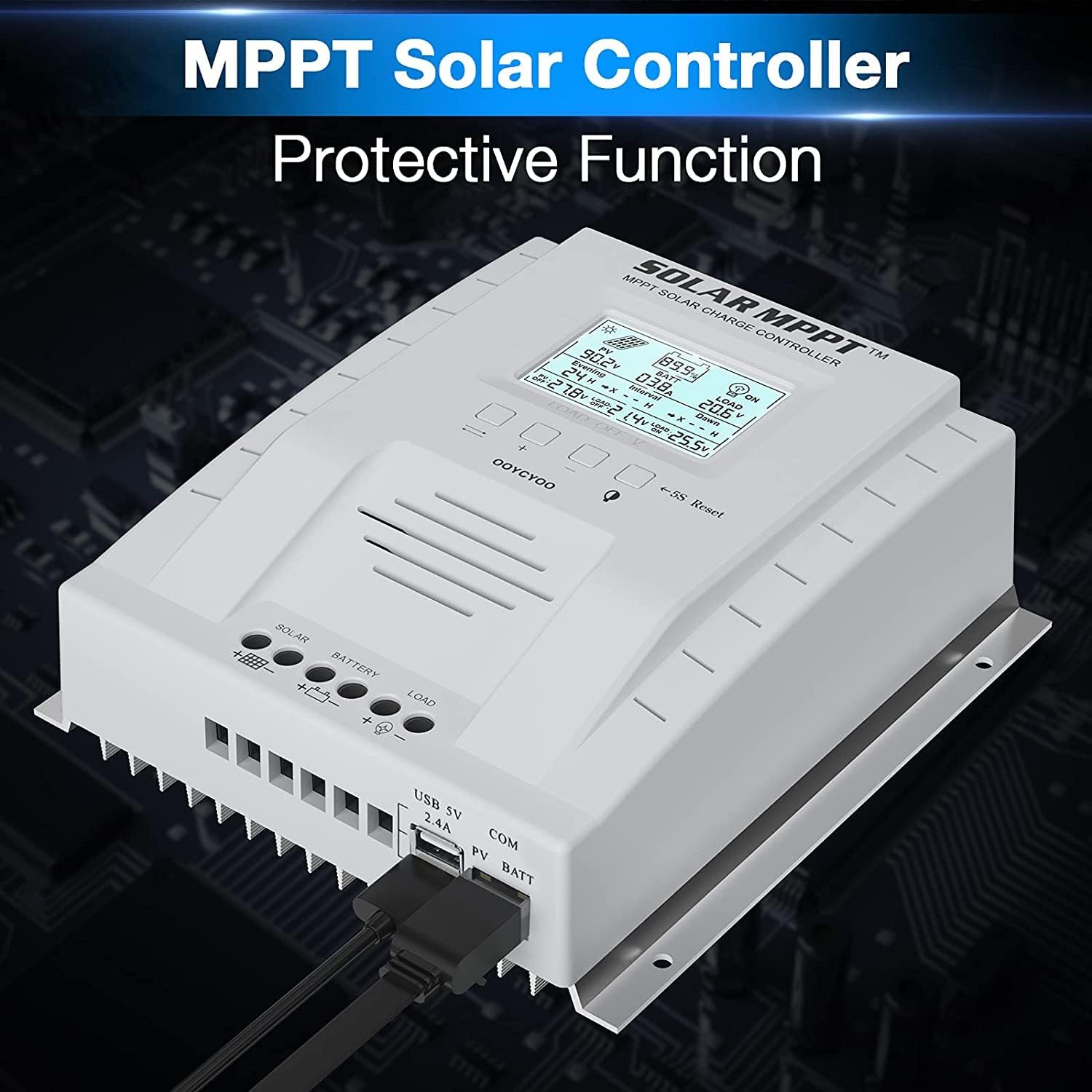
The controller features a clear LCD display on the front for monitoring system status. Below the display are control buttons for navigation and settings. Connection terminals for solar panels, battery, and load are located at the bottom. USB ports and an RS485 communication port are on the side.
4. การตั้งค่าและการติดตั้ง
การติดตั้งอย่างถูกต้องมีความสำคัญอย่างยิ่งต่อการทำงานที่ปลอดภัยและมีประสิทธิภาพของตัวควบคุมการชาร์จพลังงานแสงอาทิตย์ของคุณ โปรดปฏิบัติตามขั้นตอนเหล่านี้อย่างระมัดระวัง
4.1 การติดตั้งคอนโทรลเลอร์
- Choose a dry, well-ventilated location, protected from direct sunlight, high temperatures, and water.
- Ensure there is sufficient space around the controller for heat dissipation.
- Mount the controller vertically on a wall or stable surface using the provided mounting holes.
4.2 การเชื่อมต่อสายไฟ
Follow the connection order precisely to avoid damage to the controller or other components.
- เชื่อมต่อแบตเตอรี่: Connect the positive and negative terminals of the battery to the corresponding battery terminals on the controller. Ensure correct polarity. The controller will automatically detect the system voltagอี (12V หรือ 24V)
- เชื่อมต่อแผงโซลาร์เซลล์: Connect the positive and negative leads from your solar panel array to the corresponding PV terminals on the controller. Ensure correct polarity. Do not exceed the maximum PV input voltagกระแสตรง 100V.
- เชื่อมต่อโหลด (ทางเลือก): Connect your DC loads to the load terminals on the controller. Note that the load output is for DC loads only. Do not connect inverters or inductive loads directly to these terminals.
- Connect the Remote Temperature Sensor: Plug the temperature sensor into its dedicated port. This sensor helps the controller optimize charging based on battery temperature.

หมายเหตุสำคัญ: Always connect the battery first and disconnect the solar panel last. Incorrect connection order can damage the controller.
5. คู่มือการใช้งาน
Once installed, the controller will begin operation automatically. The LCD display provides real-time system information.
จอแสดงผล LCD 5.1 และปุ่มต่างๆ

The backlit LCD displays critical system parameters such as PV voltage, ปริมาณแบตเตอรี่tage, charging current, load current, and accumulated energy (KWH). The four buttons below the display are used for navigation and settings adjustment:
- ปุ่มสลับ: Used to cycle through display screens or confirm selections.
- '+' (Plus) Key: เพิ่มค่าหรือเลื่อนไปข้างหน้าในเมนู
- '-' (Minus) Key: ลดค่าหรือเลื่อนถอยหลังในเมนู
- Manual Switch Load Key: Toggles the load output on/off manually.
- 5S Reset: กดค้างไว้ 5 วินาที เพื่อคืนค่าเป็นการตั้งค่าจากโรงงาน
5.2 Battery Charging Algorithm
ตัวควบคุมใช้หน่วยความจำ 4 วินาทีtagอัลกอริทึมการชาร์จเพื่อเพิ่มประสิทธิภาพและอายุการใช้งานของแบตเตอรี่:
- การเรียกเก็บเงินจำนวนมาก: ชาร์จแบตเตอรี่ด้วยกระแสไฟสูงสุดจนกระทั่งถึงระดับแรงดันไฟฟ้าtage ถึงบูสต์โวลtage.
- บูสต์ชาร์จ: ประจุที่ปริมาตรคงที่tage for a set period to ensure full charge.
- ค่าลอย: รักษาระดับแรงดันไฟฟ้าของแบตเตอรี่ให้อยู่ในระดับต่ำtage to prevent self-discharge and overcharging.
- Equalization (for specific battery types): ชาร์จแบตเตอรี่เกินเป็นระยะเพื่อปรับสมดุลแรงดันไฟฟ้าของเซลล์tages and prevent sulfation.
5.3 ประเภทแบตเตอรี่ที่รองรับ
ตัวควบคุมนี้สามารถใช้งานร่วมกับแบตเตอรี่หลายประเภท ได้แก่:
- Lead-Acid (Sealed, Gel, Flooded)
- ลิเธียม (LFP)
- User-defined parameters for other battery types.
Pre-set charging parameters are available for Sealed, Gel, Flooded, and LI (LFP) batteries. Users can customize parameters for other battery types as needed.
6. ฟังก์ชั่นการป้องกัน
The OOYCYOO MPPT 60A Solar Charge Controller incorporates multiple protection mechanisms to ensure system safety and longevity:
- PV Overcurrent/Overpower Protection
- PV Short Circuit Protection
- การป้องกันการกลับขั้ว PV
- Reverse Charging at Night Protection
- การป้องกันการกลับขั้วของแบตเตอรี่
- แรงดันไฟเกินของแบตเตอรี่tagการป้องกันอี
- Battery Over-discharge Protection
- Battery Overtemperature Protection
- Controller Overtemperature Protection
- Lithium Battery Low Temperature Protection
- การป้องกันไฟฟ้าลัดวงจร
- ป้องกันการโอเวอร์โหลด
- TVS ฉบับสูงtage การป้องกันชั่วคราว
7. การบำรุงรักษา
Regular maintenance ensures optimal performance and extends the lifespan of your solar charge controller.
- ตรวจสอบการเชื่อมต่อ: Periodically inspect all wiring connections for tightness and corrosion. Tighten any loose connections.
- ทำความสะอาดตัวควบคุม: Keep the controller clean and free of dust. Use a dry cloth to wipe the exterior. Ensure ventilation openings are not obstructed.
- ตรวจสอบความเสียหาย: Check for any signs of physical damage, overheating, or unusual odors.
- การตรวจสอบแบตเตอรี่: โปรดปฏิบัติตามคำแนะนำในการบำรุงรักษาของผู้ผลิตสำหรับแบตเตอรี่ประเภทเฉพาะของคุณ
8 การแก้ไขปัญหา
ส่วนนี้จะกล่าวถึงปัญหาทั่วไปที่คุณอาจพบเจอเกี่ยวกับตัวควบคุมการชาร์จพลังงานแสงอาทิตย์ของคุณ
| ปัญหา | สาเหตุที่เป็นไปได้ | สารละลาย |
|---|---|---|
| Controller not powering on / LCD blank | ไม่มีแบตเตอรี่เชื่อมต่อหรือไม่มีแรงดันไฟฟ้าของแบตเตอรี่tage too low. Reverse polarity connection. | Ensure battery is connected first and has sufficient voltage. Check battery polarity. |
| ไม่สามารถชาร์จไฟจากแผงโซลาร์เซลล์ได้ | Solar panels not connected or reverse polarity. Insufficient sunlight. PV voltagต่ำหรือสูงเกินไป | ตรวจสอบการเชื่อมต่อและขั้วของแผงโซลาร์เซลล์ ตรวจสอบให้แน่ใจว่ามีแสงแดดเพียงพอ ตรวจสอบแรงดันไฟฟ้าของแผงโซลาร์เซลล์tage is within operating range (e.g., 18V-96V for 12V system, 36V-96V for 24V system). |
| โหลดไม่ทำงาน | Load output disabled. Load short circuit or overload. Battery voltagอีต่ำเกินไป | Check load output status on LCD. Disconnect load and check for short circuit. Ensure battery is sufficiently charged. |
| ตัวควบคุมความร้อนสูงเกินไป | Poor ventilation. Excessive load or charging current. | Ensure adequate airflow around the controller. Reduce load or charging current if possible. |
| ฉบับไม่ถูกต้องtagการอ่านค่า | Loose connections. Faulty temperature sensor. | Check all wiring connections. Ensure temperature sensor is properly connected. |
9. ข้อมูลจำเพาะ
Technical specifications for the OOYCYOO MPPT 60A Solar Charge Controller.
| พารามิเตอร์ | ค่า |
|---|---|
| กระแสไฟชาร์จที่กำหนด | 60เอ |
| เล่มระบบtage | 12V/24V Auto Identification |
| แม็กซ์ PV Open Circuit Voltage | กระแสตรง 100 โวลต์ |
| กำลังไฟฟ้าขาเข้าสูงสุดจากแผงโซลาร์เซลล์ (ระบบ 12V) | 750วัตต์ |
| กำลังไฟฟ้าขาเข้าสูงสุดจากแผงโซลาร์เซลล์ (ระบบ 24V) | 1500วัตต์ |
| DC/DC Transfer Efficiency | สูงสุดถึง 98.7% |
| อุณหภูมิในการทำงาน | -20℃ ถึง +55℃ |
| ขนาดเทอร์มินัล | 10 อ็อกกิวเมนต์ |
| ขนาด (กว้าง*ยาว*สูง) | 8.3 x 8.4 x 3.4 นิ้ว (21.2 x 20.8 x 8.4 ซม.) |
| น้ำหนัก | 3 ปอนด์ (1.28 กก.) |
| ประเภทจอภาพ | ไฟแบ็คไลท์ LCD |
| ยูพีซี | 768461886785 |
| หมายเลขรุ่น | พี 60เอ |


10. การรับประกันและการสนับสนุน
For warranty information or technical support, please contact your retailer or the manufacturer directly. Refer to the product packaging or purchase documentation for specific contact details.


