1. บทนำ
ขอบคุณสำหรับการซื้อasing the iDance GO PARTY 4 Portable Bluetooth Speaker. This device is designed to provide high-quality audio streaming via Bluetooth, USB MP3 playback, and includes a wired microphone with voice changer effects and integrated disco LED lights. This manual provides essential information for safe and effective use of your speaker.
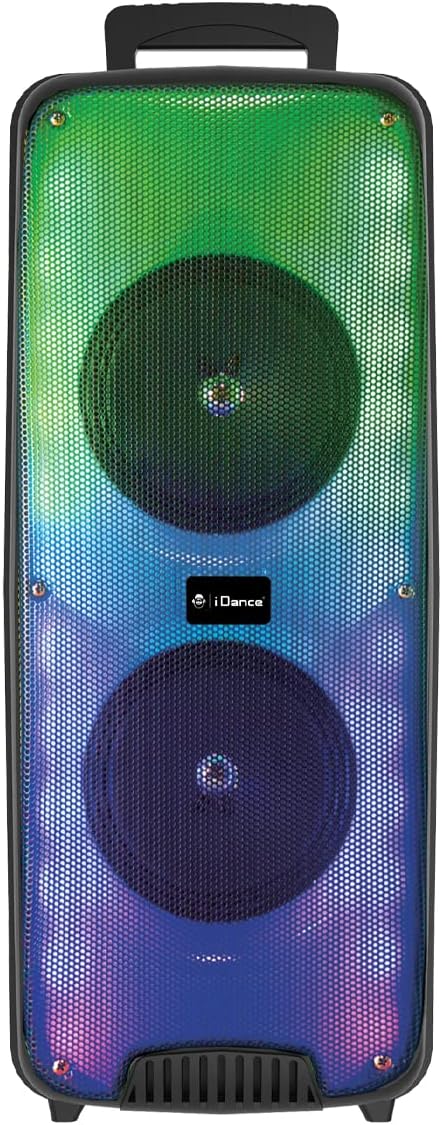
ภาพที่ 1.1: ด้านหน้า view of the iDance GO PARTY 4 Portable Bluetooth Speaker, showcasing its dual speakers and vibrant LED lighting.
2. ข้อมูลด้านความปลอดภัย
- อ่านคำแนะนำทั้งหมดก่อนใช้งานอุปกรณ์
- Keep the speaker away from water, moisture, and extreme temperatures. This product is ไม่กันน้ำ.
- อย่าปิดกั้นช่องระบายอากาศ
- ใช้เฉพาะอุปกรณ์เสริม/สิ่งที่แนบที่ผู้ผลิตกำหนดเท่านั้น
- ถอดปลั๊กอุปกรณ์ในระหว่างที่มีพายุฝนฟ้าคะนองหรือเมื่อไม่ได้ใช้งานเป็นเวลานาน
- อย่าพยายามซ่อมแซมเครื่องด้วยตนเอง โปรดส่งเครื่องไปให้ช่างผู้ชำนาญการเป็นผู้ดำเนินการซ่อมแซม
- กำจัดแบตเตอรี่และส่วนประกอบอิเล็กทรอนิกส์อย่างมีความรับผิดชอบตามกฎระเบียบท้องถิ่น
3. เนื้อหาบรรจุภัณฑ์
ตรวจสอบให้แน่ใจว่ามีรายการทั้งหมดอยู่ในบรรจุภัณฑ์:
- iDance GO PARTY 4 Portable Bluetooth Speaker
- ไมโครโฟนแบบมีสาย
- รีโมทคอนโทรล
- สายชาร์จ (ไมโคร USB)

Image 3.1: Included wired microphone and remote control.
4. สินค้าหมดview
Familiarize yourself with the control panel and ports of your iDance GO PARTY 4 speaker.

Image 4.1: Rear control panel of the iDance GO PARTY 4 speaker.
คุณสมบัติของแผงควบคุม:
- สวิตช์เปิด/ปิด: เปิดหรือปิดลำโพง
- ปุ่มปรับระดับเสียง: ปรับระดับเสียงลำโพงหลัก
- อินพุตเสียง: อินพุตเสริมขนาด 3.5 มม. สำหรับอุปกรณ์เสียงภายนอก
- CHARGING DC 5V Port: พอร์ต Micro USB สำหรับชาร์จลำโพง
- พอร์ต USB: For USB MP3 playback.
- ช่องเสียบการ์ด TF: For TF (MicroSD) card MP3 playback.
- PREV / NEXT Buttons: นำทางไปยังแทร็กต่างๆ ระหว่างการเล่นไฟล์ MP3
- SOUND EFFECT Button: Activates various sound effects.
- VOICE CHANGER Button: Cycles through voice changer modes.
- MODE / LED ON/OFF Button: Switches between input modes (Bluetooth, USB, AUX) and controls LED lights.
- ปุ่ม ECHO: ปรับค่าเอฟเฟ็กต์เสียงสะท้อนสำหรับไมโครโฟน
- ปุ่มปรับระดับเสียง MIC: ปรับระดับเสียงไมโครโฟน
- INPUT (MIC) Port: 6.35mm jack for connecting the wired microphone.
- ไฟแสดงสถานะการชาร์จ: ไฟ LED แสดงสถานะการชาร์จ
5. การตั้งค่า
5.1. ชาร์จลำโพง
- Connect the provided Micro USB charging cable to the CHARGING DC 5V Port บนลำโพง
- เชื่อมต่อปลายสายอีกด้านหนึ่งเข้ากับอะแดปเตอร์ไฟ USB มาตรฐาน (ไม่รวมอยู่ด้วย) หรือพอร์ต USB ของคอมพิวเตอร์
- ไฟแสดงสถานะการชาร์จจะสว่างขึ้น เมื่อชาร์จเต็มแล้ว ไฟอาจเปลี่ยนสีหรือดับลง ขึ้นอยู่กับรุ่น
- A full charge provides approximately 4 to 8 hours of playback time.
5.2. เปิด/ปิดเครื่อง
- To turn on the speaker, slide the สวิตซ์เปิด/ปิด to the 'ON' position.
- To turn off the speaker, slide the สวิตซ์เปิด/ปิด ไปที่ตำแหน่ง 'ปิด'
6. คู่มือการใช้งาน
6.1. การจับคู่บลูทู ธ
- ตรวจสอบให้แน่ใจว่าลำโพงเปิดอยู่
- กดปุ่ม โหมด button on the control panel or remote control until the speaker is in Bluetooth mode. A voice prompt or indicator light will confirm.
- บนอุปกรณ์เคลื่อนที่ของคุณ (สมาร์ทโฟน แท็บเล็ต ฯลฯ) เปิดใช้งานบลูทูธและค้นหาอุปกรณ์ที่มีอยู่
- Select "iDance GO PARTY 4" or a similar name from the list of devices.
- Once paired, the speaker will indicate a successful connection, and you can begin streaming audio.
6.2. การเล่นไฟล์ MP3 ผ่าน USB
- ใส่แฟลชไดรฟ์ USB ที่มีไฟล์เสียง MP3 fileเข้าไปใน พอร์ต USB.
- The speaker should automatically switch to USB mode and begin playing the MP3 fileถ้าไม่ ให้กดปุ่ม โหมด ปุ่มเพื่อเลือกโหมด USB
- ใช้ ก่อนหน้า / ถัดไป ปุ่มสำหรับข้ามเพลง
6.3. Microphone Usage and Voice Changer
- เชื่อมต่อไมโครโฟนแบบมีสายเข้ากับ INPUT (MIC) Port.
- ปรับระดับเสียงไมโครโฟนโดยใช้ ปุ่มหมุน MIC VOL.
- หมุน ปุ่ม ECHO to add or reduce the echo effect to your voice.
- กดปุ่ม VOICE CHANGER Button to cycle through the four available voice effects: Child, Woman, Man, and Robot.
6.4. ไฟ LED
The iDance GO PARTY 4 features integrated disco LED lights. Press the MODE / LED ON/OFF Button (or the dedicated LED button on the remote) to turn the lights on or off.
6.5. ฟังก์ชั่นการควบคุมระยะไกล
The included remote control allows for convenient operation of the speaker from a distance. Functions include:
- เปิด/ปิดเครื่อง
- การเลือกโหมด (บลูทูธ, USB, AUX)
- เพิ่ม/ลดระดับเสียง
- Track Skip (Previous/Next)
- เล่น/หยุดชั่วคราว
- การควบคุมไฟ LED
- Voice Changer Activation
- Sound Effects (EFX1-EFX8)
7. การบำรุงรักษา
- การทำความสะอาด: ใช้ผ้านุ่มและแห้งเช็ดทำความสะอาดภายนอกลำโพง ห้ามใช้น้ำยาทำความสะอาดหรือวัสดุขัดถู
- พื้นที่จัดเก็บ: เก็บลำโพงไว้ในที่แห้งและเย็น หลีกเลี่ยงแสงแดดโดยตรงและอุณหภูมิที่สูงหรือต่ำเกินไป
- การดูแลแบตเตอรี่ เพื่อยืดอายุการใช้งานแบตเตอรี่ ควรหลีกเลี่ยงการใช้แบตเตอรี่จนหมดบ่อยๆ ควรชาร์จลำโพงเป็นประจำ แม้ในขณะที่ไม่ได้ใช้งาน เพื่อรักษาประสิทธิภาพของแบตเตอรี่
8 การแก้ไขปัญหา
| ปัญหา | สาเหตุที่เป็นไปได้ | สารละลาย |
|---|---|---|
| ลําโพงไม่เปิดขึ้น | แบตเตอรี่หมด | ชาร์จลำโพงโดยใช้สาย Micro USB ที่ให้มา |
| ไม่มีเสียงจากลำโพง | Volume is too low; incorrect input mode; device not paired (Bluetooth). | Increase volume; press MODE button to select correct input; re-pair Bluetooth device. |
| อุปกรณ์บลูทูธไม่สามารถเชื่อมต่อได้ | ลำโพงไม่ได้อยู่ในโหมดจับคู่ อุปกรณ์อยู่ไกลเกินไป มีสัญญาณรบกวน | ตรวจสอบให้แน่ใจว่าลำโพงอยู่ในโหมดบลูทูธ ขยับอุปกรณ์ให้ใกล้ขึ้น และปิดอุปกรณ์บลูทูธอื่นๆ |
| ไมโครโฟนไม่ทำงาน | Microphone not properly connected; MIC VOL too low. | Ensure microphone is fully plugged into the INPUT port; increase MIC VOL. |
| รีโมทคอนโทรลไม่ตอบสนอง | Battery depleted; obstruction between remote and speaker. | Replace remote control battery; ensure clear line of sight to the speaker's IR receiver. |
9. ข้อมูลจำเพาะ
| หมายเลขรุ่น | GOPTY4 |
| ยี่ห้อ | เต้นรำแห่ง |
| เทคโนโลยีการเชื่อมต่อ | บลูทูธ |
| กำลังขับ | 200 วัตต์ (พีค) |
| Speaker Output (Max) | 10 วัตต์ |
| แหล่งพลังงาน | ใช้พลังงานจากแบตเตอรี่ (ลิเธียมไออน) |
| อายุการใช้งานแบตเตอรี่ | 4-8 ชั่วโมง (โดยประมาณ) |
| ขนาด (กว้าง x ยาว x สูง) | 25.5 x 20 x 58 ซม. |
| น้ำหนัก | 3.99 กิโลกรัม |
| วัสดุ | พลาสติก |
| วิธีการควบคุม | Remote Control, On-device buttons |
| คุณสมบัติพิเศษ | Portable, Disco LED Lights, USB MP3 Player, Wired Microphone, Voice Changer (Child, Woman, Man, Robot), Echo Effect |
| อุปกรณ์ที่รองรับ | Smartphones, Tablets, MP3 Players, Home Cinema Systems, Televisions |
| กันน้ำ | เลขที่ |
10. การรับประกันและการสนับสนุน
The iDance GO PARTY 4 Portable Bluetooth Speaker comes with a limited warranty. Please refer to the warranty card included in your package for specific terms and conditions. For technical support, service inquiries, or further assistance, please contact your retailer or visit the official iDance webเว็บไซต์.


