
1. บทนำ
The Black Box Boxilla KVM Manager, model BXAMGR-R2-ULT, is a robust and TAA-compliant KVM management solution designed to streamline network operations. This device allows for efficient management and control of an unlimited number of devices within your KVM infrastructure, eliminating the need for multiple licenses. It ensures compliance with government and public sector standards, providing a secure and reliable platform for KVM management.
This manual provides comprehensive instructions for the setup, operation, maintenance, and troubleshooting of your Boxilla KVM Manager.
2. ข้อมูลด้านความปลอดภัย
โปรดอ่านและทำความเข้าใจคำแนะนำด้านความปลอดภัยทั้งหมดก่อนใช้งานอุปกรณ์นี้ การไม่ปฏิบัติตามคำแนะนำเหล่านี้อาจส่งผลให้เกิดไฟฟ้าช็อต ไฟไหม้ หรือความเสียหายต่อผลิตภัณฑ์ได้
- ตรวจสอบให้แน่ใจว่าอุปกรณ์เสียบเข้ากับเต้ารับไฟฟ้าที่มีสายดินแล้ว
- อย่าให้เครื่องโดนน้ำหรือความชื้นมากเกินไป
- อย่าเปิดอุปกรณ์casinก. ส่งต่อการบริการทั้งหมดให้กับบุคลากรที่มีคุณสมบัติเหมาะสม
- ใช้งานอุปกรณ์ภายในช่วงอุณหภูมิและความชื้นที่กำหนด
- ถอดปลั๊กไฟก่อนทำความสะอาดหรือเคลื่อนย้ายอุปกรณ์
3. เนื้อหาบรรจุภัณฑ์
ตรวจสอบว่ามีรายการทั้งหมดอยู่ในแพ็คเกจ:
- Black Box Boxilla KVM Manager (BXAMGR-R2-ULT)
- อะแดปเตอร์แปลงไฟ
- คู่มือเริ่มต้นอย่างรวดเร็ว
- ฮาร์ดแวร์สำหรับติดตั้ง (ถ้ามี)
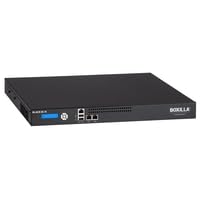
Image of the Black Box Boxilla KVM Manager, model BXAMGR-R2-ULT, showing its front panel and compact design.
4. การตั้งค่า
Follow these steps for initial setup of your Boxilla KVM Manager:
- แกะอุปกรณ์ออกจากกล่อง: Carefully remove the KVM manager and all accessories from its packaging.
- การจัดวาง: Place the device on a stable, flat surface or mount it in a rack using the provided hardware. Ensure adequate ventilation around the unit.
- เชื่อมต่อสายเคเบิลเครือข่าย: Connect the KVM manager to your network infrastructure using standard Ethernet cables. Refer to your network topology for specific port connections.
- เชื่อมต่อพลังงาน: Plug the power adapter into the KVM manager's power input, then connect it to a grounded electrical outlet. The device will power on automatically.
- การกำหนดค่าเริ่มต้น: เข้าถึงอุปกรณ์ได้ web อินเทอร์เฟซผ่าน a web browser using its default IP address (refer to the Quick Start Guide for default IP and login credentials). Follow the on-screen prompts to configure network settings, user accounts, and initial KVM device discovery.
5. คู่มือการใช้งาน
Once the Boxilla KVM Manager is set up, you can begin managing your KVM devices. The primary interface for operation is the web-based management console.
- เข้าสู่ระบบ: เปิด web browser and navigate to the IP address or hostname of your Boxilla KVM Manager. Enter your username and password.
- การค้นพบอุปกรณ์: Use the discovery tools within the interface to find and add KVM transmitters and receivers to your management system.
- การจัดการผู้ใช้: Create and manage user accounts, assigning appropriate access levels and permissions for KVM control.
- Session Management: Initiate, monitor, and terminate KVM sessions to connected devices.
- การตรวจสอบระบบ: Review system logs, device status, and network performance metrics through the dashboard.
- อัพเดตเฟิร์มแวร์: ตรวจสอบและใช้การอัพเดตเฟิร์มแวร์เป็นประจำเพื่อให้มั่นใจถึงประสิทธิภาพและความปลอดภัยที่เหมาะสมที่สุด
6. การบำรุงรักษา
Regular maintenance ensures the longevity and optimal performance of your Boxilla KVM Manager.
- การทำความสะอาด: ใช้ผ้านุ่มและแห้งเช็ดทำความสะอาดภายนอกอุปกรณ์ ห้ามใช้น้ำยาทำความสะอาดหรือสเปรย์
- การระบายอากาศ : Ensure that ventilation openings are clear of dust and obstructions to prevent overheating.
- เฟิร์มแวร์: Keep the device firmware updated to the latest version. Refer to the Black Box support website for updates and instructions.
- การกำหนดค่าการสำรองข้อมูล: Periodically back up your device configuration settings to prevent data loss in case of an unforeseen issue.
7 การแก้ไขปัญหา
This section addresses common issues you might encounter with the Boxilla KVM Manager.
| ปัญหา | สาเหตุที่เป็นไปได้ | สารละลาย |
|---|---|---|
| อุปกรณ์ไม่เปิดเครื่อง | No power supply, faulty power adapter, or power outlet issue. | Check power cable connection. Verify power outlet functionality. Try a different power adapter if available. |
| ไม่สามารถเข้าถึงได้ web อินเทอร์เฟซ | ที่อยู่ IP ไม่ถูกต้อง ปัญหาการเชื่อมต่อเครือข่าย หรือไฟร์วอลล์ปิดกั้นการเข้าถึง | Verify the device's IP address. Check network cable connections. Ensure your computer is on the same network segment. Temporarily disable firewall for testing. |
| KVM devices not discovered. | Network configuration issues, KVM devices not powered on, or incorrect discovery settings. | Ensure KVM transmitters/receivers are powered and connected. Verify network settings on Boxilla and KVM devices. Check discovery range settings in the web อินเทอร์เฟซ |
| ประสิทธิภาพการทำงานช้า | Network congestion, outdated firmware, or high CPU/memory usage. | Check network bandwidth. Update firmware to the latest version. Monitor system resources via the web อินเทอร์เฟซ |
8. ข้อมูลจำเพาะ
Detailed specifications for the Black Box Boxilla KVM Manager BXAMGR-R2-ULT:
- หมายเลขรุ่น: BXAMGR-R2-ULT
- ASIN: B0BCX8GNRR
- ขนาดสินค้า : 11 x 10 x 6 นิ้ว
- ผู้ผลิต: Black Box Network
- มีจำหน่ายครั้งแรก: 30 พฤษภาคม 2023
- ใบอนุญาต: Unlimited Device License
- การปฏิบัติตาม: สอดคล้องกับ TAA
9. การรับประกันและการสนับสนุน
For warranty information and technical support, please refer to the official Black Box Network webหรือติดต่อฝ่ายบริการลูกค้า เก็บใบเสร็จรับเงินไว้เพื่อใช้ในการเคลมประกัน
Black Box Network Official Webเว็บไซต์: www.blackbox.com